
 Repository
Current collected state Current
Observed since 20 Oct, 22:43 UTC
No superseded metadata states collected. Unchanged observations do not create new revisions.
A Vite plugin that forwards browser console logs to the Vite dev server console
A Vite plugin that forwards browser console logs to the Vite dev server console for better debugging experience during development.
This plugin intercepts browser console logs (console.log, console.warn, console.error, etc.) and forwards them to your Vite dev server console with module-aware tracking. This is particularly useful when:
[background], [content])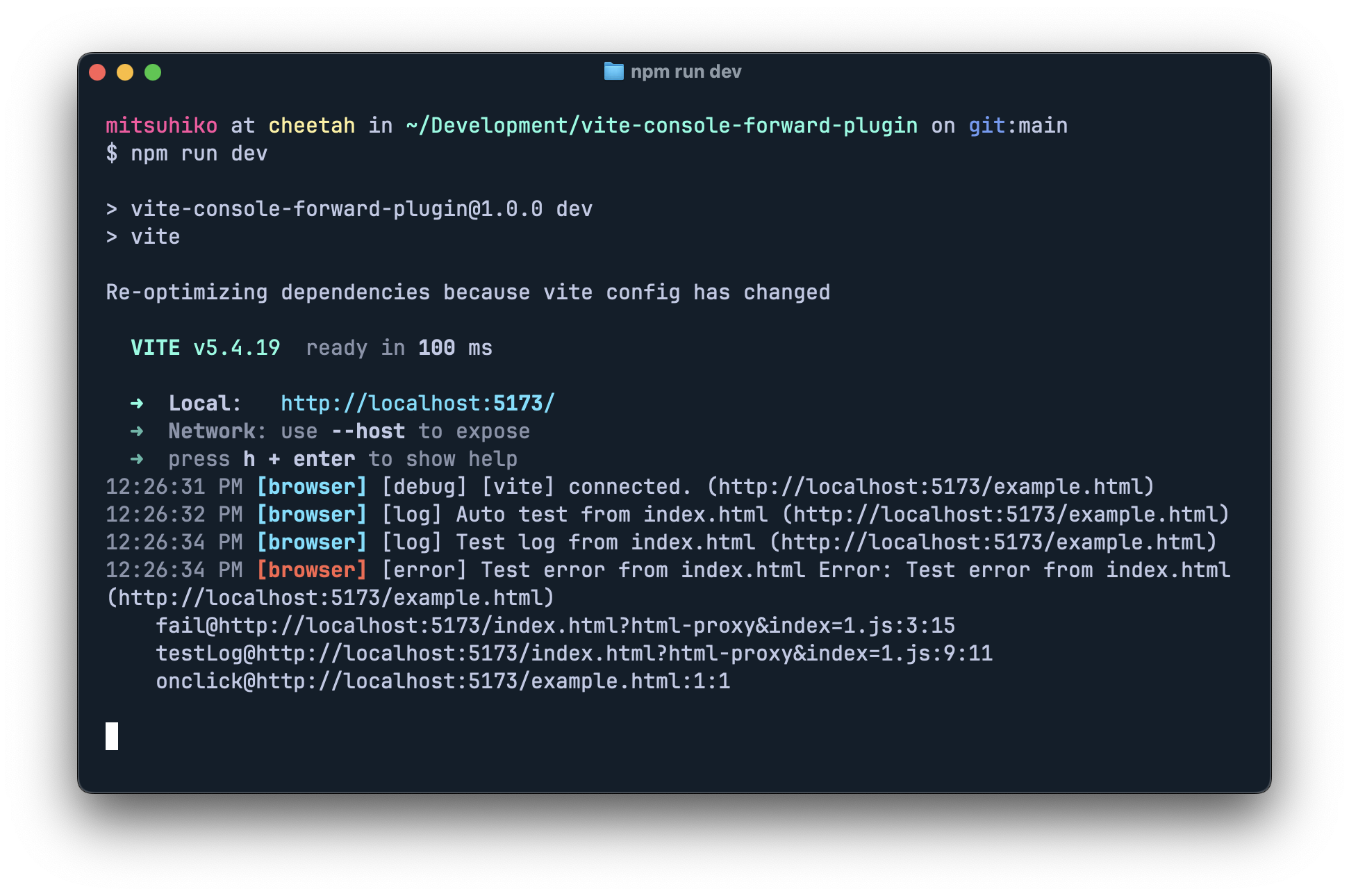
Since this is a single-file plugin, you can copy vite-console-forward-plugin.ts directly into your project, or install it as a local dependency.
Add the plugin to your vite.config.ts:
import { defineConfig } from "vite";
import { consoleForwardPlugin } from "./vite-console-forward-plugin";

export default defineConfig({
  plugins: [
    consoleForwardPlugin({
      // Default configuration works for most web apps
      // Automatically injects into all HTML files
    }),
  ],
});
import { defineConfig } from "vite";
import { consoleForwardPlugin } from "./vite-console-forward-plugin";

export default defineConfig({
  plugins: [
    consoleForwardPlugin({
      // Include JavaScript/TypeScript files directly
      injectPatterns: [
        "**/*.{js,jsx,ts,tsx,html}"
      ],

      // Exclude test files and specific directories
      excludePatterns: [
        "**/node_modules/**",
        "**/*.test.{js,ts}",
        "**/dist/**"
      ],

      // Custom module name extraction
      moduleExtractor: (id: string) => {
        // Extract meaningful module names from file paths
        if (id.includes("/components/")) return "component";
        if (id.includes("/utils/")) return "utils";
        if (id.includes("/api/")) return "api";
        return "app";
      },

      // Forward errors and promise rejections
      forwardErrors: true,
    }),
  ],
});
The consoleForwardPlugin accepts an options object with the following properties:
| Option | Type | Default | Description |
|---|---|---|---|
enabled | boolean | true | Whether to enable console forwarding |
endpoint | string | "/api/debug/client-logs" | API endpoint path for receiving logs |
levels | string[] | ["log", "warn", "error", "info", "debug"] | Console levels to forward |
injectPatterns | string[] | ["**/*.html"] | Glob patterns for files to inject console forwarding |
excludePatterns | string[] | ["**/node_modules/**"] | Glob patterns for files to exclude from injection |
moduleExtractor | (id: string) => string | Built-in path parser | Custom function to extract module names from paths |
silentOnError | boolean | true | Don't show console warnings when server is down |
forwardErrors | boolean | true | Forward uncaught errors and promise rejections |
The plugin uses micromatch for powerful glob pattern matching:
By default, the plugin only injects into HTML files (["**/*.html"]). This is perfect for standard web applications where all JavaScript is loaded through HTML pages.
You can customize which files receive console forwarding using glob patterns:
consoleForwardPlugin({
  // Include all JavaScript and TypeScript files
  injectPatterns: ["**/*.{js,jsx,ts,tsx}"],

  // Exclude test files and node_modules
  excludePatterns: ["**/node_modules/**", "**/*.test.{js,ts}", "**/*.spec.{js,ts}"]
})
"**/*.js" - All JavaScript files"src/**/*.{ts,tsx}" - TypeScript files in src directory"!**/*.min.js" - Exclude minified files"**/components/**/*.jsx" - JSX files in any components directoryFor browser extension development, you'll need to specify your extension's entry points since they don't run through HTML files:
consoleForwardPlugin({
  enabled: isDev,
  // Target specific extension entry points
  injectPatterns: [
    "**/entries/background/**/*.{ts,js}",
    "**/entries/content/**/*.{ts,js}",
    "**/entries/popup/**/*.{tsx,jsx}",
    "**/entries/options/**/*.{tsx,jsx}",
  ],
  // Custom module extraction for cleaner logs
  moduleExtractor: (id) => {
    if (id.includes("/background/")) return "background";
    if (id.includes("/content/")) return "content";
    if (id.includes("/popup/")) return "popup";
    if (id.includes("/options/")) return "options";
    return "extension";
  },
})
This will show logs like [background] User logged in or [content] Page loaded, making it easy to track which part of your extension is generating each log.
For applications using workers, add their scripts to the patterns:
consoleForwardPlugin({
  injectPatterns: [
    "**/*.html",
    "**/workers/**/*.js",
    "**/service-worker.js"
  ],
  moduleExtractor: (id) => {
    if (id.includes("service-worker")) return "service-worker";
    if (id.includes("/workers/")) return "worker";
    return defaultModuleExtractor(id);
  }
})
The plugin includes simple, robust error handling for when the development server is unavailable:
silentOnError: false to see errors)This ensures your application continues to work normally even when the dev server is down, without generating ERR_CONNECTION_REFUSED errors in the browser console.
MIT
Download counts and popularity will appear here as the collector receives them.
This describes our collected data; it is not a security assessment.
Shared repository data · GitHub
Observed since 20 Oct, 22:43 UTC
No superseded metadata states collected. Unchanged observations do not create new revisions.
package:12acf6c3920590763a312f0419fb5171fa6f0a3545e6775c08721300360487aa