
 Repository
Current collected state Current
Observed since 21 Oct, 08:58 UTC
No superseded metadata states collected. Unchanged observations do not create new revisions.
Execute cypress specs in parallel across multiple docker containers
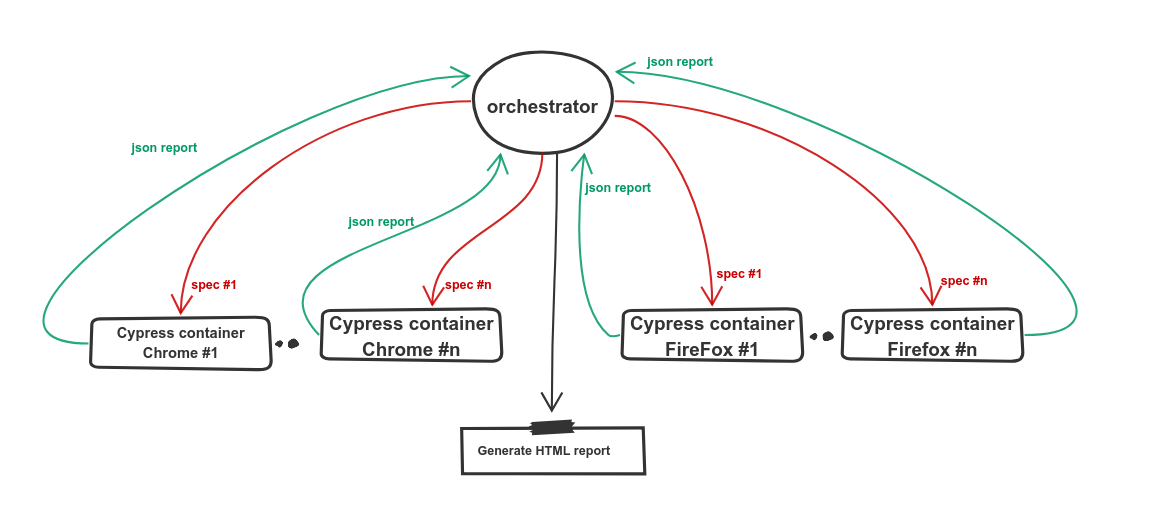
Orchestrator executes all cypress specs across n parallel docker containers based on a configuration file.
1- Cypress parallelization with the Orchestrator — part 1
2- Cypress parallelization with the Orchestrator — part 2 — ShowCase
Check the following repo as a public use case.
The orchestrator can measure and report the execution time for each spec per browser. It will report it as mochawesome-report/specsExecutionTime-chrome.json file. If you provided this path as specsExecutionTimePath in the next run, The orchestrator will split the specs-based on its execution time to minimize the total execution time 🚀.
brew install coreutils command.npm -g install @0xislamtaha/orchestrator
npm -g install 0xislamtaha/orchestrator
1- docker-compose file with a cypress service. here is an example of it.
version: '3.8'
services:
  cypress-container:
    image: 0xislamtaha/cypress-snapshot-image:latest
    network_mode: "bridge"
    volumes:
      - ./cypress/:/cypress_testing/cypress
      - ./mochawesome-report:/cypress_testing/mochawesome-report
      - /dev/shm:/dev/shm
2- use mochawesome as a reporter in cypress.json, just add the following snippet to your cypress.json.
{
  "reporter": "mochawesome",
  "reporterOptions": {
    "reportDir": "cypress/report/mochawesome-report",
    "overwrite": false,
    "html": false,
    "json": true
  }
}
3- Edit the orchestrator configuration file with your configuration. Here is the description of each configuration option.
- parallelizm:
    description: number of container machines per browser
    type: Integer
    example: 2

- browser:
    description: list of browsers
    type: list
    example: ["chrome", "firefox"]

- timeout:
    description: timeout of each process of cypress
    type: string
    example: "20m"

- environment:
    description: enviroment variable to be exported
    type: dict
    example: {"DOCKER_TAG": "master_283"}

- preCommands:
    description: list of commands to be executed befor the deployment of the cypress containers
    type: list
    example: ["ls -al", "mkdir -p test"],

- dockerComposeOptions:
    description: docker-compose options to be passed to the docker-compose commands
    type: dict
    example: {"-p": "project_name"}

- dockerComposePath:
    description: path to the docker compose file.
    type: string
    example: "/opt/code/github/cypress.docker-compose.yml"

- specsHomePath:
    description: path to the specs dir in the host machine.
    type: string
    example: "/opt/code/github/cypress/integration/"

- specsDockerPath:
    description: path to the specs dir in the cypress container.
    type: string
    example: "/cypress/integration"

- cypressContainerName:
    description: the name of cypress service.
    type: sting
    example: "cypress_service"

- mochawesomeJSONPath:
    description: path to the mochawseom dir in the host machine.
    type: string
    example: "mochawesome-report/*.json"

- reportPath:
    description: path to save the generated HTML report dir.
    type: string
    example: "./"

- specs:
    description: array of specific specs to be executed
    type: array
    example: ["test.js", "test2.js"]

- analyseReport:
    description: boolen value to generate an execution time report.
    type: boolen
    example: true
npx orchestrator --config "/path/to/orchestrator.json"
npx orchestrator --config ./src/orchestrator.json --parallelizm 2 --environment '{"DOCKER_TAG":"master_283"}' --browsers "[chrome, firefox]" --specs "[alerts.js, avatar.js]"
The orchestrator generates two reports by default:
mochawesome-report dir.ExecutionTimeReport dir.Download counts and popularity will appear here as the collector receives them.
This describes our collected data; it is not a security assessment.
Observed since 21 Oct, 08:58 UTC
No superseded metadata states collected. Unchanged observations do not create new revisions.
package:77a16bdca562f56ed775087b77e0cf0a64b8bd4b3c2c9ab3c410e020e29bb778