
 Repository
Current collected state Current
Observed since 21 Oct, 10:07 UTC
No superseded metadata states collected. Unchanged observations do not create new revisions.
Connect package for Sequence Web SDK
Sequence Web SDK 🧰 is a library enabling developers to easily integrate web3 wallets in their app. It is based on wagmi and supports all wagmi features.
View the demo! 👀
@0xsequence/connect is the core package. Any extra modules require this package to be installed first.
To install this package:
npm install @0xsequence/connect @0xsequence/hooks wagmi ethers@6.13.0 viem 0xsequence @tanstack/react-query
# or
pnpm install @0xsequence/connect @0xsequence/hooks wagmi ethers@6.13.0 viem 0xsequence @tanstack/react-query
# or
yarn add @0xsequence/connect @0xsequence/hooks wagmi ethers@6.13.0 viem 0xsequence @tanstack/react-query
createConfig(walletType, options) method is used to create your initial config and prepare sensible defaults that can be overriddenwalletType is either 'waas' or 'universal'
interface CreateConfigOptions {
  appName: string
  projectAccessKey: string
  chainIds?: number[]
  defaultChainId?: number
  disableAnalytics?: boolean
  defaultTheme?: Theme
  position?: ModalPosition
  customCSS?: string // Injected into shadow dom
  trailsCustomCSS?: string | { light?: string; dark?: string }
  signIn?: {
    logoUrl?: string
    projectName?: string
    useMock?: boolean
  }
  displayedAssets?: Array<{
    contractAddress: string
    chainId: number
  }>
  ethAuth?: EthAuthSettings
  onConnectSuccess?: (address: string) => void // callback fired when wallet connects

  wagmiConfig?: WagmiConfig // optional wagmiConfig overrides

  waasConfigKey: string
  enableConfirmationModal?: boolean

  walletConnect?:
    | boolean
    | {
        projectId: string
      }

  guest?: boolean

  google?:
    | boolean
    | {
        clientId: string
      }

  apple?:
    | boolean
    | {
        clientId: string
        redirectURI: string
      }

  X?:
    | boolean
    | {
        clientId: string
        redirectURI: string
      }

  email?:
    | boolean
    | {
        legacyEmailAuth?: boolean
      }
}
import { SequenceConnect, createConfig } from '@0xsequence/connect'

import Content from './components/Content'

const config = createConfig('waas', {
  projectAccessKey: '<your-project-access-key>',
  chainIds: [1, 137],
  defaultChainId: 1,
  appName: 'Demo Dapp',
  waasConfigKey: '<your-waas-config-key>',

  guest: true,

  google: {
    clientId: '<your-google-client-id>'
  },

  apple: {
    clientId: '<your-apple-client-id>',
    redirectURI: '...'
  },

  X: {
    clientId: '<your-X-client-id>',
    redirectURI: '...'
  },

  walletConnect: {
    projectId: '<your-wallet-connect-id>'
  },

  email: true
})

function App() {
  return (
    <SequenceConnect config={config}>
      <Content />
    </SequenceConnect>
  )
}
Please ensure that the redirect uri and the callback page route is identical or X will refuse the authentication
export function XAuthCallback() {
  useEffect(() => {
    const query = new URLSearchParams(window.location.search)

    const payload = {
      code: query.get('code'),
      state: query.get('state')
    }

    if (window.opener) {
      window.opener.postMessage({ type: 'OAUTH_RETURN', data: payload }, '*')
    }

    window.close()
  }, [])

  return (
    <h3>
      you may now close this window.
    </h3>
  )
}
React apps must be wrapped by a Wagmi client and the SequenceWalletProvider components. It is important that the Wagmi wrapper comes before the Sequence Web SDK wrapper.
import Content from './components/Content'
import { SequenceConnectProvider, getDefaultConnectors, getDefaultChains } from '@0xsequence/connect'
import { QueryClient, QueryClientProvider } from '@tanstack/react-query'
import { createConfig, http, WagmiProvider } from 'wagmi'
import { mainnet, polygon, Chain } from 'wagmi/chains'

const projectAccessKey = 'xyz'

const chains = getDefaultChains(/* optional array of chain ids to filter */)

const transports = {}

chains.forEach(chain => {
  transports[chain.id] = http()
})

const connectors = getDefaultConnectors('universal', {
  projectAccessKey,
  appName: 'demo app',
  defaultChainId: 137,

  walletConnect: {
    projectId: '<your-wallet-connect-project-id>'
  }
})

const config = createConfig({
  chains,
  transports,
  connectors
})

const queryClient = new QueryClient()

function App() {
  return (
    <WagmiProvider config={config}>
      <QueryClientProvider client={queryClient}>
        <SequenceConnectProvider>
          <Content />
        </SequenceConnectProvider>
      </QueryClientProvider>
    </WagmiProvider>
  )
}
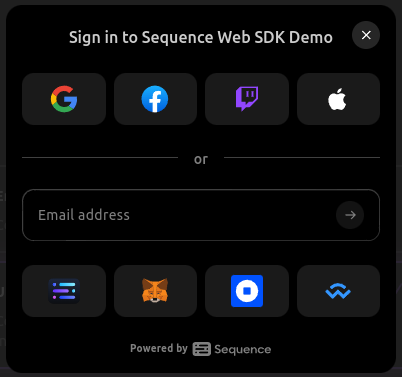
Wallet selection is done through a modal which can be called programmatically.
import { useOpenConnectModal } from '@0xsequence/connect'
import { useDisconnect, useAccount } from 'wagmi'

const MyReactComponent = () => {
  const { setOpenConnectModal } = useOpenConnectModal()

  const { isConnected } = useAccount()

  const onClick = () => {
    setOpenConnectModal(true)
  }

  return <>{!isConnected && <button onClick={onClick}>Sign in</button>}</>
}

Instead of using a modal, you can render the connect UI inline within your layout using the SequenceConnectInline component. This is perfect for custom layouts, embedded wallet experiences, or when you want the connect UI to be part of your page flow.
import { SequenceConnectInline, createConfig } from '@0xsequence/connect'
import { useNavigate } from 'react-router-dom'

const config = createConfig('waas', {
  projectAccessKey: '<your-project-access-key>',
  chainIds: [1, 137],
  defaultChainId: 1,
  appName: 'Demo Dapp',
  waasConfigKey: '<your-waas-config-key>',

  // Optional: callback fired when wallet connects successfully
  onConnectSuccess: (address) => {
    console.log('Connected wallet:', address)
    // Redirect or perform other actions
  },

  google: { clientId: '<your-google-client-id>' },
  email: true
})

function InlinePage() {
  return (
    <div className="my-custom-layout">
      <h1>Connect Your Wallet</h1>
      <SequenceConnectInline config={config} />
    </div>
  )
}
For more control, you can use the lower-level SequenceConnectInlineProvider:
import { SequenceConnectInlineProvider } from '@0xsequence/connect'
import { WagmiProvider } from 'wagmi'
import { QueryClient, QueryClientProvider } from '@tanstack/react-query'

const queryClient = new QueryClient()

function App() {
  return (
    <WagmiProvider config={wagmiConfig}>
      <QueryClientProvider client={queryClient}>
        <SequenceConnectInlineProvider config={connectConfig}>
          <YourContent />
        </SequenceConnectInlineProvider>
      </QueryClientProvider>
    </WagmiProvider>
  )
}
Use the useOpenConnectModal to change to open or close the connection modal.
import { useOpenConnectModal } from '@0xsequence/connect'
// ...
const { setOpenConnectModal } = useOpenConnectModal()
setOpenConnectModal(true)
Use the useTheme hook to get information about the current theme, such as light or dark, or set it to something else.
import { useTheme } from '@0xsequence/connect'
const { theme, setTheme } = useTheme()

setTheme('light')
The SequenceConnectProvider wrapper can accept an optional config object.
The settings are described in more detailed in the Sequence Web SDK documentation.
  const connectConfig =  {
    defaultTheme: 'light',
    position: 'top-left',
    signIn: {
      logoUrl: 'https://logo-dark-mode.svg',
      projectName: 'my app',
    },
    // limits the digital assets displayed on the assets summary screen
    displayedAssets: [
      {
        contractAddress: zeroAddress,
        chainId: 137,
      },
      {
        contractAddress: '0x631998e91476da5b870d741192fc5cbc55f5a52e',
        chainId: 137
      }
    ],
    readOnlyNetworks: [10],
    // callback fired when wallet connects successfully
    onConnectSuccess: (address) => {
      console.log('Wallet connected:', address)
      // Perform actions like redirecting, analytics tracking, etc.
    },
  }

  <SequenceConnectProvider config={connectConfig}>
    <App />
  <SequenceConnectProvider>
| Package | Description | Docs |
|---|---|---|
| @0xsequence/connect | Core package for Sequence Web SDK | Read more |
| @0xsequence/wallet-widget | Embedded wallets for viewing and sending coins and collectibles | Read more |
| @0xsequence/checkout | Checkout modal with fiat onramp | Read more |
| example-react | Example application showing sign in, wallet and checkout | Read more |
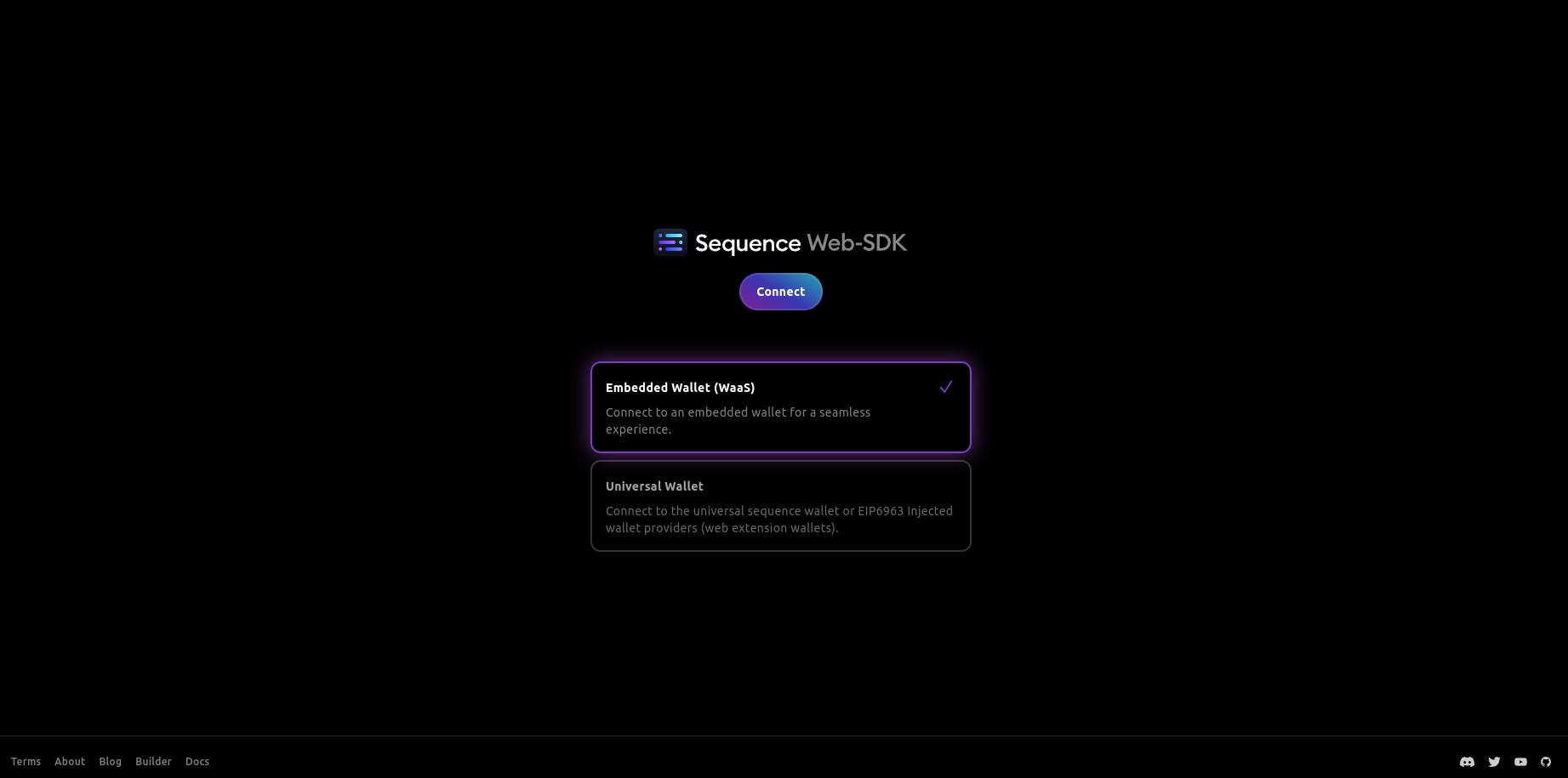
The React example can be used to test the library locally.
pnpm installpnpm build to build the packages.pnpm dev:react or pnpm dev:next to run the examples.Now that the core package is installed, you can install the embedded wallet or take a look at the checkout.
Apache-2.0
Copyright (c) 2017-present Sequence Platforms ULC. / https://sequence.xyz
Download counts and popularity will appear here as the collector receives them.
| Version | Published | Direct dependencies | Open version |
|---|---|---|---|
| 5.4.12Registry latest | 13 Jul 2026 | 28 | |
| 6.0.9 | 13 Jul 2026 | 31 | |
| 6.0.8 | 30 Jun 2026 | 31 | |
| 6.0.7 | 24 Jun 2026 | 31 | |
| 6.0.6 | 14 May 2026 | 31 | |
| 5.4.11 | 9 Apr 2026 | 28 | |
| 6.0.5 | 9 Apr 2026 | 31 | |
| 6.0.4 | 8 Apr 2026 | 31 | |
| 5.4.10 | 30 Mar 2026 | 28 | |
| 6.0.3 | 30 Mar 2026 | 31 | |
| 6.0.2 | 13 Mar 2026 | 31 | |
| 5.4.9 | 13 Mar 2026 | 30 | |
| 0.0.0-20260311175940 | 11 Mar 2026 | 30 | |
| 6.0.1 | 10 Mar 2026 | 31 | |
| 6.0.0 | 4 Mar 2026 | 34 | |
| 6.0.0-beta.4 | 13 Feb 2026 | 34 | |
| 6.0.0-beta.3 | 12 Feb 2026 | 34 | |
| 6.0.0-beta.2 | 12 Feb 2026 | 34 | |
| 0.0.0-20260210215314 | 10 Feb 2026 | 30 | |
| 6.0.0-beta.1 | 2 Feb 2026 | 34 |
This describes our collected data; it is not a security assessment.
Observed since 21 Oct, 10:07 UTC
No superseded metadata states collected. Unchanged observations do not create new revisions.
package:29db06344ad9328590a154d81bbd5f5702158f1148feb9e6120c73dbc23a552d