
Current collected state Current
Observed since 20 Oct, 19:36 UTC
No superseded metadata states collected. Unchanged observations do not create new revisions.
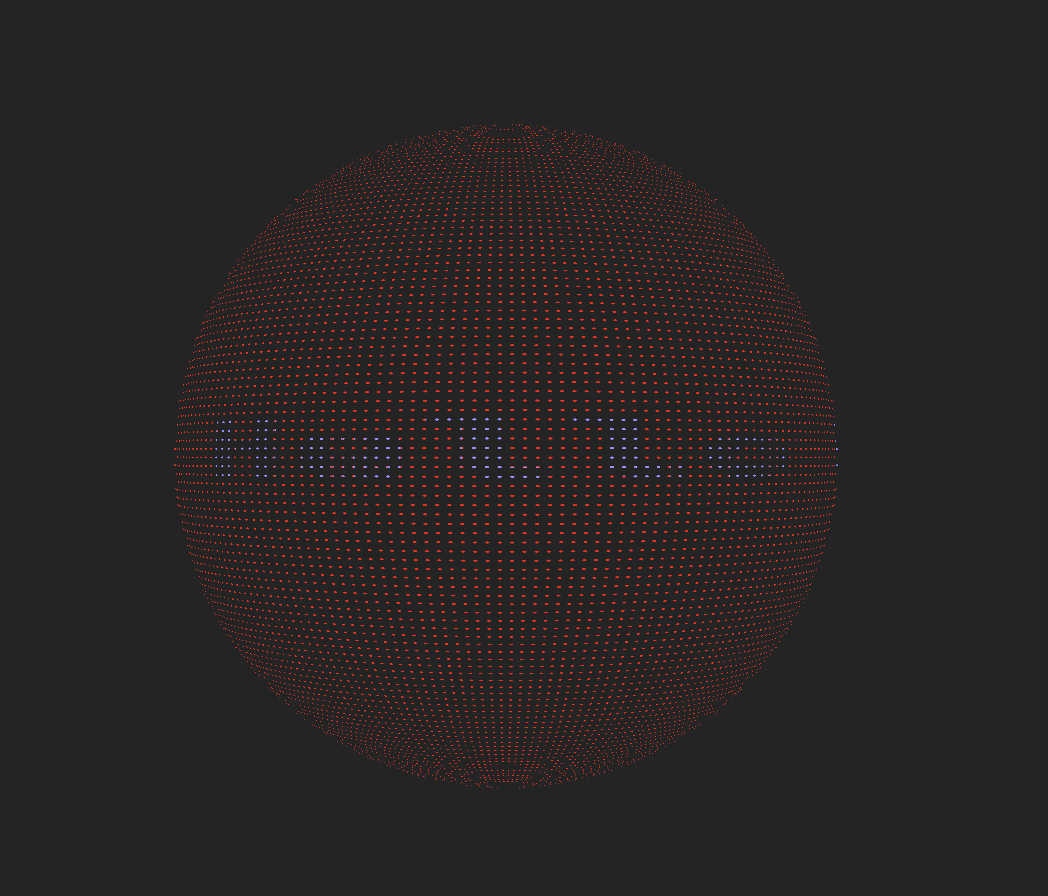
A React library featuring a 3D rotating orb with a scrolling LED marquee effect. The word scrolls horizontally across the center band of the sphere, creating a seamless ticker display.
A React library featuring a 3D rotating orb with a scrolling LED marquee effect. The word scrolls horizontally across the center band of the sphere, creating a seamless ticker display.
Install the package:
npm install 3d-marquee
Note: With npm 7+ and yarn, peer dependencies are automatically installed. If you're using npm 6 or earlier, you'll need to install the peer dependencies manually:
npm install 3d-marquee react react-dom three @react-three/fiber @react-three/drei @react-three/postprocessing
The following peer dependencies are required and will be automatically installed with npm 7+:
react: ^18.0.0 || ^19.0.0react-dom: ^18.0.0 || ^19.0.0three: >=0.158.0@react-three/fiber: ^8.15.11 || ^9.0.0@react-three/drei: ^9.92.7 || ^10.0.0@react-three/postprocessing: ^2.15.9 || ^3.0.0Import and use the LedMarqueeOrbContainer component:
import { LedMarqueeOrbContainer } from '3d-marquee'

function App() {
  return (
    <div style={{ width: '100vw', height: '100vh' }}>
      <LedMarqueeOrbContainer
        word="Hello World"
        speed={0.1}
        dimColor="red"
        brightColor="blue"
      />
    </div>
  )
}
If you're using Vite, add this to your vite.config.ts to ensure React is properly deduplicated:
import { defineConfig } from 'vite'
import react from '@vitejs/plugin-react'

export default defineConfig({
  plugins: [react()],
  resolve: {
    dedupe: ['react', 'react-dom'],
  },
  optimizeDeps: {
    include: ['react', 'react-dom', '@react-three/fiber', '@react-three/drei', '@react-three/postprocessing'],
  },
})
LedMarqueeOrbContainerThe main component that includes the Canvas, lighting, controls, and post-processing effects.
Props:
word (string, required): The text to display on the marqueespeed (number, required): Scroll speed multiplier (higher = faster)dimColor (string, required): Color for inactive LEDs (e.g., "#1a261a" or "red")brightColor (string, required): Color for active LEDs (e.g., "#00ff4d" or "blue")radius (number, optional, default: 1): Sphere radiusledSpacing (number, optional, default: 0.0075): Spacing between LED dotscolumnSpacing (number, optional, default: 0.005): Spacing between columnsLedMarqueeOrbThe core orb component (used internally by LedMarqueeOrbContainer). You can use this directly if you need more control over the Canvas setup.
Props:
Same as LedMarqueeOrbContainer, but all props are optional with defaults.
To build the library for distribution:
npm run build:lib
This creates the distribution files in the dist/ directory.
To run the demo/example application:
npm run dev
The application will be available at http://localhost:5173 (or the port shown in the terminal).
Build the production bundle:
npm run build
Preview the production build:
npm run preview
The LED marquee effect is implemented using a custom shader material that:
MIT
Download counts and popularity will appear here as the collector receives them.
| Version | Published | Direct dependencies | Open version |
|---|---|---|---|
| 0.2.3Registry latest | 2 Jan 2026 | 13 | |
| 0.2.1 | 24 Dec 2025 | 13 | |
| 0.2.0 | 23 Dec 2025 | 13 | |
| 0.1.12 | 23 Dec 2025 | 13 | |
| 0.1.11 | 23 Dec 2025 | 13 | |
| 0.1.10 | 23 Dec 2025 | 13 | |
| 0.1.9 | 23 Dec 2025 | 13 | |
| 0.1.8 | 23 Dec 2025 | 13 | |
| 0.1.7 | 23 Dec 2025 | 13 | |
| 0.1.6 | 23 Dec 2025 | 13 | |
| 0.1.5 | 23 Dec 2025 | 13 | |
| 0.1.4 | 23 Dec 2025 | 13 | |
| 0.1.3 | 23 Dec 2025 | 13 | |
| 0.1.2 | 23 Dec 2025 | 13 | |
| 0.1.1 | 23 Dec 2025 | 13 |
This describes our collected data; it is not a security assessment.
Observed since 20 Oct, 19:36 UTC
No superseded metadata states collected. Unchanged observations do not create new revisions.
package:8d88e1480332cb33261a69e45de0d92e2f1608a6eba4da7015eb3c17866620ef