
 Repository
Current collected state Current
Observed since 20 Oct, 19:41 UTC
No superseded metadata states collected. Unchanged observations do not create new revisions.
Inspect, align, and save local 3D Tiles root transforms in an interactive browser session.



3dtiles-inspector is a Node.js package and CLI for opening a local 3D Tiles tileset in a browser inspector, adjusting the root transform, tuning geometric-error scaling, cropping supported 3D Gaussian Splat tilesets, and saving the result back to disk.
Requires Node.js 18 or newer.
This project is based on and integrates work from:
npm install 3dtiles-inspector
3dtiles-inspector <tileset_json>
npx 3dtiles-inspector <tileset_json>
From a cloned repository:
npm run cli -- <tileset_json>
The CLI starts a localhost HTTP server, copies the built inspector assets into a temporary directory, opens the default browser, and keeps running until you stop it with Ctrl+C.
<tileset_json> can be either:
out_tiles/tileset.jsontileset.jsonconst { runInspector } = require('3dtiles-inspector');
(async () => {
await runInspector('./out_tiles/tileset.json');
})();
If you need to control the browser launch or manage the session lifecycle yourself:
const {
  resolveAndValidateTilesetPath,
  startInspectorSession,
} = require('3dtiles-inspector');

(async () => {
  const tilesetPath = resolveAndValidateTilesetPath('./out_tiles/tileset.json');
  const session = await startInspectorSession(tilesetPath, {
    openBrowser: false,
    handleSignals: false,
  });

  console.log(session.url);

  await session.close();
})();
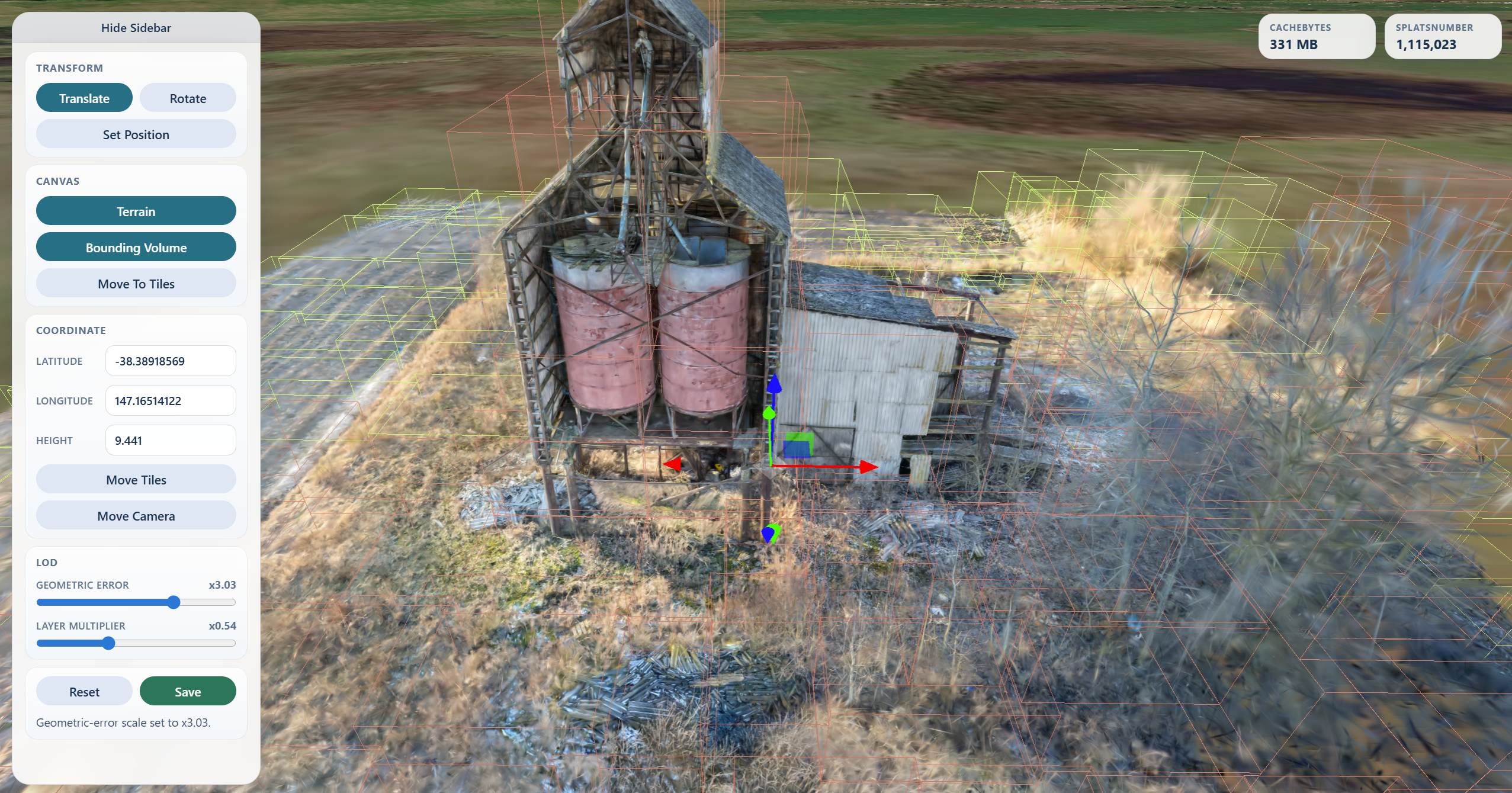
Translate, Rotate, infinite Scale track/value input, and Reset for root transform editsMove Camera to a WGS84 latitude / longitude / heightMove Tiles to relocate the tileset root with an ENU-aligned transformSet Position to click the globe, terrain, or loaded tiles and place the tileset thereTerrain, off by default, to toggle Cesium World Terrain after entering a Cesium ion token, while keeping satellite imageryRender on demand, enabled by default, to pause canvas rendering while the scene is idleGeometric Error scaling from 1/16x to 16xLayer Multiplier scaling from 1/8x to 8x for each tile's geometric-error difference from the tileset's global leaf baselineCrop Regions for drawing screen-space exclude regions or a crop sphere on 3D Gaussian Splat tilesetsSave to persist root transform edits, geometric-error scaling, and confirmed crop selections back to diskCrop Regions appears when the loaded tileset contains 3D Gaussian Splat content. It lets you draw one or more screen-space exclude rectangles or define a single crop sphere, preview them in the viewer, then apply the crop when you click Save.
For screen regions:
Draw Region and drag a rectangle over the splats to remove.Confirm to add the region to the save list, or Cancel to discard the pending rectangle.Save to persist the root transform and delete splats inside the confirmed crop regions.For the crop sphere:
Create Sphere to place one sphere at the current tileset center.Confirm to hide splats outside the sphere, or Cancel to discard it.Save to remove splats outside the confirmed sphere.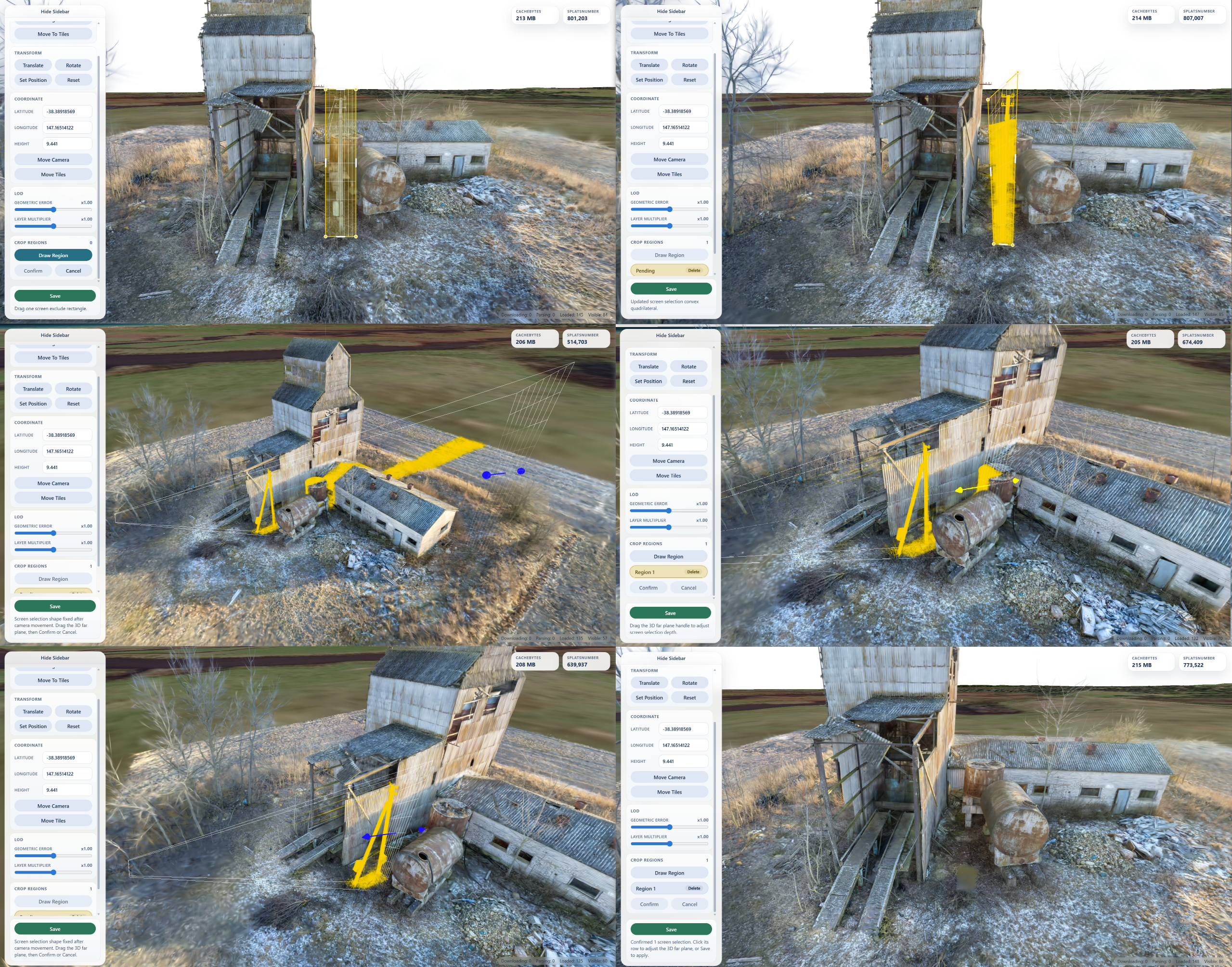
Crop saving rewrites supported local .gltf / .glb Gaussian Splat resources that use KHR_gaussian_splatting_compression_spz_2. Fully deleted splat primitives are removed from their glTF, and empty tile content can be pruned from the tileset JSON. Remote content and unsupported Gaussian Splat encodings are rejected instead of being modified.
If build_summary.json exists next to the root tileset, Save also updates:
root_transformroot_transform_sourceroot_coordinateviewer_geometric_error_scaleviewer_geometric_error_layer_scalenpm install
npm test
npm run pack:check
Runtime and validation failures throw InspectorError from the Node API and print a concise error message in the CLI.
Download counts and popularity will appear here as the collector receives them.
| Version | Published | Direct dependencies | Open version |
|---|---|---|---|
| 0.3.3Registry latest | 31 Aug 2026 | 5 | |
| 0.3.2 | 31 Aug 2026 | 5 | |
| 0.3.1 | 30 Aug 2026 | 5 | |
| 0.3.0 | 28 Aug 2026 | 5 | |
| 0.2.21 | 6 Aug 2026 | 5 | |
| 0.2.20 | 5 Aug 2026 | 5 | |
| 0.2.19 | 4 Aug 2026 | 5 | |
| 0.2.18 | 16 Jul 2026 | 5 | |
| 0.2.17 | 16 Jul 2026 | 5 | |
| 0.2.16 | 23 Jun 2026 | 5 | |
| 0.2.15 | 22 Jun 2026 | 5 | |
| 0.2.14 | 19 Jun 2026 | 5 | |
| 0.2.13 | 2 Jun 2026 | 5 | |
| 0.2.12 | 1 Jun 2026 | 6 | |
| 0.2.11 | 21 May 2026 | 6 | |
| 0.2.10 | 21 May 2026 | 6 | |
| 0.2.9 | 21 May 2026 | 6 | |
| 0.2.8 | 13 May 2026 | 6 | |
| 0.2.7 | 9 May 2026 | 6 | |
| 0.2.6 | 5 May 2026 | 6 |
This describes our collected data; it is not a security assessment.
Shared repository data · GitHub
Observed since 20 Oct, 19:41 UTC
No superseded metadata states collected. Unchanged observations do not create new revisions.
package:032809d593eced552ee3ec1a3d3f600cd0e6f68a4fb04220a950d64d7cd96698