
Current collected state Current
Observed since 20 Oct, 21:40 UTC
No superseded metadata states collected. Unchanged observations do not create new revisions.
Remote terminal access from anywhere
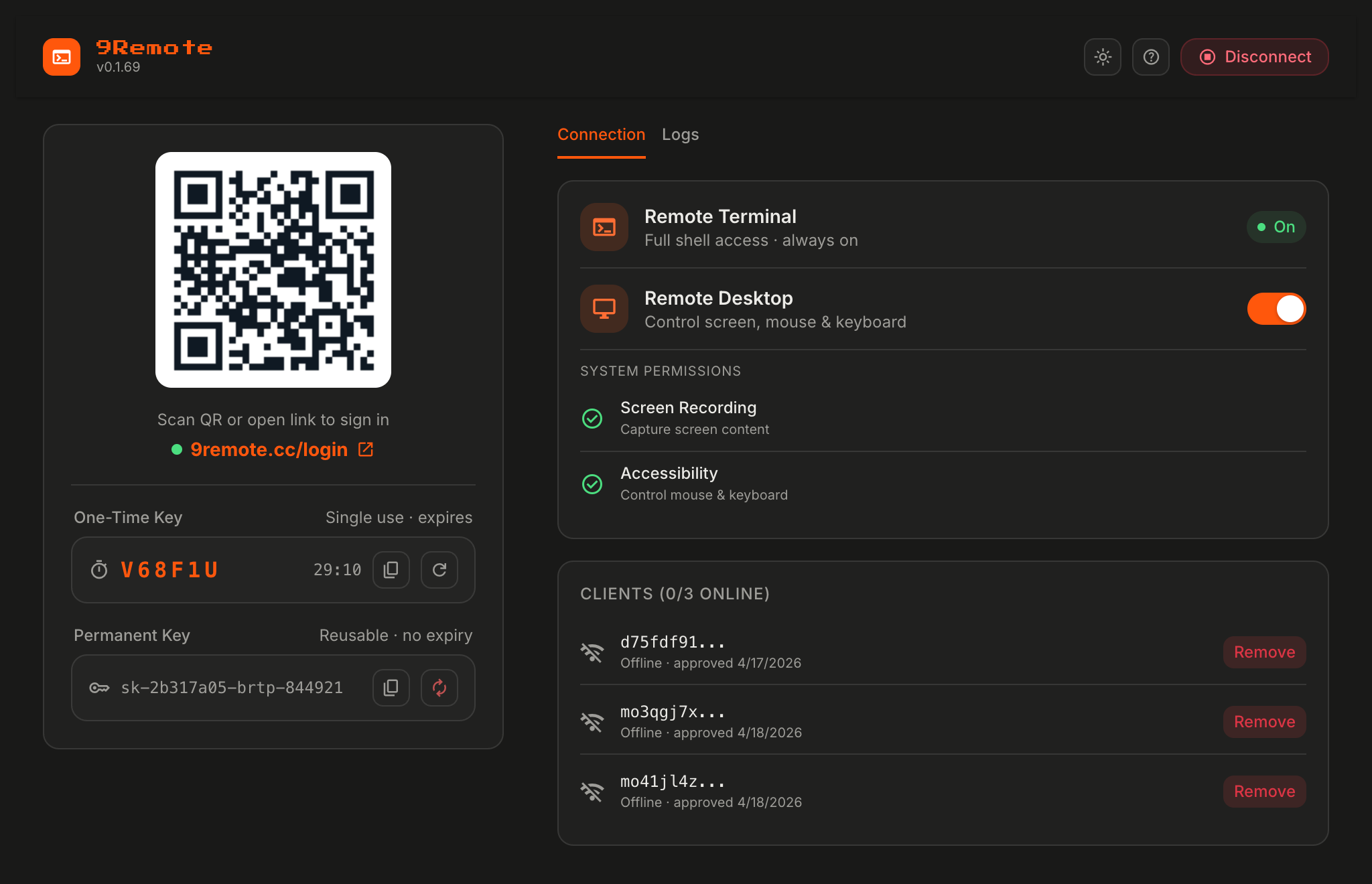
Your Mac/Linux/Windows terminal, remote desktop, and file explorer — accessible from any phone or browser, anywhere, instantly.



Remote access today is painful:
9Remote solves all of it:
npm install -g 9remote
9remote
🎉 Scan the QR → pair your device → you're in.
Works on macOS, Linux, Windows. Requires Node.js 20+.
| Command | Description |
|---|---|
9remote | TUI mode — interactive menu with QR code |
9remote ui | Web UI mode — opens dashboard at localhost:2208 |
| Feature | What It Does |
|---|---|
| 🖥️ Remote Terminal | Full PTY shell via WebSocket |
| 🖱️ Remote Desktop | Live screen streaming via WebRTC |
| 📁 File Explorer | Browse, upload, download files |
| 💻 Code Editor | Built-in editor with syntax highlighting |
| 🔗 Git Integration | Run git commands with visual status |
| 📱 Mobile Optimized | Touch-friendly UI, gesture controls |
| 🔑 QR Login | One-time 30-min key, scan to connect |
| 🔒 Auto Tunnel | Cloudflare tunnel, no port forwarding |
| 🔄 Persistent Sessions | PTY daemon survives restarts |
| 🌍 Multi-Device Sync | Same session across phone/tablet/laptop |
| 🔔 Push Notifications | Build finished? Get notified |
| 🤖 AI Integration | Claude Code, Codex, Cursor, OpenClaw |
| 🌐 Local Sites Proxy | Expose localhost:3000 to phone |
| 🔐 Pair Device | Approve each device before it connects |
| 🆓 No Account | Machine ID + QR key, zero signup |
Code from bed — 11 PM, bug in prod, laptop in another room? Open the app on your phone, scan QR, fix, push, sleep.
Fix bugs at a cafe — Production down, only phone + café Wi-Fi? Connect to your home Mac, tail logs, edit config, deploy.
Deploy on vacation — Client needs a hotfix, you're on the beach? Phone → 9remote → git pull → deploy → back to the beach.
On-call engineer — 3 AM alert, don't want to boot laptop? Push notification → terminal + remote desktop from bed.
On first run, 9Remote generates two keys:
Connect from phone:
9remote on your machineKeys are never stored on our servers after the session ends.
Requires two system permissions:
System Settings → Privacy & Security → Screen RecordingSystem Settings → Privacy & Security → AccessibilityEnable Terminal (or the app you ran 9remote from), then toggle Remote Desktop in the TUI menu.
Performance:
Expose your local dev servers automatically:
http://localhost:3000  →  https://<tunnel>/proxy/3000/
http://localhost:5173  →  https://<tunnel>/proxy/5173/
Perfect for testing responsive design on real devices, sharing WIP builds, or mobile debugging without USB.
Yes. Every new device must be explicitly approved via Pair Device before it can access the host. Plus:
Yes. Free to use, no signup, no credit card. MIT licensed.
No. Uses Cloudflare Quick Tunnel — outbound only. Works behind home NAT, corporate firewalls, mobile hotspots, VPNs.
Yes. A LocalFirstAdapter races LAN vs tunnel and uses whichever is faster. If phone and host share the same Wi-Fi, traffic stays local.
Yes. Works seamlessly with Claude Code, OpenAI Codex CLI, Cursor, OpenClaw, and any CLI tool. Run them on your host, access from your phone.
Host: macOS (Intel + Apple Silicon), Linux (x64, arm64), Windows (x64) Client: Any modern browser, iOS 14+, Android 8+
"Port 2208 already in use"
pkill -f 9remote and retryPORT=3308 9remote"Cloudflare tunnel failed to start"
cloudflared auto-installed on first run; otherwise install manually from cloudflared docs"Screen Recording / Accessibility denied" (macOS)
System Settings → Privacy & Security, then restart 9Remote"QR code expired"
Key → Regenerate"Can't connect from phone"
MIT © 9Team
Download counts and popularity will appear here as the collector receives them.
| Version | Published | Direct dependencies | Open version |
|---|---|---|---|
| 2.0.55Registry latest | 2 Jul 2026 | 34 | |
| 2.0.54 | 2 Jul 2026 | 34 | |
| 2.0.53 | 2 Jul 2026 | 34 | |
| 2.0.52 | 2 Jul 2026 | 34 | |
| 2.0.51 | 2 Jul 2026 | 34 | |
| 2.0.50 | 2 Jul 2026 | 34 | |
| 2.0.49 | 2 Jul 2026 | 34 | |
| 2.0.48 | 2 Jul 2026 | 34 | |
| 2.0.47 | 2 Jul 2026 | 34 | |
| 2.0.46 | 2 Jul 2026 | 34 | |
| 2.0.44 | 2 Jul 2026 | 34 | |
| 2.0.43 | 2 Jul 2026 | 34 | |
| 2.0.42 | 2 Jul 2026 | 34 | |
| 2.0.41 | 2 Jul 2026 | 34 | |
| 2.0.40 | 2 Jul 2026 | 34 | |
| 2.0.39 | 2 Jul 2026 | 34 | |
| 2.0.37 | 2 Jul 2026 | 34 | |
| 2.0.36 | 2 Jul 2026 | 34 | |
| 2.0.35 | 2 Jul 2026 | 34 | |
| 2.0.34 | 2 Jul 2026 | 34 |
This describes our collected data; it is not a security assessment.
Observed since 20 Oct, 21:40 UTC
No superseded metadata states collected. Unchanged observations do not create new revisions.
package:6d5c22ec6eaeb70bb66d43e834e57e8e9e6051080837254703a435eceb81dd3d