
 Repository
Current collected state Current
Observed since 20 Oct, 15:06 UTC
No superseded metadata states collected. Unchanged observations do not create new revisions.
A fully free, customizable rich text editor for Django — built on Lexical and React
A fully free, pip-installable rich text editor for Django — built on Lexical (Meta's editor framework) and React. No paid tier, no vendor lock-in, 100% MIT licensed.
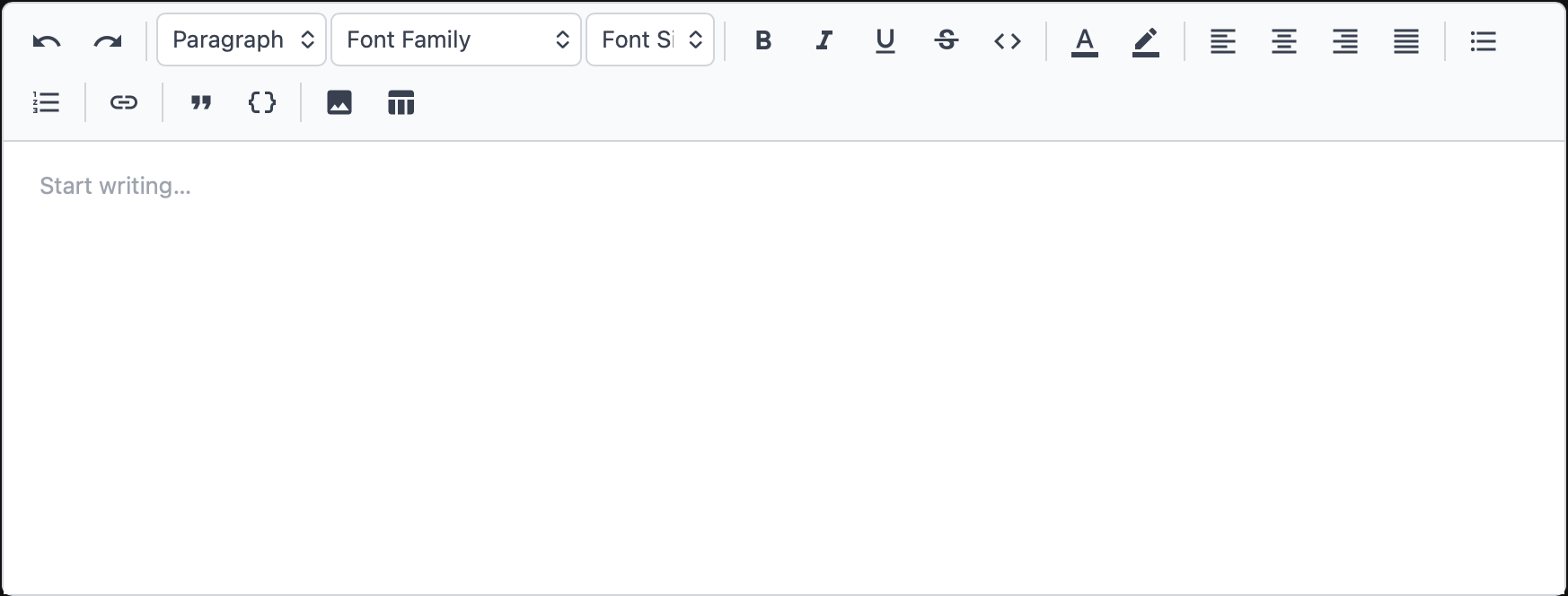
Documentation is available in English, O'zbek and Русский below.
minimal (default) or full, or a custom list of itemsen / ru / uz — placeholder, tooltips, heading labels, modals| Requirement | Version |
|---|---|
| Python | 3.10+ |
| Django | 3.2+ |
| Browser | Any modern browser |
pip install 101editor
Open your Django project's settings.py and add editor101 to the list:
INSTALLED_APPS = [
    # ... your other apps ...
    'editor101',
]
Open your project's main urls.py and include the editor's URL:
from django.urls import path, include

urlpatterns = [
    # ... your other urls ...
    path('editor101/', include('editor101.urls')),
]
This registers one endpoint: POST /editor101/upload/ — used when the user uploads an image inside the editor.
editor101 has no database models. No migration is required.
Add an EDITOR101 dictionary to settings.py to override defaults:
EDITOR101 = {
    # "minimal" shows: undo/redo, heading, font, bold/italic/underline/strikethrough,
    # inline-code, text color, highlight, alignment, bullet list, ordered list, link.
    # "full" adds: blockquote, code block, image upload, table.
    # You can also pass a list of specific item names (see Item Names below).
    "toolbar": "minimal",      # default: "minimal"

    # Interface language for placeholders, tooltips, heading labels, modal text.
    # Supported: "en" (English), "ru" (Russian), "uz" (Uzbek)
    "language": "en",          # default: "en"

    # Where uploaded images are saved (relative to MEDIA_ROOT).
    "upload_path": "editor101/uploads/",  # default

    # Maximum allowed image file size in megabytes.
    "max_image_size_mb": 10,   # default

    # Allowed image MIME types.
    "allowed_image_types": [
        "image/jpeg",
        "image/png",
        "image/gif",
        "image/webp",
    ],
}
Make sure MEDIA_ROOT and MEDIA_URL are set in settings.py:
import os
MEDIA_ROOT = os.path.join(BASE_DIR, 'media')
MEDIA_URL = '/media/'
And in development, add this to your main urls.py:
from django.conf import settings
from django.conf.urls.static import static

urlpatterns = [
    # ...
] + static(settings.MEDIA_URL, document_root=settings.MEDIA_ROOT)
from django.db import models
from editor101.fields import RichTextField

class Post(models.Model):
    title = models.CharField(max_length=200)
    content = RichTextField()

    def __str__(self):
        return self.title
RichTextField is a standard Django TextField under the hood. Django Admin picks it up automatically — the rich editor appears in place of the default textarea with no extra code.
from django import forms
from editor101.widgets import RichTextWidget
from .models import Post

class PostForm(forms.ModelForm):
    class Meta:
        model = Post
        fields = ['title', 'content']
        widgets = {
            'content': RichTextWidget(),
        }
Or on a plain form field:
from django import forms
from editor101.widgets import RichTextWidget

class ArticleForm(forms.Form):
    body = forms.CharField(widget=RichTextWidget())
The editor saves HTML. To display it safely in a template, use Django's safe filter:
{% load editor101_tags %}

<!-- Renders with correct typography, table, code block styles -->
<div class="editor101-content">
    {{ post.content|safe }}
</div>
Add the editor101-content CSS class to the wrapper so the bundled stylesheet applies proper typography, table borders, code block colours, etc.
To load the stylesheet on a non-admin page, add this to your template's <head>:
{% load static %}
<link rel="stylesheet" href="{% static 'editor101/editor.css' %}">
When "toolbar" is a list, use these exact string identifiers:
| Item | Description |
|---|---|
"undo" | Undo |
"redo" | Redo |
"|" | Visual separator line |
"heading" | Heading dropdown (H1–H6 + Paragraph) |
"font-family" | Font family dropdown |
"font-size" | Font size dropdown |
"bold" | Bold |
"italic" | Italic |
"underline" | Underline |
"strikethrough" | Strikethrough |
"code" | Inline code |
"subscript" | Subscript |
"superscript" | Superscript |
"math" | Math menu — subscript/superscript + LaTeX formula insert (rendered via KaTeX) |
"text-color" | Text colour picker |
"bg-color" | Highlight colour picker |
"align-left" | Align left |
"align-center" | Align center |
"align-right" | Align right |
"align-justify" | Justify |
"checklist" | Checklist / task list |
"bullet-list" | Unordered list |
"ordered-list" | Ordered list |
"indent" | Increase indent |
"outdent" | Decrease indent |
"link" | Link insert/edit |
"blockquote" | Blockquote |
"code-block" | Code block with language picker |
"horizontal-rule" | Insert a horizontal divider |
"clear-formatting" | Strip formatting back to plain text |
"image" | Image upload (left/right alignment floats the image so text wraps beside it) |
"table" | Table grid picker |
"media-embed" | Insert a video/iframe embed by URL (YouTube/Vimeo links auto-convert) |
"emoji" | Emoji picker |
"fullscreen" | Expand the editor to fill the screen |
Example — custom toolbar:
EDITOR101 = {
    "toolbar": ["bold", "italic", "underline", "|", "link", "image"],
}
You can pass a different toolbar per field:
from editor101.widgets import RichTextWidget

class PostForm(forms.ModelForm):
    class Meta:
        model = Post
        fields = ['title', 'content', 'summary']
        widgets = {
            'content': RichTextWidget(toolbar='full'),
            'summary': RichTextWidget(toolbar='minimal'),
        }
{} button or select a language from the dropdown to enter a code block.If you want to modify the editor's source (React/TypeScript):
# Clone / open the project
cd "custom text editor"

# Install Python package in editable mode
pip install -e ".[dev]"

# Install JS dependencies
cd editor-src
npm install

# Start Vite dev server (hot-reload) — for editor development only
npm run dev

# In a separate terminal — run the Django demo project
cd ../demo
python manage.py migrate
python manage.py createsuperuser
python manage.py runserver
# Open http://127.0.0.1:8000/admin/
After making changes to the React source, build the production bundle:
cd editor-src
npm run build
# Outputs editor.bundle.js and editor.css into editor101/static/editor101/
pip install build twine

# Build wheel + sdist
python -m build

# Verify the package metadata
twine check dist/*

# Upload (you will be asked for username/__token__ and your API key)
twine upload dist/*
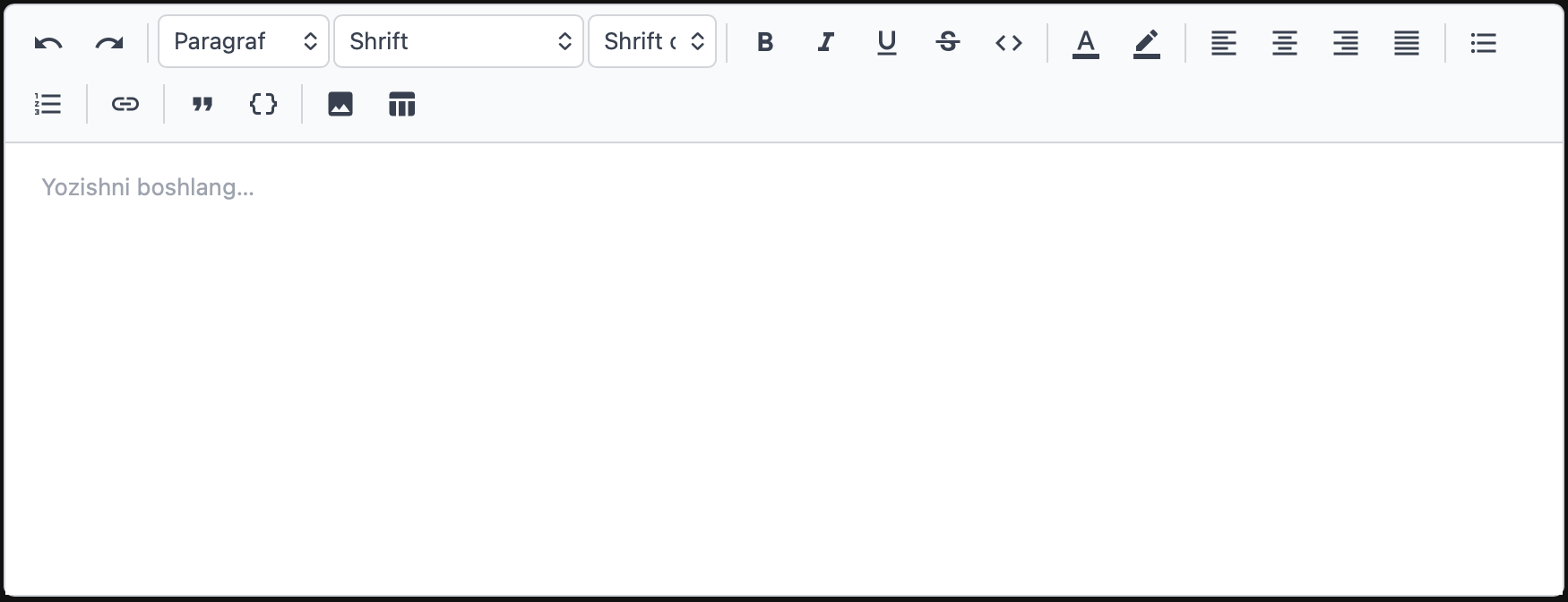
minimal (standart) yoki full, yoki maxsus elementlar ro'yxatien / ru / uz| Talab | Versiya |
|---|---|
| Python | 3.10+ |
| Django | 3.2+ |
| Brauzer | Istalgan zamonaviy brauzer |
Terminalda quyidagi buyruqni bajaring:
pip install 101editor
Bu buyruq PyPI'dan paketni yuklab o'rnatadi. pip avtomatik barcha bog'liqliklarni o'rnatadi.
Django loyihangizning settings.py faylini oching va editor101 ni ro'yxatga qo'shing:
INSTALLED_APPS = [
    # ... boshqa ilovalaringiz ...
    'editor101',
]
Bu qadam Django'ga editor101 ilovasini topa olishi, statik fayllar va URL larni yuklashi uchun zarur.
Loyihangizning asosiy urls.py faylini oching:
from django.urls import path, include

urlpatterns = [
    # ... boshqa URL laringiz ...
    path('editor101/', include('editor101.urls')),
]
Bu POST /editor101/upload/ manzilini ro'yxatdan o'tkazadi — muharrir ichida rasm yuklanganida ishlatiladi.
editor101 da ma'lumotlar bazasi modellari yo'q. Migratsiya shart emas.
settings.py ga EDITOR101 lug'atini qo'shing:
EDITOR101 = {
    # Toolbar rejimi:
    # "minimal" — asosiy vositalar (qaytarish, sarlavha, shrift, formatlash,
    #             ranglar, hizalash, ro'yxatlar, havola)
    # "full" — barcha vositalar (minimal + iqtibos, kod bloki, rasm, jadval)
    # Yoki maxsus elementlar ro'yxatini bering (quyidagi jadvalga qarang)
    "toolbar": "minimal",

    # Interfeys tili: "en" (inglizcha), "ru" (ruscha), "uz" (o'zbekcha)
    "language": "uz",

    # Yuklangan rasmlar saqlanadigan joy (MEDIA_ROOT ga nisbatan)
    "upload_path": "editor101/uploads/",

    # Rasm fayli maksimal hajmi (megabaytda)
    "max_image_size_mb": 10,

    # Ruxsat etilgan rasm turlari
    "allowed_image_types": [
        "image/jpeg",
        "image/png",
        "image/gif",
        "image/webp",
    ],
}
settings.py da MEDIA_ROOT va MEDIA_URL ni belgilang:
import os
MEDIA_ROOT = os.path.join(BASE_DIR, 'media')
MEDIA_URL = '/media/'
Ishlab chiqish jarayonida asosiy urls.py ga qo'shing:
from django.conf import settings
from django.conf.urls.static import static

urlpatterns = [
    # ...
] + static(settings.MEDIA_URL, document_root=settings.MEDIA_ROOT)
from django.db import models
from editor101.fields import RichTextField

class Post(models.Model):
    title = models.CharField(max_length=200)
    content = RichTextField()

    def __str__(self):
        return self.title
RichTextField ostida oddiy Django TextField dir. Django Admin uni avtomatik aniqlaydi — qo'shimcha kod shart emas.
from django import forms
from editor101.widgets import RichTextWidget
from .models import Post

class PostForm(forms.ModelForm):
    class Meta:
        model = Post
        fields = ['title', 'content']
        widgets = {
            'content': RichTextWidget(),
        }
Oddiy form maydoni uchun:
from django import forms
from editor101.widgets import RichTextWidget

class ArticleForm(forms.Form):
    body = forms.CharField(widget=RichTextWidget())
Muharrir HTML saqlaydi. Shablonda xavfsiz ko'rsatish uchun Django'ning safe filtri ishlatiladi:
<div class="editor101-content">
    {{ post.content|safe }}
</div>
editor101-content CSS klassini qo'shish kerak — bu to'g'ri tipografiya, jadval chegaralari, kod bloki ranglari va boshqa uslublarni qo'llaydi.
Admin bo'lmagan sahifada uslublar faylini ulash:
{% load static %}
<link rel="stylesheet" href="{% static 'editor101/editor.css' %}">
"toolbar" ro'yxat sifatida berilganda, quyidagi nomlardan foydalaning:
| Element | Tavsif |
|---|---|
"undo" | Bekor qilish |
"redo" | Qayta bajarish |
"|" | Ajratuvchi chiziq |
"heading" | Sarlavha (H1–H6 + Paragraf) |
"font-family" | Shrift oilasi |
"font-size" | Shrift o'lchami |
"bold" | Qalin |
"italic" | Kursiv |
"underline" | Tagiga chizilgan |
"strikethrough" | Ustiga chizilgan |
"code" | Inline kod |
"subscript" | Pastki indeks |
"superscript" | Yuqori indeks |
"math" | Matematik formulalar menyusi — pastki/yuqori indeks + LaTeX formula (KaTeX orqali chiziladi) |
"text-color" | Matn rangi |
"bg-color" | Ajratish rangi |
"align-left" | Chapga hizalash |
"align-center" | Markazga hizalash |
"align-right" | O'ngga hizalash |
"align-justify" | Kengligi bo'yicha |
"checklist" | Vazifalar ro'yxati |
"bullet-list" | Tartibsiz ro'yxat |
"ordered-list" | Tartibli ro'yxat |
"indent" | Chekinishni oshirish |
"outdent" | Chekinishni kamaytirish |
"link" | Havola |
"blockquote" | Iqtibos |
"code-block" | Kod bloki |
"horizontal-rule" | Gorizontal chiziq qo'shish |
"clear-formatting" | Formatlashni tozalash |
"image" | Rasm yuklash (chap/o'ng tekislash rasmni suzuvchi qiladi — matn uning yonidan o'tadi) |
"table" | Jadval |
"media-embed" | URL orqali video/iframe qo'shish (YouTube/Vimeo havolalari avtomatik aylantiriladi) |
"emoji" | Emoji tanlagich |
"fullscreen" | Muharrirni to'liq ekranga yoyish |
Misol — maxsus toolbar:
EDITOR101 = {
    "toolbar": ["bold", "italic", "|", "link", "image"],
}
{} tugmasini bosing yoki tilni tanlang.# Python paketini tahrirlash rejimida o'rnatish
pip install -e ".[dev]"
# JS bog'liqliklarini o'rnatish
cd editor-src
npm install
# Vite dev serverni ishga tushirish (muharrir ishlab chiqish uchun)
npm run dev
# Alohida terminalda Django demo loyihasini ishga tushirish
cd ../demo
python manage.py migrate
python manage.py createsuperuser
python manage.py runserver
# http://127.0.0.1:8000/admin/ ni oching
O'zgartirishlardan keyin ishlab chiqarish bundlini yarating:
cd editor-src
npm run build
pip install build twine

# Wheel va sdist yaratish
python -m build

# Paket meta-ma'lumotlarini tekshirish
twine check dist/*

# Yuklash (username/__token__ va API kalitingiz so'raladi)
twine upload dist/*
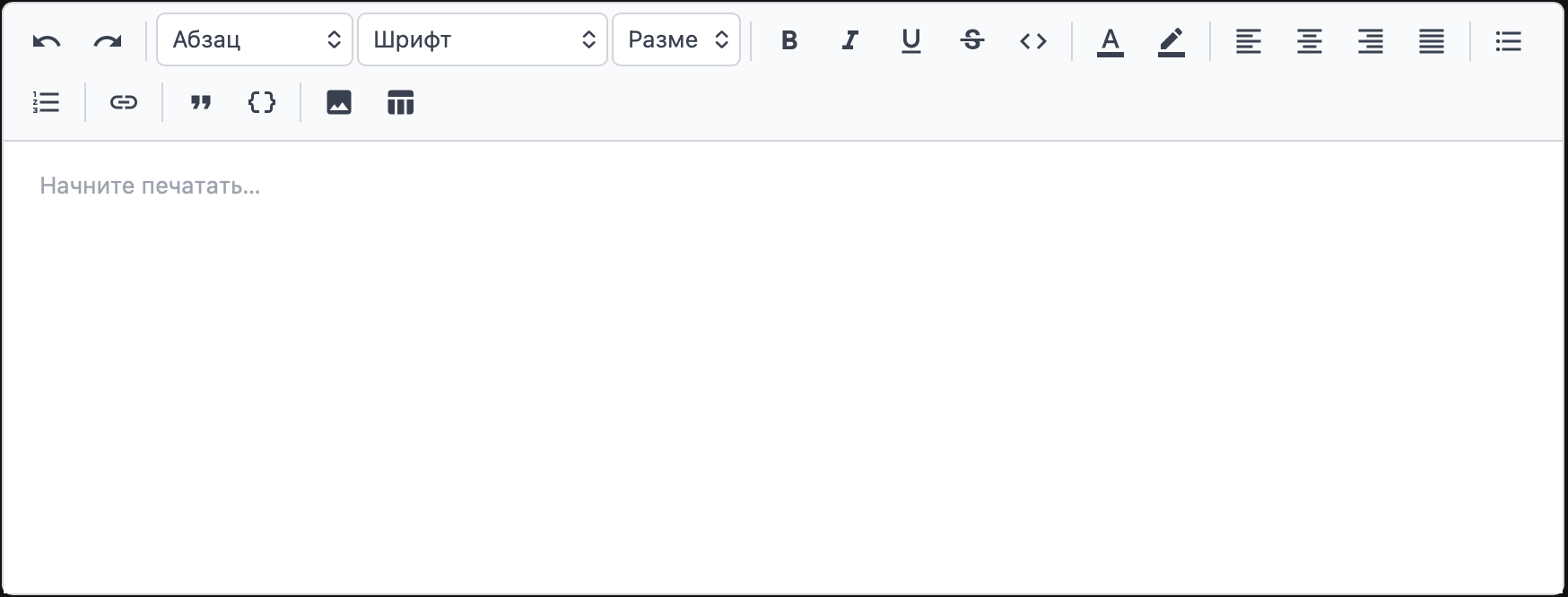
minimal (по умолчанию) или full, или произвольный список элементовen / ru / uz| Требование | Версия |
|---|---|
| Python | 3.10+ |
| Django | 3.2+ |
| Браузер | Любой современный браузер |
Выполните в терминале:
pip install 101editor
Команда загрузит пакет с PyPI и автоматически установит все зависимости.
Откройте settings.py вашего Django-проекта и добавьте editor101 в список:
INSTALLED_APPS = [
    # ... другие приложения ...
    'editor101',
]
Это необходимо для того, чтобы Django мог найти приложение, загрузить статические файлы и URL-маршруты.
Откройте главный urls.py проекта:
from django.urls import path, include

urlpatterns = [
    # ... другие URL ...
    path('editor101/', include('editor101.urls')),
]
Это регистрирует один маршрут: POST /editor101/upload/ — используется при загрузке изображений внутри редактора.
В editor101 нет моделей базы данных. Миграции не нужны.
Добавьте словарь EDITOR101 в settings.py:
EDITOR101 = {
    # Режим панели инструментов:
    # "minimal" — основные инструменты (отмена/повтор, заголовок, шрифт,
    #             жирный/курсив/подчёркнутый/зачёркнутый, встроенный код,
    #             цвет текста, выделение, выравнивание, списки, ссылка)
    # "full" — все инструменты (minimal + цитата, блок кода, изображение, таблица)
    # Или передайте список конкретных элементов (см. таблицу ниже)
    "toolbar": "minimal",

    # Язык интерфейса: "en" (английский), "ru" (русский), "uz" (узбекский)
    "language": "ru",

    # Папка для сохранения загруженных изображений (относительно MEDIA_ROOT)
    "upload_path": "editor101/uploads/",

    # Максимальный размер файла изображения в мегабайтах
    "max_image_size_mb": 10,

    # Допустимые MIME-типы изображений
    "allowed_image_types": [
        "image/jpeg",
        "image/png",
        "image/gif",
        "image/webp",
    ],
}
Убедитесь, что в settings.py заданы MEDIA_ROOT и MEDIA_URL:
import os
MEDIA_ROOT = os.path.join(BASE_DIR, 'media')
MEDIA_URL = '/media/'
В режиме разработки добавьте в главный urls.py:
from django.conf import settings
from django.conf.urls.static import static

urlpatterns = [
    # ...
] + static(settings.MEDIA_URL, document_root=settings.MEDIA_ROOT)
from django.db import models
from editor101.fields import RichTextField

class Post(models.Model):
    title = models.CharField(max_length=200)
    content = RichTextField()

    def __str__(self):
        return self.title
RichTextField — это обычный TextField Django под капотом. Django Admin распознаёт его автоматически и показывает богатый редактор вместо обычного текстового поля.
from django import forms
from editor101.widgets import RichTextWidget
from .models import Post

class PostForm(forms.ModelForm):
    class Meta:
        model = Post
        fields = ['title', 'content']
        widgets = {
            'content': RichTextWidget(),
        }
Или для обычного поля формы:
from django import forms
from editor101.widgets import RichTextWidget

class ArticleForm(forms.Form):
    body = forms.CharField(widget=RichTextWidget())
Редактор сохраняет HTML. Для безопасного отображения в шаблоне используйте фильтр safe:
<div class="editor101-content">
    {{ post.content|safe }}
</div>
Класс editor101-content на обёртке нужен для применения правильной типографии, границ таблиц, цветов блока кода и других стилей из подключённого CSS.
Для подключения стилей на странице, не являющейся частью Admin:
{% load static %}
<link rel="stylesheet" href="{% static 'editor101/editor.css' %}">
Когда "toolbar" является списком, используйте следующие идентификаторы:
| Элемент | Описание |
|---|---|
"undo" | Отменить |
"redo" | Повторить |
"|" | Разделитель |
"heading" | Заголовок (H1–H6 + Абзац) |
"font-family" | Семейство шрифтов |
"font-size" | Размер шрифта |
"bold" | Жирный |
"italic" | Курсив |
"underline" | Подчёркнутый |
"strikethrough" | Зачёркнутый |
"code" | Встроенный код |
"subscript" | Подстрочный текст |
"superscript" | Надстрочный текст |
"math" | Меню формул — подстрочный/надстрочный текст + вставка формулы LaTeX (рендерится через KaTeX) |
"text-color" | Цвет текста |
"bg-color" | Цвет выделения |
"align-left" | По левому краю |
"align-center" | По центру |
"align-right" | По правому краю |
"align-justify" | По ширине |
"checklist" | Список задач |
"bullet-list" | Маркированный список |
"ordered-list" | Нумерованный список |
"indent" | Увеличить отступ |
"outdent" | Уменьшить отступ |
"link" | Ссылка |
"blockquote" | Цитата |
"code-block" | Блок кода |
"horizontal-rule" | Вставить горизонтальную линию |
"clear-formatting" | Очистить форматирование |
"image" | Загрузка изображения (выравнивание влево/вправо делает изображение плавающим — текст обтекает его) |
"table" | Таблица |
"media-embed" | Вставка видео/iframe по URL (ссылки YouTube/Vimeo конвертируются автоматически) |
"emoji" | Выбор эмодзи |
"fullscreen" | Развернуть редактор на весь экран |
Пример — произвольная панель инструментов:
EDITOR101 = {
    "toolbar": ["bold", "italic", "|", "link", "image"],
}
{} или выберите язык в выпадающем списке.# Установить Python-пакет в режиме редактирования
pip install -e ".[dev]"
# Установить JS-зависимости
cd editor-src
npm install
# Запустить Vite dev-сервер (горячая перезагрузка) — для разработки редактора
npm run dev
# В отдельном терминале — запустить демо Django-проект
cd ../demo
python manage.py migrate
python manage.py createsuperuser
python manage.py runserver
# Откройте http://127.0.0.1:8000/admin/
После внесения изменений в исходный код React соберите продакшн-бандл:
cd editor-src
npm run build
# Выводит editor.bundle.js и editor.css в editor101/static/editor101/
pip install build twine

# Сборка wheel и sdist
python -m build

# Проверка метаданных пакета
twine check dist/*

# Загрузка (будет запрошен username/__token__ и ваш API-ключ)
twine upload dist/*
MIT — свободно использовать в личных и коммерческих проектах.
Download counts and popularity will appear here as the collector receives them.
| Version | Published | Direct dependencies | Open version |
|---|---|---|---|
| 0.2.0 | 3 Jul 2026 | 2 |
This describes our collected data; it is not a security assessment.
Observed since 20 Oct, 15:06 UTC
No superseded metadata states collected. Unchanged observations do not create new revisions.
package:a7120bfe31aab76c780866ec7fba488e16b94ee5df27c66886981b0a41242be5