
 Repository
Current collected state Current
Observed since 20 Oct, 16:17 UTC
No superseded metadata states collected. Unchanged observations do not create new revisions.
Accessibility-first computer-use framework for macOS, Windows, Linux, and the browser (CDP): pruned accessibility-tree snapshots, element refs, and a safety layer, exposed as an MCP server + CLI.




Computer use for AI agents that clicks real UI elements instead of guessed pixels. The model reads a pruned accessibility tree and says click e14. Works on macOS, Windows, Linux, and Chromium, through one MCP server.
0.4.3 captures 100x faster on macOS 26 (screencapture, per-window OCR that ignores covering apps). 0.4.2 closes the first three agent-filed issues (file dialogs by address, no whole-display OCR under an app's grant), refuses to fight the user for an app (
user_active), and asks permission through a real macOS alert. 0.4.0: the user keeps working while the agent works (docs/coexist.md).
uvx a11y-computer-use doctor            # try it, no install
pip install a11y-computer-use           # extras: [browser] [windows] [linux] [ocr] [holo]
An isolated venv cannot build the [agent,linux] extras. PyGObject is sdist-only and pycairo has no Linux wheel, so pip compiles both, and that compile needs pkg-config plus the cairo and girepository headers. Use the distro packages and a venv that can see them:
sudo apt install python3-gi python3-gi-cairo gir1.2-atspi-2.0
python3 -m venv --system-site-packages .venv
.venv/bin/pip install 'a11y-computer-use[agent,linux]'
The other path is to install those build dependencies and then pip-install into an isolated venv. The package list is in docs/linux-port.md.
Add it to Claude Code, Claude Desktop, Cursor, or any MCP host:
claude mcp add a11y-computer-use -- uvx a11y-computer-use mcp
{ "mcpServers": { "a11y-computer-use": { "command": "uvx", "args": ["a11y-computer-use", "mcp"] } } }
For a browser tab instead of the desktop, start Chrome with --remote-debugging-port=9222 and set A11Y_COMPUTER_USE_DRIVER=browser.
[snap-7] com.apple.TextEdit (window)
  e1 window "Untitled"
    e2 textarea ="Hello" (edit,focus)
    e3 button "Save" (click)
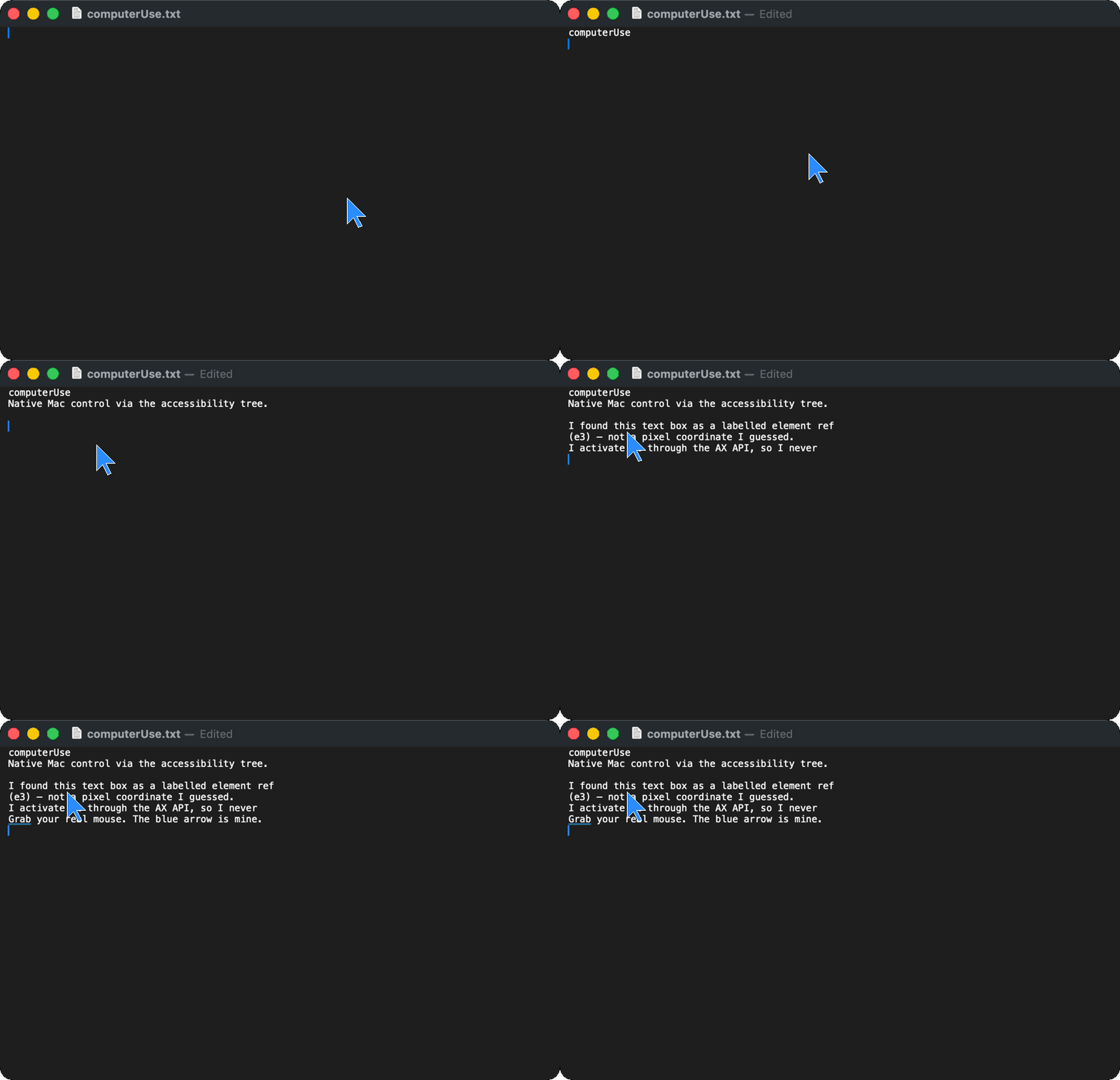
Then it acts: click(ref="e3"), type("hello"), set_value(ref="e2", value="..."). Ref clicks go through the accessibility API and leave your pointer alone; typing addressed to an app (type(text, app=...)) leaves your screen alone too. A stale ref comes back as stale_ref with the nearest live candidates. Re-observing as a diff costs about 10 tokens. Apps with no accessibility tree (Telegram, canvases) get OCR refs o1..oN from on-device text recognition, and click(ref="o7") works the same way (docs/ocr-refs.md).
26 tools: desktop_snapshot, find, screen_text, screenshot, zoom, crop (PNG of one ref's on-screen bounds; no OCR), click, hover (Linux: move the pointer and deliver a hover with no click; elsewhere unsupported), type, key, scroll, drag (with waypoint paths for strokes), wait_for, wait_until, act, set_value, scroll_to_find, notes, menu, file_dialog, app, window, clipboard, request_permission, grant_app, report_issue (agents file the tool's own defects and slow calls as issues here, docs/reporting.md), plus console, network, and webmcp (tools a page registers through navigator.modelContext, listed as w1..wN, docs/webmcp.md) on the browser. Menus and file dialogs stay reachable even in custom-drawn apps (docs/macos-primitives.md). Details: docs/agent-loop.md and the tool docstrings.
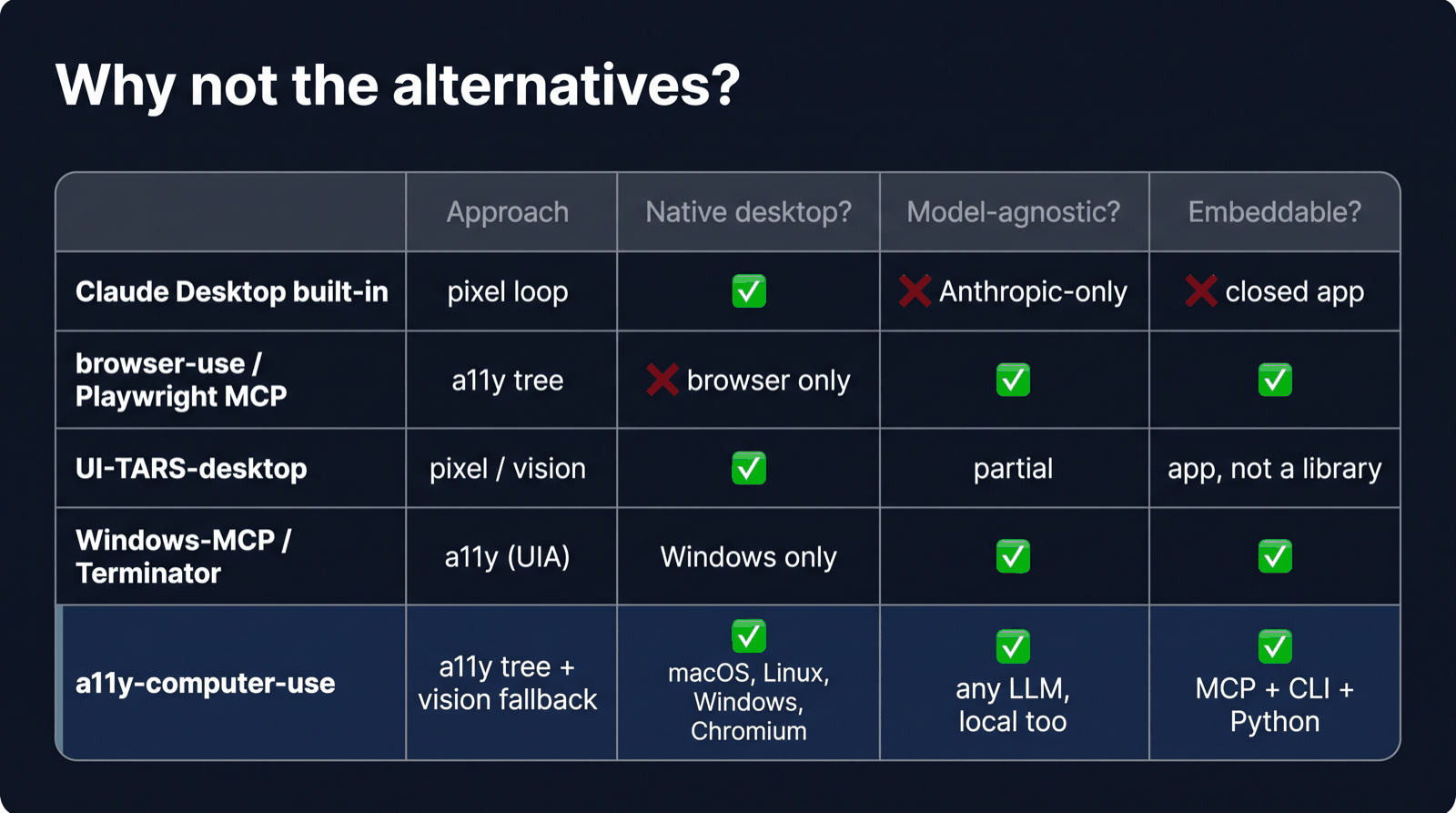
| Approach | Native desktop | Any model | Embeddable | |
|---|---|---|---|---|
| Claude Desktop built-in | pixel loop | ✅ | ❌ | ❌ |
| browser-use, Playwright MCP | a11y tree | ❌ browser only | ✅ | ✅ |
| UI-TARS-desktop | pixel / vision | ✅ | partial | app |
| Windows-MCP, Terminator | a11y (UIA) | Windows only | ✅ | ✅ |
| a11y-computer-use | a11y tree + vision fallback | ✅ macOS, Linux, Windows*, Chromium | ✅ local too | ✅ MCP, CLI, Python |
Same planner, 13 browser tasks, one round: refs finished 13/13 with 0 misclicks for $7.04; screenshot coordinates finished 7/13 with 27 misclicks for $11.74 (full results). Run it yourself with a11y-computer-use bench h2h.
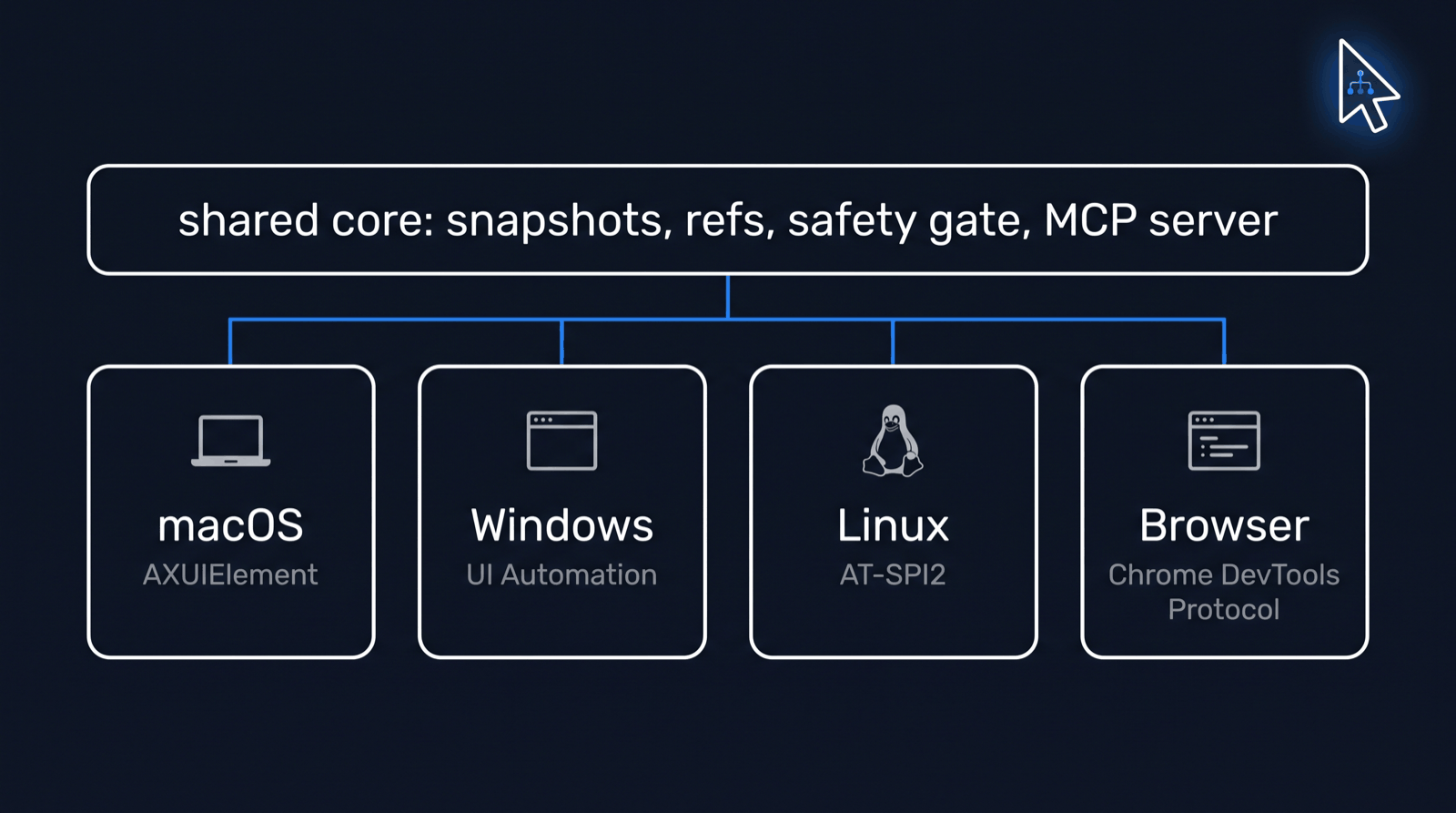
| Observe | Ref actions | Type, keys | Coordinates, screenshot | Verified | |
|---|---|---|---|---|---|
| macOS (AX) | ✅ | ✅ | ✅ | ✅ | live on a granted Mac |
| Linux (AT-SPI2) | ✅ | ✅ | ✅ | ✅ X11, ❌ Wayland | CI + real desktop VM |
| Browser (CDP) | ✅ | ✅ | ✅ | ✅ | CI, headless Chrome |
| Windows (UIA)* | ✅ | ◐ press only | ✅ | ❌ | CI, Notepad |
*Windows is partial: ref re-resolution, capture, and coordinate input are not implemented yet. Exact gates per platform: docs/ci.md, docs/windows-port.md, docs/linux-port.md.
Linux GTK2 limitation: HexChat 2.16.2 has been reported as listed and focusable without an AT-SPI tree. Snapshot, find, and menus then return no_accessibility_bridge. See the GTK2 bridge prerequisites and known limitation.
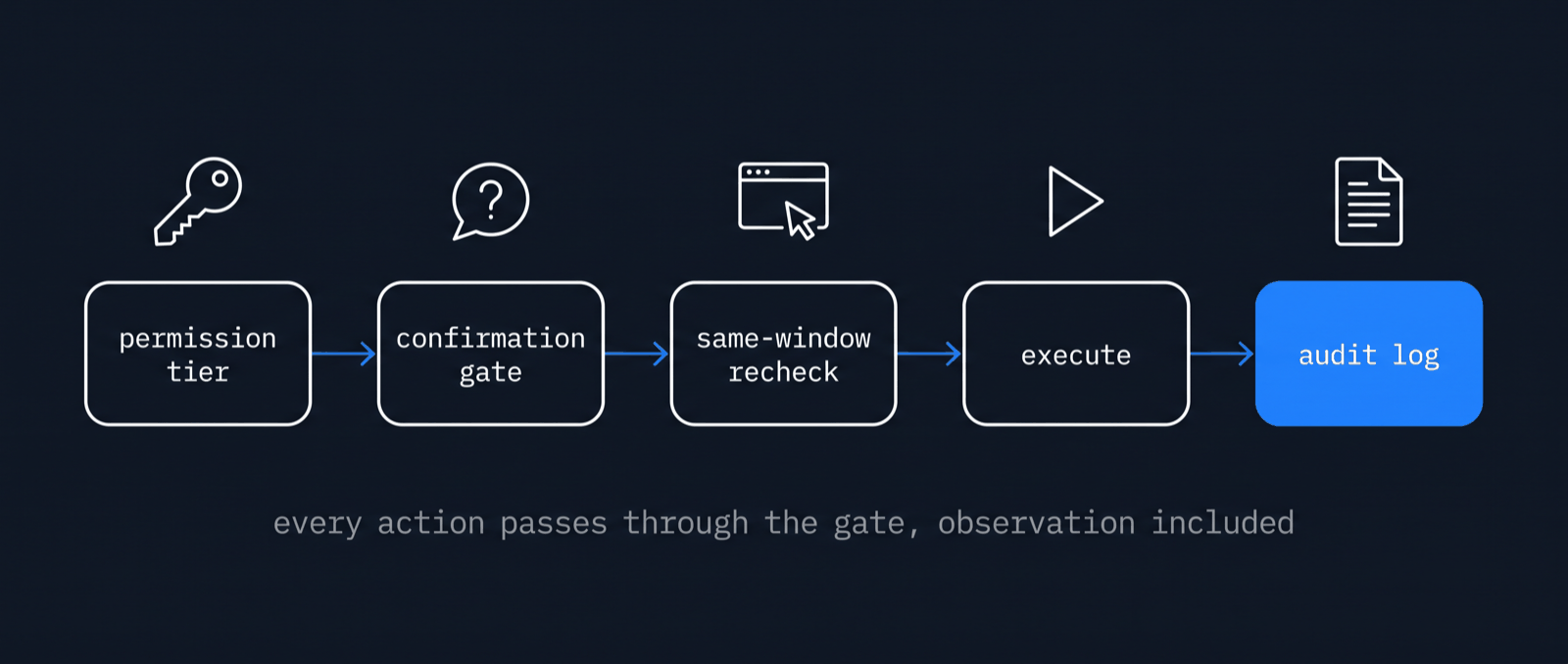
read, click, full) in ~/.a11y-computer-use/permissions.json. No tool can grant itself access: grant_app records only what the user accepted in the host's own dialog, or the user runs a11y-computer-use grant <app> <tier>.~/.a11y-computer-use/audit/ as JSONL, with secrets redacted.Report security issues privately: SECURITY.md.
from a11y_computer_use import safety, server

store = safety.PermissionStore()
store.set_tier("com.apple.TextEdit", safety.Tier.FULL)
rt = server.Runtime(store=store)
print(rt.desktop_snapshot("com.apple.TextEdit", mode="interactive"))
rt.click(ref="e3", verify=True)
Existing Anthropic or OpenAI computer-use loops can run through it unchanged via a11y_computer_use.adapters (docs/provider-adapters.md). A reference agent loop ships as a11y-computer-use agent --task "..." and works with Anthropic, OpenAI-compatible endpoints (Ollama included), or the Claude Code CLI. a11y-agent runs one goal from an accessibility snapshot; the loop, the scripted model, and the exit codes are in docs/agent.md.
Spoken commands skip the planner: a11y-computer-use voice matches each utterance to one fixed skill and runs it through the same safety gate, with a per-command timeline (docs/voice.md). agent --mcp-command "ssh vm a11y-computer-use mcp" keeps the planner local and runs every action on a remote machine under its own grants.
Long jobs across several apps run as missions: phases with their own app grants, step budgets, runner-side checks (a file exists, a URL answers, text is on screen), retries, and a wall-clock timeline for video cuts.
a11y-computer-use mission run examples/missions/agency-demo.toml --provider claude-cli
Format and checks: docs/missions.md. The example mission is the design-agency reel described in docs/missions/agency-demo.md.
Agent loop · a11y-agent · Missions · Permissions · Coexist · Reporting · Voice · WebMCP · OCR refs · macOS menus and dialogs · Adapters · Observation cost · Benchmark · Browser backend · Linux · Windows · Real-desktop test bed · CI · Decision records · Changelog · Contributing
Apache-2.0. Copyright 2026 Perception Dynamics, Inc.
Download counts and popularity will appear here as the collector receives them.
| Version | Published | Direct dependencies | Open version |
|---|---|---|---|
| 0.4.74 | 18 Oct 2026 | 19 |
This describes our collected data; it is not a security assessment.
Shared repository data · GitHub
Observed since 20 Oct, 16:17 UTC
No superseded metadata states collected. Unchanged observations do not create new revisions.
package:b40b7facb55feb01609521d88728e2cf843918214561573f175050e01e9aeb7a