
 Repository
Current collected state Current
Observed since 20 Oct, 17:14 UTC
No superseded metadata states collected. Unchanged observations do not create new revisions.
Tool to run & compare AlphaFold3, Boltz, Chai-1, OpenFold3, Protenix and RosettaFold3


Scripts to run AlphaFold3, Boltz, Chai-1, OpenFold3, Protenix and RosettaFold3 with MMseqs2 Multiple sequence alignments (MSAs) and custom templates.
We recommend installing this package in a micromamba environment. Python 3.11 is recommended, but the package should work with Python 3.9 and above. For instructions on installing micromamba, check their website here.
To set up a micromamba environment, run:
micromamba env create -n abcfold python=3.11 -y
micromamba activate abcfold
Environment note
- Your main Python environment can be Conda, micromamba, or virtualenv.
abcfoldwill automatically create internal micromamba environments to run Boltz, Chai-1, OpenFold3, Protenix and RosettaFold3 safely, therefore a micromamba installation is required.- This prevents package conflicts with your main environment and ensures reproducible results.
To install the package from PyPI, run:
python -m pip install abcfold
Or, to install the package from source, first clone the repository and then run:
python -m pip install .
If you wish to help develop this package, you can install the development dependencies by running:
python -m pip install -e .
python -m pip install -r requirements-dev.txt
python -m pre_commit install
ABCFold will run Alphafold3, Boltz, Chai-1, OpenFold3, Protenix and RosettaFold3 consecutively. The program takes an input of a JSON in the Alphafold3 format (For full instruction on how to format this, click here). An example JSON is shown below:
{
  "name": "2PV7",
  "sequences": [
    {
      "protein": {
        "id": ["A", "B"],
        "sequence": "GMRESYANENQFGFKTINSDIHKIVIVGGYGKLGGLFARYLRASGYPISILDREDWAVAESILANADVVIVSVPINLTLETIERLKPYLTENMLLADLTSVKREPLAKMLEVHTGAVLGLHPMFGADIASMAKQVVVRCDGRFPERYEWLLEQIQIWGAKIYQTNATEHDHNMTYIQALRHFSTFANGLHLSKQPINLANLLALSSPIYRLELAMIGRLFAQDAELYADIIMDKSENLAVIETLKQTYDEALTFFENNDRQGFIDAFHKVRDWFGDYSEQFLKESRQLLQQANDLKQG"
      }
    }
  ],
  "modelSeeds": [1],
  "dialect": "alphafold3",
  "version": 1
}
Please make sure you have AlphaFold3 installed on your system (Instructions here) and have procured the model parameters. Boltz, Chai-1, OpenFold3, Protenix and RosettaFold3 are installed upon runtime.
For the majority of jobs, ABCFold can be run as follows:
abcfold <input_json> <output_dir> -abcop --mmseqs2 --model_params <path_to_af3_model_params>
[!NOTE]
--model_paramsis stored after the first run, therefore subsequent ABCFold jobs don't require this flag.
[!NOTE] If you wish to run ABCFold with the AlphaFold3 JACKHMMER MSA search, you need to remove the
--mmseqs2flag and provide the--databaseflag with the path to the directory containing the AlphaFold3 databases. The--databasepath will also be stored after the first run and won't be required in subsequent ABCFold jobs.
[!WARNING] When using the
--mmseqs2flag, AlphaFold3 will be run without pairedMSA information. If this is important for your target (e.g. modelling a complex), we recommend running the AlphaFold3 JACKHMMER MSA search as the pairedMSA is automatically generated.
[!WARNING]
--model_paramsand--databasewill need to be provided again if you do a fresh install.
However, there you may wish to use the following flags to add run time options such as the use of templates, or the number of models to create.
<input_json>: Path to the input AlphaFold3 JSON file.<output_dir>: Path to the output directory.-a, -b, -c, -o, -p, -r (--alphafold3, --boltz,--chai1, --openfold3, --protenix, --rosettafold3): Flags to run Alphafold3, Boltz, Chai-1, OpenFold3, Protenix and RosettaFold3 respectively. If none of these flags are provided, Alphafold3 will be run by default.--mmseqs2: [optional] Flag to use MMseqs2 MSAs and templates (if specified).--mmseqs_database: [optional] The path to the database used by a local copy of MMSeqs2, provided mmseqs is installed, the inclusion of this flag allows MMseqs2 to be run locally.--override: [optional] Flag to override the existing output directory.--save_input: [optional] Flag to save the input JSON file in the output directory.--model_params: Path to the directory containing the AlphaFold3 model parameters.--database: [optional] Path to the directory containing the AlphaFold3 databases #Note: This is not used if using the
--mmseqs2 flag.--af3_sif_path: [optional] Path to sif file if using an AlphaFold3 singularity instead of Docker--use_af3_template_search[optional] If providing your own custom MSA or you've ran --mmseqs2, allow Alphafold3 to search for templates--inference_ckpt_path [optional] Path for model checkpoint to be used for inference. If not specified, will attempt to find or download parameters in ~/.openfold3/ABCFold can score the binding affinity of a protein–ligand complex using the Boltz-2 affinity head (via Boltzina). Affinity scoring is off by default and is enabled by passing the ligand chemistry on the command line with either --ligand_smiles or --ligand_ccd. When enabled, every predicted complex is scored in a single batched pass — this includes the models from all of the sources you ran (AlphaFold3, Boltz, Chai-1, etc.), not just Boltz — and two extra columns appear in the results table:
Input requirements
ligand entity (using smiles or ccdCodes) so that the predicted models actually include the ligand to be scored.--ligand_smiles (a SMILES string) or --ligand_ccd (a CCD code) — provide only one. This tells the affinity head which ligand chemistry to score.--ligand_chain to choose which chain to score; otherwise the ligand is auto-detected.Example input JSON containing a ligand entity:
{
  "name": "2PV7",
  "modelSeeds": [1],
  "sequences": [
    { "protein": { "id": ["A", "B"], "sequence": "GMRESYANENQFGFKTINSD..." } },
    { "ligand":  { "id": "E", "smiles": "CC(=O)OC1C[NH+]2CCC1CC2" } }
  ],
  "dialect": "alphafold3",
  "version": 1
}
Example run (score the ligand across all predicted models):
abcfold <input_json> <output_dir> -abc --mmseqs2 --ligand_smiles "CC(=O)OC1C[NH+]2CCC1CC2"
Affinity arguments:
--ligand_smiles: [optional] Ligand SMILES to score with the Boltz-2 affinity head. Providing this (or --ligand_ccd) enables affinity scoring.--ligand_ccd: [optional] Ligand CCD code to score (alternative to --ligand_smiles).--ligand_chain: [optional] Restrict affinity scoring to the ligand in this chain. If omitted, the ligand is auto-detected.--templates: Flag to enable a template search
--num_templates: [optional] The number of templates to use (default: 20)
--custom_template: [optional] Path to a custom template file in mmCIF format or a list of custom templates. A more detailed decription on how to use the custom template argument can be found below Visualisation arguments.
--custom_template_chain: [conditionally required] The chain ID of the chain to use in your custom template, only required if using a multi-chain template. If providing a list of custom templates, you will need to provide a list of custom template chains.
--target_id: [conditionally required] The ID of the sequence the custom template relates to, only required if modelling a complex. If providing a list of custom templates, you can provide a single target ID if they all relate to the same target. Otherwise, you should provide a list of target IDs corresponding to the list of custom templates.
--no_server: [optional] Flag to not run the server for the output page (see below) but the pages are created , useful for running on a cluster.--no_visuals: [optional] Flag to not generate any output pages or PAE plots and only output the models.If you wanted to provide a custom template, custom_a.pdb for your protein sequence with the ID A and you have your template has two chains: chain A and chain B and chain B is what you want the template to be, you could run:
abcfold <input_json> <output_dir> -abcopr --mmseqs2 --custom_template custom_a.pdb --custom_template_chain B --target_id A
If you had multiple IDs in your input sequence, multiple template files and you wanted to provide 3 custom templates, chain A from custom_a.pdb, chain B from custom_b.pdb, and chain B from custom_c.pdb, where custom_a.pdb and custom_b.pdb correspond to the ID A and custom_c.pdb corresponds to the ID B, you could run:
abcfold <input_json> <output_dir> -abcopr --mmseqs2 --custom_template custom_a.pdb custom_b.pdb custom_c.pdb --custom_template_chain A B B --target_id A A B
ABCFold will output the AlphaFold, Boltz, Chai, OpenFold3, Protenix and RosettaFold3 models in the <output_dir>, it will also produce an output page containing a results table and informative PAE viewer. This is opened automatically in your default browser unless the --no_server or --no_visuals flags are used.
Unless the --no_visuals flag is used, you can then open the output pages by running:
cd <output_dir>
python open_output.py
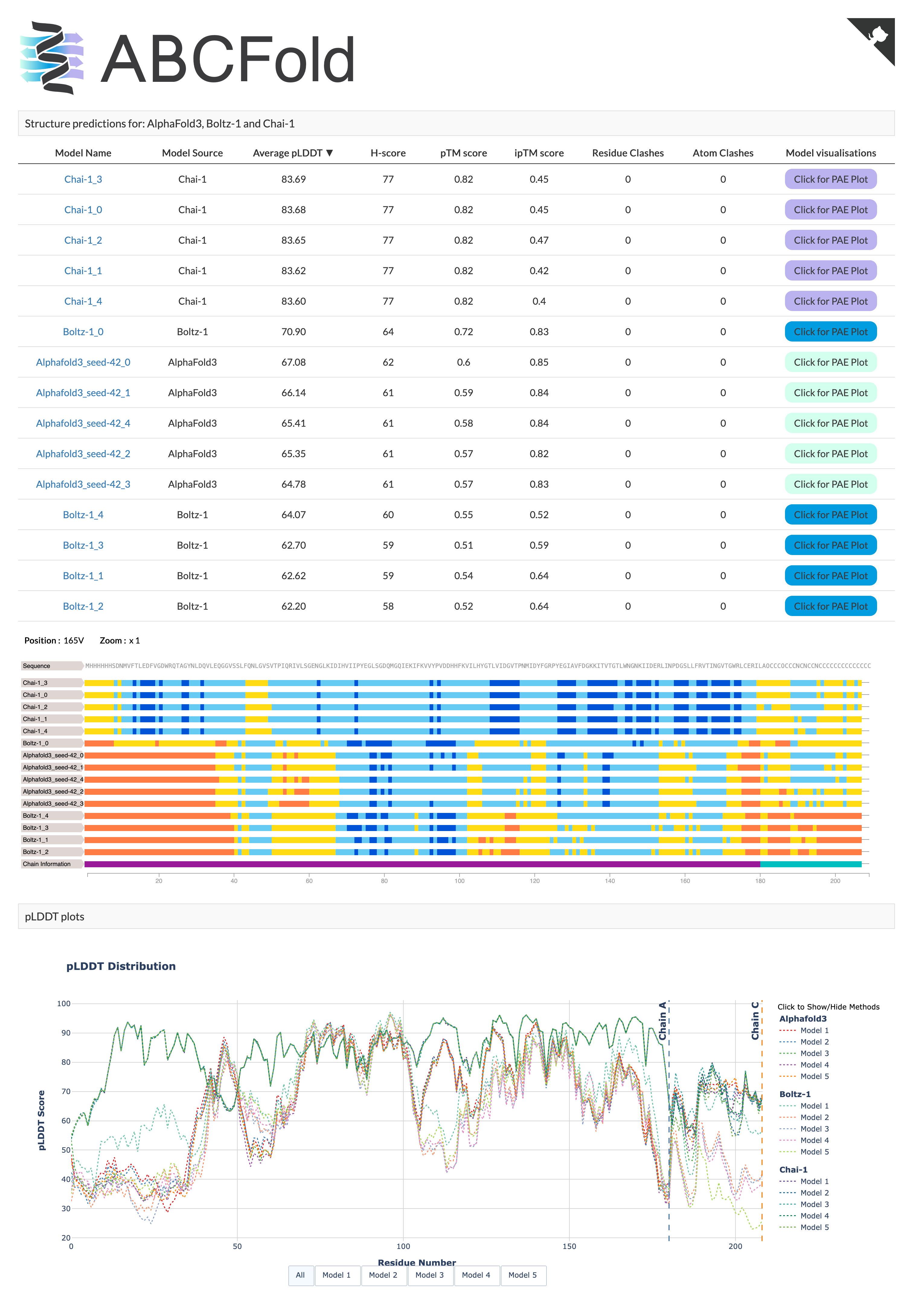
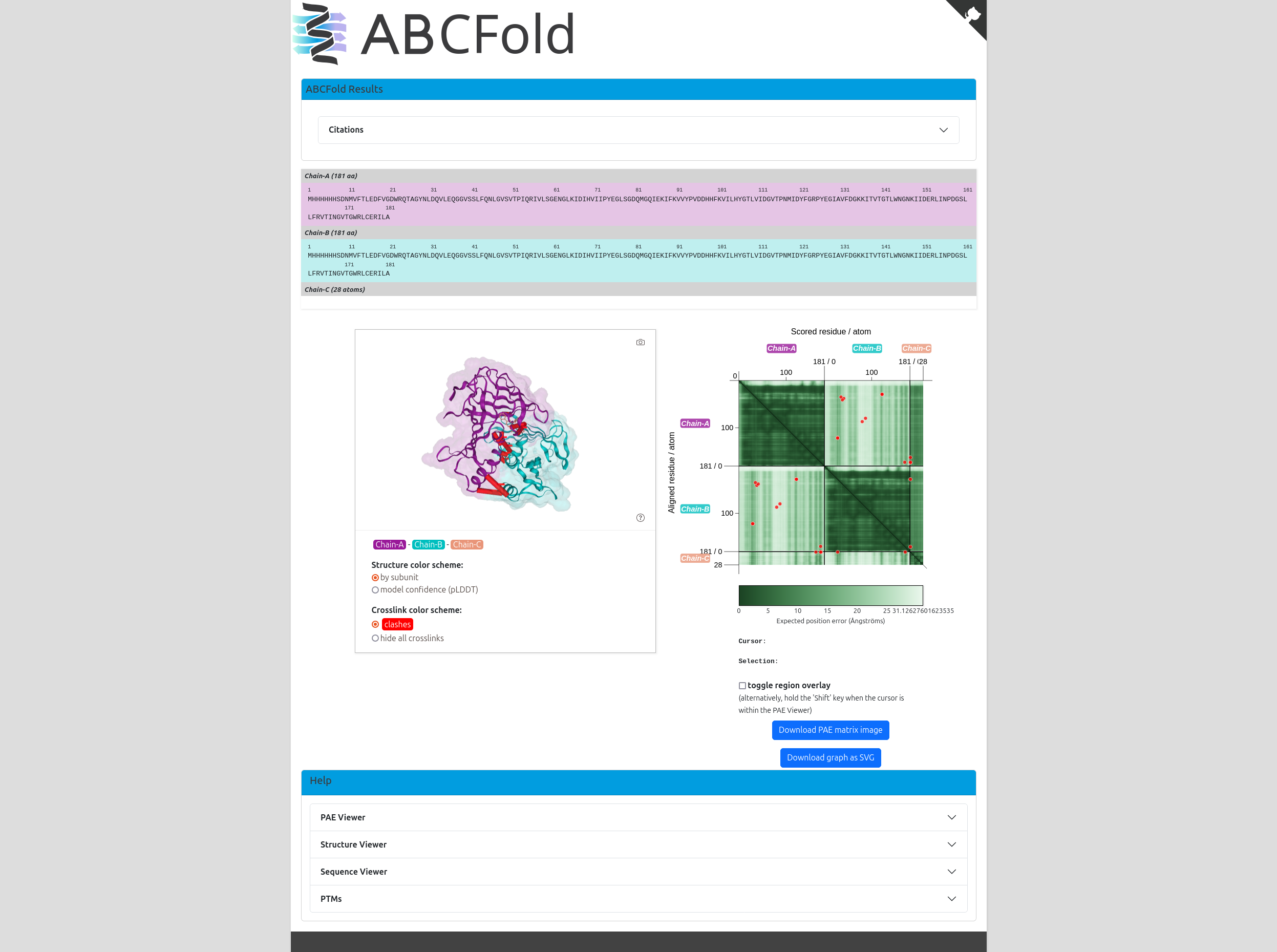
The output page will be available on http://localhost:8000/index.html. If you need to rerun the server to create the output,
you will find open_output.py in your <output_dir>. This needs to be run from your <output_dir>.
Below are scripts for adding MMseqs2 MSAs and custom templates to AlphaFold3 input JSON files.
[!WARNING] These scripts will only modify the input JSON files, I.E. they will NOT run AlphaFold3, Boltz, Chai-1, OpenFold3, Protenix and RosettaFold3.
To add MMseqs2 MSAs and templates to the AlphaFold3 input JSON, you can use the mmseqs2msa:
To run the script with templates, use the following command:
mmseqs2msa --input_json <input_json> --output_json <output_json> --templates --num_templates <num_templates>
<input_json>: Path to the input AlphaFold3 JSON file.<output_json>: [optional] Path to the output JSON file (default: <input_json_stem>_mmseqs.json).<num_templates>: [optional] The number of templates to use (default: 20)<mmseqs_database>: [optional] The path to the database used by a local copy of MMSeqs2, provided mmseqs is installed, the inclusion of this flag allows MMseqs2 to be run locally.[!NOTE] If you need to install the mmseqs databases you can use setup_mmseqs_databases.sh This replicates the MMSeqs2 database setup from ColabFold
bash
MMSEQS_NO_INDEX=1 ./setup_mmseqs_databases.sh /path/to/db_folder
To run the script without templates, use the following command:
mmseqs2msa --input_json <input_json> --output_json <output_json>
<input_json>: Path to the input AlphaFold3 JSON file.<output_json>: [optional] Path to the output JSON file (default: <input_json_stem>_mmseqs.json).You may wish to add custom templates to your AlphaFold3 job, e.g. homologues which have yet to be deposited in the PDB. You can do so in two ways:
If you just wish to add a custom template, you can use custom_templates:
custom_templates --input_json <input_json> --output_json <output_json> --custom_template <custom_template> --custom_template_chain <custom_template_chain> --target_id <target_id>
<input_json>: Path to the input AlphaFold3 JSON file.<output_json>: [optional] Path to the output JSON file (default: <input_json_stem>_custom_template.json).<custom_template>: [optional] Path to a custom template file in mmCIF format or a list of custom templates.<custom_template_chain>: [conditionally required] The chain ID of the chain to use in your custom template, only required if using a multi-chain template. If providing a list of custom templates, you will need to provide a list of custom template chains.<target_id>: [conditionally required] The ID of the sequence the custom template relates to, only required if modelling a complex. If providing a list of custom templates, you can provide a single target ID if they all relate to the same target. Otherwise, you should provide a list of target IDs corresponding to the list of custom templates.If you wish to add a custom template and generate an MMseqs2 MSA/templates, you can use mmseqs2msa:
mmseqs2msa --input_json <input_json> --output_json <output_json> --templates --num_templates <num_templates> --custom_template <custom_template> --custom_template_chain <custom_template_chain> --target_id <target_id>
<input_json>: Path to the input AlphaFold3 JSON file.<output_json>: [optional] Path to the output JSON file (default: <input_json_stem>_mmseqs.json).<num_templates>: [optional] The number of templates to use (default: 20)<custom_template>: [optional] Path to a custom template file in mmCIF format or a list of custom templates.<custom_template_chain>: [conditionally required] The chain ID of the chain to use in your custom template, only required if using a multi-chain template. If providing a list of custom templates, you will need to provide a list of custom template chains.<target_id>: [conditionally required] The ID of the sequence the custom template relates to, only required if modelling a complex. If providing a list of custom templates, you can provide a single target ID if they all relate to the same target. Otherwise, you should provide a list of target IDs corresponding to the list of custom templates.--target_id with homo-oligomerBelow is an example of a hetero-3-mer. When modelling a homo-oligomer, id is given as a list, you should select 1 of the identifiers in the list.
{
  "name": "7ZYH",
  "sequences": [
    {
      "protein": {
        "id": "A",
        "sequence": "SNAESKIKDCPWYDRGFCKHGPLCRHRHTRRVICVNYLVGFCPEGPSCKFMHPRFELPMGTTEQ"
      }
    },
    {
      "protein": {
        "id": ["B", "C"],
        "sequence": "SNAGSINGVPLLEVDLDSFEDKPWRKPGADLSDYFNYGFNEDTWKAYCEKQKRIRMGLEVIPVTSTTNK"
      }
    }
  ],
  "modelSeeds": [1],
  "dialect": "alphafold3",
  "version": 1
}
If you want to add a custom template to the first sequence, you can use --target_id A. If you wish to add a custom template to the second sequence, use --target_id B or --target_id C.
If modelling multiple copies of the same sequence in Boltz, the input JSON must be set up as follows:
{
  "name": "7ZYH",
  "sequences": [
    {
      "protein": {
        "id": ["A", "B"],
        "sequence": "SNAESKIKDCPWYDRGFCKHGPLCRHRHTRRVICVNYLVGFCPEGPSCKFMHPRFELPMGTTEQ"
      }
    },
  ],
  "modelSeeds": [1],
  "dialect": "alphafold3",
  "version": 1
}
If the identical sequences are given as seperate entities (as shown below) you will encounter an error.
{
  "name": "7ZYH",
  "sequences": [
    {
      "protein": {
        "id": "A",
        "sequence": "SNAESKIKDCPWYDRGFCKHGPLCRHRHTRRVICVNYLVGFCPEGPSCKFMHPRFELPMGTTEQ"
      }
    },
    {
      "protein": {
        "id": "B",
        "sequence": "SNAESKIKDCPWYDRGFCKHGPLCRHRHTRRVICVNYLVGFCPEGPSCKFMHPRFELPMGTTEQ"
      }
    }
  ],
  "modelSeeds": [1],
  "dialect": "alphafold3",
  "version": 1
}
Additionally, Boltz currently lack the ability to create linked-ligands and therefore covalent bonds between the chain/ligand will be missing.
Currently OpenFold3 is unable to create bonded-pairs or alter the number of recycles. Therefore these options will be ignored if provided.
Contributions are welcome! Please open an issue or submit a pull request.
Download counts and popularity will appear here as the collector receives them.
| Version | Published | Direct dependencies | Open version |
|---|---|---|---|
| 1.1.6 | 18 Aug 2026 | 12 |
This describes our collected data; it is not a security assessment.
Observed since 20 Oct, 17:14 UTC
No superseded metadata states collected. Unchanged observations do not create new revisions.
package:16f55084e53c098fc66a57cfe5631bf83f7e51f3148c682a4233cff6be5b4dea