
 Repository
Current collected state Current
Observed since 20 Oct, 17:28 UTC
No superseded metadata states collected. Unchanged observations do not create new revisions.
Editable PowerPoint chart engine for dual-axis financial charts
ablechart is a focused Python SDK for creating, inspecting, parsing,
and updating editable PowerPoint chart assets.
It is built for workflows where a chart must stay a real PowerPoint chart, not a screenshot:
.pptx without rebuilding the whole slideThe project is intentionally narrow. It is a chart asset kernel, not a full presentation generation framework, report builder, template library, or AI slide generator.
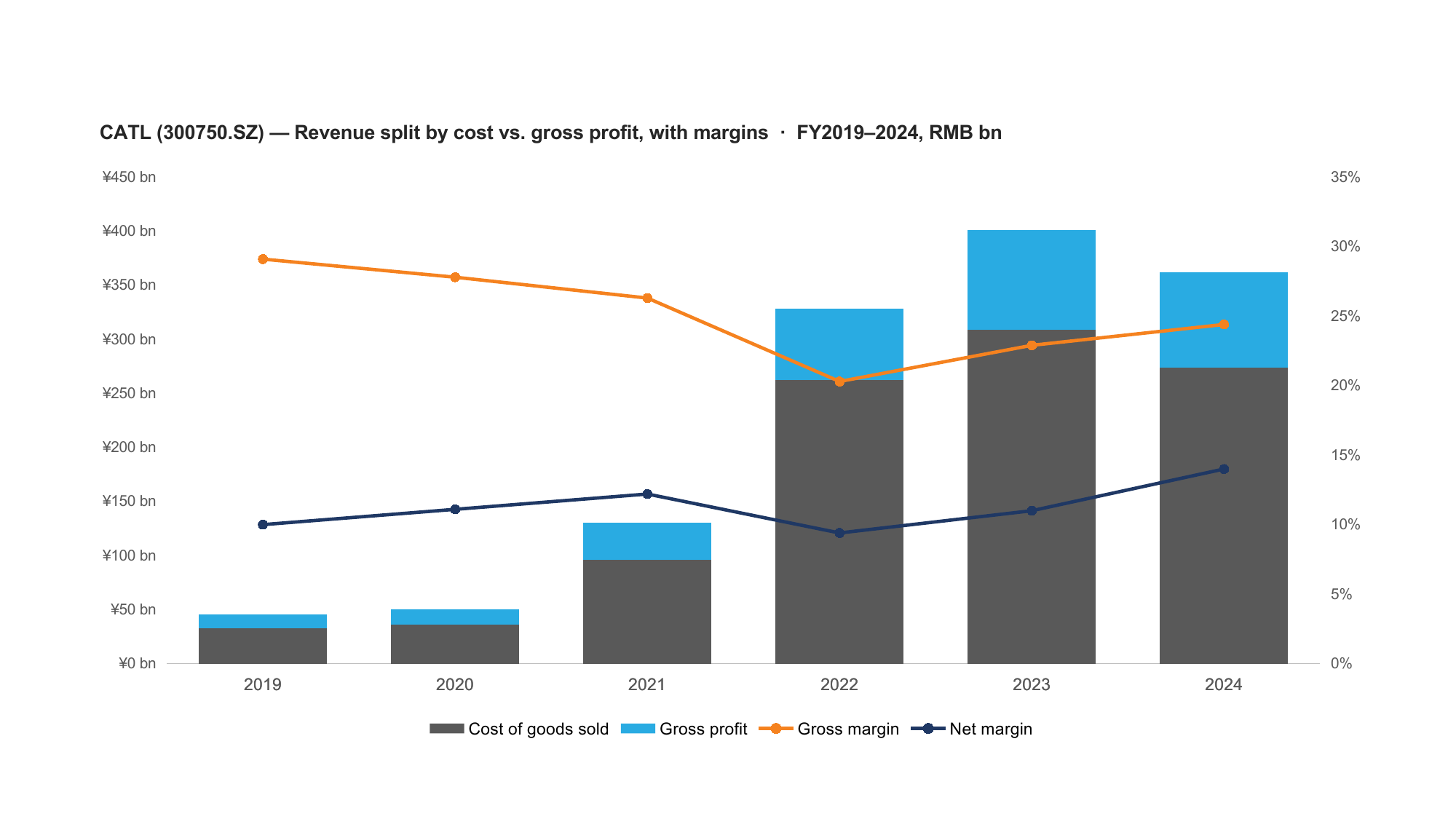
A real, editable PowerPoint chart rendered from a .pptx produced by ablechart — stacked columns and two lines on a second value axis, with per-axis number formats. Data: CATL (300750.SZ) FY2019–2024 annual filings (source: Tushare).
pip install ablechart
Python >=3.10 is required.
Core dependencies:
python-pptx>=1.0.2,<1.1pandas>=2.2,<3numpy>=1.26,<2lxml>=5,<6openpyxl>=3.1,<4For local development:
git clone https://github.com/hanlinlibham/ablechart.git
cd ablechart
pip install -e .
python -m pytest
import pandas as pd
from pptx import Presentation
from ablechart import create_combo_chart

df = pd.DataFrame(
    {
        "Year": [2021, 2022, 2023, 2024],
        "Revenue": [100, 110, 120, 140],
        "Profit": [10, 12, 15, 18],
    }
)

prs = Presentation()
slide = prs.slides.add_slide(prs.slide_layouts[6])

create_combo_chart(
    slide=slide,
    df=df,
    categories_col="Year",
    series_config=[
        {"key": "Revenue", "name": "Revenue", "type": "bar", "axis": "primary"},
        {"key": "Profit", "name": "Profit", "type": "line", "axis": "secondary"},
    ],
    title="Revenue and profit",
)

prs.save("combo-demo.pptx")
from ablechart import parse_chart_from_pptx

df, series_config, chart_type, layout_info = parse_chart_from_pptx("combo-demo.pptx")

print(chart_type)
print(df.head())
print(series_config)
from ablechart import SeriesData, inspect_pptx_charts, replace_pptx_chart_data

inventory = inspect_pptx_charts("template.pptx")
target = next(item for item in inventory if item.replaceable)

result = replace_pptx_chart_data(
    input_pptx="template.pptx",
    output_pptx="updated.pptx",
    selector=target.selector,
    categories=["2026Q1", "2026Q2", "2026Q3"],
    series=[
        SeriesData(name="Revenue", values=[120.0, 132.0, 141.0]),
        SeriesData(name="Cost", values=[82.0, 88.0, 91.0]),
    ],
)

assert result.status == "ok", result.error_detail
| Family | Entry point | Notes |
|---|---|---|
| Combo | create_combo_chart() | Bar, line, area, stacked, percent-stacked, dual-axis, date-axis presets |
| Waterfall | create_waterfall_chart() | Editable bridge chart with total and relative measures |
| Scatter | create_scatter_chart() | Native scatter chart with parse helpers |
| Bubble | create_bubble_chart() | Native bubble chart with parse helpers |
| Range snapshot | create_range_snapshot_chart() | Valuation range snapshot with min/max/average/current markers |
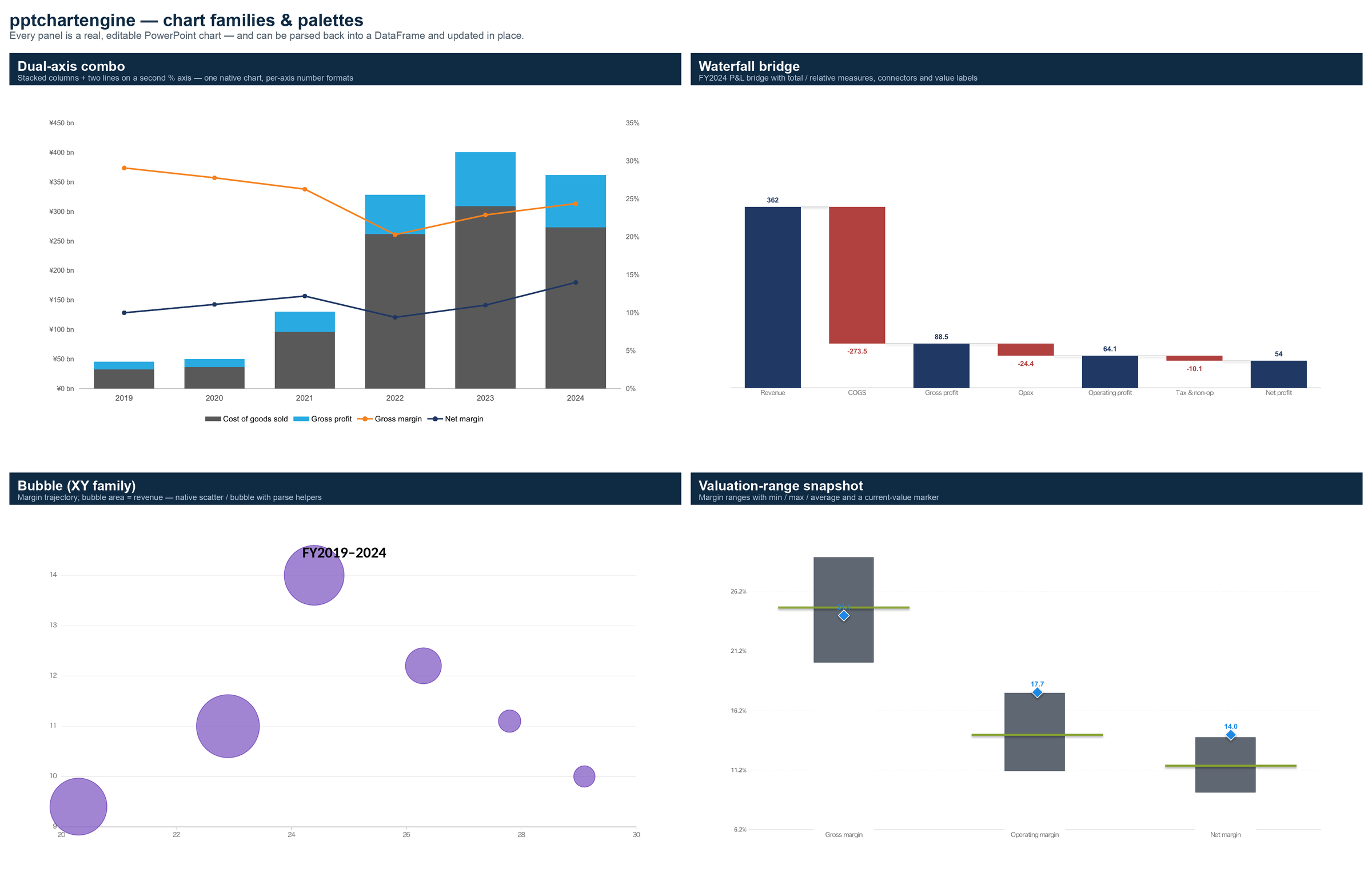
Each panel is a real, editable PowerPoint chart produced by ablechart, then rendered to an image. Every one can be parsed back into a DataFrame and updated in place. All four use the same real dataset (CATL 300750.SZ, source: Tushare); regenerate with python scripts/make_gallery.py.
create_semantic_chart() and the family-specific helpers provide a higher
level mapping from financial-report concepts to native chart or shape
composition primitives.
Currently exposed families include:
performance_comparedistribution_plus_historystyle_boxstyle_allocationfactor_exposurescore_overlayconcentrationevent_timelineattribution_decompositionranked_tile_matrixheatmap_matrixtable_plus_chart_compositefactor_attribution_panelregime_table_panelmanager_timeline_profileaward_timeline_panelselection_timing_griddual_chart_panelholding_detailThis layer is useful for single-slide financial report components. It is not a report orchestration engine.
The public API is organized around the chart asset lifecycle:
| Lifecycle | Representative APIs |
|---|---|
| Create | create_combo_chart(), create_waterfall_chart(), create_semantic_chart() |
| Parse | parse_chart_from_pptx(), parse_all_charts_from_pptx(), get_semantic_chart_spec() |
| Metadata | ChartMetadataV1, write_chart_metadata, METADATA_SCHEMA_VERSION |
| Inspect | inspect_pptx_charts(), ChartInventoryItem, ChartSelector |
| Replace | replace_pptx_chart_data(), SeriesData, ReplaceResult |
The design goal is that a generated chart can become a durable asset: created once, opened and edited in PowerPoint, parsed again later, and updated without losing its position, size, identity, or basic editability.
ablechart is not trying to replace broad PowerPoint SDKs. It is a
small layer for high-quality chart assets and template-safe chart updates.
| Project | Main strength | How ablechart differs |
|---|---|---|
python-pptx | General Python library for creating and updating .pptx files, including adding charts and replacing chart data. | ablechart builds on the PowerPoint-native path but adds financial chart families, semantic metadata, chart round-trip parsing, inventory, and template-safe replacement contracts. |
PptxGenJS | Broad JavaScript presentation generation for Node.js, browser, React, Electron, charts, tables, images, and HTML-to-PPTX workflows. | ablechart is Python-only and intentionally narrower: it does not generate full decks from layouts, but focuses on editable chart assets and parse/update lifecycles. |
mschart | R package for native editable Microsoft Office charts, commonly used with officer. | ablechart targets Python financial-report workflows and adds inspect/replace and metadata round-trip APIs for existing .pptx chart assets. |
Aspose.Slides for Python via .NET | Commercial, full-featured presentation processing SDK with broad PowerPoint manipulation, chart modules, export, animation, SmartArt, VBA, and conversion features. | ablechart is MIT-licensed and much smaller. It does not aim to cover the whole PowerPoint object model or rendering/export conversion. |
Spire.Presentation for Python | Commercial presentation API covering creation, editing, conversion, and chart operations. | ablechart avoids broad document processing scope and concentrates on deterministic chart creation, chart metadata, and safe data replacement. |
In short:
python-pptx when you need a general Python PowerPoint building block.PptxGenJS when your stack is JavaScript or browser-side PPTX generation.ablechart when your hard problem is editable, updateable,
inspectable PowerPoint charts for data-heavy reports.ablechart does not currently provide:
Unsupported chart replacement cases fail explicitly rather than silently rebuilding the chart. The first-batch replacement path is focused on common embedded-workbook chart types such as bar, line, combo, area, pie, scatter, and bubble charts.
Styling granularity also has known gaps. Supported: legend (5 preset
positions), per-axis number format / font / range / gridlines / tick marks
(primary and secondary), axis titles (category + both value axes), and
tick-label rotation, and hiding a single series from the legend
(show_in_legend=False). Not yet implemented: log scale, native display units
(thousands / millions), and manual (XY) legend placement.
Run the test suite:
python -m pytest
Build the distribution artifacts:
python -m build --sdist --wheel
python -m twine check dist/*
The repository keeps contract tests for:
.pptx fixture behaviorMIT License. See LICENSE.
Download counts and popularity will appear here as the collector receives them.
| Version | Published | Direct dependencies | Open version |
|---|---|---|---|
| 0.2.0 | 21 Jun 2026 | 7 |
This describes our collected data; it is not a security assessment.
Observed since 20 Oct, 17:28 UTC
No superseded metadata states collected. Unchanged observations do not create new revisions.
package:81086eeda92763f8fdcd7618ef68bd5cbe5f0332550cbc8f6e01c72d3f4fa151