
 Repository
Current collected state Current
Observed since 20 Oct, 17:28 UTC
No superseded metadata states collected. Unchanged observations do not create new revisions.
MusicMixCode — MCP server for AI-driven auto-mixing and mastering in Ableton Live: style-based mixing, preview renders, release checks


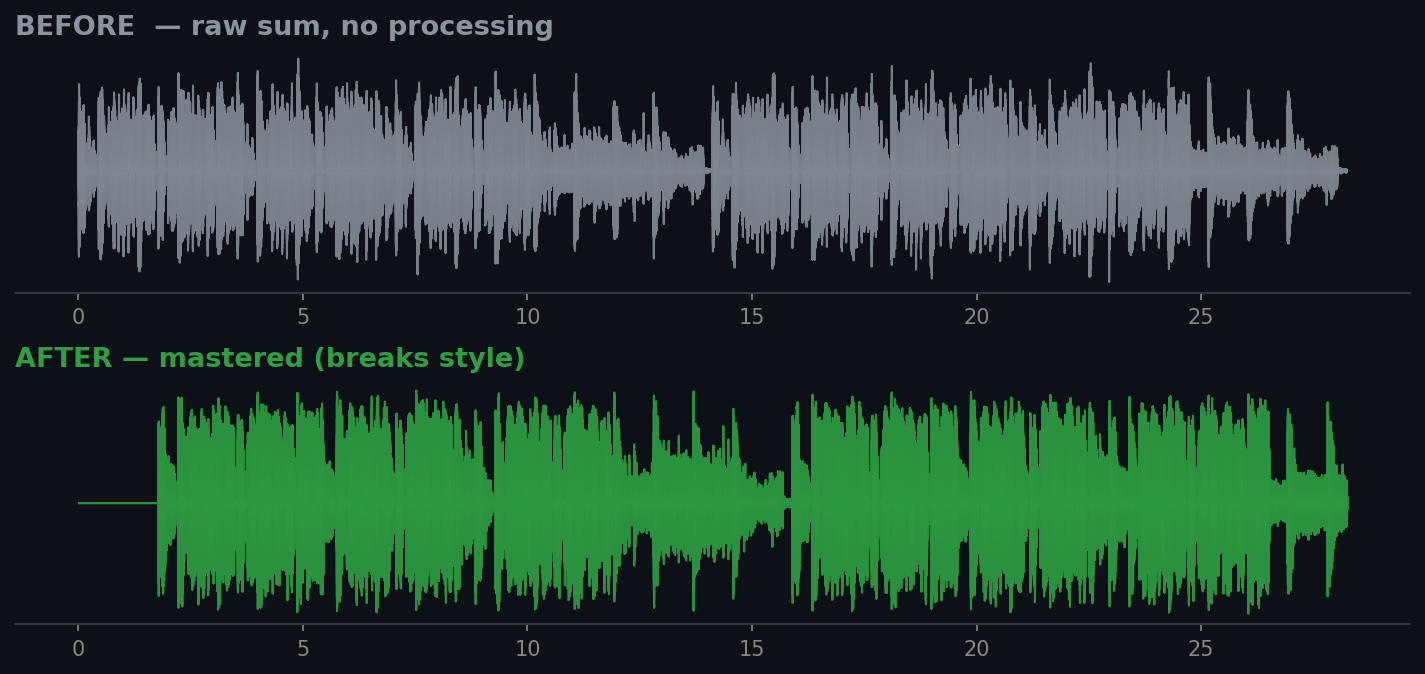
An MCP server for auto-mixing and auto-mastering in Ableton Live tuned to a musical style/genre. An AI agent (opencode, Claude Code, Claude Desktop...) analyzes render files of your tracks, compares them against a style profile and produces/applies corrections: levels, pan, EQ hints, compression — and additionally renders a mastered preview mix (sidechain, HPF, mud-cut, soft-clipper, true-peak limiter).
ready / needs_work verdict.You → MCP client → ableton-auto-mix-mcp (MCP server)
├── styles/*.json — style profiles (target curves)
├── analyzer.py — LUFS/LRA, spectrum, stereo width (librosa/pyloudnorm)
├── mixer.py — engine: analysis vs profile → corrections (anchor = kick, LUFS)
├── preview.py — preview-mix render + mastering chain
├── qa.py — conflict analysis + release check
└── ableton_client.py — AbletonOSC (python-osc) → Ableton Live
Principle: the MCP itself does not "mix" — it provides tools and metrics while the model decides. Cycle: render → analyze → dry-run report → preview mix → release check → apply corrections.
pip install -r requirements.txt # or: pip install -e .
Then connect the MCP server in your client (example for Claude Code / opencode):
{ "mcpServers": { "ableton-auto-mix": {
    "command": "python", "args": ["-m", "ableton_auto_mix"],
    "cwd": "C:/path/to/ableton-auto-mix-mcp"
}}}
Analysis and preview rendering do not require Ableton Live — one WAV per track is enough.
renders/ (one WAV per track) for analysis.| Tool | What it does |
|---|---|
list_styles | list of styles and their targets |
get_style(name) | full style profile (curve, balance, compression, FX) |
get_ableton_status | check the connection to Live |
analyze_audio(path) | metrics for one WAV |
analyze_render_dir(dir) | metrics for all renders |
auto_mix(style, render_dir, dry_run) | corrections for a style (dry-run or apply to Live) |
suggest_style(render_dir) | which style fits your material best |
preview_mix(style, render_dir, ...) | render a master-ready preview mix to WAV |
analyze_conflicts(render_dir) | track pairs fighting for frequency bands |
release_check(style, render_dir) | LUFS/TP/LRA vs label targets, ready/needs_work verdict |
"Mix the renders from renders/ in a techno style, show what to change"
→ auto_mix("techno", "renders", true)

"OK, go ahead"
→ auto_mix("techno", "renders", false)

"Render a mastered preview mix"
→ preview_mix("breaks", "renders", max_duration=30)

"Check if the mix is release-ready"
→ release_check("breaks", "renders")
Everything is available from the command line via python -m ableton_auto_mix <command>
(or ableton-auto-mix-mcp <command> after installing):
ableton-auto-mix-mcp styles                                  # list styles
ableton-auto-mix-mcp style breaks                            # style profile
ableton-auto-mix-mcp analyze renders/                        # metrics of all renders
ableton-auto-mix-mcp suggest renders/                        # which style fits
ableton-auto-mix-mcp mix breaks renders/                     # dry-run: what to change
ableton-auto-mix-mcp preview breaks renders/ --max-duration 30   # preview mix to WAV
ableton-auto-mix-mcp conflicts renders/                      # frequency conflicts
ableton-auto-mix-mcp release breaks renders/                 # ready/needs_work verdict
Output is JSON (script-friendly). Example: preview breaks renders/ --manual-gain "bass=2.0,snt2=-4.0" --output out.wav.
Styles ship inside the package (ableton_auto_mix/styles/) — 11 profiles: techno, hip_hop, pop, lo_fi, ambient,
balanced, trance, breaks, drum_n_bass, trap.
Each profile defines: target LUFS/LRA, a spectral curve (6 bands), relative instrument levels
(kick/bass/vocals/lead/wobble/breaks/...), per-role HPF, mud-cut, sidechain, mastering settings, compression and
FX recommendations. You can add your own: copy a JSON and change name and targets.
To use custom styles without editing the package, point to an env var:
export ABLETON_AUTO_MIX_STYLES_DIR=/path/to/my-styles
python tests/test_smoke.py # 5 smoke tests: render → mix → preview → release check
auto_mix(dry_run=false) requires a running Ableton Live with the AbletonOSC control surface.MIT © 2026 MusicMixCode / HighVoltSound
Download counts and popularity will appear here as the collector receives them.
| Version | Published | Direct dependencies | Open version |
|---|---|---|---|
| 0.1.4 | 3 Aug 2026 | 8 |
This describes our collected data; it is not a security assessment.
Shared repository data · GitHub
Observed since 20 Oct, 17:28 UTC
No superseded metadata states collected. Unchanged observations do not create new revisions.
package:011a6c5bd6e12a4c9b7e0fdbe9e76ff0194b3cf209f9633d11622ed333530d63