Catalog PyPI
PACKAGE EXPLORERView in registry

Active-Labeling-System

PyPI

Active Labeling System v2 with PyQt6, YOLO active learning, and manual labeling tools.

active-learningcomputer-visionlabelingpyqt6yolo
Versions collected1
Direct dependencies10From release 0.2.1
Last observed20 Oct, 18:36 UTC

README

Version 0.2.1 documentation

ActiveLabelingSystem

Formerly known as LabelOps.

Local-first AI-assisted image labeling with active learning, manual box tools, background retraining, and dataset version snapshots.

New features and updates

  • New Feature: Freehand region labeling for polygon-style segmentation in manual mode.
  • New Feature: Manual toolbox mode switch between bounding boxes and freehand regions, with highlight toggling and point undo.
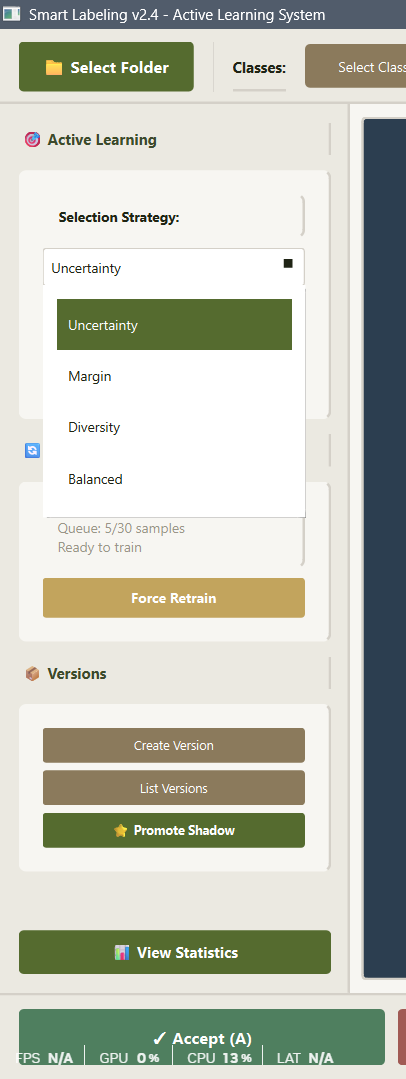
  • New Feature: Active learning strategy selector with Uncertainty, Margin, Diversity, and Balanced modes.
  • New Feature: Previous-image navigation and auto-accepted image log from the review bar.
  • Update: Modular app structure (src/app, src/core, src/features) for cleaner maintenance.
  • Update: Active learning image prioritization when loading folders (unlabeled images first, sorted by uncertainty).
  • Update: Retraining policy engine with multi-signal checks (sample count, time, entropy shift, class balance, confidence drift).
  • Update: Dataset versioning from UI with metadata, hash integrity, and manifest tracking.
  • Update: Label format selection at folder load time: COCO JSON or Plain JSON.
  • Update: Safer persistence:
    • autosave per folder (labels_autosave.json)
    • internal state store (.labels_internal.json)
    • atomic file writes for exports.
  • Update: Improved manual labeling UX:
    • floating toolbox
    • box and freehand region modes
    • quick class switching (1-9)
    • undo/delete/point-undo shortcuts
    • inline floating action toolbar.
  • Update: Better training controls in UI:
    • force retrain
    • live queue/training status
    • shadow model promotion with validation warning flow.

Features

Active learning and triage

  • Entropy-aware detection metadata is attached to predictions.
  • Folder loading prioritizes unlabeled images for high-value review.
  • Replay buffer preserves historical samples for continual learning.

Retraining workflow

  • Background training via Ray shadow trainer.
  • Training trigger policy requires minimum sample count plus at least one urgency signal.
  • Promotion flow supports validation and explicit override confirmation.

Dataset versioning

  • Create version snapshots from current labels.
  • Stores YOLO-style labels, copied images, metadata, and a dataset hash.
  • Keeps lineage and latest pointer in src/datasets/manifest.json.

Label export

  • Plain JSON output (labels.json) for direct app consumption.
  • COCO JSON output (labels_coco.json) for downstream ML pipelines.

Manual labeling mode

  • Draw boxes directly on the canvas.
  • Draw freehand regions as polygon segmentations.
  • Per-box class assignment with deterministic class colors.
  • Save-and-next loop without leaving manual mode.

Project structure

ActiveLabelingSystem/
  images/
  src/
    app/
      window.py
      dialogs.py
      state.py
      actions.py
    core/
      data_manager.py
      entropy.py
      sample_selector.py
      retrain_policy.py
      dataset_versioner.py
      replay_buffer.py
      shadow_trainer.py
      training_orchestrator.py
      model_manager.py
      feedback_validator.py
    features/
      manual.py
      shortcut_manager.py
      shortcut_config.py
      toolbar_manager.py
      toolbar_widget.py
      toolbar_styles.py
    datasets/
    models/
    main.py
    requirements.txt
    run_tests.bat
  README.md
  GUID.md

Installation

git clone https://github.com/sairam-s0/ActiveLabelingSystem.git
cd ActiveLabelingSystem
python -m venv .venv
# Windows
.venv\Scripts\activate
# Linux/macOS
# source .venv/bin/activate

pip install .

Users can install it directly with:

pip install Active-Labeling-System

Run the app

After install, run the bootstrap/setup command first:

als

This command:

  • runs run_tests.bat on Windows
  • checks Python and runtime dependencies
  • installs missing packages automatically
  • detects GPU hardware
  • installs CUDA-enabled PyTorch automatically for NVIDIA GPUs
  • falls back to CPU mode for unsupported GPU setups

After setup completes, start the GUI with:

als --start

How to use

1. Select image folder and output format

  • Click Select Folder.
  • Choose output format:
    • COCO JSON -> writes labels_coco.json
    • Plain JSON -> writes labels.json
  • The app also keeps internal state in .labels_internal.json and autosave in labels_autosave.json inside the selected folder.
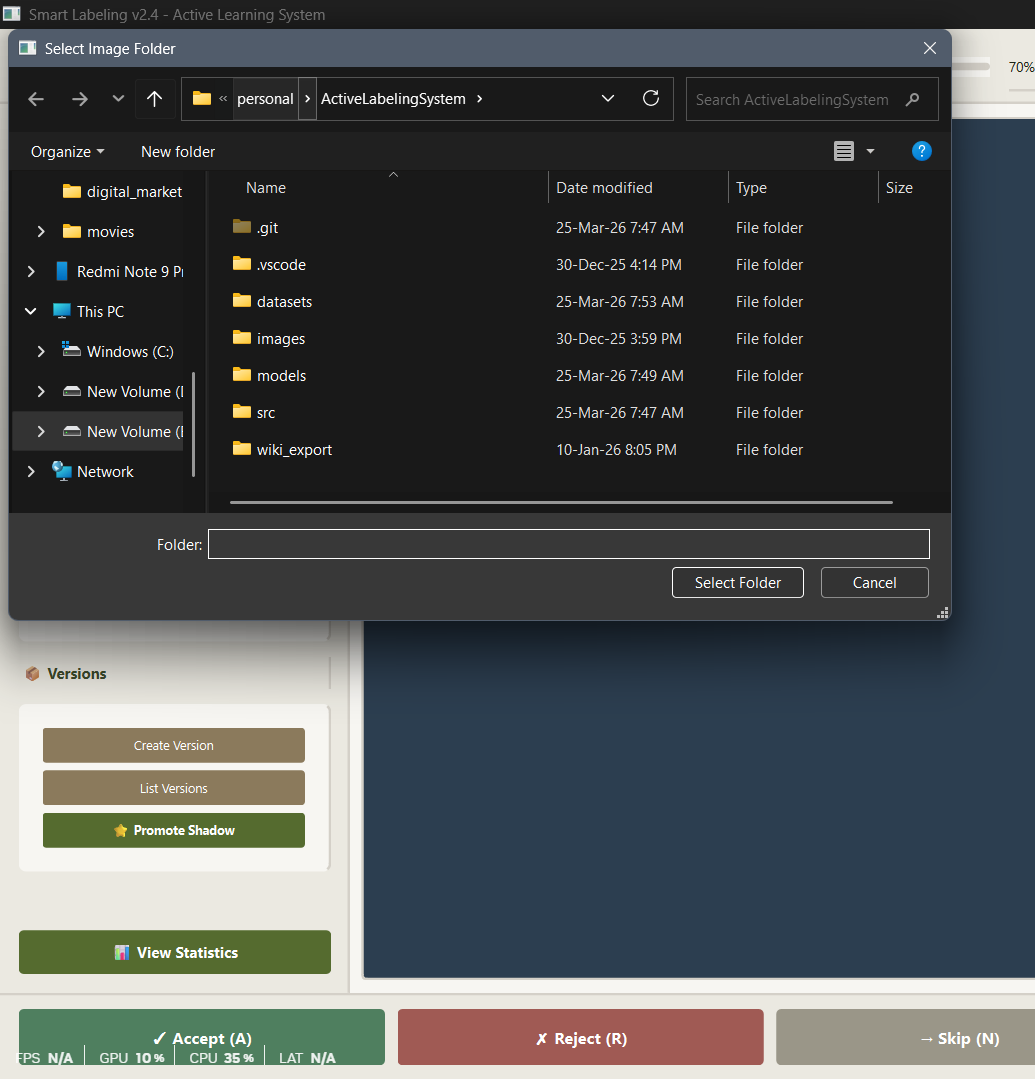
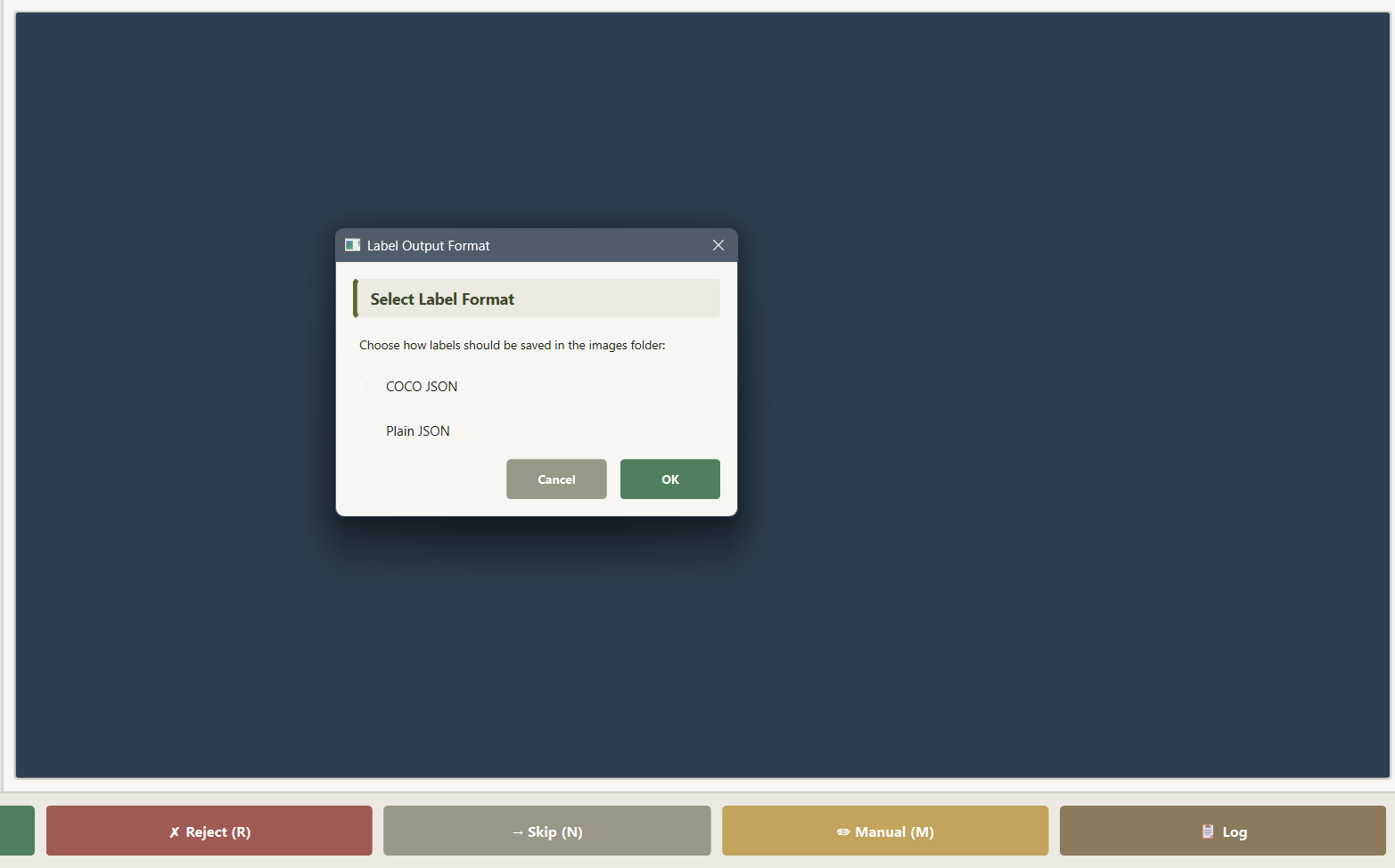
Folder Selection Format Selection

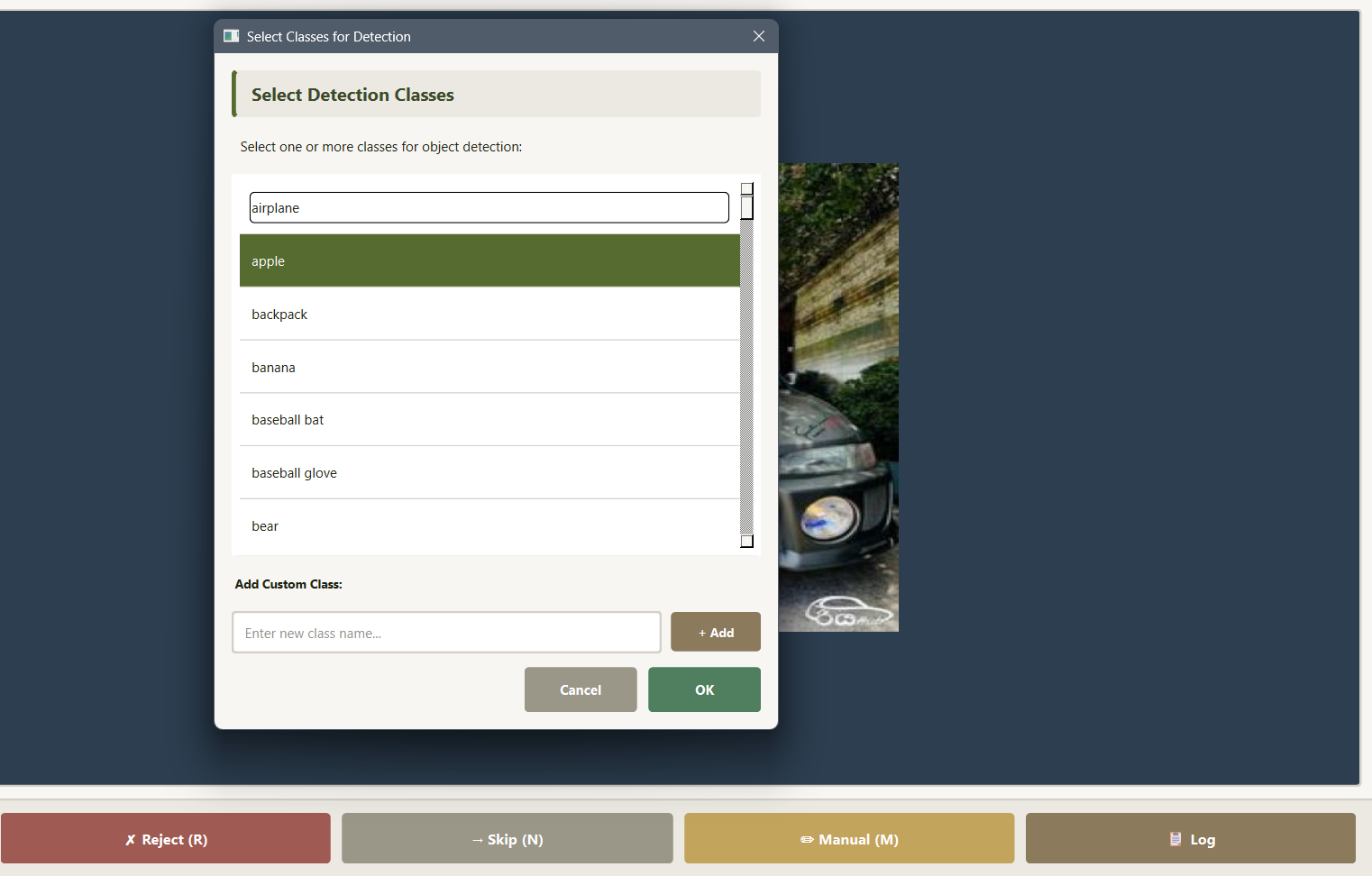
2. Select classes

  • Click Select Classes.
  • Pick one or more classes.
  • Add custom classes from the same dialog when needed.

Class Selection

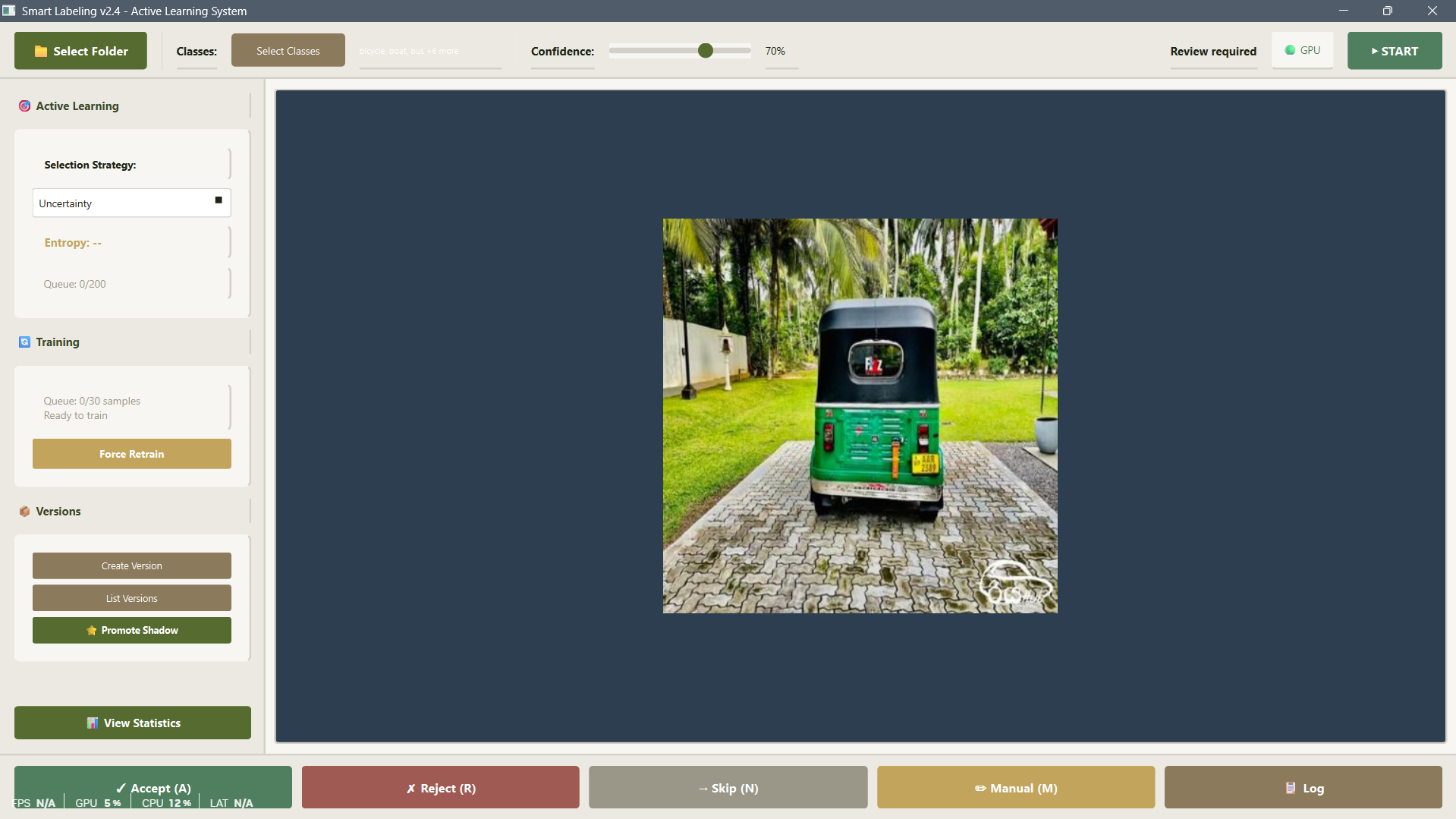
3. Start labeling

  • Click START.
  • Review detections and use bottom actions:
    • Previous (P)
    • Accept (A)
    • Reject (R)
    • Skip (N)
    • Manual (M)
    • Log

Active Learning Options

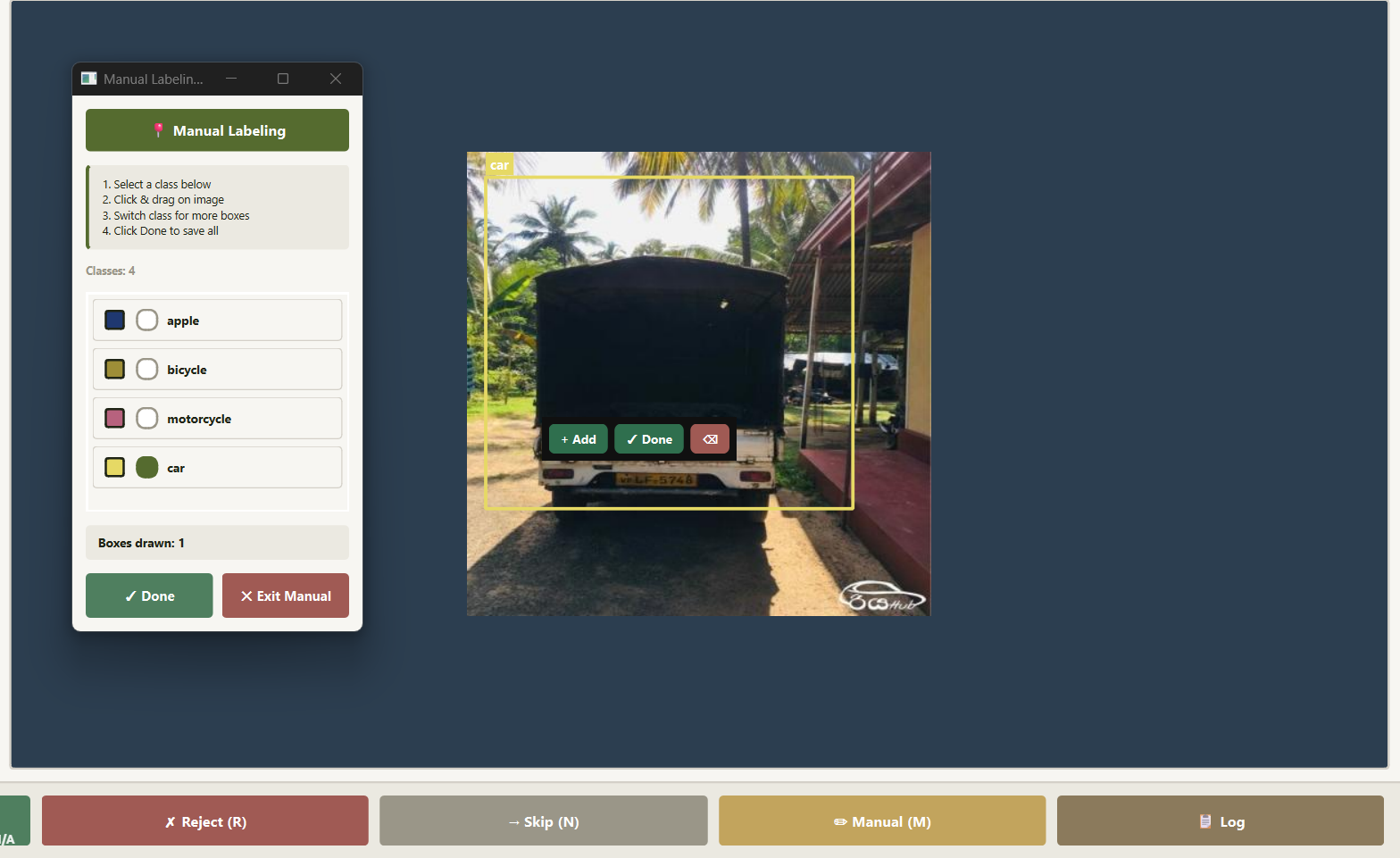
4. Manual mode (box drawing)

Normal GUI

  • Draw boxes by click-drag on canvas.
  • Switch to Freehand Region in the manual toolbox to draw polygon regions.
  • In freehand mode, click points to build a region, then double-click, right-click, or click Finish Region to close it.
  • Use Highlight On/Off to control shape fill visibility while editing.
  • Save boxes and move next with:
    • Space or Enter -> save and next
    • Esc -> exit manual mode
    • Ctrl+Z -> undo last box
    • Backspace -> undo last freehand point
    • Delete -> delete last box
    • 1..9 -> switch class index

Manual Labelling

5. Monitor active learning and training

  • Left panel shows:
    • entropy of current image
    • queue size
    • training progress/status.
  • Use Force Retrain if you want to bypass normal policy checks (still requires minimum samples).
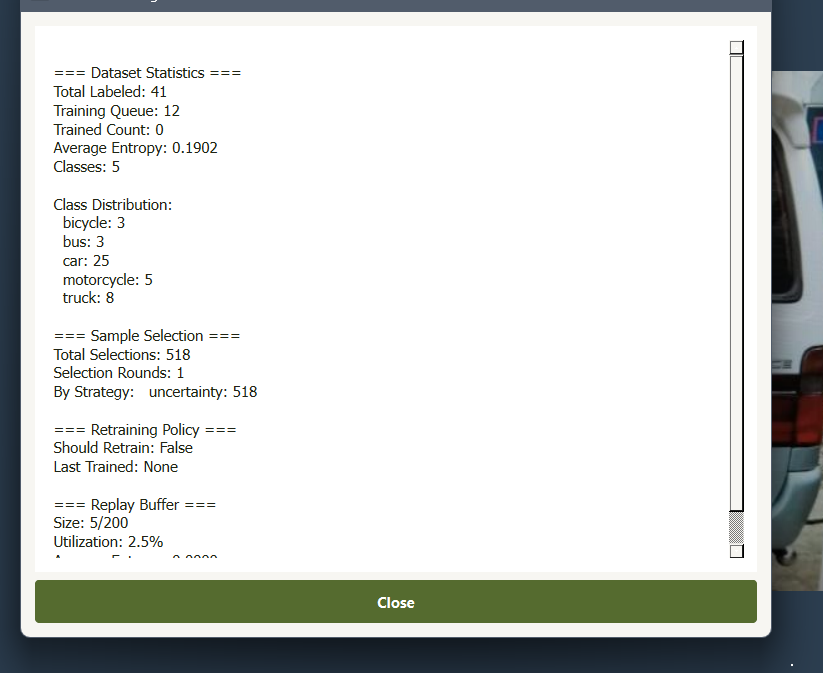
Dataset Statistics

6. Version and promote

  • Create Version creates a dataset snapshot in src/datasets/v_YYYYMMDD_HHMMSS/.
  • List Versions shows stored versions and metadata.
  • Promote Shadow promotes trained candidate model to active model.

Output files and artifacts

For each selected image folder:

  • labels.json or labels_coco.json (selected format)
  • .labels_internal.json (internal metadata store)
  • labels_autosave.json (session recovery)

Notes

  • If Ray is unavailable, labeling still works; background training features are reduced.
  • If class mapping is not available yet, trainer creation waits until first labels are saved.
  • Restart app after model promotion for a clean reload of active weights.

Contributing

Please read CONTRIBUTING.md.

License

MIT. See LICENSE.

Downloads & popularity

Awaiting observations

No metric observations yet

Download counts and popularity will appear here as the collector receives them.

Versions 1

Collected releases
VersionPublishedDirect dependenciesOpen version
0.2.118 Jul 202610

Package advisories

0
No matching advisories collected

This describes our collected data; it is not a security assessment.

Repository

PENDING
sairam-s0/activelabelingsystem

Shared repository data · GitHub

License detected in repository
Not collected

Metadata history

Meaningful changes
Current collected state Current

Observed since 20 Oct, 18:36 UTC

No superseded metadata states collected. Unchanged observations do not create new revisions.

Record identity

package:e49cb634ebd0a02398d9615f96d8ec00a0334fd27766f5d4d563557aa746eb82