
 Repository
Current collected state Current
Observed since 20 Oct, 18:37 UTC
No superseded metadata states collected. Unchanged observations do not create new revisions.
The Ultimate Network Privacy & VPN Detection Tool

The Ultimate Network Privacy & VPN Detection Tool




ActiveVPN inspects your system's network interfaces, analyzes running processes, checks your external IP against known hosting providers, and performs DNS leak tests — all in one hacker-style terminal UI. It tells you whether your VPN is actually working.
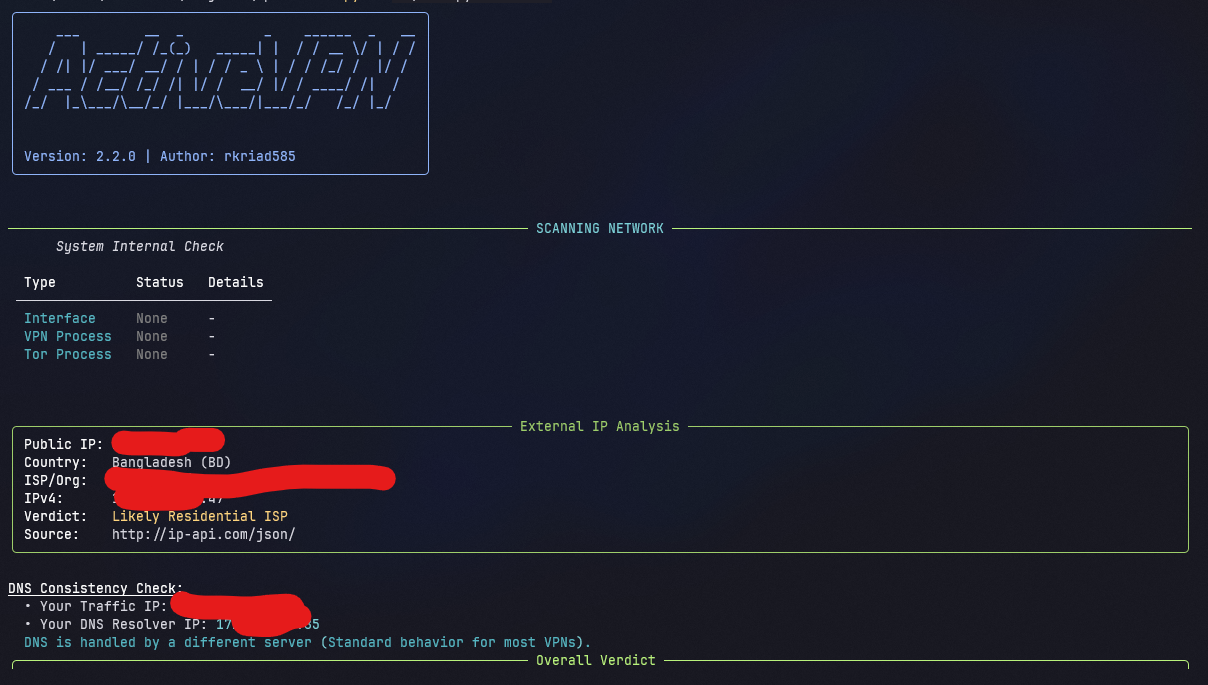
More screenshots: View all screenshots
--kill-force fallback.--history and exportable as JSON, CSV, or TXT.activevpn.scan(), NetworkDetector, typed ScanResult), with silent mode and watch callbacks for developers.Requires Python 3.8 or newer and pip.
pip install activevpn
Or install from source:
git clone https://github.com/rkriad585/ActiveVPN.git
cd ActiveVPN
pip install -r requirements.txt
See docs/installation.md for platform-specific notes (Linux, macOS, Windows, Termux).
# Run a full scan
activevpn
You should see a system check, an external IP analysis, a DNS consistency check, and an overall verdict.
# Standard network scan (interfaces, processes, IP, DNS)
activevpn

# Kill active VPN processes (requires admin/root)
sudo activevpn --kill

# Force-kill stubborn VPN processes
sudo activevpn --kill-force

# Show past scan results
activevpn --history

# Export scan history as CSV
activevpn --export csv

# Clear all saved history
activevpn --clear-history

# Continuously rescan every 30 seconds
activevpn --watch 30

# Verbose debug logging
activevpn --debug

# Show help
activevpn --help
Exit codes: 0 = no VPN detected, 1 = VPN/Tor/Proxy detected, 2 = offline or error. Full reference in docs/cli.md.
| Doc | Description |
|---|---|
| docs/getting-started.md | First steps with ActiveVPN |
| docs/installation.md | Install instructions for every platform |
| docs/usage.md | Daily usage and examples |
| docs/cli.md | Full command-line reference |
| docs/configuration.md | Config file and environment variables |
| docs/architecture.md | How the code is organized |
| docs/development.md | Building, testing, and packaging |
| docs/deployment.md | Running on servers and in containers |
| docs/faq.md | Frequently asked questions |
| docs/troubleshooting.md | Common issues and fixes |
| docs/screenshots.md | All screenshots |
| GitHub Pages | Online documentation site |
ActiveVPN is a command-line tool. It is distributed as the activevpn console script (see [project.scripts] in pyproject.toml) and can also be launched with python main.py.
When run without flags it performs a full scan and prints four sections:
0–100) and label.The tool returns meaningful exit codes (0/1/2) so it can be used in scripts and CI.
ActiveVPN/
├── main.py               # Entry point + CLI (argparse) + rich TUI rendering
├── config.py             # Legacy shim → re-exports activevpn.config
├── pyproject.toml        # Packaging, metadata, console script
├── requirements.txt      # Runtime dependencies
├── activevpn/            # The library (importable as a package)
│   ├── __init__.py       # Public API: scan(), NetworkDetector, ScanResult, ...
│   ├── config.py         # Config dataclass, platformdirs paths, load_config()
│   ├── detector.py       # NetworkDetector + typed data model (ScanResult, Verdict, IPInfo, ...)
│   ├── logger.py         # History persistence, load/clear, and export helpers
│   ├── logo.py           # ASCII banner generation (pyfiglet + rich)
│   └── help.py           # Help menu rendering
├── core/                 # Backward-compatible shim (deprecated, use activevpn)
├── tests/                # pytest suite (mocked psutil/requests)
├── logo/                 # Brand logo
└── docs/                 # Documentation
The flow: main.run() parses arguments → NetworkDetector.scan_network() collects system + online signals → _compute_verdict() scores them → save_log() persists the result → tables/panels are rendered with rich.
import activevpn

# One-shot scan (silent — no TUI)
result = activevpn.scan(console=None)
print(result.verdict.label, result.verdict.score)   # CLEAN 0
print(result.to_json())                             # serializable output

# Programmatic configuration (stored under ~/.config/neostore/ActiveVPN/config.toml)
cfg = activevpn.load_config()
cfg.vpn_process_names.append("my-vpn-daemon")

# Continuous watch with callbacks
detector = activevpn.NetworkDetector(console=None, config=cfg)
for r in detector.watch(interval=60, on_change=lambda r: print("Verdict changed!", r.verdict.label)):
    pass
See docs/architecture.md for details.
| Requirement | Minimum |
|---|---|
| OS | Linux, macOS, Windows, or Android (Termux) |
| Runtime | Python 3.8+ |
| Network | Internet access for the public IP and DNS checks |
No special hardware is required. --kill and --kill-force need administrator/root privileges.
On Linux:
sudo apt update && sudo apt install -y python3 python3-pip
On macOS (Homebrew):
brew install python
# Clone and install dependencies
git clone https://github.com/rkriad585/ActiveVPN.git
cd ActiveVPN
python -m venv .venv
. .venv/bin/activate        # Windows: .venv\Scripts\Activate.ps1
pip install -r requirements.txt pytest build twine

# Run the test suite
pytest -q

# Build the distributable packages
python -m build

# Verify the built artifacts
python -m twine check dist/*
The CI workflow (.github/workflows/ci.yml) runs pytest on Ubuntu, Windows, and macOS with Python 3.8 and 3.12. See docs/development.md.
Contributions are welcome! Please read CONTRIBUTING.md for setup, branch rules, commit style, and the pull request workflow. All participants must follow the CODE_OF_CONDUCT.md.
If you find a security issue, please read SECURITY.md before reporting it. Do not open a public issue for vulnerabilities.
Distributed under the MIT License. See LICENSE for the full text.
Download counts and popularity will appear here as the collector receives them.
| Version | Published | Direct dependencies | Open version |
|---|---|---|---|
| 2.4.0 | 7 Aug 2026 | 9 |
This describes our collected data; it is not a security assessment.
Observed since 20 Oct, 18:37 UTC
No superseded metadata states collected. Unchanged observations do not create new revisions.
package:cd672a01311e178e4f5e2519d7ff8ca6921ca5f2fb55de695bf05b03a3760ff1