
 Repository
Current collected state Current
Observed since 20 Oct, 19:23 UTC
No superseded metadata states collected. Unchanged observations do not create new revisions.
Download a song from a URL or YouTube search and auto-import it into Apple Music.





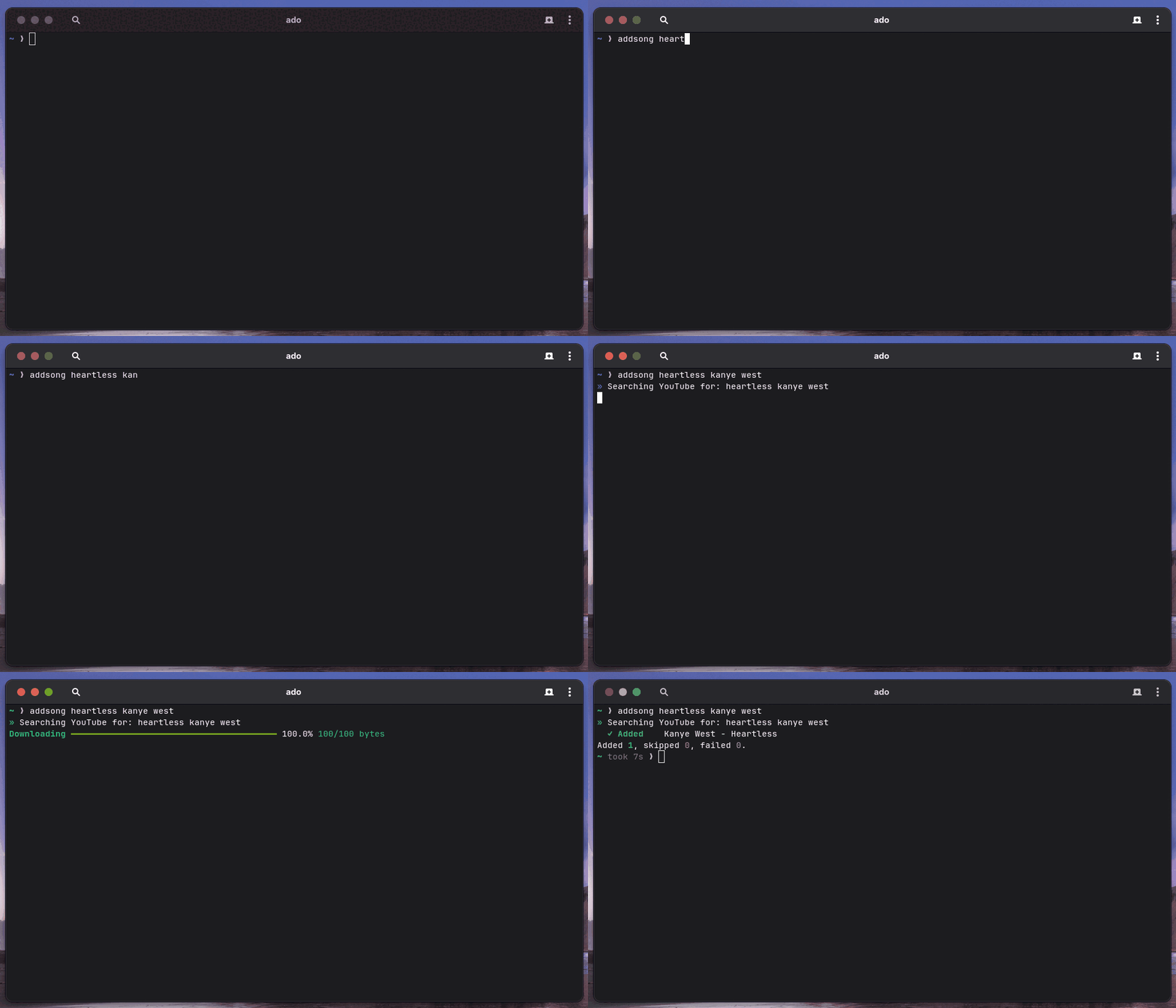
Paste a link and the song shows up in Apple Music.
addsong takes a song name or a YouTube link. It downloads the track, tags it with the title, artist, and cover art, then drops it into Apple Music. No dragging files around, just a single command.
addsong "songname"
addsong "https://www.youtube.com/watch?v=..."
You need Python 3.11 or newer, plus two tools that do the real work, yt-dlp and ffmpeg. addsong itself is a Python package you install with pipx.
pipx install addsong
Don't have pipx yet? Install it first. On macOS run brew install pipx. On
Linux run pip install --user pipx (or use your distro's package). On Windows
run pip install pipx. Once pipx is set up, run pipx ensurepath and reopen
your terminal so addsong is on your PATH.
No pipx? pip install --user addsong works too.
These do the downloading and tagging. Pick the command for your system.
 macOS
macOS
brew install yt-dlp ffmpeg
 Linux and WSL
sudo apt-get install -y ffmpeg && pipx install yt-dlp
On other distros use your package manager for ffmpeg. yt-dlp can come from pipx or pip.
 Windows (PowerShell)
winget install yt-dlp.yt-dlp Gyan.FFmpeg
addsong --version
pipx upgrade addsong
With pip instead of pipx, run python -m pip install --user --upgrade addsong.
addsong can print a completion script for your shell. Source it or save it to your shell's completion directory.
source <(addsong --print-completion bash)      # bash
addsong --print-completion zsh  > ~/.zsh/completions/_addsong   # zsh
addsong --print-completion fish > ~/.config/fish/completions/addsong.fish  # fish
See your shell's docs for where completion files go.
addsong "songname"
addsong shows what it found so you can fix mistakes before saving.
  Review track ♪
  Artist: Artist Name
  Title:  Song Title

  [Enter] Add  ·  [E] Edit  ·  [S] Skip
  ❯
Press Enter and the song lands in Apple Music a second later.
| Command | What it does |
|---|---|
addsong "name" | Add the top search result |
addsong "<link>" | Add a specific video |
addsong --results 3 "name" | Add the top 3 search results |
addsong --playlist "<link>" | Add a whole playlist |
addsong --from list.txt | Add every link in a file |
addsong subscribe "<link>" | Follow a playlist |
addsong sync | Add new songs from playlists you follow |
addsong list | Show playlists you follow |
addsong unsubscribe "<link>" | Stop following a playlist |
addsong forget | Forget everything added so it can be re-added |
| Flag | What it does |
|---|---|
-y | Don't ask, just add it |
--review | Always pause to fix the title or artist first |
--reimport | Add a song again even if you already have it |
--dry-run | Show what would happen without downloading |
--format FMT | Output format, m4a (default), mp3, flac, opus |
--quality N | Audio quality 0 to 10, 0 is best and the default |
--notify | Pop a desktop notification as each song imports |
--quiet / --verbose | Show less or more output |
--help | Full list of commands and options |
Set environment variables like ADDSONG_WATCH_DIR to change defaults. Run
addsong --help for the full list.
On macOS and Windows songs go straight into Apple Music. On Linux they land
in ~/Music/addsong/. Point them somewhere else with
ADDSONG_WATCH_DIR=/your/folder.
If you see command not found, run pipx ensurepath and reopen your
terminal. Still stuck? Repeat the Installation step.
If a song downloads but never shows up, open the Apple Music app and keep it open while adding (macOS or Windows).
If a download fails, update yt-dlp, then retry with --verbose to see why.
Download counts and popularity will appear here as the collector receives them.
| Version | Published | Direct dependencies | Open version |
|---|---|---|---|
| 1.0.1 | 15 Jul 2026 | 1 |
This describes our collected data; it is not a security assessment.
Observed since 20 Oct, 19:23 UTC
No superseded metadata states collected. Unchanged observations do not create new revisions.
package:11a897facf5976689e8dd1f72e548f1fa2a6c511486675286bbcecf7baec6cab