
 Repository
Current collected state Current
Observed since 20 Oct, 19:37 UTC
No superseded metadata states collected. Unchanged observations do not create new revisions.
Library for Google ADK focused on observability, telemetry, session tracing, and operational cost analysis for AI agents.

Observability & FinOps for Google ADK agents - in real time.
AdkTelemetry is the product name. On PyPI the distribution is adktelemetry (all lowercase): use pip install adktelemetry and import adktelemetry in code.
AdkTelemetry is a Python library for Google ADK that captures runner events, token usage, estimated USD cost, and error signals, then exposes them through a built-in dashboard and JSON APIs.
Dashboard URL (example with adk web on port 8080): http://localhost:8080/adktelemetry
pip install adktelemetry
from adktelemetry import agentelemetry

agentelemetry(
    modelkey="YOUR_GEMINI_API_KEY",  # required - use your app’s secret/config source
    adkmodel="gemini-2.5-flash",     # optional FinOps fallback when events lack model_version
)
adk web by adding a services.py next to your app (same agents directory root ADK loads). ADK imports it before the web server builds FastAPI:from adktelemetry.patch_cli import ensure_adk_web_server_patch
ensure_adk_web_server_patch()
adk web, open /adktelemetry, and use the time range control to match the window you care about.Configuration in code: the library does not read environment variables by itself. You normally pass modelkey (and optionally adkmodel) from your own configuration - for example os.environ["GEMINI_API_KEY"], a secrets manager, or Django settings.
| Surface | Purpose |
|---|---|
| Dashboard | Human-readable charts and tables; event-driven updates over Server-Sent Events (GET /adktelemetry/api/v1/stream) whenever a new telemetry record is stored (with a short debounce for bursts). Idle: one long-poll-style wait plus an occasional comment line (~45s) so proxies do not drop the stream. |
GET /adktelemetry/api/v1/stream | text/event-stream for the dashboard: event: ready on connect, then event: update after each coalesced batch of store writes. |
GET /adktelemetry/api/v1/snapshot | Same aggregates the UI uses; optional since / until (Unix seconds) for a time window. The UI calls this after each update event (and once on load), not on a fixed timer. |
GET /adktelemetry/api/v1/session_detail | Per-session brief from the in-memory buffer (user_id, session_id query params). |
GET /adktelemetry/api/v1/pricing_catalog | Reference FinOps rates shown in the UI (USD per 10K tokens) plus a catalog reference date (month/year). |
GET /adktelemetry/api/v1/error_breakdown | Error counts grouped by short label for the selected range (same query rules as snapshot). |
Interpreting a snapshot (filtered mode): totals rolls up only sessions that had at least one event in [since, until]. sessions and model_distribution are recomputed from stored events in that window. applied_range is { "since", "until" } when filtering, or null for the full in-memory snapshot. pricing_models is the count of model IDs in the active FinOps catalog (informational; opens the catalog modal from the header).
Events without a usable timestamp are omitted when filtering by range, so very old or malformed records may not appear in windowed views.
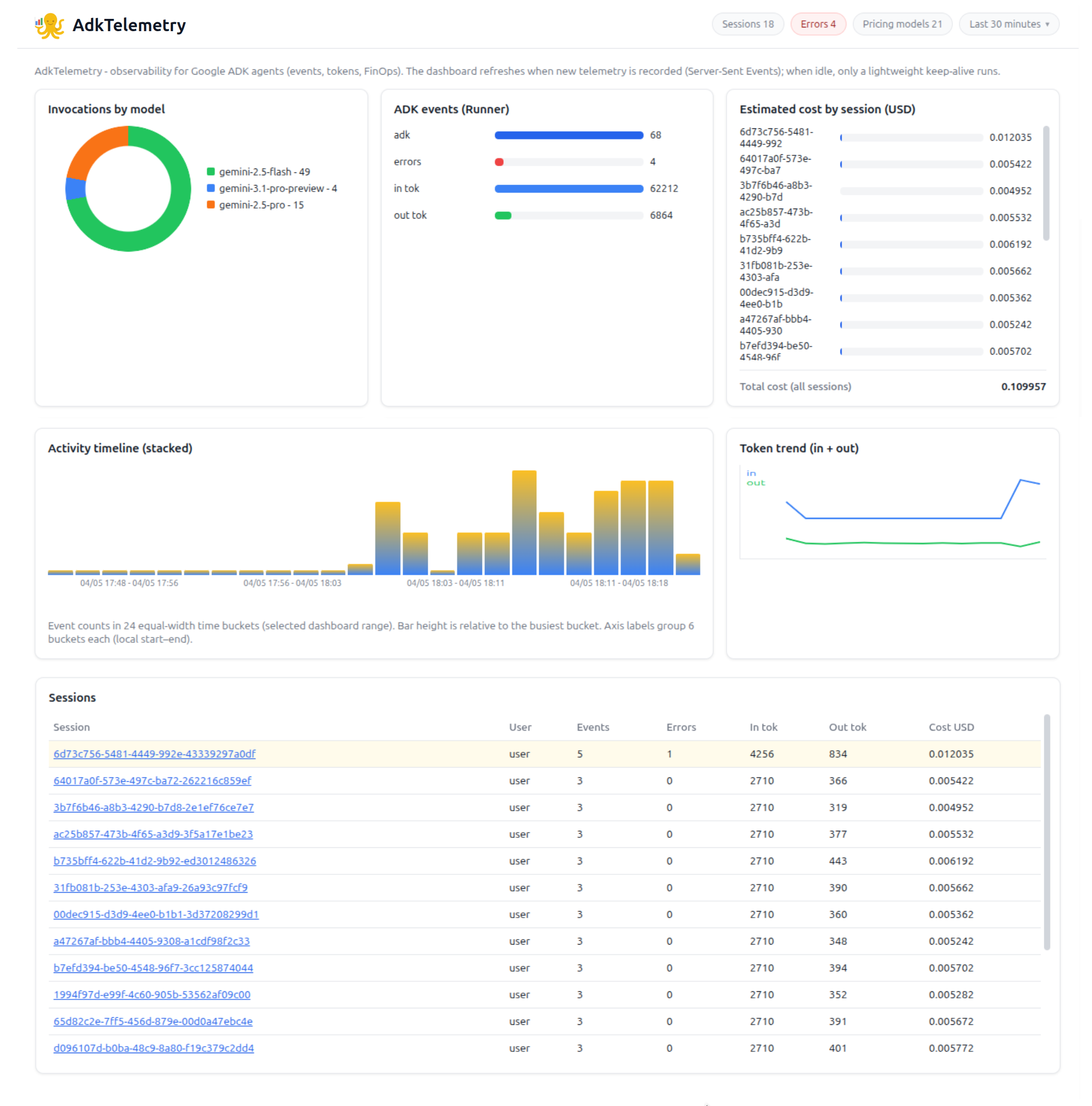
The layout is a single page: header (summary pills + time range), then a grid of cards, then Sessions Errors and Sessions tables. All numeric cards respect the selected time range except when you load the snapshot API with no since/until (full store).
| Control | Behavior |
|---|---|
| 15 / 30 minutes, 1 hour, 12 hours | Sliding window ending at “now” on each refresh. |
| Custom | Start and end dates in the local timezone (start 00:00, end 23:59:59.999). Maximum span 31 days. |
Changing the range updates the snapshot query, recomputes aggregates, and keeps drill-down modals aligned with the same window.
| Pill | Shows | Click opens |
|---|---|---|
| Sessions | Count of sessions with activity in the current range (or all sessions in unfiltered snapshot mode). | Sessions overview modal: total sessions, input/output tokens, total estimated USD, last interaction timestamp (latest session activity in the window). |
| Errors | Sum of per-session error counts in the range. | Error breakdown modal: pie chart by short error label, legend with % and counts, and a top category callout with a representative message when available. |
| Pricing models | Number of models in the FinOps catalog used for estimates. | Gemini FinOps catalog modal: table of input/output USD per 10,000 tokens per model, unit disclaimer, link to official Google pricing, and the catalog reference month/year (see FinOps below). |
model_version, with FinOps resolution and fallback to adkmodel when the event has no model.Four horizontal bars (not a single combined scale):
totals.events).totals.errors), same basis as the Errors pill.totals.total_input_tokens, totals.total_output_tokens).Bar length is normalized within two groups: events vs errors share one max; input vs output tokens share another. Use this card to compare volume of ADK traffic, error load, and token volume side by side.
total_cost_usd for every session in the current range’s payload (not only visible rows). This matches FinOps recomputation from events in the window.activity_timeline.since / until / counts, the chart is wall-clock faithful for the range.last_timestamp), not chronological chat order.LlmResponse error fields and plain-text failures (e.g. Error: …) on model/system content - same signals that increment the Errors column in Sessions.recent_errors (still subject to the global in-memory cap - see limitations).GET /adktelemetry/api/v1/streamContent-Type: text/event-stream (SSE).event: ready — sent once when the browser connects (dashboard does not depend on it for the first paint; it already runs an initial snapshot fetch).event: update — emitted after the in-memory store receives new telemetry (Runner events and captured SSE errors), with a ~80ms debounce so a single model turn does not flood the client.: keepalive) — about every 45 seconds while idle so intermediaries treat the connection as alive.Open one stream per dashboard tab. If the connection drops, the UI reconnects after ~3 seconds.
GET /adktelemetry/api/v1/snapshot| Query | Description |
|---|---|
since | Optional. Range start (Unix seconds). |
until | Optional. Range end (Unix seconds). |
applied_range is null.until defaults to now, since defaults to 15 minutes before until if omitted.since < until required; range length ≤ 31 days or 400.GET /adktelemetry/api/v1/session_detail| Query | Description |
|---|---|
session_id | Required. |
user_id | Required. |
Returns 404 if the session is unknown to the store.
GET /adktelemetry/api/v1/pricing_catalogReturns models (rows with model_id, input_usd_per_10k, output_usd_per_10k), unit_label, catalog_updated (MM/YY reference), and pricing_doc_url. Use this if you need the same reference the UI shows.
GET /adktelemetry/api/v1/error_breakdownSame since / until rules as snapshot. Body includes total, slices (label, count, percent), and optional top with a longer message sample for the dominant label.
catalog_updated field from /adktelemetry/api/v1/pricing_catalog). Always check that date when comparing estimates to real invoices - the catalog is refreshed on a schedule by support / operations, not by each application team.MIT License © 2026
Download counts and popularity will appear here as the collector receives them.
| Version | Published | Direct dependencies | Open version |
|---|---|---|---|
| 1.0.0 | 5 Apr 2026 | 5 |
This describes our collected data; it is not a security assessment.
Observed since 20 Oct, 19:37 UTC
No superseded metadata states collected. Unchanged observations do not create new revisions.
package:7484f86452adf68f82d6745e7765f1c9352eaad196661d27e56286334c326f4b