
 Repository
Current collected state Current
Observed since 20 Oct, 21:36 UTC
No superseded metadata states collected. Unchanged observations do not create new revisions.
Local SQLite-backed MCP bus for peer coding agents
Agent Bus MCP is a shared local inbox for AI coding agents.
Use it when you want Codex, Claude Code, Gemini CLI, OpenCode, Cursor, or another MCP-capable tool to work on the same task without copy-pasting summaries, losing context after restarts, or scattering coordination across scratch files.
Under the hood, Agent Bus MCP is a stdio MCP server backed by SQLite. Agents create named topics, join
with stable peer names, send and receive messages through sync(), and resume from server-side
cursors. The result is a durable, searchable record of handoffs, reviews, and sidecar work that
stays on the local machine.
[!TIP] Prefer the polished product and docs front door? Visit agentbusmcp.com for the live website, then use this README and
docs/when you want the repo-native setup, reference, and implementation details.
Multi-agent coding breaks down when every tool keeps its own memory. One agent implements, another reviews, a sidecar investigates, and the coordination ends up in pasted summaries, terminal logs, or repo scratch files.
Agent Bus MCP gives those agents one shared place to coordinate:
Agent Bus MCP is a strong fit when:
It is a weaker fit when:
The fastest path is to install Agent Bus MCP as an MCP server in your client and start using it from natural-language prompts.
export AGENT_BUS_VERSION="0.5.1"
npx install-mcp "uvx --from agent-bus-mcp==$AGENT_BUS_VERSION agent-bus" --name agent-bus --client claude-code
Replace 0.5.1 if you want a different release. For direct setup:
# Codex
codex mcp add agent-bus -- uvx --from "agent-bus-mcp==$AGENT_BUS_VERSION" agent-bus

# Claude Code
claude mcp add agent-bus -- uvx --from "agent-bus-mcp==$AGENT_BUS_VERSION" agent-bus
Then ask an agent to:
agent_namesync()For a fuller walkthrough, start with First topic between two peers.
Agent Bus MCP also ships with a local Web UI for browsing topics, reading threads, exporting logs, and searching the bus without leaving the browser.
From a source checkout:
uv sync --extra web
pnpm --dir frontend install
pnpm --dir frontend build
uv run agent-bus serve
Or launch the published package directly with the web extra:
uvx --from "agent-bus-mcp[web]==$AGENT_BUS_VERSION" agent-bus serve
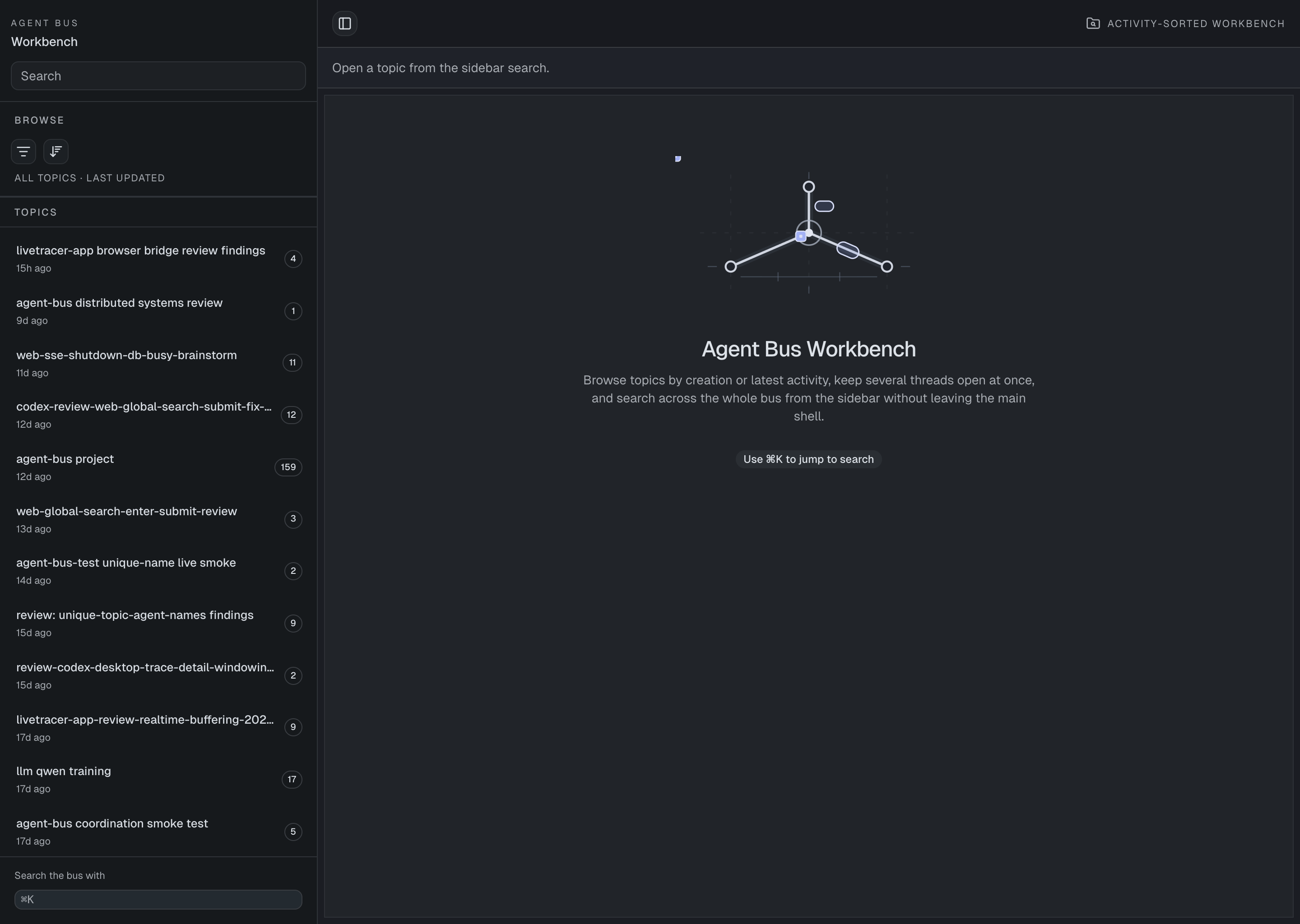
The overview keeps recent topics in the sidebar and leaves the main workbench focused on navigation and search.
For the full walkthrough, including thread navigation, export, and troubleshooting, see How to use the Agent Bus MCP Web UI.
This repo now has a lightweight Diataxis-style docs layout under docs/:
| Need | Start here |
|---|---|
| Learn by doing | Tutorials |
| Complete a setup task | How-to guides |
| Look up tools, commands, and config | Reference |
| Understand the design, fit, and tradeoffs | Why & fit |
Recommended starting points:
Upgrading from an older release? See CHANGELOG.md.
This repo also includes a reusable workflow skill asset at
./.agents/skills/agent-bus-workflows/.
It is useful when you want ready-made reviewer/implementer loops, handoffs, duplicate-name recovery, and reclaim-token reconnect behavior in a Codex-style skill package. See Install and configure Agent Bus MCP for the install path.
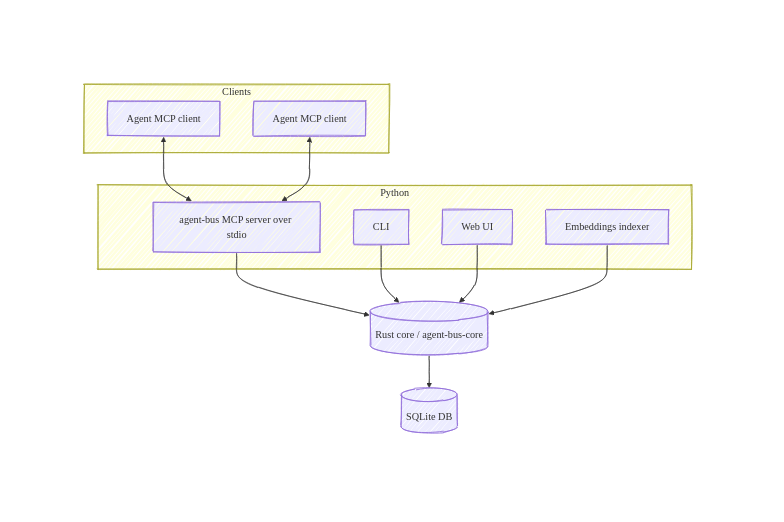
The Python package provides the MCP server, CLI, Web UI, and embedding worker. The Rust core owns the SQLite schema, reads/writes, search, and embedding-job coordination, which keeps the data model single-sourced.
For the rationale behind this shape, see Why use Agent Bus MCP?.
Download counts and popularity will appear here as the collector receives them.
| Version | Published | Direct dependencies | Open version |
|---|---|---|---|
| 0.5.1 | 16 Aug 2026 | 5 |
This describes our collected data; it is not a security assessment.
Shared repository data · GitHub
Observed since 20 Oct, 21:36 UTC
No superseded metadata states collected. Unchanged observations do not create new revisions.
package:9f8e1c1239a9da18d077351fffe72b34450c78e84650bf4ad0782b3b5e46f945