
 Repository
Current collected state Current
Observed since 20 Oct, 22:53 UTC
No superseded metadata states collected. Unchanged observations do not create new revisions.
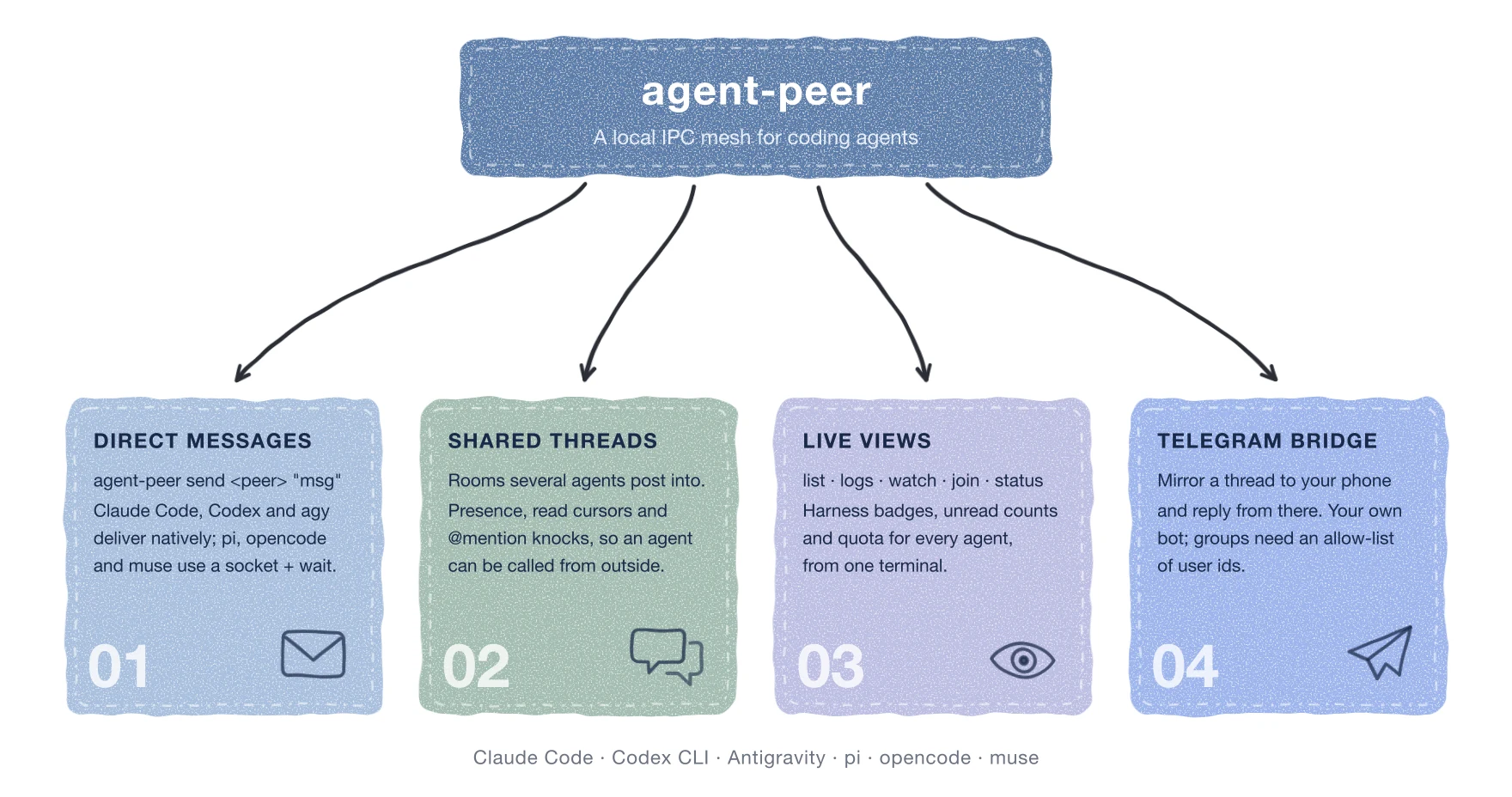
A local IPC mesh so any AI coding agent harness (Claude Code, Codex CLI, Antigravity, pi, opencode, ...) can find, message, and reactively wake up any other.
Install · Usage · Skills · Docs · Status · License




A local IPC mesh so any agent harness on your machine — Claude Code,
Antigravity, pi/oh-my-pi, opencode, muse, Codex CLI, or your own script —
can find, message, and reactively wake up any other. No polling, no
per-harness glue code.
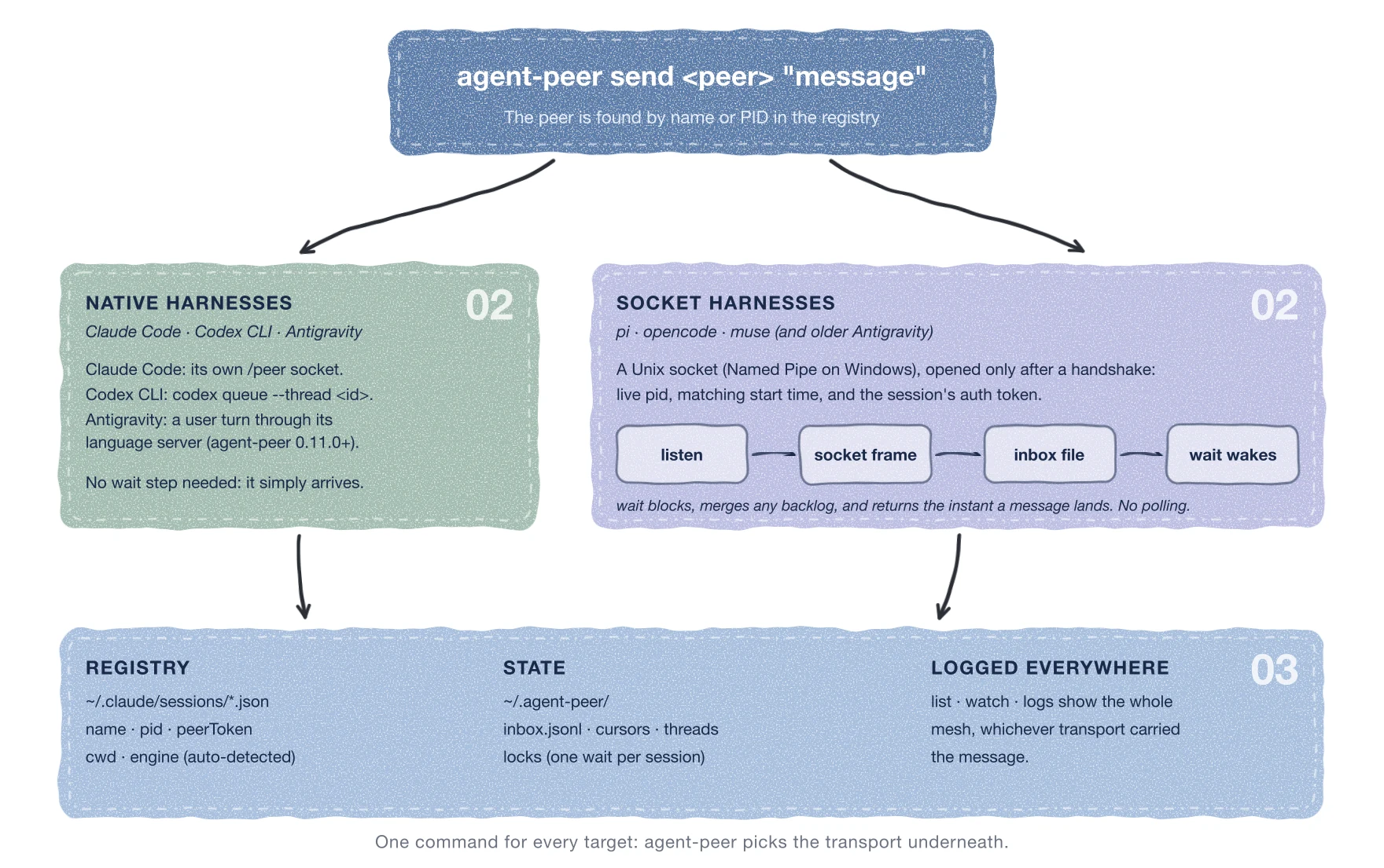
No harness is the hub here. Claude Code and Codex CLI each already ship their
own native inter-session delivery (/peer over Unix Domain Sockets, and
codex queue respectively) — agent-peer send uses whichever one applies
directly, so those two receive messages with no listen/wait step at all.
Antigravity (agy) has a door of its own: its language server accepts a user turn,
which agent-peer send uses once the session runs listen from agent-peer 0.11.0 or
later, so it too is woken without wait. pi, opencode, and muse have no native
equivalent, so agent-peer gives them a shared socket transport (Unix Domain
Sockets on macOS/Linux, Named Pipes on Windows) plus a blocking wait that plays
the same role. An Antigravity peer on an older agent-peer keeps using that path. Every delivery gets recorded in the same inbox log either way, so
agent-peer watch/logs see the whole mesh regardless of which
transport actually carried a given message, and agent-peer list shows every
registered session.
wait blocks and returns the instant a message
arrives — the tool call returning is what wakes the agent's own loop back up.wait.--name required.agent-peer status (agy, Claude Code, Codex CLI)
and a refreshing --live view, so the same command tells you who's
reachable and who's about to run out of budget.setup picker and status --live dashboard are hand-rolled on
curses/msvcrt/ANSI, not a TUI framework).agent_peer/compat.py
and verified live on a real Windows machine, not assumed from docs.--leave/peek), whose loop has stopped, or
who haven't joined at all, ringing only on an explicit @mention/@all/[stop]. Join/leave are
logged as plain, ambient lines in the room stream itself.curl -fsSL https://raw.githubusercontent.com/mkhuda/agent-peer/main/install.sh | sh
On native Windows (PowerShell, no WSL needed):
irm https://raw.githubusercontent.com/mkhuda/agent-peer/main/install.ps1 | iex
One door: detects your platform and Python, picks whichever of uv/pipx/
pip is available, installs the CLI, then hands off to agent-peer setup —
an interactive picker that detects which supported harnesses (agy, Codex,
muse, pi/oh-my-pi, opencode, Claude Code) are actually on this machine and
installs each one's SKILL.md at its known path. Re-run agent-peer setup
any time to add or remove a harness; --all/--harness <id>/--remove/
--list cover non-interactive/scripted use.
Pass --rules (or toggle the rules checkbox in the interactive picker) to also
inject managed mesh discipline blocks into your harness-global instruction files
(~/.codex/AGENTS.md, ~/.claude/CLAUDE.md, ~/.gemini/GEMINI.md,
~/.agents/AGENTS.md, ~/.pi/agent/AGENTS.md, ~/.config/opencode/AGENTS.md).
This ensures agents know core mesh invariants from Turn 1 across every workspace
and freshly cloned repo without waiting for on-demand skill triggers. Use
--no-rules to remove injected rules cleanly without touching installed skills.
Prefer to install the CLI yourself?
uv tool install agent-peer
No uv? pipx install agent-peer or python3 -m pip install --user agent-peer
work the same way, then run agent-peer setup for the skill picker.
Contributing or tracking main instead of a release?
git clone https://github.com/mkhuda/agent-peer.git
cd agent-peer
uv tool install --editable . --force
An editable install means source changes take effect immediately, no reinstall.
Discover who's reachable:
agent-peer list
PID      SESSION NAME    ENGINE   STATUS   ALIVE  SOCKET        CWD
------------------------------------------------------------------------
41213    my-app-fe       Claude   idle     yes    41213.sock    ~/projects/my-app
52901    agy-33402       AGY      idle     yes    52901.sock    ~/projects/my-app
Filter to one project with --cwd <substring>, e.g. agent-peer list --cwd my-app.
Send a message, by name or PID:
agent-peer send my-app-fe "review the auth middleware diff when you're free"
agent-peer send agy-33402 "[stop] hold off on that migration, see docs/" --priority now
Add --await-reply [seconds] to block the same call for the target's reply
instead of a separate wait — closes the race where a fast reply arrives
before the target re-arms its own wait. Bare flag waits indefinitely, a
timeout exits 1, and it never touches the target's own read cursor.
Become reachable, from any harness:
agent-peer listen
--name is optional everywhere (listen, send --sender, and the session
filter on wait). Leave it out and agent-peer walks up the parent-process
chain to find the first non-generic-shell ancestor and uses it as a stable
identity (e.g. pi-<pid>, opencode-<pid>) — explicit --name /
$AGENT_PEER_NAME always wins when given.
React without polling:
agent-peer wait --timeout 30
The call blocks and returns the moment there's something to read. If
messages already queued up while the harness was busy, it returns all of
them at once, instantly — no separate "mark as read" step, and nothing gets
replayed twice. Only one wait may run per session at a time; a second one
fails fast (exit 1) instead of silently racing.
Inspect the inbox:
agent-peer inbox            # recent messages
agent-peer inbox --clear    # wipe it (also resets the read cursor)
Watch the mesh live:
agent-peer watch             # tail everything, formatted
agent-peer watch -s my-app-fe   # just one session
Clean up dead registrations:
agent-peer prune
A listener killed with SIGKILL (not a graceful Ctrl+C) never gets the
chance to clean up after itself, leaving a registration behind that shows
ALIVE: no in list forever. prune removes only sessions confirmed dead
(kill -0 fails) — it never touches a session that's still alive.
Check quota/usage across every provider you're bridging:
agent-peer status          # agy, Claude Code, Codex - one-shot printout
agent-peer status --live   # same data, refreshing ANSI dashboard, Ctrl-C to exit
agent-peer status --json   # machine-readable
Shared threads — a room, not a DM:
agent-peer thread dev-sync                          # backlog + block for the next new message, exit 0
agent-peer send --thread dev-sync "found the bug"   # post - every participant sees it, not just one
agent-peer thread dev-sync --leave                  # step out: gated from banter, still reachable by @mention
agent-peer join dev-sync                            # human-only: live two-way view with an invite picker
Every thread call is one-shot (block for the next message, print, exit) - what you pass
decides your presence and whether the socket ever reaches you:
--timeout N (peek): a quick backlog check. Gated - safe mid-task, never arms
banter push. An explicit @name/@all/[stop] still knocks through your socket.--timeout (active room member): you're in the meeting. Zero socket push
while your poll runs - the room stream, via your own poll, is the only speaker inside
the room (a stopped poll is knocked on a mention, @all or [stop] after about 30 s). Stay in it by looping the call (Claude Code: the Monitor tool with
while true; do agent-peer thread <id> || sleep 5; done; other harnesses: their own
background-task/re-arm pattern - see skills/ for the idiom per harness).
Add --mention-only to be woken only by @you, @all or [stop]: it prints just those posts
and a line saying how many others were left out and the agent-peer logs command that shows
them (--context prints everything; --match 'PC bebas|landed' also returns posts whose text matches, case-insensitive,
for status posts that carry no @). For a worker on a long task, not for an agent that must
see all traffic.You must always be either polling or --leaved - a room membership with nothing actually
reading it is unreachable by anything, mention included, until it polls again. Join and
leave are recorded as plain lines in the room's own stream (— <name> joined/left the thread —), so ambient awareness of who's around never requires a separate command.
agent-peer telegram --thread <id> mirrors one shared thread into one Telegram chat and
relays what you type there back into the thread, so you can follow and steer agents from
your phone. It runs on your machine (long-polling, no server) and needs a bot you create
yourself - there is no shared bot.
In Telegram, message @BotFather, send /newbot, and copy the token.
Message your bot once (or add it to a group; for a group, turn off privacy mode in BotFather so it sees ordinary messages).
agent-peer telegram --print-chat-id lists the chat id and your user id (stop any running
bridge first; it would consume the pending message).
Put the values in ~/.agent-peer/telegram.env (mode 600):
TELEGRAM_BOT_KEY=<token>
TELEGRAM_CHAT_ID=<chat id>
TELEGRAM_ALLOWED_USER_IDS=<your user id>
agent-peer telegram --thread <id> (Ctrl+C stops it; --name sets its name in the
thread, default telegram-bridge; --env-file reads another file).
The bridge relays only messages that arrive while it runs. Whatever was posted while it was
stopped is not sent; one line says how many were skipped and the agent-peer logs command
that shows them. --max-age MINUTES also relays messages up to that old at start.
Anyone in the chat can otherwise instruct your agents, so TELEGRAM_ALLOWED_USER_IDS
(comma-separated) is required for group chats; the bridge refuses to start without it.
Only one bridge can poll a given bot token at a time. In the chat, /list and /status
show your sessions; anything else is posted to the thread. If a token leaks, revoke it
with /revoke in BotFather and update the file.
agent-peeragent-peer setup (see Install) detects and installs this
automatically — the section below is what it does under the hood, useful if
you're installing a skill by hand or adding a new harness.
skills/ ships a ready SKILL.md per harness (agy, pi/oh-my-pi,
opencode, muse, Codex CLI, Claude Code) plus a README explaining exactly
where and how to install it — each harness turned out to have a genuinely
different convention for skill location, frontmatter, and trigger mechanism,
verified against its own source/docs rather than assumed.
pi/oh-my-pi, opencode, and muse (and Antigravity when a peer is on an older
agent-peer) go through agent-peer's own socket transport (Unix Domain Sockets on macOS/Linux, Named Pipes on
Windows via agent_peer/compat.py), which mirrors the handshake Claude Code
enforces for its native sessions:
ps -o lstart= on macOS/Linux, GetProcessTimes on Windows), so a
reused PID can't impersonate an old session.{"type":"auth","token":"<peerToken>"}.{"type":"user","priority":"now","from":"...","message":{"content":"..."}}.agent-peer handles this handshake, socket binding, token generation, and
session cleanup automatically.
Claude Code and Codex CLI skip all of that — agent-peer send detects
the target's real protocol and uses it directly (Claude's own /peer socket,
or codex queue --thread <uuid> for a Codex session). A Codex session just
needs agent-peer listen, no flags: Codex sets CODEX_THREAD_ID in its own
process environment (since 0.154.0) and listen picks it up automatically —
--codex-thread <uuid> / $CODEX_THREAD_ID remain as an explicit override
for an older Codex without it. Either way the delivery is still recorded to
~/.agent-peer/inbox.jsonl so watch/logs/inbox show it — see the
diagram at the top for the full picture.
Antigravity (agy) exports its language server's address, CSRF token and conversation id
into the shell it runs tools in. agent-peer listen reads them from its own environment,
keeps the token only in a private file under ~/.agent-peer/agy-ls/, and registers just the
conversation id. agent-peer send then calls the server's SendUserCascadeMessage, which
lands as an ordinary user turn - at once if agy is idle, at its next step if it is working.
The conversation id is stable across a resume, so the session also gets its name back without
--name. Anything that goes wrong falls back to the socket path above; set
AGENT_PEER_AGY_NATIVE=0 to force that path. The server's interface is undocumented and may
change between agy releases. A message that reaches an agy session's socket anyway - a Claude
SendMessage to it, a sender on an older agent-peer - is handed to agy by the listener itself
when the native hand-off succeeds (otherwise it stays in the inbox): a direct message is forwarded,
a thread post only when it mentions that session, @all or [stop].
The session registry. A listener writes its own entry under ~/.agent-peer/sessions/,
named by the Codex thread or agy conversation when there is one, so a restart replaces the
entry instead of leaving a stale one. When the Claude config directory (~/.claude, or $CLAUDE_CONFIG_DIR) already exists it also
writes a copy in its sessions/ folder, which older agent-peer releases and Claude's own peer list
still read; without that directory, nothing is created there. agent-peer list and send resolve
against both. A Codex session registers the working directory Codex recorded for its thread when
Codex's database has it. AGENT_PEER_CLAUDE_MIRROR=1 forces the copy, =0 turns it off, and
AGENT_PEER_REGISTRY=legacy goes back to the old single location (read and write).
docs/status.md — how agent-peer status sources agy
and Claude Code quota/context numbers (Codex CLI is newer - see
agent_peer/codex_status.py for how that one works until this doc covers it too).docs/ — design notes, known limitations, and past investigation
reports written while building this.skills/ — per-harness SKILL.md templates and install guides.MIT.
Download counts and popularity will appear here as the collector receives them.
| Version | Published | Direct dependencies | Open version |
|---|---|---|---|
| 0.12.4 | 9 Oct 2026 | 0 |
This describes our collected data; it is not a security assessment.
Observed since 20 Oct, 22:53 UTC
No superseded metadata states collected. Unchanged observations do not create new revisions.
package:760bab52c546f6c5b4fc1d416b7773c2c2bda87f032e31a5fbafb63d70a286b7