
 Repository
Current collected state Current
Observed since 20 Oct, 23:11 UTC
No superseded metadata states collected. Unchanged observations do not create new revisions.
Local-first CLI that records every Claude Code and Codex session into a searchable SQLite database
Every agent session you run disappears the moment it ends. This one doesn't.
A CLI that records every Claude Code and Codex session - prompts, tool calls, shell commands, file changes, errors and token costs into a searchable SQLite database. Find what you worked on, see what failed and extract reusable workflow patterns.
AI coding sessions are opaque. When a session ends, all you have is changed files and a vague memory of what the agent tried. There's no way to answer:
afr records all of that and keeps it queryable - locally, permanently, without sending anything to a server.
git clone https://github.com/AravindKurapati/agent-flight-recorder
cd agent-flight-recorder
pip install -e .
Requirements: Python 3.11+ - no API keys, no accounts, everything stays on your machine.
afr ingest claude     # reads ~/.claude/projects/**/*.jsonl
afr ingest codex      # reads ~/.codex/sessions/**/*.jsonl
Or wire a Claude Code hook to ingest automatically after every session (add to ~/.claude/settings.json):
{
  "hooks": {
    "Stop": [{ "matcher": "", "hooks": [{ "type": "command", "command": "afr ingest claude" }] }]
  }
}
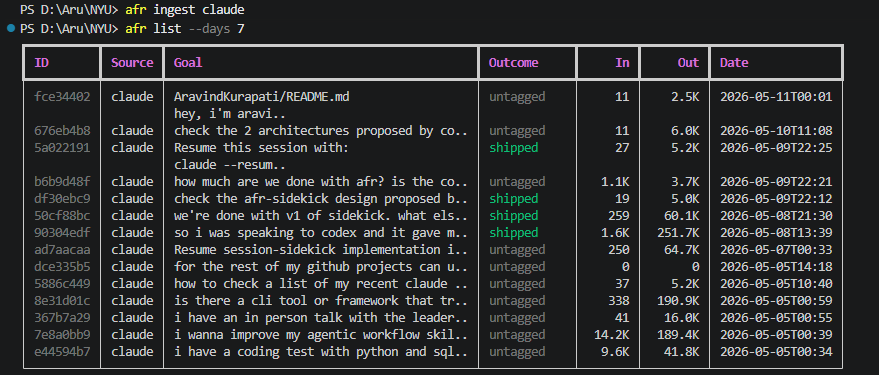
afr list --days 7
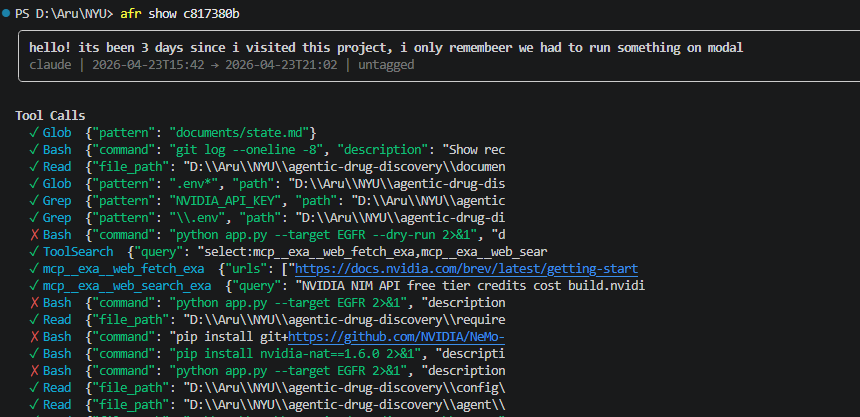
afr show 50c3f2a1
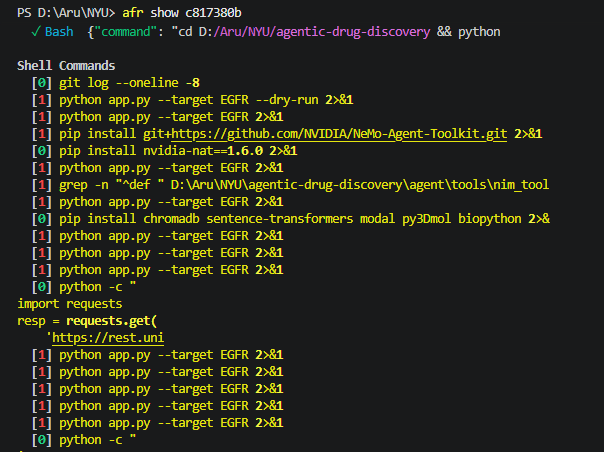
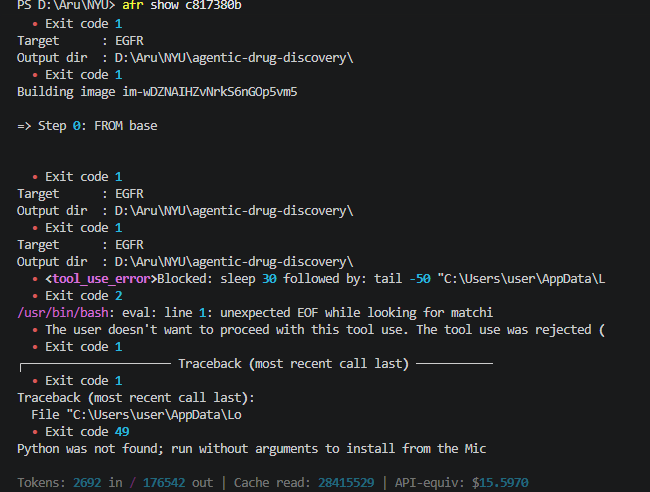
afr search "authentication"
afr search "modal" --days 30
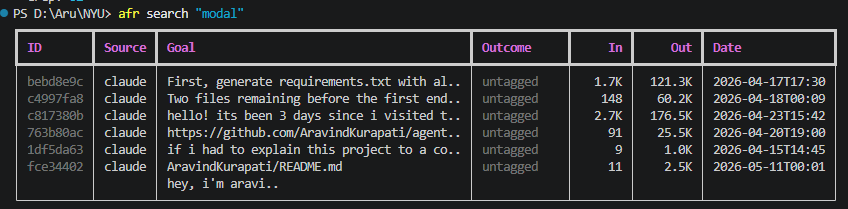
afr list/afr search show an 8-char id prefix, but claude --resume needs the
full session id and must run from the directory the session started in. afr resume
resolves the prefix to the full id plus the recorded working directory and hands you
the exact command:
afr resume 6c84c429
#   Session: 6c84c429-b7cb-4685-af6d-a318a2def2fc  (claude)
#   branch: main
#   Resume with:
#     cd "D:\Aru\NYU\prosper-podcast" && claude --resume 6c84c429-b7cb-4685-af6d-a318a2def2fc

afr resume 6c84c429 --run    # launch it now instead of printing
An ambiguous prefix lists the matches so you can add characters. Codex sessions get a
codex resume <id> command instead. Sessions recorded before v0.2.0 backfill their
directory on the next afr ingest; if the original session file is gone, resume still
gives you the full id to run from the project directory yourself.
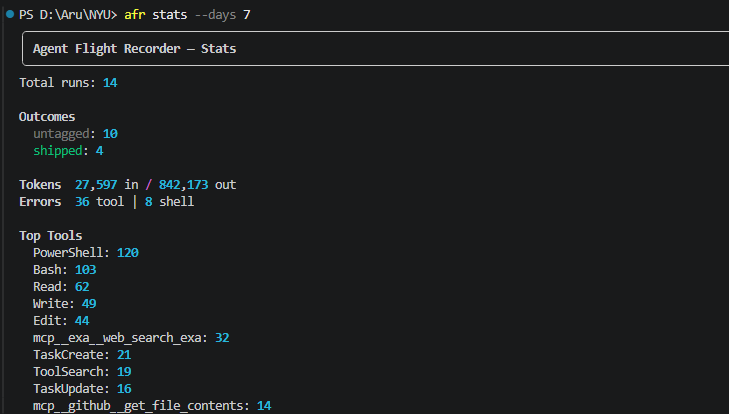
afr stats --days 30
afr config set weekly-reset "Wed 00:00"      # when your weekly cap resets
afr config set timezone "America/New_York"   # your display timezone (IANA)
afr windows
afr windows reconstructs the Anthropic 5-hour usage windows you actually
opened (from recorded run timestamps) and shows how many fresh windows fit
before your weekly reset. This is the time/window view; for the token-budget
forecast, use claude-burnrate with /usage.
afr export 50c3f2a1              # prints to stdout
afr export 50c3f2a1 --out report.md   # writes to file
Valid outcomes: shipped, blocked, abandoned, exploratory
After a few sessions solving the same class of problem, run:
afr extract-skills --min-runs 3
Candidate: deployment-modal-debug
  4 sessions | tools: Bash, Read | errors: 6
  Generate SKILL.md? [y/n]: y
  Written → generated_skills/deployment-modal-debug/SKILL.md
It clusters sessions by keyword similarity, finds ones that ended in shipped, and drafts a SKILL.md from the successful tool sequence. You approve before anything is written.
| Command | What it does |
|---|---|
afr ingest claude | Parse ~/.claude/ sessions into the database |
afr ingest codex | Parse ~/.codex/ sessions into the database |
afr list [--days N] | Table of recent runs with goals, outcomes, and token in/out |
afr show <id> | Full detail: tool calls, shell commands, errors, cost |
afr resume <id> | Print (or --run) the command to resume a session in its original directory |
afr search <query> | Full-text search across run goals and summaries |
afr stats [--days N] | Outcome distribution, top tools, error counts |
afr tag <id> <outcome> | Label a run: shipped / blocked / abandoned / exploratory |
afr export <id> [--out file] | Export session as a markdown report |
afr extract-skills | Cluster sessions, propose SKILL.md candidates |
<id> accepts the first 8 characters from afr list output.
For each session:
afr resume)shipped, blocked, abandoned, exploratorySecrets are redacted before anything is written to the database (API keys, bearer tokens, private keys, .env contents).
Everything lives at ~/.afr/afr.db - a single SQLite file on your machine. No data leaves your machine.
You can query it directly with any SQLite client:
sqlite3 ~/.afr/afr.db "SELECT user_goal, outcome, tokens_in FROM runs ORDER BY started_at DESC LIMIT 10"
| Agent | Source | Adapter |
|---|---|---|
| Claude Code | ~/.claude/projects/**/*.jsonl | Full - tool calls, tokens, errors |
| Codex (OpenAI) | ~/.codex/sessions/**/*.jsonl | Full - tool name mapping, tokens, errors |
MIT
Download counts and popularity will appear here as the collector receives them.
| Version | Published | Direct dependencies | Open version |
|---|---|---|---|
| 0.2.0 | 11 Jul 2026 | 4 |
This describes our collected data; it is not a security assessment.
Shared repository data · GitHub
Observed since 20 Oct, 23:11 UTC
No superseded metadata states collected. Unchanged observations do not create new revisions.
package:1b4666e07cc69852819250594ecd3e849c756543b045e9422df85c633528f51b