

 Repository
Current collected state Current
Observed since 20 Oct, 23:20 UTC
No superseded metadata states collected. Unchanged observations do not create new revisions.
Native GTK4 GUI to manage and resume AI coding agent sessions (Claude Code, Cursor)


Native GTK4/libadwaita desktop app to browse, name, and resume your AI coding-agent sessions in embedded terminal tabs. Supports Claude Code and Cursor, side by side.
Unofficial community tool. An independent community project, not affiliated with or endorsed by any agent vendor (including Anthropic). It never modifies your agents' own session data — all app state lives in its own config file.
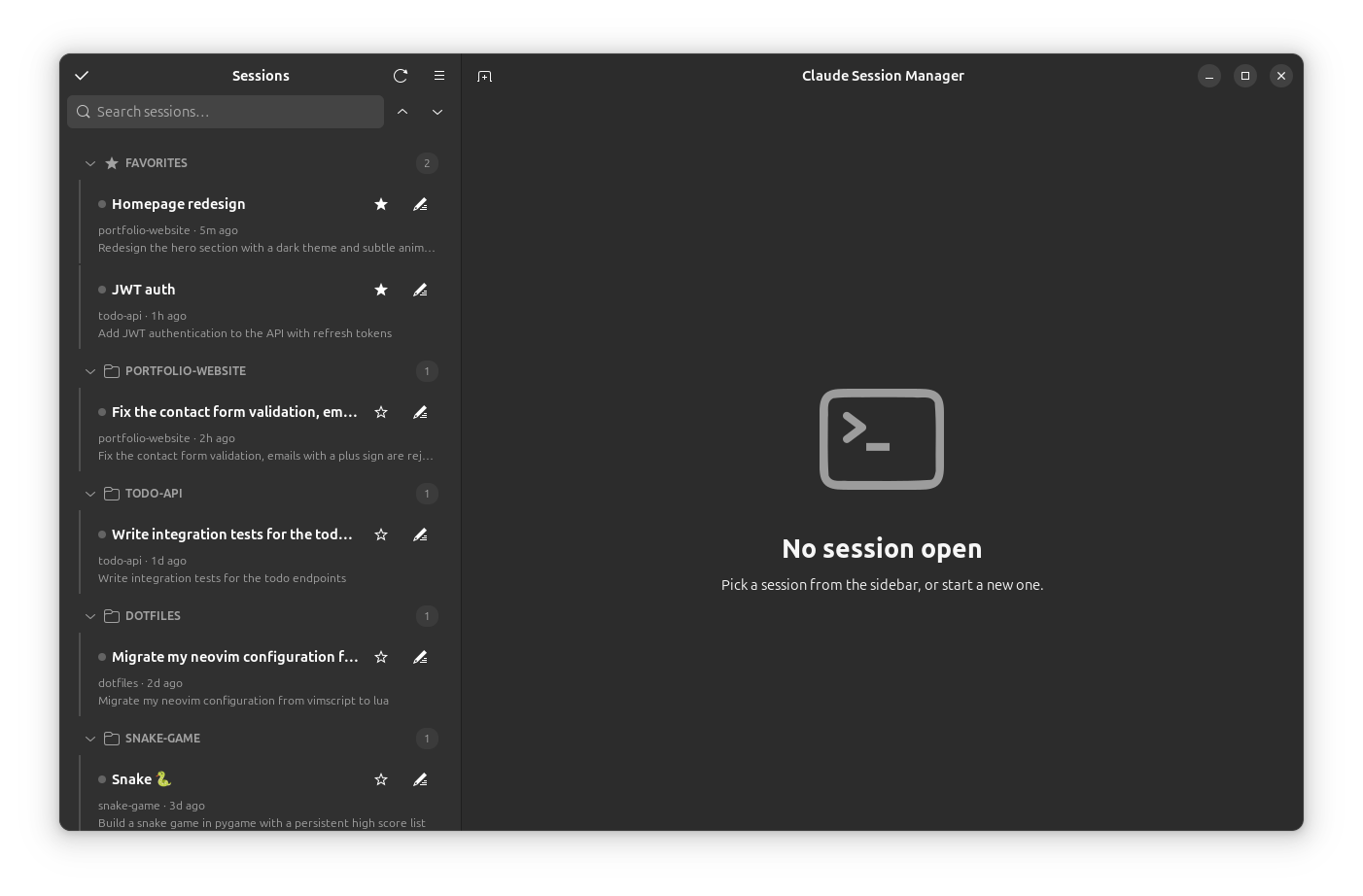
Features:
~/.claude/projects/), grouped by project (collapsible headers, with collapse-all/expand-all buttons next to the search box), with a Favorites section pinned on top — star a session to move it there. A search box filters by name, project, preview, or session id, and the list updates live as sessions are created or written to.~/.config/agent-session-manager/state.json — your agents' own session files are never modified.$SHELL with the agent's resume command (claude --resume <session-id> for Claude Code) typed into it, in the session's original project directory. When the agent exits you drop to a shell prompt; the tab closes when the shell exits. Closing a tab asks the agent to exit cleanly (Claude Code's /exit) in the background first.Ctrl+Shift+G) over the tab's scrollback.F9. Shift+Enter inserts a newline in the agent's prompt.--fork-session), rename, favorite, details (messages/models/tokens, a peek at recent messages, and MCP servers/usage), copy session id, reveal transcript, hide, or move the transcript to trash.claude) there.Ctrl+Shift+K) jumps to any session by type-ahead; the New Session button remembers your last folder; the sidebar is resizable and its width is remembered.~/.claude.json, global and per-project.Ctrl+,): terminal font, scrollback, color scheme, and a Show folder path toggle for the sidebar.--add-dir), or continue the last session in a folder..jsonl transcript directly; permanent delete sits alongside Move to trash; Ctrl+Shift+E toggles a 😊 marker on the current tab.| Shortcut | Action |
|---|---|
Ctrl+Shift+F | Focus search |
Ctrl+Shift+T | New session |
Ctrl+Shift+N | New window |
Ctrl+Shift+W | Close current tab |
Ctrl+PgUp / Ctrl+PgDn | Previous / next tab |
Ctrl+Shift+C / Ctrl+Shift+V | Copy / paste in terminal |
Ctrl+Shift+G | Find in terminal |
Ctrl+Shift+K | Quick switcher (jump to any session) |
Ctrl+Shift+E | Toggle 😊 marker on the current tab |
F9 | Toggle sidebar |
Ctrl+, | Preferences |
Python ≥ 3.10, GTK 4, libadwaita ≥ 1.5, VTE (GTK 4 build), PyGObject — from your distro's packages:
# Ubuntu / Debian
sudo apt install python3-gi gir1.2-gtk-4.0 gir1.2-adw-1 gir1.2-vte-3.91

# Fedora
sudo dnf install python3-gobject gtk4 libadwaita vte291-gtk4

# Arch
sudo pacman -S python-gobject gtk4 libadwaita vte4
Plus a supported agent's CLI on your PATH — currently the claude CLI.
Installing with
pipx? PyGObject comes from the system, so usepipx install --system-site-packages agent-session-manager-gtk.
Ubuntu — PPA:
sudo add-apt-repository ppa:matemiller992/agent-session-manager
sudo apt update && sudo apt install agent-session-manager
Arch — AUR: yay -S agent-session-manager
Any distro — pipx: pipx install --system-site-packages agent-session-manager-gtk
Debian/Ubuntu — .deb package (from the latest release):
sudo apt install ./agent-session-manager_0.8.0_all.deb
Dependencies are pulled in automatically; the app appears in your app grid as "Agent Session Manager".
From source:
git clone https://github.com/r4nd3l/agent-session-manager.git
cd agent-session-manager
python3 -m claude_session_manager
Or install the desktop launcher + icon (shows up in the app grid as "Agent Session Manager"):
./data/install.sh
Terminal shortcuts: Ctrl+Shift+C copy, Ctrl+Shift+V paste.
claude_session_manager/
├── app.py        # Adw.Application entry point + CSS
├── window.py     # main window: split view, sidebar, tabs, actions, dialogs
├── sessions.py   # session discovery + transcript statistics
├── state.py      # persistent app state (names, favorites, hidden, settings)
├── prefs.py      # preferences dialog
└── terminal.py   # VTE terminal tab spawning the agent CLI
data/
├── io.github.r4nd3l.AgentSessionManager.desktop   # launcher template
├── icons/io.github.r4nd3l.AgentSessionManager.svg # app icon
└── install.sh                              # install launcher + icon for current user
scripts/
├── build_deb.sh                            # build the .deb package into dist/
└── make_demo_data.py                       # fake sessions for screenshots/demos
Releases are one step: push a v* tag. .github/workflows/release.yml then
builds the wheel/sdist and the .deb, creates the GitHub Release (with the
.deb attached and auto-generated notes), and publishes to
PyPI via trusted
publishing (OIDC — no API tokens).
# bump version in pyproject.toml / __init__.py / debian/changelog, commit, then:
git tag -a v0.8.0 -m v0.8.0 && git push origin v0.8.0
PyPI trusted-publisher setup expects workflow release.yml (owner r4nd3l,
repo agent-session-manager). The AUR and PPA are updated separately
(see packaging/).
Download counts and popularity will appear here as the collector receives them.
| Version | Published | Direct dependencies | Open version |
|---|---|---|---|
| 1.0.0 | 20 Jun 2026 | 0 |
This describes our collected data; it is not a security assessment.
Shared repository data · GitHub
Observed since 20 Oct, 23:20 UTC
No superseded metadata states collected. Unchanged observations do not create new revisions.
package:7262654069fffa6a21db99c98739bce08aaa14219f27ebf7e1e7842267d810ef