
 Repository
Current collected state Current
Observed since 20 Oct, 23:36 UTC
No superseded metadata states collected. Unchanged observations do not create new revisions.
Local Codex plugin for evidence-driven evaluation and checkpointed tuning of existing Agents.
简体中文 | English

Find out why your Agent fails, and check whether each change actually helps.
Agent Tune Kit (ATK) is a local Codex plugin. Bring your Agent project and test tasks to a Codex conversation to evaluate its behavior, investigate failures, try changes, and compare results before and after.
Use it to improve an existing Agent's prompts, business Skills, code, or configuration. No migration to a new Agent framework is required.
Install · Quick start · Analyze existing results · FAQ
| Your question | What you can do with ATK |
|---|---|
| My Agent sometimes fails. Where should I start? | Evaluate representative tasks and investigate failures using outputs and execution records |
| A prompt change fixed a few examples. What about the rest? | Compare versions and check that previously working tasks still pass |
| I've tried many changes. Which ones helped? | Keep results and adoption decisions, with support for restoring recorded versions |
| I already have batch results or Langfuse exports | Import them for analysis before setting up Agent execution |
ATK is for an existing Agent or existing execution results. If you are building an Agent from scratch, get it to complete a real task first, then use ATK to evaluate and improve it.
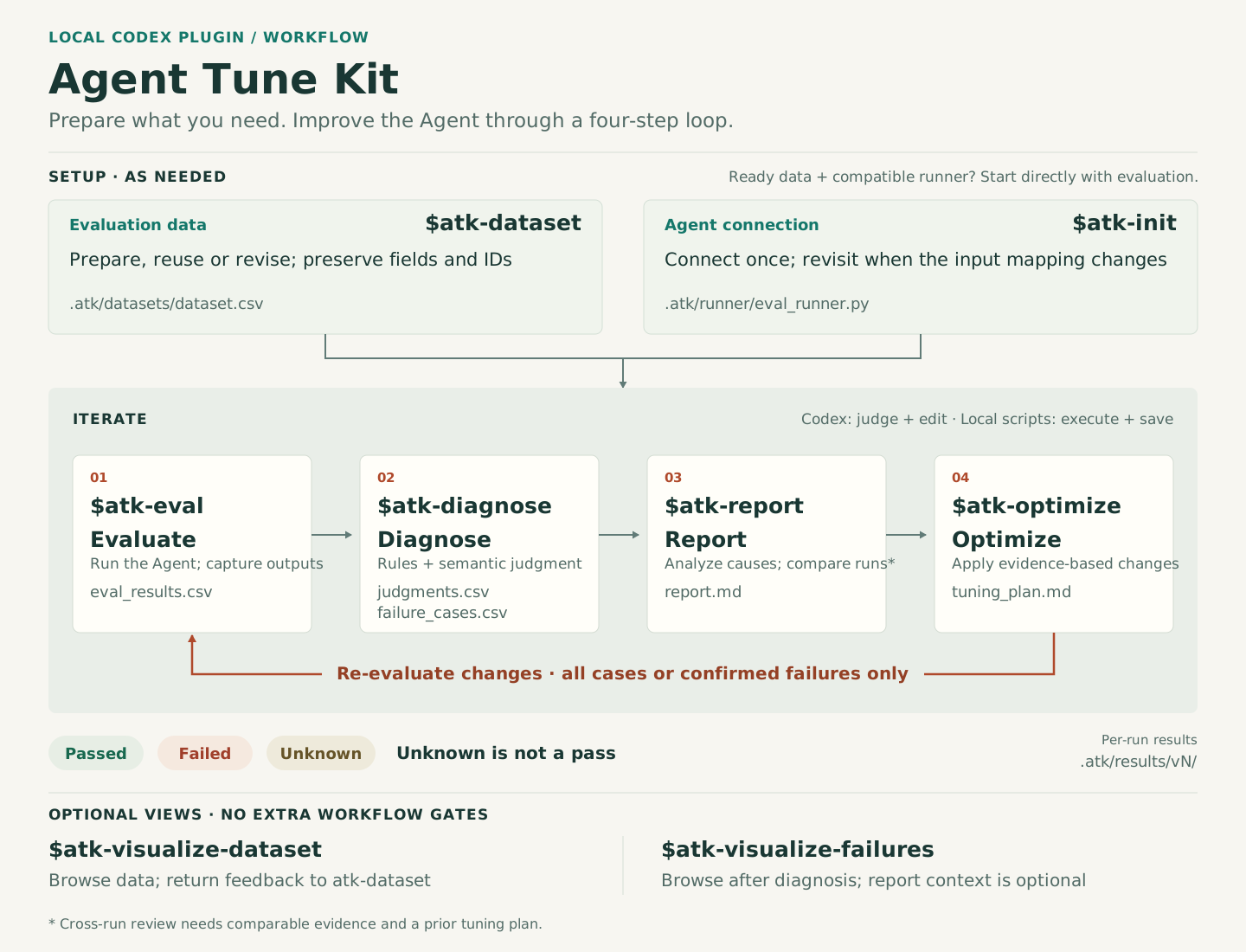
ATK connects this workflow to your existing project:
| Part | Responsibility | Benefit |
|---|---|---|
| Your Agent | Runs tasks through its existing entry point | Keep your framework, models, and tools |
| ATK Skills in Codex | Guide the current session through analysis and changes | Work in natural language without writing internal operation commands |
| Local ATK tools | Run evaluations, save evidence, compare versions, and manage Git checkpoints | Review the basis for decisions and restore changes you do not adopt |
You set the evaluation criteria and allowed scope of changes. ATK preserves inconclusive results too, helping you distinguish changes worth keeping from those that need more evidence.
ATK replies, reports, and descriptions in new artifacts default to Simplified Chinese unless you explicitly request another language. Protocol fields and original evidence retain their original form.
You need local Codex, Python 3.11+, and uv.
1. Run in your terminal:
uv tool install agent-tune-kit@latest
atk install
2. Enter /plugins in Codex, then find and enable Agent Tune Kit.
3. Open your own Agent project in Codex and enter $atk-init to begin.
All $atk-* examples below are Skill calls entered in a Codex conversation, not terminal commands. You do not need to download this repository to use ATK.
If your shell cannot find atk, run uv tool update-shell and open a new terminal. If Skills are missing in Codex, refresh the plugin list and open a new session. Run atk status in your terminal to check installation status.
Choose a small goal, such as reducing incorrect refund-policy answers in a support Agent. Prepare:
Formal evaluation and tuning require a clean Git working tree; commit or safely set aside existing changes first. Evaluation runs your Agent and may consume model or tool credits. Use a test environment for actions such as sending messages or writing to databases.
Replace the example paths below with your own. Send one call at a time and wait for it to finish.
$atk-init My Agent entry point is scripts/agent.py. Check its runtime environment and input/output handling, then connect it.
$atk-dataset Use the tasks in data/eval.csv. Help confirm inputs, expected results, and judging criteria. Keep already working tasks to check for regressions.
$atk-init only confirms the entry point, dependencies, and input/output handling, then sets up the adapter; $atk-dataset organizes test tasks and judging criteria. If you do not have a dataset file yet, give $atk-dataset real task examples to organize.
$atk-eval Confirm repeat count, timeout, and budget, then evaluate the current version as a baseline for comparison.
$atk-diagnose Investigate failed tasks. Identify the most useful problem to address first, with evidence and remaining uncertainties.
You receive task-level judgments and a failure analysis. The cause may be a prompt, tool, data, or runtime issue. Locate the cause before choosing what to change.
$atk-optimize Confirm the allowed scope of changes for this round, then prepare one change for the confirmed problem.
$atk-validate Compare results before and after the change. Check whether the target problem improves and previously working tasks regress.
$atk-decide Use the validation results to keep, reject, or defer this change. Explain the decision.
Normal acceptance requires passing validation and creates a local Git commit in your project. Rejection or deferral preserves evaluation records and restores the previous file contents. ATK does not automatically push, publish, or deploy.
Repeat step 3 for additional problems. Before finishing, check the combined effect of all changes:
$atk-validate Run final validation, comparing all accepted changes with the version at the start of this round.
$atk-decide Close this round based on final validation. Summarize accepted changes, their effects, and unresolved issues.
Import CSV, JSON, or JSONL batch results, or Langfuse exports, directly for analysis. Import-only analysis needs neither an Agent execution command nor Git.
Send these calls in Codex, one at a time:
$atk-init Only analyze existing results for now. Do not run the Agent.
$atk-eval Import data/traces.json. Confirm field meanings, redaction rules, and judging criteria, then assess the results.
$atk-diagnose Summarize the main failure causes, supporting evidence, and information still needed.
$atk-decide Save the analysis and close this round without adopting changes.
To test improvements later, add Agent runtime configuration and a Git baseline while keeping existing evidence. See the usage guide for import formats and mappings.
Results are saved under .atk/ in your Agent project. Ask Codex to help review them:
Summarize this round: which tasks failed, what improved, and did anything regress? Link the evidence files and generate a local HTML evaluation report.
ATK keeps tasks, actual outputs, judgments, changes, and decisions. To stop midway, ask Codex to pause and record progress. When resuming, ask it to check the current project state first.
| What you want to do | Skill |
|---|---|
| Connect a project | $atk-init |
| Prepare or add test tasks | $atk-dataset |
| Run evaluations, import results, or reassess them | $atk-eval |
| Investigate failures | $atk-diagnose |
| Try a change | $atk-optimize |
| Check its effects | $atk-validate |
| Keep, reject, defer, roll back changes, or close a round | $atk-decide |
Can I use it without reference answers?
Yes, starting with analysis. Independently verifiable requirements can be assessed; judgments without reliable evidence remain unknown. The Agent's original answer is not automatically a correct reference answer.
Does “local plugin” mean fully offline?
Evaluation records and Git checkpoints are stored locally. Analysis uses your current Codex session, and your Agent may call external models or services. Handle input data according to those services' data policies.
How do I upgrade or troubleshoot installation?
Rerun both installation commands to update the CLI and Skills. atk install checks the installation automatically and shows only the result and activation guidance. It does not keep historical backups or manage installation versions.
Can I continue from version 0.x?
Version 1.0.0 does not automatically migrate old .atk data. Initialization stops if it finds a legacy directory. Back it up and decide how to preserve it, or start in a clean target project. Do not overwrite it.
Does passing validation guarantee better production results?
Validation applies to the tasks and criteria used. Real multi-task gains, valid change-adoption commits, and external repair workflows still await full acceptance. Start with a small comparison in your own project; see the acceptance record.
The following detailed documents are in Chinese:
Install from this repository and run development checks:
uv run --frozen atk install
uv run --frozen pytest -q
uv run --frozen ruff check .
python3 scripts/validate_skill_pack.py
uv build --no-sources
For Skill development and internal interfaces, read the shared Skill workflow.
Download counts and popularity will appear here as the collector receives them.
| Version | Published | Direct dependencies | Open version |
|---|---|---|---|
| 1.1.0 | 11 Oct 2026 | 0 |
This describes our collected data; it is not a security assessment.
Observed since 20 Oct, 23:36 UTC
No superseded metadata states collected. Unchanged observations do not create new revisions.
package:e85225a4f2f0d9ca7608a4bfe012a3ad8cede3b517a30a00686b1bc71ba81a39