
 Repository
Current collected state Current
Observed since 20 Oct, 21:28 UTC
No superseded metadata states collected. Unchanged observations do not create new revisions.
AgentApps — A flexible multi-agent orchestration framework with visual Flow Builder
A flexible multi-agent orchestration framework for building intelligent agent applications with a visual Flow Builder.
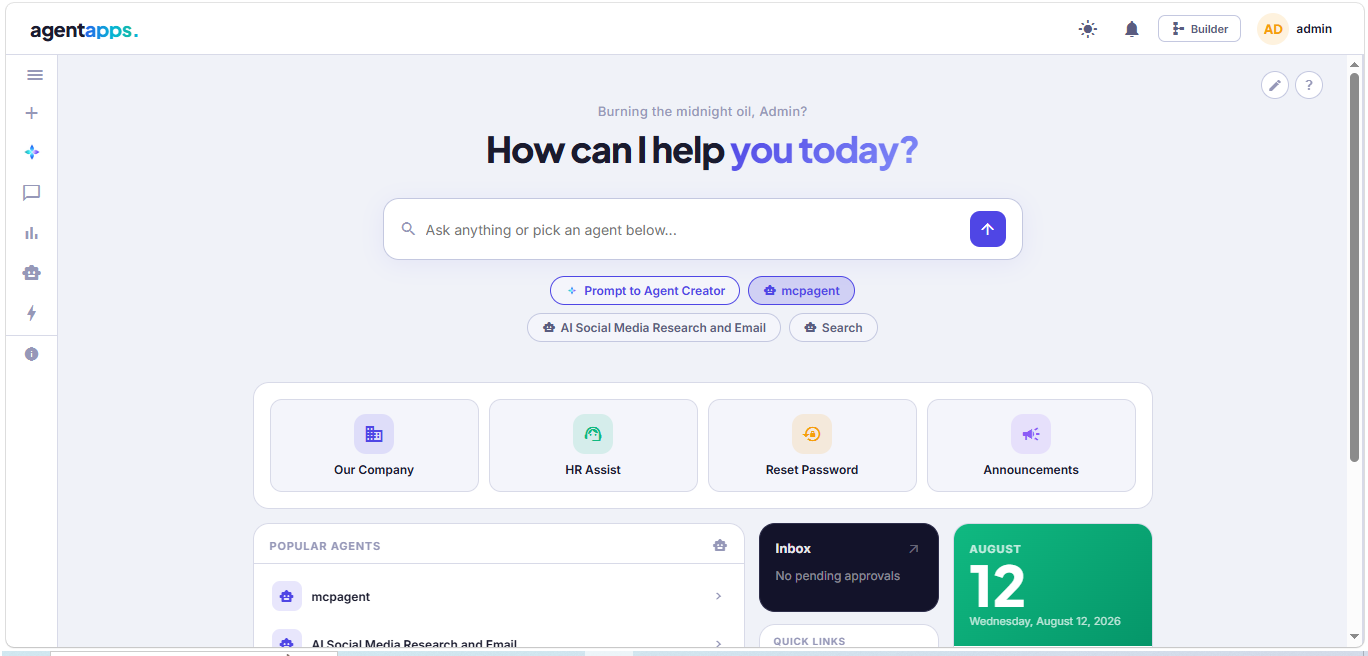
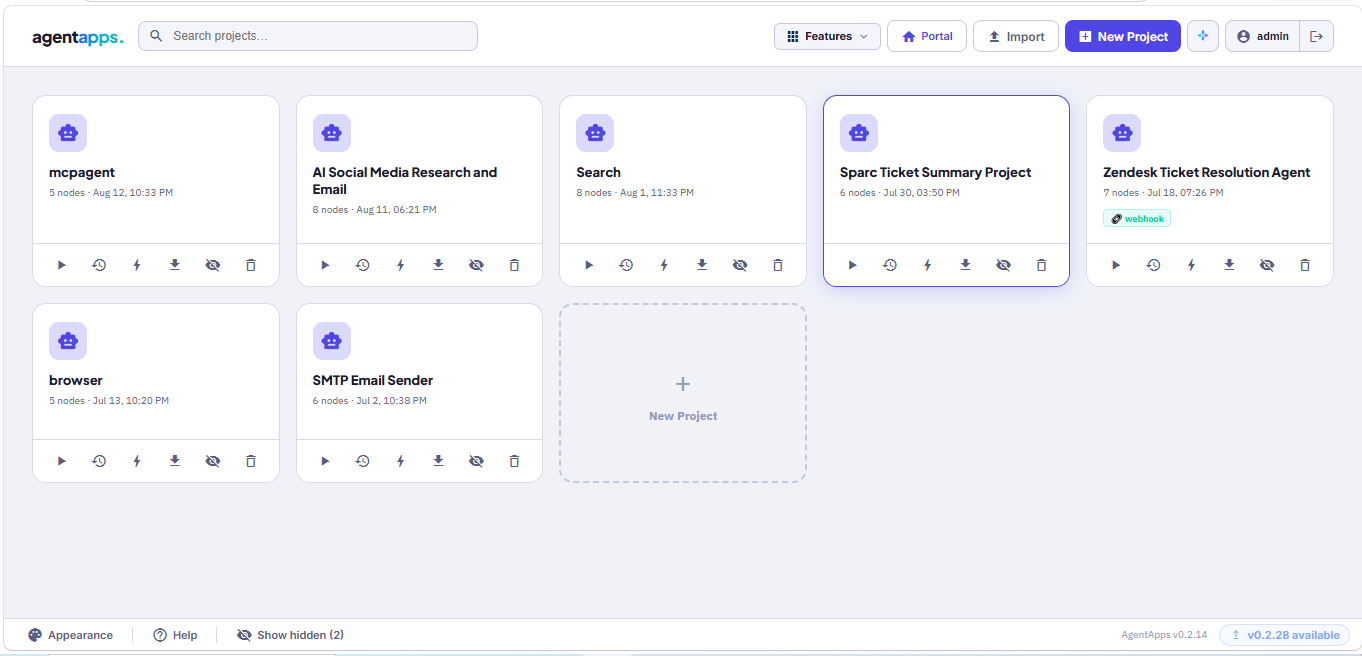
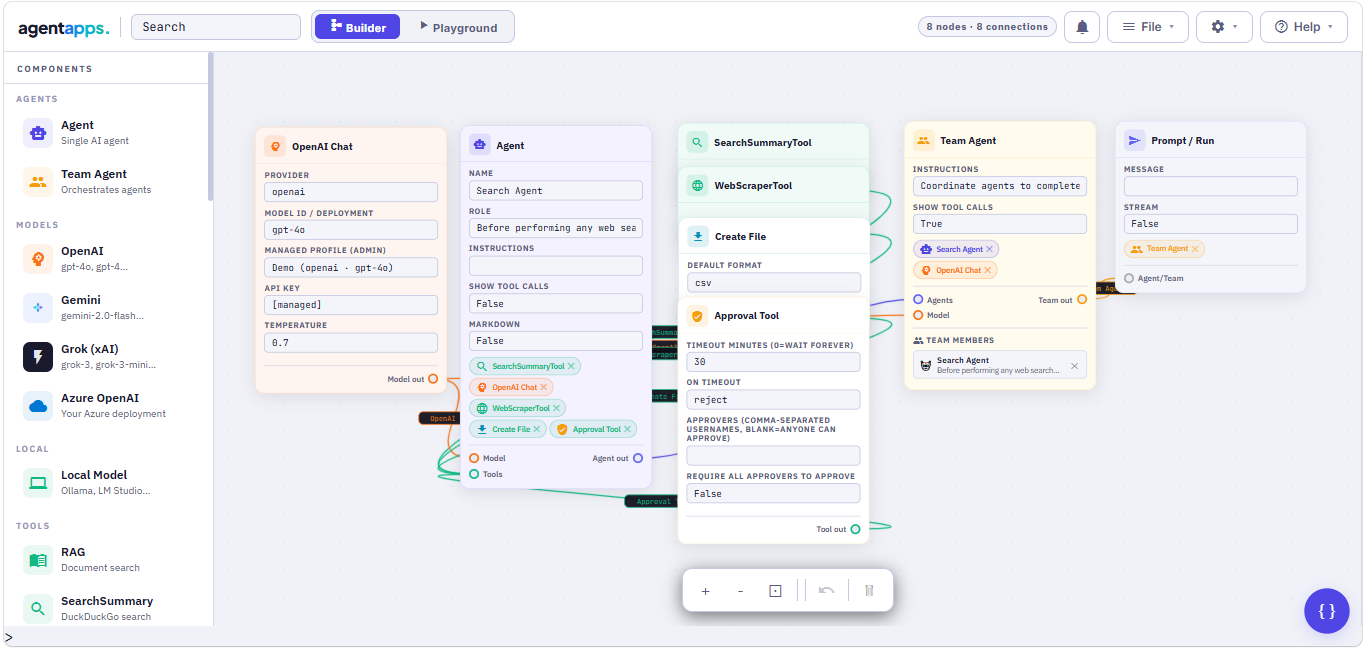
🤖 Simple Agent Creation — Clean, intuitive agent setup
👥 Team Collaboration — Multiple agents working together
🔄 Sequential Workflows — Automatic multi-step execution
🛠️ Built-in Tools — Web search, scraping, calculations
🎯 Custom Tools — Easy 3rd-party integrations (Jira, Slack, GitHub, SMTP and more)
📊 Streaming Support — Real-time responses
🔍 Web Search — DuckDuckGo integration
🌐 Web Scraping — Extract content from any URL
🌟 Multi-Model Support — OpenAI, Google Gemini, xAI Grok, Ollama (local)
🗂️ Platform Tables — Built-in structured data storage
⏰ Triggers & Scheduler — Run agents on a schedule or via webhook
🐚 Shell Tool — Execute server commands from agents (opt-in)
🔐 Role-Based Access — Admin, Editor, Operator, Viewer roles
🔑 SSO / Microsoft Azure AD — Single Sign-On support
🏗️ AI Builder — Describe an agent in plain English and it builds itself
🌍 Portal — End-user chat interface for your deployed agents
🔌 MCP Client Tool — Connect to any MCP server and use its tools (New)
📌 Pinned Response Cards — Pin agent responses to the Portal hero page (New)
💾 Session Persistence — Responses saved even if you navigate away (New)
pip install agentapps
agentapps-flow
This starts the server and automatically opens the visual Flow Builder in your browser at http://localhost:7860.
# Custom port
agentapps-flow --port 8080

# Don't open browser automatically
agentapps-flow --no-browser

# Dev mode with hot-reload
agentapps-flow --reload
agentapps-flow --password mysecretpassword
export AGENTAPPS_PASSWORD=mysecretpassword
agentapps-flow
If no password is set, one is auto-generated and printed to the console:
╔══════════════════════════════════════════════╗
║   🔑 Auto-generated password:                ║
║      xK9mP2nQvR4sT7uW                        ║
╚══════════════════════════════════════════════╝
Passwords are stored as secure hashes — never in plaintext.
Enable agents to run shell commands on the server (Windows cmd, Mac/Linux bash, PowerShell):
agentapps-flow --enable-shell
Or via environment variable:
AGENTAPPS_ENABLE_SHELL=true agentapps-flow
Optionally restrict the working directory:
AGENTAPPS_SHELL_DIR=/path/to/scripts agentapps-flow --enable-shell
Shell tool is disabled by default. All commands are logged and protected by a blocklist. Use with care on shared servers.
| Provider | Model IDs |
|---|---|
| OpenAI | gpt-4o, gpt-4-turbo, gpt-3.5-turbo, gpt-5.6-luna |
| Google Gemini | gemini-2.0-flash, gemini-1.5-pro |
| xAI Grok | grok-3, grok-3-mini |
| Ollama (local) | Any locally served model via http://localhost:11434 |
| Azure OpenAI | Any Azure-hosted OpenAI deployment |
from agentapps import Agent
from agentapps.model import OpenAIChat
from agentapps.tools import SearchSummaryTool

agent = Agent(
    name="Research Assistant",
    role="Search and analyze information",
    model=OpenAIChat(id="gpt-4o", api_key="your-openai-key"),
    tools=[SearchSummaryTool()],
    instructions=["Always include sources"],
    show_tool_calls=True
)

agent.print_response("What is the latest news about AI?")
Get an OpenAI API key: https://platform.openai.com/api-keys
from agentapps import Agent
from agentapps.model import GeminiChat
from agentapps.tools import SearchSummaryTool

agent = Agent(
    name="Research Assistant",
    role="Search and analyze information",
    model=GeminiChat(id="gemini-2.0-flash-exp", api_key="your-google-api-key"),
    tools=[SearchSummaryTool()],
    instructions=["Always include sources"],
    show_tool_calls=True
)

agent.print_response("What is the latest news about AI?")
Get a Gemini API key: https://makersuite.google.com/app/apikey
from agentapps import Agent
from agentapps.model import GrokChat
from agentapps.tools import SearchSummaryTool

agent = Agent(
    name="Research Assistant",
    role="Search and analyze information",
    model=GrokChat(id="grok-3-mini", api_key="your-xai-api-key"),
    tools=[SearchSummaryTool()],
    instructions=["Always include sources"],
    show_tool_calls=True
)

agent.print_response("What is the latest news about AI?")
Get a Grok API key: https://console.x.ai
Search the web and get detailed snippets:
from agentapps.tools import SearchSummaryTool

agent = Agent(
    name="Searcher",
    model=OpenAIChat(id="gpt-4o", api_key="key"),
    tools=[SearchSummaryTool()]
)
Scrape content from URLs:
from agentapps.tools import WebScraperTool

agent = Agent(
    name="Scraper",
    model=OpenAIChat(id="gpt-4o", api_key="key"),
    tools=[WebScraperTool()]
)
Perform calculations:
from agentapps.tools import CalculatorTool
agent = Agent(name="Calculator", model=OpenAIChat(id="gpt-4o", api_key="key"), tools=[CalculatorTool()])
Connect to any MCP server and use its tools:
from agentapps.tools import MCPClientTool

tool = MCPClientTool(
    server_url="http://localhost:8000/mcp",
    tool_name="add_numbers",
    tool_description="Add two numbers together",
    auth_type="none"   # or "bearer" / "apikey"
)

agent = Agent(name="MCP Agent", model=OpenAIChat(id="gpt-4o", api_key="key"), tools=[tool])
agent.print_response("Add 42 and 58")
Or use the MCP Tool node in the Flow Builder — enter the server URL, click Discover Tools, select a tool, and it auto-fills all fields.
Create teams that work together sequentially:
from agentapps import Agent
from agentapps.model import OpenAIChat
from agentapps.tools import SearchSummaryTool, WebScraperTool

search_agent = Agent(
    name="Search Agent",
    role="Search the web",
    model=OpenAIChat(id="gpt-4o", api_key="your-key"),
    tools=[SearchSummaryTool()]
)

scraper_agent = Agent(
    name="Scraper Agent",
    role="Read web pages",
    model=OpenAIChat(id="gpt-4o", api_key="your-key"),
    tools=[WebScraperTool()]
)

team = Agent(
    team=[search_agent, scraper_agent],
    instructions=[
        "First, search for relevant URLs",
        "Then, scrape content from those URLs",
        "Finally, provide a comprehensive answer"
    ],
    show_tool_calls=True
)

team.print_response("Research NVIDIA's latest AI developments")
Create your own tools easily:
from agentapps import Tool

class WeatherTool(Tool):
    def __init__(self):
        super().__init__(
            name="get_weather",
            description="Get weather for a city"
        )

    def execute(self, city: str) -> str:
        return f"Weather in {city}: Sunny, 72°F"

    def get_parameters(self):
        return {
            "type": "object",
            "properties": {
                "city": {"type": "string", "description": "City name"}
            },
            "required": ["city"]
        }

agent = Agent(
    name="Weather Agent",
    model=OpenAIChat(id="gpt-4o", api_key="key"),
    tools=[WeatherTool()]
)
You can also register custom tools via the Flow Builder UI — no restart required.
The Portal is the end-user interface for interacting with your deployed agents.
Pin any agent response directly to the hero page:
agent = Agent(
    name="Stock Analyst",
    role="Analyze stocks",
    model=OpenAIChat(id="gpt-4o", api_key="key"),
    tools=[SearchSummaryTool()],
    instructions=["Include price targets and analyst ratings"]
)

agent.print_response("Analyze NVDA stock with latest news and recommendations")
research_team = Agent(
    team=[search_agent, scraper_agent],
    instructions=[
        "Search for academic sources",
        "Read full articles",
        "Provide a comprehensive summary with citations"
    ]
)

research_team.print_response("What are the latest breakthroughs in quantum computing?")
Agent(
    name: str = "Agent",
    role: str = "General Assistant",
    model: Model = None,
    tools: List[Tool] = None,
    instructions: List[str] = None,
    team: List[Agent] = None,
    show_tool_calls: bool = False,
    markdown: bool = False,
    temperature: float = None
)
| Method | Description |
|---|---|
run(message, stream=False) | Execute agent |
print_response(message, stream=False) | Print response to console |
clear_history() | Clear conversation history |
add_tool(tool) | Add a tool dynamically |
get_info() | Get agent information |
The platform supports four roles assignable per user:
| Role | Description |
|---|---|
| Admin | Full access — users, settings, SSO, shell tool |
| Editor | Build and run — create/edit agents, tools, schedules |
| Operator | Run only — use agents via portal, view reports and approvals |
| Viewer | Read only — view projects, tables, reports |
Manage users and assign roles from the Admin → Users section in the Flow Builder.
Run agents automatically on a schedule or via external webhook:
Connect to any MCP (Model Context Protocol) server directly from the Flow Builder.
Supported transports: Streamable HTTP (JSON-RPC 2.0)
Auth options: None, Bearer Token, API Key
Compatible with: FastMCP, official MCP servers, any compliant server
from agentapps.tools import MCPClientTool

tool = MCPClientTool(
    server_url="https://mcp.example.com",
    tool_name="search",
    tool_description="Search for information",
    tool_schema={
        "type": "object",
        "properties": {"query": {"type": "string"}},
        "required": ["query"]
    },
    auth_type="bearer",
    auth_value="your-token"
)
Secure HTTPS is required for production webhooks.
pip install cryptography
agentapps-flow --ssl-self-signed
agentapps-flow --ssl-cert /path/to/cert.pem --ssl-key /path/to/key.pem
pip install certbot
certbot certonly --standalone -d yourdomain.com

agentapps-flow \
  --ssl-cert /etc/letsencrypt/live/yourdomain.com/fullchain.pem \
  --ssl-key  /etc/letsencrypt/live/yourdomain.com/privkey.pem
agentapps-flow --port 443 --ssl-self-signed
On Linux/macOS, binding to port 443 requires root or sudo. Consider using a reverse proxy (nginx, Caddy) for production.
# Terminal 1
agentapps-flow

# Terminal 2
ngrok http 7860
Use the https://xxxx.ngrok-free.app URL as your webhook base URL.
https://your-domain.com/webhook/<project-name>?token=<bearer-token>
Tokens are generated in the Flow Builder under ☰ Menu → 🔗 Webhooks.
| Flag | Default | Description |
|---|---|---|
--port | 7860 | Port to listen on |
--host | 0.0.0.0 | Host to bind to |
--no-browser | off | Don't auto-open browser |
--reload | off | Hot-reload on file changes (dev mode) |
--password | — | Set UI login password |
--ssl-self-signed | off | Auto-generate self-signed certificate |
--ssl-cert | — | Path to SSL certificate .pem file |
--ssl-key | — | Path to SSL private key .pem file |
--enable-shell | off | Enable ShellTool |
--enable-browser | off | Enable BrowserTool |
MIT License
Contributions welcome! Please feel free to submit a Pull Request on GitHub.
Download counts and popularity will appear here as the collector receives them.
| Version | Published | Direct dependencies | Open version |
|---|---|---|---|
| 0.2.37 | 23 Aug 2026 | 24 |
This describes our collected data; it is not a security assessment.
Observed since 20 Oct, 21:28 UTC
No superseded metadata states collected. Unchanged observations do not create new revisions.
package:63f63ff19ecfd6a65f1d95316216fe32d8894d21f402267401dbefeeb7704edc