
 Repository
Current collected state Current
Observed since 20 Oct, 21:35 UTC
No superseded metadata states collected. Unchanged observations do not create new revisions.
Description of your package
Agent Bruno is a package tailored for the energy and utility sector. It includes a variety of modules, classes, functions, and methods, all implementing Generative AI techniques outlined in established research papers. Built on LangChain and OpenAI, this user-friendly package aims to streamline your AI workflow.
The purpose of this package is to serve as a valuable resource, offering references, techniques, best practices, and guidance for solving diverse business problems using Generative AI. With the rapid pace of research in this field, keeping up with the latest techniques can be challenging. Agent Bruno addresses this challenge by encapsulating the implementation of various tricks and techniques, specifically curated for use in the energy and utility sector. Its primary goal is to provide easy access to these resources, simplifying your AI journey.
Note: Please note that this package is not intended for production use. Instead, it's designed for quick reference, experimentation, and hypothesis testing. By leveraging Agent Bruno, you can reduce the time spent on research and gain a better understanding of which techniques to implement and how to use them effectively.
This module offers an implementation of the STORM technique using LangChain, LangGraph, and OpenAI. STORM, which stands for Synthesis of Topic Outlines through Retrieval and Multi-perspective Question Asking, enables the creation of well-structured, comprehensive articles from scratch, comparable in depth and breadth to Wikipedia pages. The technique, introduced in the research paper "Assisting in Writing Wikipedia-like Articles From Scratch with Large Language Models" by Shao et al., operates through several stages, some of which are customized to suit the energy and utility sector use cases - for example connecting domain specific knowledge catalogue:
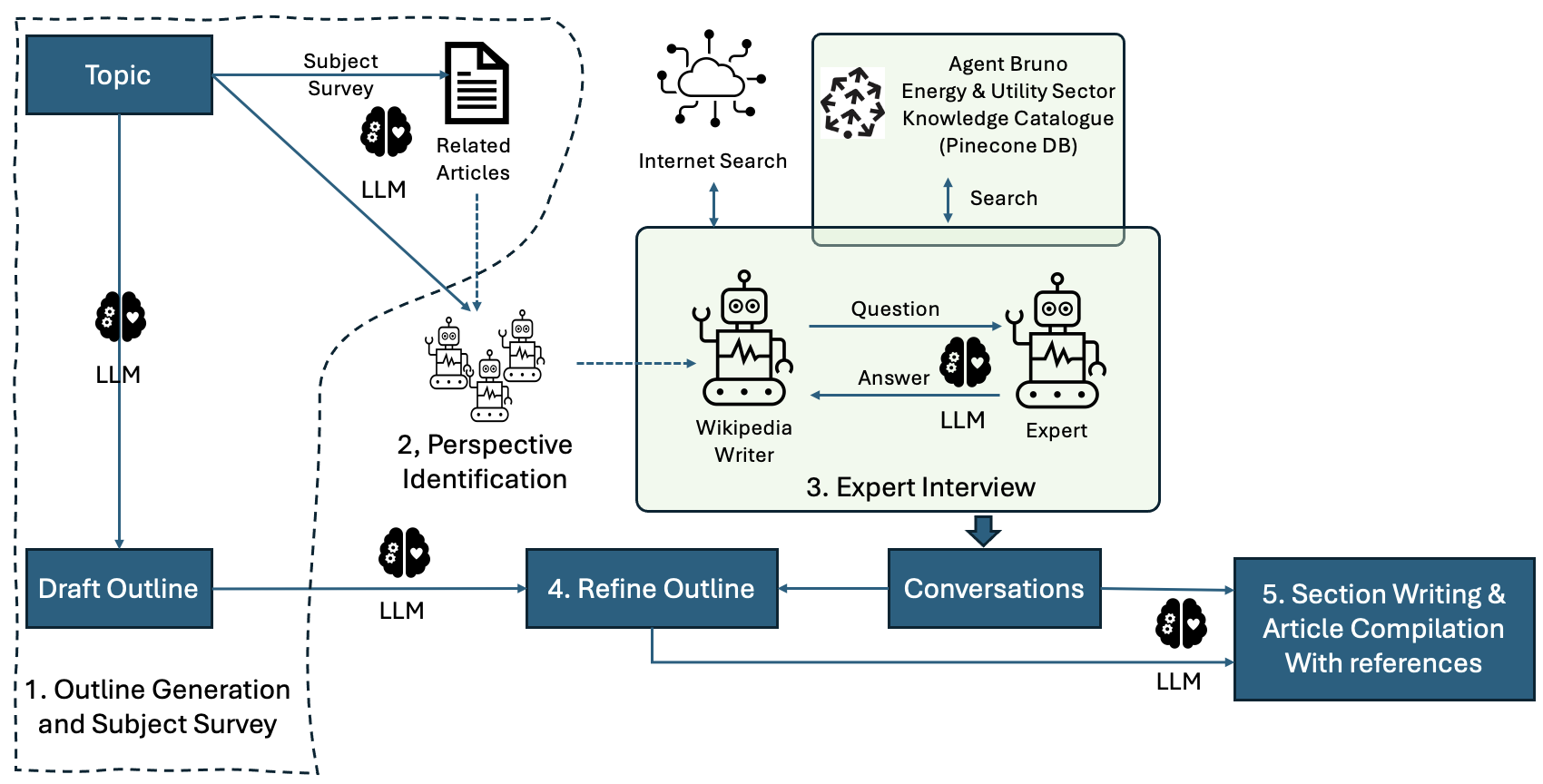
It's worth noting that most of the code is derived from LangGraph’s implementation of STORM as a baseline, further enhanced to cater to domain-specific needs and optionally integrate the Pinecone vector store.
Integrating the vector store (Pinecone, in the current release) in this technique proves beneficial for business use cases, where companies may leverage internal data alongside external sources. The enhanced insights provided by integrating domain-specific knowledge catalogues can significantly expedite processes like regulatory reporting and submission, such as drafting RIIO submissions/draft determinations for Regulators. As a consultant in the energy sector, I've found that the STORM technique, when integrated with a domain-specific and private knowledge catalog, can greatly accelerate the drafting process.
Give it a try on the topic of your choice: https://agentbrunopublic.streamlit.app
Agent Bruno is a package tailored for the energy and utility sector. It includes a variety of modules, classes, functions, and methods, all implementing Generative AI techniques outlined in established research papers - starting with STORM technique. Built on LangChain using OpenAI LLM, this user-friendly package aims to streamline your AI workflow.
Now, I will show you how you can write wikipedia like articles with STORM technique using AgentBruno Package and view the article in browser using streamlit.
Step 1: Install AgentBruno Package:
pip install AgentBruno
This will install AgentBruno STORM module along with all the required packages including LangChain, LangGraph, streamlit and OpenAI. I recommend installing this package in a separate python enviornment.
Step 2: Create a new python file for example: 'agentbruno_articlewriter.py' and import following
#agentbruno_articlewriter.py
from AgentBruno.storm import Storm
import asyncio
import streamlit as st
Step 3A: We will now create an instance of Storm class, initialise the parameters and call the write_storm_article() method.
#agentbruno_articlewriter.py

from AgentBruno.storm import Storm
import asyncio
import streamlit as st

async def main():

    # This code researches about the topic over internet and generates an article. This code doesn't integrate with domain specific knowledge catalogue.
    topic = 'Navigating Risk - Considerations for Migrating SCADA Solutions to the Cloud' # Your topic name

    open_ai_key = "<<Enter your API Key>>"      # Passin your OpenAI API key - you can directly passin the key
    #open_ai_key = st.secrets["OPENAI_API_KEY"] # Passin your OpenAI API key - you can pull it from the streamlit secrets folder

    storm_instance = Storm(topic, open_ai_key)  # Create instance of Storm class
    article = await storm_instance.write_storm_article() # Call the write_storm_article method to write the article.

    st.write(article) # Write the generated article on the Streamlit page.

if __name__ == '__main__':
    asyncio.run(main())
Note: This implementation is without connecting to domain specific knowledge catalogue.
Note: Running this code might take a few or two. Becuase the STROM code does work of researching and writing.
Step 3B: (Optional) If you have a domain specific knowledge catalogue in Pinecone you can integrate it as follows
#agentbruno_articlewriter.py

from AgentBruno.storm import Storm
import asyncio
import streamlit as st

async def main():

  # Use this code if you have a domain specific knowledge catalogue in Pinecone.

    topic = 'Navigating Risk - Considerations for Migrating SCADA Solutions to the Cloud' # Your topic name

    open_ai_key = "<<Enter your API Key>>"      # Passin your OpenAI API key - you can directly passin the key
    #open_ai_key = st.secrets["OPENAI_API_KEY"] # Passin your OpenAI API key - you can pull it from the streamlit secrets folder

    # Use this code if you have a domain specific knowledge catalogue in Pinecone. Uncomment below section of code.

    pinecone_api_key = "<Enter Pinecone API key>" ##st.secrets['PINECONE_API_KEY']
    pinecone_envo = "Enter Pinecone environment" ##st.secrets['PINECONE_ENV']
    pinecone_index = "Enter Pinecone index" ##st.secrets['PINECONE_INDEX']

    storm_instance = Storm(topic, open_ai_key, pinecone_api_key, pinecone_envo, pinecone_index) ## Create instance of Storm class
    article = await storm_instance.write_storm_article()  ## Call the write_storm_article method to write the article.
    st.write(article) ## Write the generated article on the Streamlit page.

if __name__ == '__main__':
    asyncio.run(main())
Note: The only addition to code we wrote in step 3A is that we are passing in additional pinecone parameters to the Storm class.
Step 4: To run the code we will open the terminal/command prompt - navigate to the project folder and activate the environment and run the following command
streamlit run agentbruno_articlewriter.py
That's it - it might take a minute or two to write the article.
Disclaimer: All the code, models, insights and contents are my own and do not reflect the views or opinions of my employer, client or any SaaS service providers.
This project utilizes code from the following sources:
Download counts and popularity will appear here as the collector receives them.
| Version | Published | Direct dependencies | Open version |
|---|---|---|---|
| 0.0.5 | 13 Apr 2024 | 9 |
This describes our collected data; it is not a security assessment.
Observed since 20 Oct, 21:35 UTC
No superseded metadata states collected. Unchanged observations do not create new revisions.
package:5b1b98a4594f3626481d7eb51090538c9d675834c7304b111e6cb056cb8b5533