
 Repository
Current collected state Current
Observed since 20 Oct, 21:47 UTC
No superseded metadata states collected. Unchanged observations do not create new revisions.
Agent Data Shuttle - Python SDK
ADS Python SDK enables you to build ADS Publishers and Subscribers in Python, allowing your AI agents to react to external events in real time.
It is interoperable with other ADS SDKs (NodeJS/TypeScript, n8n) and supports all publisher-subscriber combinations.
pip install agentdatashuttle_adspy
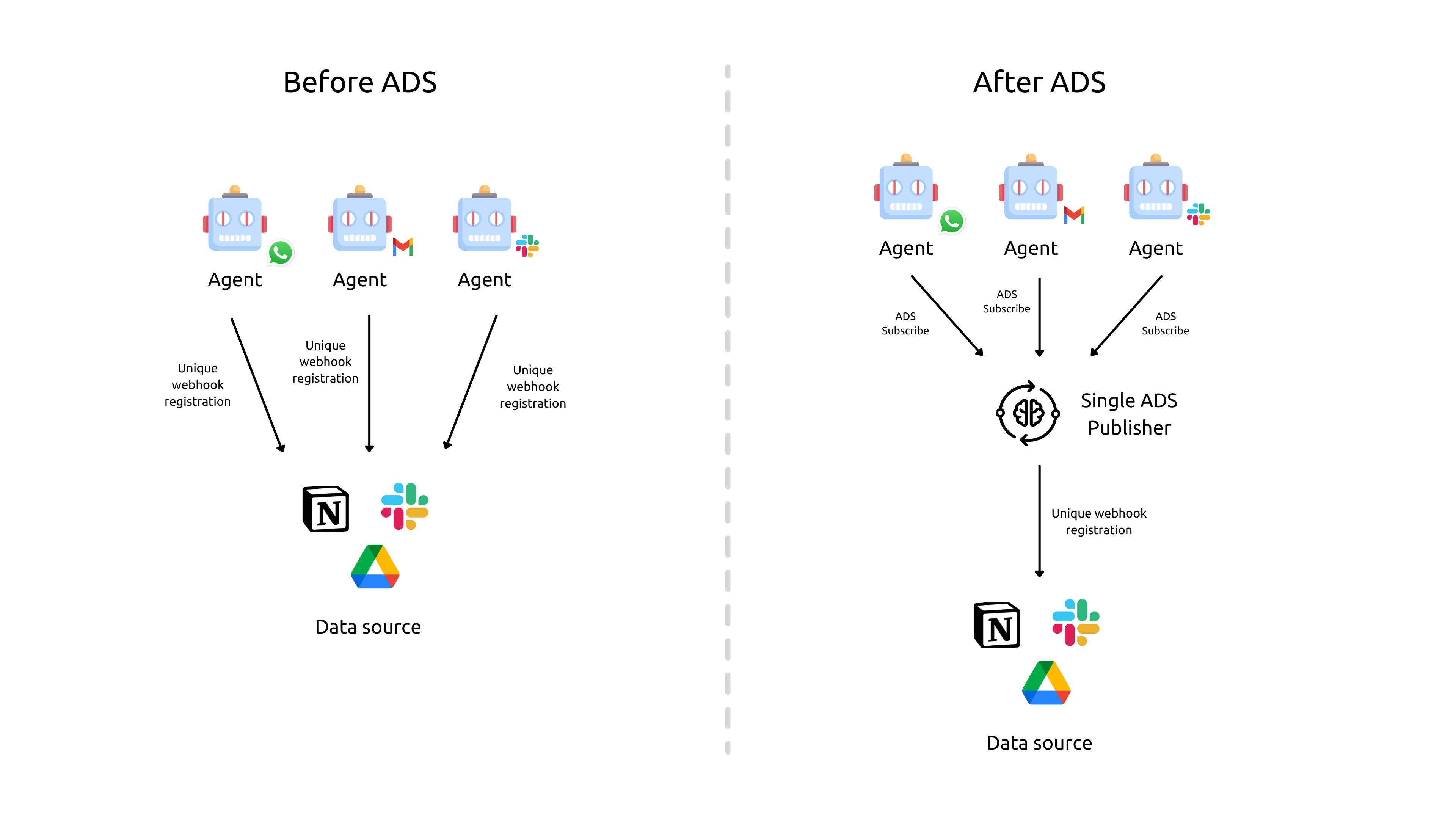
Agent Data Shuttle (ADS) is a framework for connecting event sources (publishers) and AI agents (subscribers) across platforms and languages.
This SDK lets you build Python publishers and subscribers that can interoperate with NodeJS/TypeScript SDKs and n8n.
All combinations are possible:
More channels coming soon.
Python 3.8+
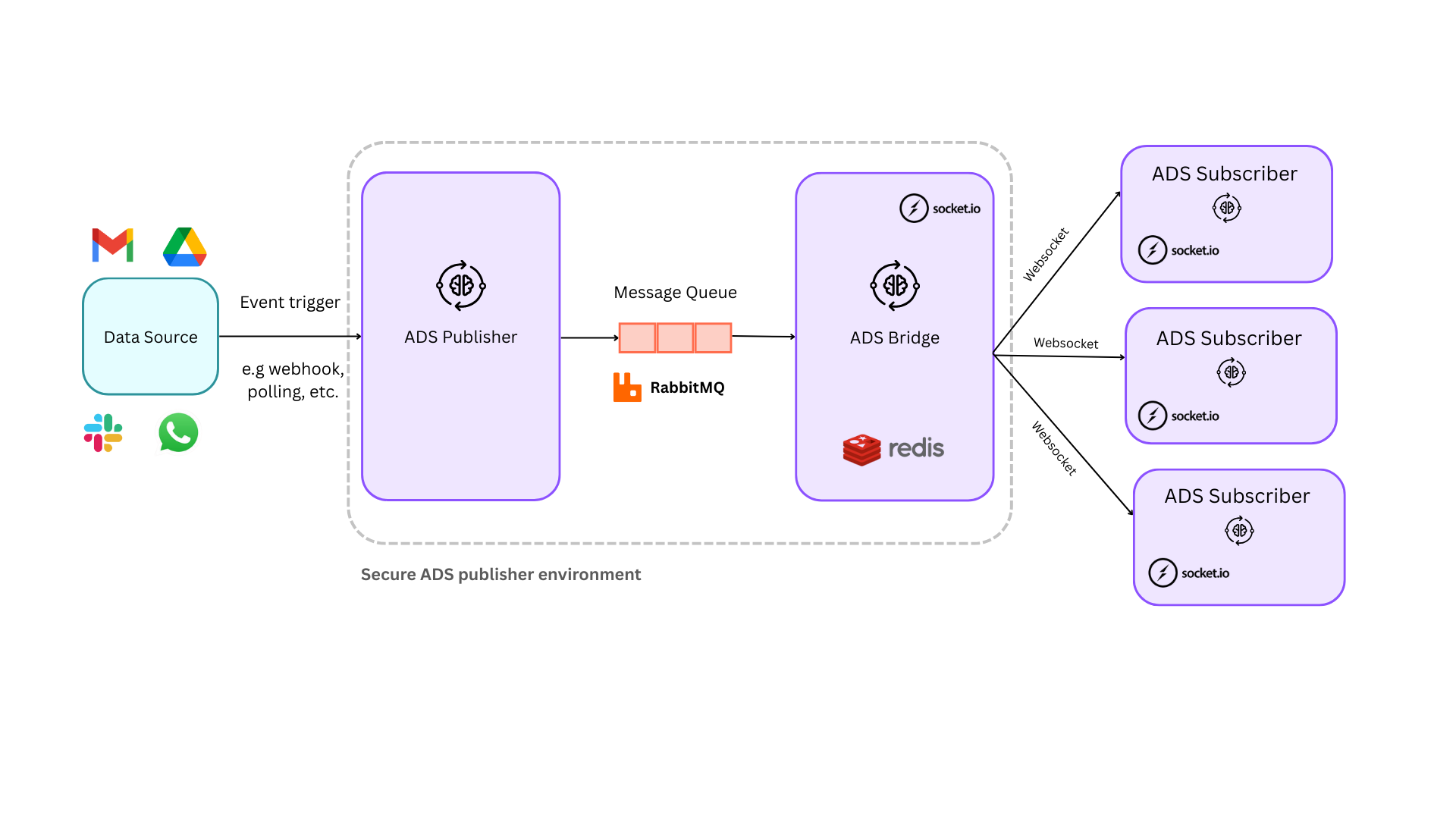
RabbitMQ instance
For event queueing and secure event publishing
ADS Bridge
For real-time event delivery via Socket.io
You must run the ADS Bridge service which would be the point of connection for subscribers.
More info at: https://github.com/agentdatashuttle/ads-bridge
Redis
For handling ADS event delivery to a large number of ADS Subscribers from ADS Bridge
Python 3.8+
Email/Slack credentials (Optional)
For using notification channels upon each autonomous agent invocation
AI Agent or LLM (for integrating with an AI model and trigger agentic workflows)
Publish events to ADS subscribers.
import os
import time
from agentdatashuttle_adspy.core.client import ADSRabbitMQClientParams
from agentdatashuttle_adspy.core.publisher import ADSPublisher
from agentdatashuttle_adspy.models.models import ADSDataPayload

# Step 1: Create ADSRabbitMQClientParams
client_params = ADSRabbitMQClientParams(
                    host=os.getenv("RABBITMQ_HOST", "localhost"),
                    username=os.getenv("RABBITMQ_USERNAME", "ads_user"),
                    password=os.getenv("RABBITMQ_PASSWORD", "ads_password"),
                    port=int(os.getenv("RABBITMQ_PORT", 5672))
                )


# Step 2: Create a ADSPublisher instance
# Example: ADSPublisher for Kubernetes Health monitoring system
publisher = ADSPublisher("KubernetesMonitoring", client_params)

# Step 3: Create a sample ADSDataPayload
payload = ADSDataPayload(
    event_name="pod_killed",
    event_description="Pod 'payment-service-233ch3' just got killed due to OOMKilled error",
    event_data={
        "pod": "payment-service-233ch3",
        "recorded_memory_usage": "2042Mi",
        "limits": "2000Mi"
    }
)

time.sleep(2)  # Simulate some delay before publishing

# Publish the payload
publisher.publish_event(payload)

print("Event published successfully.")
Tip: Customize the event payload to match your use case, and provide a detailed event_description and as much detail as required in the event_data dictionary for the subscriber AI Agent to take remediation actions with greater confidence and accuracy.
Subscribe to events and invoke your AI agent.
import os
from langchain_google_genai import ChatGoogleGenerativeAI
from langchain_core.messages import HumanMessage
from langgraph.prebuilt import create_react_agent

# Import ADS Subscriber and add ADS Data Connectors
from agentdatashuttle_adspy.core.subscriber import ADSSubscriber
from agentdatashuttle_adspy.core.dataconnector import ADSDataConnector
from agentdatashuttle_adspy.core.client import ADSBridgeClientParams
from agentdatashuttle_adspy.models.models import ADSDataPayload
from agentdatashuttle_adspy.core.notifications import EmailNotificationChannel, SlackNotificationChannel

# Define the tools for the agent to use
agent_tools = [toolA, toolB, see_k8s_logs_tool]
llm = ChatGoogleGenerativeAI(model="gemini-2.0-flash")

agent = create_react_agent(llm, agent_tools, debug=True)

# Step 1: Define callback function for ADS Subscriber to invoke agent
def invoke_agent(prompt: str, payload: ADSDataPayload) -> str:
    print("The ADS payload was:", payload)

    # Filter specific events in/out as you desire
    if payload.event_name == "container_up":
        return "NO AGENT INVOCATION FOR THIS EVENT - CONTAINER UP"

    # Invoke your agent with the context enriched prompt generated by Agent Data Shuttle
    response = agent.invoke({"messages": [HumanMessage(prompt)]})

    # Return final agent response - will be sent to all notification channels for later review
    return response["messages"][-1].content

# Step 2: Define ADSBridgeClientParams and corresponding ADSDataConnector
ads_bridge_client_params = ADSBridgeClientParams(
    connection_string="http://localhost:9999",
    path_prefix="/ads_bridge",
    ads_subscribers_pool_id="<a_random_uuid>"  # Replace with your actual pool ID to group horizontally scaled replicas of ADS Subscribers - use https://agentdatashuttle.knowyours.co/pool-id-generator to make one if needed
)

data_connector_one = ADSDataConnector(
    connector_name="K8sMonitoringConnector",
    bridge_client_params=ads_bridge_client_params
)

# Step 3: Optionally, add notification channels
email_channel = EmailNotificationChannel(
    "<agent_description>",
    "<smtp_host>",
    "<smtp_port>",
    "<smtp_username>",
    "<smtp_password>",
    "from@example.com",
    "to@example.com"
)

slack_channel = SlackNotificationChannel(
    "<agent_description>",
    "<slack_bot_token>",
    "#<your-channel>"
)

# Step 4: Create the ADSSubscriber with the callback function, LLM, and Data Connectors.
# The ADSSubscriber will listen for events from all the data connectors and invoke the agent.
ads_subscriber = ADSSubscriber(
    agent_callback_function=invoke_agent,
    llm=llm,
    agent_description="<agent_description>",
    data_connectors=[data_connector_one],
    notification_channels=[email_channel, slack_channel]
)

# Step 5: Start the ADSSubscriber to listen for events and invoke the agent.
ads_subscriber.start()
Send notifications via Email or Slack when events are processed:
from agentdatashuttle_adspy.core.notifications import EmailNotificationChannel, SlackNotificationChannel

email_channel = EmailNotificationChannel(
    "<agent_description>",
    "<smtp_host>",
    "<smtp_port>",
    "<smtp_username>",
    "<smtp_password>",
    "from@example.com",
    "to@example.com"
)

slack_channel = SlackNotificationChannel(
    "<agent_description>",
    "<slack_bot_token>",
    "#<your-channel>"
)
Pass these channels to the ADSSubscriber to enable notifications.
All core types are defined in agentdatashuttle_adspy/models/models.py:
Logging level can be configured via the LOG_LEVEL environment variable with the following values:
| Level | Description |
|---|---|
| error | Critical errors that may cause the app to crash |
| warn | Warnings about potentially harmful situations |
| info | General operational information |
| debug | Debug-level logs for development |
Contributions are welcome!
If you have ideas for improvements, bug fixes, or new features, please open a GitHub Issue to discuss or submit a Pull Request (PR).
How to contribute:
main.If you encounter any bugs or have feature requests, please raise an issue on GitHub.
Thank you for helping improve the Agent Data Shuttle initiative!
This project is licensed under the Apache License 2.0.
For questions or support, please contact
agentdatashuttle@knowyours.co
For more information about Agent Data Shuttle - https://agentdatashuttle.knowyours.co
Download counts and popularity will appear here as the collector receives them.
| Version | Published | Direct dependencies | Open version |
|---|---|---|---|
| 1.0.10 | 29 Oct 2025 | 14 |
This describes our collected data; it is not a security assessment.
Shared repository data · GitHub
Observed since 20 Oct, 21:47 UTC
No superseded metadata states collected. Unchanged observations do not create new revisions.
package:d13b0bbcab8d38c5d9451a7dfc755a59f8c5bb917c48f5a8d3d03357d3222537