
 Repository
Current collected state Current
Observed since 20 Oct, 21:54 UTC
No superseded metadata states collected. Unchanged observations do not create new revisions.
Self-hosted AI knowledge platform with 27 data source connectors, hybrid search, and MCP server
Agent Data Distillation Platform
A self-hosted AI knowledge platform. Upload documents or connect external data sources, retrieve context via hybrid semantic + BM25 search with optional cross-encoder reranking, and integrate seamlessly with Claude Desktop / Claude Code through the MCP protocol.
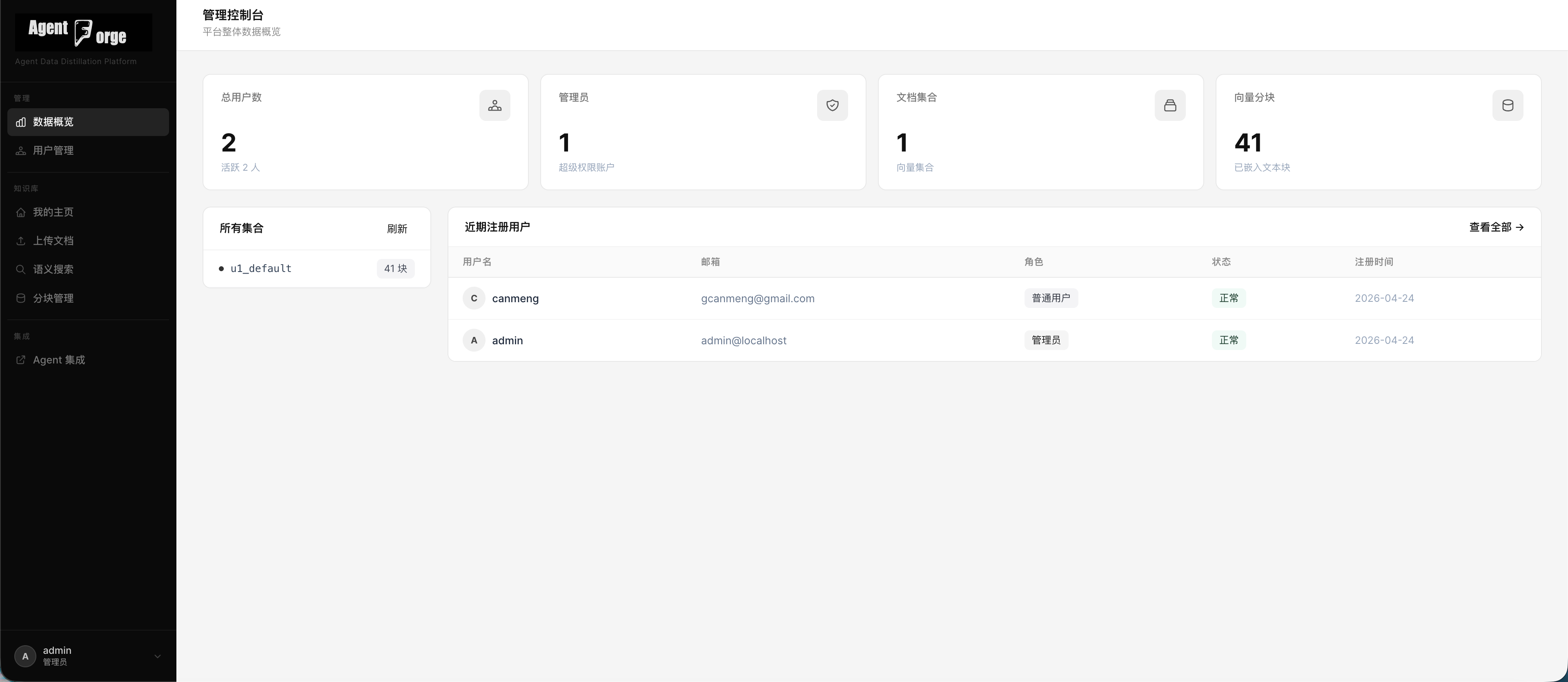 | 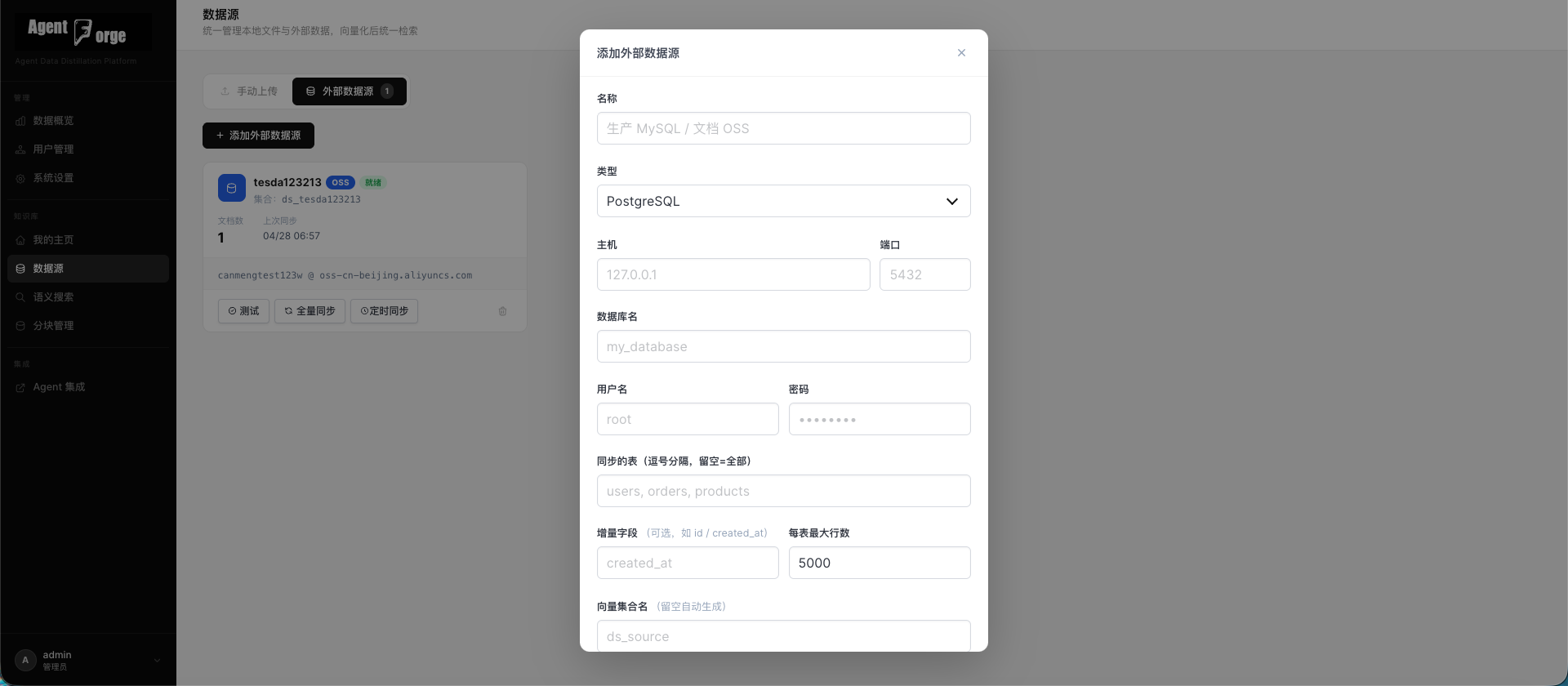 |
| Dashboard | External Data Sources |
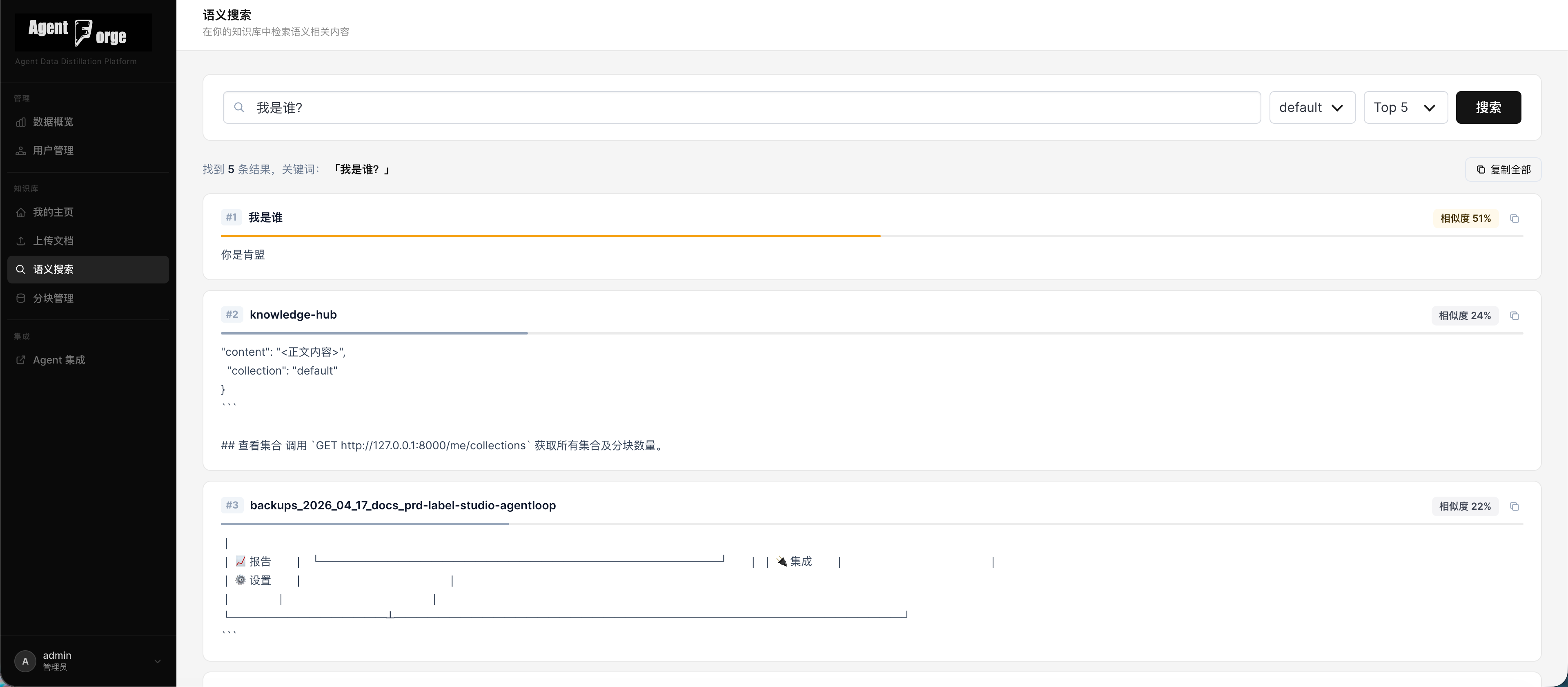 | 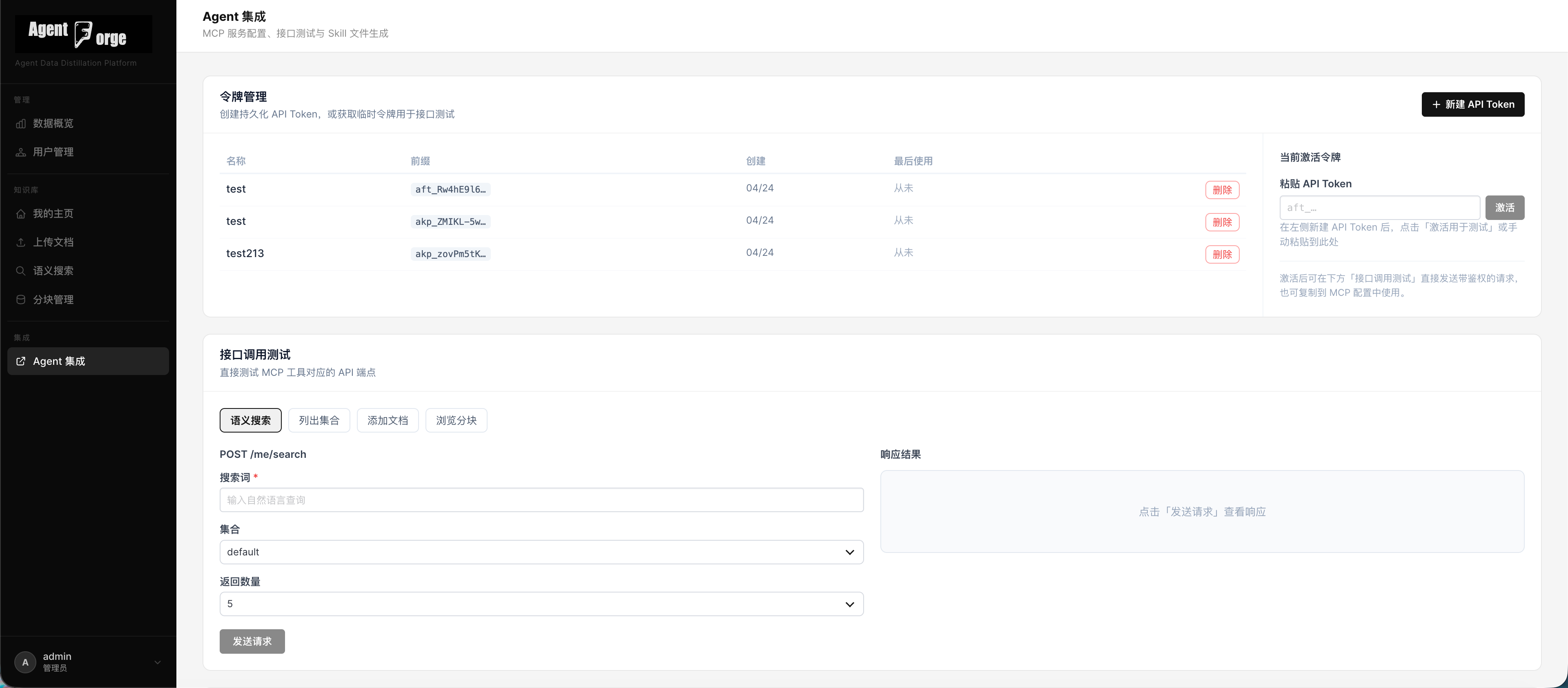 |
| Hybrid Search | Agent Integration |
| Category | Details |
|---|---|
| Document Ingestion | TXT, MD, HTML, PDF, DOCX — file upload or paste text |
| External Data Sources | 27 connector types: object storage, relational DBs, OLAP, NoSQL, document platforms, code repos, enterprise cloud |
| Hybrid Search | Vector cosine similarity + BM25 re-scoring for SQL/structured sources |
| Reranker | Optional cross-encoder reranking (sentence-transformers) for higher precision |
| Scheduled Sync | APScheduler-based incremental sync for all external data sources |
| Vector Backends | ChromaDB (default) or PostgreSQL + pgvector |
| User System | Admin + regular user roles, JWT httpOnly Cookie authentication |
| API Tokens | Persistent API tokens (aft_ prefix), SHA-256 hashed, shown only once at creation |
| MCP Server | stdio transport, exposes 5 tools for Claude to call |
| Agent Integration | MCP config generation, Skill YAML download, API testing console |
| Web UI | Bulma CSS + Alpine.js, admin console, user document management |
Browser / Claude Desktop / API Client
         │
         ▼
┌──────────────────────────────────────────────────┐
│                   FastAPI App                     │
│  ┌──────────┐  ┌───────┐  ┌──────────────────┐  │
│  │  Pages   │  │  Auth │  │  Admin / me/*    │  │
│  │(Jinja2)  │  │  /me  │  │  datasources     │  │
│  └──────────┘  └───────┘  └──────────────────┘  │
│                                │                 │
│  ┌─────────────────────────────▼───────────────┐ │
│  │            Hybrid Retrieval Pipeline        │ │
│  │  Vector fan-out → BM25 re-score (SQL types) │ │
│  │  → Cross-encoder rerank (optional) → Top-K  │ │
│  └─────────────────────────────────────────────┘ │
│                                │                 │
│  ┌─────────────────────────────▼───────────────┐ │
│  │           Vector Store Facade               │ │
│  │  chroma_vector_store (default)              │ │
│  │  pg_vector_store     (optional pgvector)    │ │
│  └─────────────────────────────────────────────┘ │
│                                                   │
│  ┌──────────────────────────────────────────────┐ │
│  │  APScheduler  ←  DataSource Connectors (27)  │ │
│  │  incremental sync → ParsedDocument → chunks  │ │
│  └──────────────────────────────────────────────┘ │
│                                                   │
│  ┌──────────────┐   ┌──────────────────────────┐ │
│  │   ChromaDB   │   │  SQLite                  │ │
│  │  (documents) │   │  (users, tokens, sources)│ │
│  └──────────────┘   └──────────────────────────┘ │
└──────────────────────────────────────────────────┘
         │
         ▼
  MCP stdio server  (src/mcp/server.py)
Each user's documents are stored in a dedicated ChromaDB collection: u{user_id}_{collection_name}. The namespace prefix is enforced server-side — user A cannot access user B's data.
Option 1 — PyPI (recommended)
pip install agentf
Option 2 — From source
git clone https://github.com/canmengfly/AgentForge.git
cd AgentForge
python -m venv .venv && source .venv/bin/activate
pip install -e .
agentf-api
Open http://localhost:8000. A default admin account is created on first launch:
| Username | Password |
|---|---|
admin | admin123 |
Change the admin password immediately after first login.
AgentForge supports 27 external data source types that can be connected, synced on a schedule, and searched alongside your uploaded documents.
| Category | Types |
|---|---|
| Object Storage | Alibaba Cloud OSS, Amazon S3, Tencent Cloud COS, Huawei Cloud OBS |
| Relational DB | MySQL, PostgreSQL, Oracle, SQL Server, TiDB, OceanBase |
| OLAP / Data Warehouse | Apache Doris, ClickHouse, Apache Hive, Snowflake |
| Search / NoSQL | Elasticsearch, MongoDB |
| Document Platforms | Feishu (Lark) Docs, DingTalk Docs, Tencent Docs, Confluence, Notion, Yuque |
| Code Platforms | GitHub, GitLab |
| Enterprise Cloud | Microsoft SharePoint, Google Drive |
30 minutes) and saveSearch results combine two signals:
An optional cross-encoder reranker can be enabled to further refine result ordering using a dedicated relevance model.
POST /me/search/all
Content-Type: application/json

{
  "query": "quarterly revenue by region",
  "top_k": 10
}
This searches across all your collections — uploaded documents and synced data sources — and returns a unified ranked result list.
All settings are read from environment variables (.env file supported):
| Variable | Default | Description |
|---|---|---|
DATA_DIR | ./data | Root directory for SQLite and ChromaDB files |
CHROMA_PERSIST_DIR | {DATA_DIR}/chroma | ChromaDB persistence directory |
JWT_SECRET | (required) | JWT signing secret (at least 32 characters) |
JWT_EXPIRE_MINUTES | 10080 | Cookie token lifetime (minutes, default 7 days) |
VECTOR_BACKEND | chroma | chroma or pgvector |
PG_VECTOR_URL | "" | PostgreSQL DSN when using pgvector |
EMBEDDING_DIM | 384 | Embedding vector dimension (must match model) |
EMBEDDING_MODEL | all-MiniLM-L6-v2 | sentence-transformers model name |
RERANKER_MODEL | "" | Cross-encoder model name (empty = disabled) |
.env example:
DATA_DIR=/var/agentforge/data
JWT_SECRET=replace-with-a-random-32-char-string
VECTOR_BACKEND=chroma
EMBEDDING_MODEL=all-MiniLM-L6-v2
RERANKER_MODEL=cross-encoder/ms-marco-MiniLM-L-6-v2
After login, the server sets an httpOnly Cookie access_token. The browser sends it automatically on every subsequent request.
aft_<32 random characters> — shown only once, save it securelyAuthorization: Bearer aft_xxxxxxxxxxxxxxxxxxxxxxxxxxxxxxxx
/me/*)| Method | Path | Description |
|---|---|---|
| GET | /me/collections | List your collections |
| POST | /me/documents/text | Add a text document |
| POST | /me/documents/upload | Upload a file (TXT/MD/HTML/PDF/DOCX) |
| GET | /me/documents | List documents in a collection |
| DELETE | /me/documents/{doc_id} | Delete a document and its chunks |
| DELETE | /me/collections/{name} | Delete an entire collection |
| GET | /me/chunks | List chunks (paginated) |
| POST | /me/search | Semantic search within a collection |
| POST | /me/search/all | Hybrid search across all collections |
Search request body:
{
  "query": "What is a transformer model?",
  "collection": "notes",
  "top_k": 5
}
/me/datasources)| Method | Path | Description |
|---|---|---|
| GET | /me/datasources | List your data sources |
| POST | /me/datasources | Create a data source |
| GET | /me/datasources/{id} | Get a data source |
| PUT | /me/datasources/{id} | Update a data source |
| DELETE | /me/datasources/{id} | Delete a data source |
| POST | /me/datasources/{id}/test | Test connection |
| POST | /me/datasources/{id}/sync | Trigger manual sync |
/me/tokens)| Method | Path | Description |
|---|---|---|
| GET | /me/tokens | List your tokens |
| POST | /me/tokens | Create a token (plaintext returned once) |
| DELETE | /me/tokens/{id} | Delete a token |
/api/admin/*)| Method | Path | Description |
|---|---|---|
| GET | /api/admin/stats | Platform statistics |
| GET | /api/admin/users | User list (paginated, filterable) |
| POST | /api/admin/users | Create a user |
| PUT | /api/admin/users/{id} | Update user (role/email/password/status) |
| DELETE | /api/admin/users/{id} | Delete a user |
| GET | /api/admin/collections | List all collections across the platform |
The MCP server uses stdio transport and is launched on demand by Claude Desktop / Claude Code — no manual startup required.
Merge the following into ~/Library/Application Support/Claude/claude_desktop_config.json:
{
  "mcpServers": {
    "knowledge": {
      "command": "agentf-mcp",
      "args": [],
      "env": {
        "AFT_API_BASE": "http://localhost:8000",
        "AFT_API_KEY": "aft_your_token_here"
      }
    }
  }
}
This config can also be auto-generated from the Agent Integration page in the Web UI.
Add the same mcpServers block to your project's .claude/settings.json.
| Tool | Description |
|---|---|
search_knowledge | Semantic search, returns ranked document chunks |
list_collections | List all collections and their chunk counts |
add_text_document | Add a text document to the knowledge base |
get_document_chunks | Retrieve all chunks of a specific document |
delete_document | Delete a document and all its chunks |
| Extension | Parser |
|---|---|
.txt | Plain text |
.md | Markdown (plain text extracted) |
.html / .htm | BeautifulSoup body extraction |
.pdf | pdfplumber |
.docx | python-docx |
src/
  api/
    main.py                     # FastAPI app, lifecycle, route registration
    routes/
      auth_routes.py            # /auth/*
      admin.py                  # /api/admin/*
      me.py                     # /me/* (documents, search, API tokens)
      datasources.py            # /me/datasources/* (data source CRUD + sync)
      config_export.py          # /export/*
      pages.py                  # HTML pages (Jinja2)
  core/
    config.py                   # pydantic-settings configuration
    auth.py                     # JWT + bcrypt + API token utilities
    database.py                 # SQLAlchemy SQLite setup
    models.py                   # User, APIToken, DataSource ORM models
    deps.py                     # FastAPI dependencies (CurrentUser, etc.)
    embeddings.py               # sentence-transformers model loader
    document_processor.py       # File parsing and text chunking
    vector_store.py             # Vector store facade
    chroma_vector_store.py      # ChromaDB backend
    pg_vector_store.py          # pgvector backend (optional)
    scheduler.py                # APScheduler incremental sync
    connectors/
      __init__.py
      oss_connector.py          # Alibaba Cloud OSS
      s3_connector.py           # Amazon S3
      tencent_cos_connector.py  # Tencent Cloud COS
      huawei_obs_connector.py   # Huawei Cloud OBS
      sql_connector.py          # MySQL / PostgreSQL (shared)
      oracle_connector.py       # Oracle Database
      sqlserver_connector.py    # Microsoft SQL Server
      tidb_connector.py         # TiDB (MySQL-compatible)
      oceanbase_connector.py    # OceanBase (MySQL-compatible)
      doris_connector.py        # Apache Doris (MySQL-compatible)
      elasticsearch_connector.py
      mongodb_connector.py
      clickhouse_connector.py
      hive_connector.py
      snowflake_connector.py
      feishu_connector.py       # Feishu (Lark) Docs
      dingtalk_connector.py     # DingTalk Docs
      tencent_docs_connector.py # Tencent Docs
      confluence_connector.py   # Atlassian Confluence
      notion_connector.py       # Notion
      yuque_connector.py        # Yuque (语雀)
      github_connector.py       # GitHub repositories
      gitlab_connector.py       # GitLab repositories
      sharepoint_connector.py   # Microsoft SharePoint
      google_drive_connector.py # Google Drive
  mcp/
    server.py                   # MCP stdio server
templates/                      # Jinja2 HTML templates
  base.html
  login.html
  dashboard.html
  search_page.html
  datasources.html              # Data source management UI
  export.html                   # Agent Integration page
  chunks.html
  admin/
    index.html
    users.html
tests/
  conftest.py
  test_auth.py
  test_admin.py
  test_documents.py
  test_search.py
  test_e2e.py
  test_new_datasources.py       # S3, Doris, ES, MongoDB, ClickHouse, Hive
  test_extended_datasources.py  # 14 new connectors
docs/
  datasources.md                # Connector configuration reference
  hybrid-search.md              # Hybrid retrieval architecture
  api-reference.md              # Full REST API reference
  deployment.md                 # Production deployment guide
  development.md                # Development and testing guide
pytest tests/ -v
sys.modules level — no real credentials neededTo use PostgreSQL instead of ChromaDB:
CREATE EXTENSION IF NOT EXISTS vector;
VECTOR_BACKEND=pgvector
PG_VECTOR_URL=postgresql://user:pass@localhost/agentforge
*** in all API responses.Download counts and popularity will appear here as the collector receives them.
| Version | Published | Direct dependencies | Open version |
|---|---|---|---|
| 0.2.1 | 29 Apr 2026 | 39 |
This describes our collected data; it is not a security assessment.
Shared repository data · GitHub
Public sponsor counts have not been collected. These signals belong to the repository owner.
github · 1 observations shown. Missing days are unknown.
| Date / source period | Value | Observed at |
|---|---|---|
| 2026-10-22 | 0 | 2026-10-22T11:38:56.1728326Z |
Observed since 20 Oct, 21:54 UTC
No superseded metadata states collected. Unchanged observations do not create new revisions.
package:d4deb285d1cc59d89fe1fa95a9da7ac2ce4ada60a00b2fc19796f33de36ed46a