

 Repository
Current collected state Current
Observed since 20 Oct, 22:09 UTC
No superseded metadata states collected. Unchanged observations do not create new revisions.
MCP server exposing AgentHive's shared team memory as native tools for Cursor and Claude Code


A Model Context Protocol (MCP) server that exposes AgentHive's shared, reviewed team memory to LLM clients (Claude Desktop, Claude Code, Cursor, VS Code, etc.) - retrieve_context, log_session, create_agent, list_agents, create_task, and list_tasks as native tools, instead of a CLAUDE.md / .cursor/rules instruction block that calls AgentHive's HTTP API by hand.
PyPI:
pip install agenthive-mcp· Image:ghcr.io/polarpoint-io/agenthive-mcp:latest· Repo: https://github.com/polarpoint-io/agenthive-mcp
You need an AgentHive team and a personal token first - see AgentHive's onboarding guide if you don't have one yet.
pip install agenthive-mcp
export AGENTHIVE_URL=https://your-agenthive-host
export AGENTHIVE_TOKEN=your_personal_token
export AGENTHIVE_TEAM_ID=your_team_id

agenthive-mcp                                 # stdio
TRANSPORT=http HTTP_PORT=8000 agenthive-mcp   # HTTP/SSE
docker pull ghcr.io/polarpoint-io/agenthive-mcp:latest

docker run --rm -i \
  -e AGENTHIVE_URL=https://your-agenthive-host \
  -e AGENTHIVE_TOKEN=your_personal_token \
  -e AGENTHIVE_TEAM_ID=your_team_id \
  ghcr.io/polarpoint-io/agenthive-mcp:latest
docker run --rm \
  -p 8000:8000 \
  -e AGENTHIVE_URL=https://your-agenthive-host \
  -e AGENTHIVE_TOKEN=your_personal_token \
  -e AGENTHIVE_TEAM_ID=your_team_id \
  -e TRANSPORT=http \
  ghcr.io/polarpoint-io/agenthive-mcp:latest
# SSE endpoint: http://localhost:8000/sse
Use your own token, not a shared or admin one - whatever it can do (member or admin) is what this server can do on your behalf, nothing more or less (see Security notes).
| Variable | Required | Default | Description |
|---|---|---|---|
AGENTHIVE_URL | yes | — | Base URL of a running AgentHive service |
AGENTHIVE_TOKEN | yes | — | Your personal AgentHive token |
AGENTHIVE_TEAM_ID | yes | — | Your AgentHive team id |
TRANSPORT | no | stdio | stdio or http |
HTTP_HOST | no | 0.0.0.0 | Bind host (HTTP mode) |
HTTP_PORT | no | 8000 | Bind port (HTTP mode) |
LOG_LEVEL | no | INFO | Python log level |
See .env.example for a copy-pasteable template.
Each client supports two transport options — pip (recommended, no Docker required) or Docker.
# Install once
pip install agenthive-mcp
Edit ~/Library/Application Support/Claude/claude_desktop_config.json (macOS) or %APPDATA%\Claude\claude_desktop_config.json (Windows).
pip (recommended)
{
  "mcpServers": {
    "agenthive": {
      "command": "agenthive-mcp",
      "env": {
        "AGENTHIVE_URL": "https://your-agenthive-host",
        "AGENTHIVE_TOKEN": "your_personal_token",
        "AGENTHIVE_TEAM_ID": "your_team_id"
      }
    }
  }
}
Docker
{
  "mcpServers": {
    "agenthive": {
      "command": "docker",
      "args": [
        "run", "--rm", "-i",
        "-e", "AGENTHIVE_URL", "-e", "AGENTHIVE_TOKEN", "-e", "AGENTHIVE_TEAM_ID",
        "ghcr.io/polarpoint-io/agenthive-mcp:latest"
      ],
      "env": {
        "AGENTHIVE_URL": "https://your-agenthive-host",
        "AGENTHIVE_TOKEN": "your_personal_token",
        "AGENTHIVE_TEAM_ID": "your_team_id"
      }
    }
  }
}
Restart Claude Desktop after editing. You should see a hammer icon in the chat confirming the agenthive server is connected with all 6 tools available.
pip (recommended)
pip install agenthive-mcp

claude mcp add agenthive -- agenthive-mcp
# then export your config before running claude:
export AGENTHIVE_URL=https://your-agenthive-host
export AGENTHIVE_TOKEN=your_personal_token
export AGENTHIVE_TEAM_ID=your_team_id
Docker
claude mcp add agenthive -- docker run --rm -i \
  -e AGENTHIVE_URL -e AGENTHIVE_TOKEN -e AGENTHIVE_TEAM_ID \
  ghcr.io/polarpoint-io/agenthive-mcp:latest
Or a plain .mcp.json in the repo root works too - same shape as Claude Desktop's config above.
Edit ~/.cursor/mcp.json:
pip (recommended)
{
  "mcpServers": {
    "agenthive": {
      "command": "agenthive-mcp",
      "env": {
        "AGENTHIVE_URL": "https://your-agenthive-host",
        "AGENTHIVE_TOKEN": "your_personal_token",
        "AGENTHIVE_TEAM_ID": "your_team_id"
      }
    }
  }
}
Docker
{
  "mcpServers": {
    "agenthive": {
      "command": "docker",
      "args": ["run", "--rm", "-i",
               "-e", "AGENTHIVE_URL", "-e", "AGENTHIVE_TOKEN", "-e", "AGENTHIVE_TEAM_ID",
               "ghcr.io/polarpoint-io/agenthive-mcp:latest"],
      "env": {
        "AGENTHIVE_URL": "https://your-agenthive-host",
        "AGENTHIVE_TOKEN": "your_personal_token",
        "AGENTHIVE_TEAM_ID": "your_team_id"
      }
    }
  }
}
Edit ~/.continue/config.json:
pip (recommended)
{
  "mcpServers": [{
    "name": "agenthive",
    "command": "agenthive-mcp",
    "env": {
      "AGENTHIVE_URL": "https://your-agenthive-host",
      "AGENTHIVE_TOKEN": "your_personal_token",
      "AGENTHIVE_TEAM_ID": "your_team_id"
    }
  }]
}
If you prefer to run the server as a persistent HTTP service rather than a subprocess - still bound to whichever token you start it with, this is a transport choice, not a different auth model:
# pip
pip install agenthive-mcp
AGENTHIVE_URL=... AGENTHIVE_TOKEN=... AGENTHIVE_TEAM_ID=... TRANSPORT=http HTTP_PORT=8000 agenthive-mcp

# Docker
docker run --rm -p 8000:8000 \
  -e AGENTHIVE_URL=... -e AGENTHIVE_TOKEN=... -e AGENTHIVE_TEAM_ID=... \
  -e TRANSPORT=http \
  ghcr.io/polarpoint-io/agenthive-mcp:latest
Then point your MCP client at http://localhost:8000/sse.
Every tool here is a member-role AgentHive call - the same tier your personal token already grants over the API directly. Admin-only calls (list_pending/approve/reject, user management, auto-approve rules) are deliberately not exposed as tools: they exist so a human operates the review gate from the review UI or an admin script, and turning them into agent-callable tools would let an agent approve or reject its own pending memory, which defeats the point of the gate. See AgentHive's ADR.md for why the gate exists, and its README for those calls.
| Tool | Description |
|---|---|
retrieve_context | Bounded neighborhood of this team's reviewed, approved memory around a topic (anchor, hops=2, hub_cutoff=15) |
retrieve_index | Same traversal as retrieve_context with the bodies withheld - ids, titles, tiers, tags and a per-node token cost, so a session can choose what to read before paying for it (anchor, hops=2, hub_cutoff=15, tags) |
fetch_nodes | Full bodies for specific ids from retrieve_index (ids). Ids you are not entitled to come back in missing, not as an error |
report_gaps | What this team keeps searching for and never finds (min_count). Call at session start next to retrieval: if your work is on the list, your log_session closes a standing gap. Entries flagged awaiting_review already have an answer stuck in the queue - don't write it twice |
log_session | Log what happened this session as a memory node (title, body, tags, links, agent_id, task_id) - starts pending |
create_agent | Register an agent identity (name, description, system_prompt) so sessions can be attributed to it |
list_agents | List agent identities already registered with the team |
create_task | Register a task (name, description) so sessions can be scoped to it |
list_tasks | List tasks already registered with the team |
Tools existing in the tool list doesn't make an agent call them unprompted - it needs a line telling it when.
If the repo uses polarpoint-io's platform-standards AGENTS.md template (see ai-capabilities/platform-standards/templates/default-agents-md.md), add it to Zone 3 ("Repo-specific notes" - free, team-owned, and explicitly meant for "context about the domain, gotchas, preferred libraries, links to runbooks"):
## AgentHive

Before starting work, call `retrieve_context` with a short description of
the task. When you're done, call `log_session` summarizing what you did
and learned.
Team-specific conventions (which tags to use, the team's AGENTHIVE_TEAM_ID) belong in Zone 2 instead - guarded, but team-owned, meant to extend Zone 1 rather than override it. Don't put either in Zone 1: that's platform-locked, and making AgentHive retrieval mandatory org-wide is a bigger call than one repo should make on its own - it would need a PR to ai-capabilities and platform-team review.
Repos without that template yet can use a plain CLAUDE.md / .cursor/rules line instead - same content, just a different file.
agenthive-log)log_session only runs when the model decides to call it. Sessions that
crash, hit the context limit, or end because someone closed the terminal
never reach it, and those are exactly the sessions worth a note.
A lifecycle hook fires regardless - but a hook cannot call an MCP
tool. MCP tools are invoked by the model inside its loop; hooks are
shell commands the harness spawns outside it. The two paths don't
connect. So this package ships a second console script, agenthive-log,
which talks to the AgentHive API directly using the same
AGENTHIVE_URL / AGENTHIVE_TOKEN / AGENTHIVE_TEAM_ID variables the
MCP server reads.
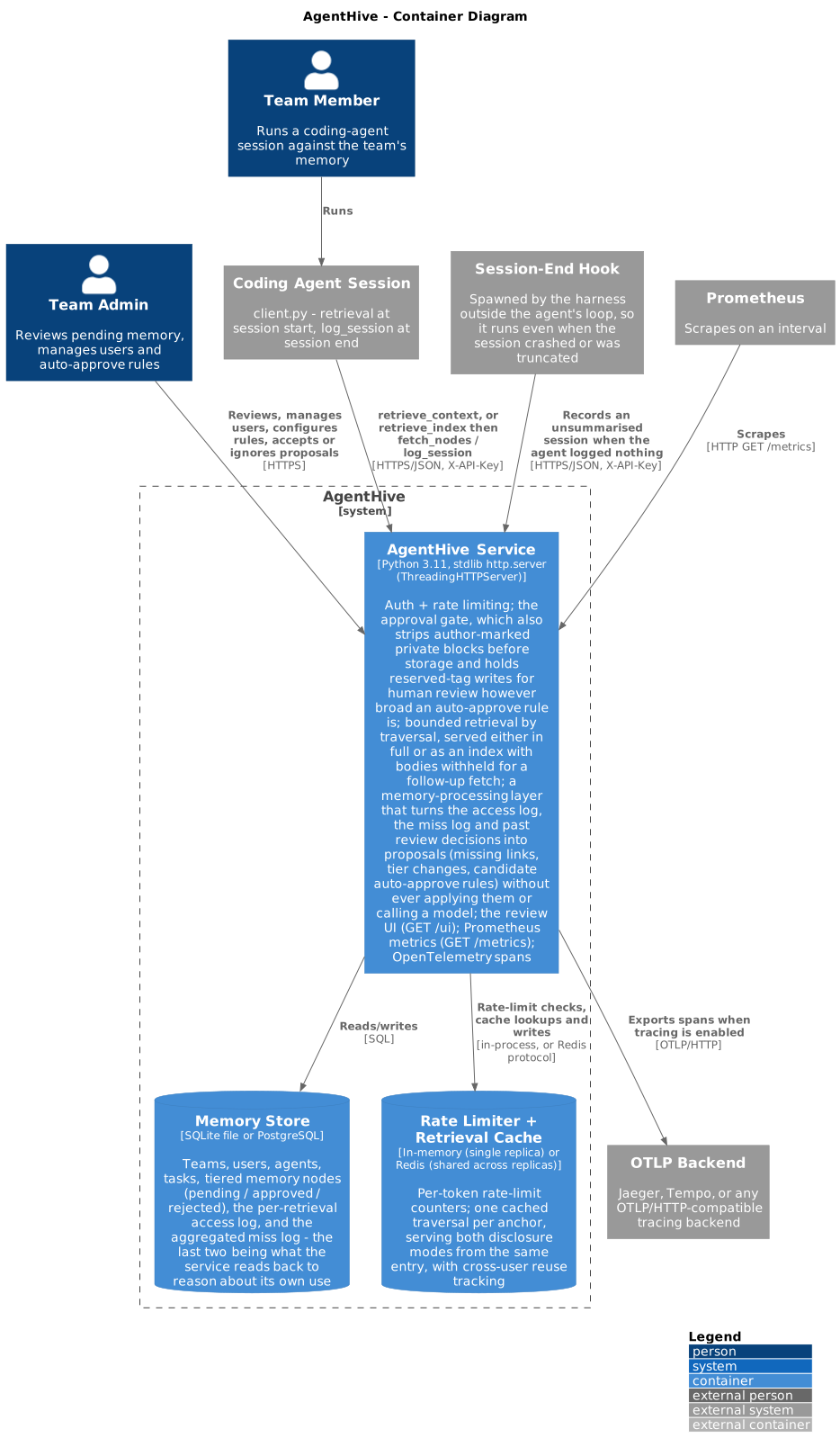
It is a backstop, not a replacement. A hook receives metadata, not understanding - it knows a session ended, not what was learned. Writing a confident-looking node from that would fill the review queue with filler and devalue the one thing in AgentHive that needs a human's attention. So:
log_session already succeeded in this session, the hook writes
nothing;unsummarised and
hook-captured, recording that a session happened and was never
summarised.The gap becomes visible. It does not get filled with noise.
The hook does not inherit the MCP server's environment. If your
AGENTHIVE_* variables live in an env block in claude_desktop_config.json
or ~/.cursor/mcp.json, those configure that subprocess only - the
harness spawns the hook separately and it will start up unconfigured,
log not configured, skipping to stderr, and write nothing. Silently,
as far as the review queue is concerned.
Pick one of these:
Shell profile (simplest when the harness is launched from a shell):
# ~/.zshrc or ~/.bashrc
export AGENTHIVE_URL=https://your-agenthive-host
export AGENTHIVE_TEAM_ID=your_team_id
export AGENTHIVE_TOKEN=your_personal_token
Note that a GUI-launched app may not see these. On macOS, launchctl setenv or a ~/Library/LaunchAgents entry covers that case.
Inline on the hook command (explicit, no profile dependency - but it puts the token in a config file, so check the file's permissions and keep it out of version control):
{
  "version": 1,
  "hooks": {
    "stop": [{
      "command": "env AGENTHIVE_URL=https://your-agenthive-host AGENTHIVE_TEAM_ID=your_team_id AGENTHIVE_TOKEN=your_personal_token agenthive-log"
    }]
  }
}
A wrapper script (best of both - the token stays in one
chmod 600 file, and the hook command stays clean):
#!/usr/bin/env bash
# ~/.local/bin/agenthive-log-hook   (chmod +x)
set -a; . "$HOME/.config/agenthive/env"; set +a
exec agenthive-log
Verify it either way with the smoke test below - it uses the same code path and the same environment the hook will get.
~/.claude/settings.json:
{
  "hooks": {
    "SessionEnd": [
      { "hooks": [{ "type": "command", "command": "agenthive-log" }] }
    ]
  }
}
~/.cursor/hooks.json (or <project>/.cursor/hooks.json, or
/etc/cursor/hooks.json to set it org-wide):
{
  "version": 1,
  "hooks": {
    "stop": [{ "command": "agenthive-log" }]
  }
}
Hooks defined in more than one location all run, so a
stophook present both globally and in a project fires twice for one session.agenthive-logfingerprints its payload and skips a duplicate inside a 15-minute window, so this is safe - but it's why the dedupe exists.
| Property | Behaviour |
|---|---|
| Exit code | Always 0, for every failure mode - unreachable API, missing config, unusable state directory, malformed stdin, unexpected field types in the payload. A memory system must never be able to break the harness. Problems go to stderr. |
| Missing config | Logs and skips. Not an error, and it does not suppress a later configured run. |
| Failed write | Logs and skips. The send claim is released, so the next firing retries rather than inheriting a marker for a write that never happened. |
| Duplicate firing | An atomic O_EXCL claim, promoted to a delivery record only after a successful write. Two hooks firing at once cannot both post. |
| Suppression scope | Keyed on (API host, team, git top level). A write for one team or repo never silences another's backstop. |
| Transcript content | Excluded by default. |
Two residual limitations worth knowing, both deliberate:
cwd, the two keys differ and you get one spare backstop node. That
is a reviewable nuisance rather than a loss.echo '{"hook_event_name":"SessionEnd","session_id":"smoke-test","cwd":"'"$PWD"'"}' \
| agenthive-log
It prints the node id to stderr and exits 0. The node lands in the
review queue tagged unsummarised, where you can reject it.
That last one is deliberate. A transcript contains whatever was pasted
into it, and none of it is wrapped in <private> for us - pasting an
excerpt into shared team memory is how a credential ends up there. The
approval gate would only catch it after it is already stored and
rendered in an admin's browser. Set
AGENTHIVE_HOOK_INCLUDE_TRANSCRIPT=true if your team has decided that
trade is right for them.
| Variable | Default | Description |
|---|---|---|
AGENTHIVE_HOOK_INCLUDE_TRANSCRIPT | false | Append a transcript tail to the backstop node. See above. |
AGENTHIVE_HOOK_STATE_DIR | $XDG_STATE_HOME/agenthive | Where the dedupe and "already logged" markers live. |
AgentHive's memory-processing layer raises four kinds of proposal from how the graph has actually been used: gaps, missing links, tier changes, and auto-approve rules its own review history justifies.
Only the first is exposed as a tool. report_gaps is read-only and
changes what an agent writes at the end of a session, which is the whole
reason it is worth a tool call.
The other three change how the review gate behaves - which memory gets
linked, which gets prioritised, and which skips human review entirely.
Those stay with the humans who own the gate, reachable through the
review UI or an admin script, for the same reason approve and reject
are not tools: an agent that could widen its own auto-approve rules has
been handed the gate it was supposed to be subject to.
This started as a module inside the AgentHive repo itself, then moved out: it has its own dependency (mcp), its own release cadence (an IDE integration changes on its own schedule, unrelated to the service's), and no reason to need AgentHive's own container image, Helm chart, or CI matrix rebuilt every time it changes - or vice versa.
It's self-contained: it makes its own plain HTTP calls to a running AgentHive service rather than importing anything from the agenthive repo, so this repo has no dependency on that one at build, install, or test time - only a runtime one, on the base URL of a service you already have running.
git clone git@github.com:polarpoint-io/agenthive-mcp.git
cd agenthive-mcp
python -m venv .venv && source .venv/bin/activate
pip install -e .[dev]

export AGENTHIVE_URL=...
export AGENTHIVE_TOKEN=...
export AGENTHIVE_TEAM_ID=...

agenthive-mcp                                 # stdio
TRANSPORT=http HTTP_PORT=8000 agenthive-mcp   # HTTP/SSE
Or via the Makefile:
make dev       # install with dev extras
make test      # pytest
make lint      # ruff check
make run       # stdio
make run-http  # HTTP/SSE on :8000
make docker    # build the image locally
make dev
make test
make lint
The test suite (tests/test_tools.py) drives the server as a real subprocess over real MCP stdio, using a real mcp.ClientSession - nothing mocked at the protocol layer. The AgentHive side is a small local fake (tests/fake_agenthive.py), not the real service, since this repo shouldn't need AgentHive itself checked out to test its own HTTP plumbing; AgentHive's own approval-gate/retrieval/auth behavior is already covered by its own test suite, in its own repo, against the real server.py. Try this server against a real AgentHive instance manually if you want to confirm the whole chain end to end.
Adding a new tool:
@mcp.tool() function in src/agenthive_mcp/server.py, calling _request() from client.py. Only for a member-role AgentHive endpoint - see Tool reference.tests/fake_agenthive.py if the endpoint isn't already covered.tests/test_tools.py using the existing stdio_client/ClientSession pattern.See AGENTS.md for deeper contribution guidance.
Releases are fully automated via semantic-release - no manual tagging needed.
Every push to main runs the CI pipeline:
ruff) + pytest across Python 3.10 / 3.11 / 3.12CHANGELOG.md, publishes to PyPI, and creates a GitHub ReleaseA release only happens when commits contain a feat:, fix:, or breaking-change - chore:, docs:, ci: commits don't trigger one.
| Tag | When pushed |
|---|---|
latest | Every merge to main |
sha-<short> | Every merge to main |
1.2.3 / 1.2 | On a semantic-release version bump |
| Secret | Description |
|---|---|
POL_GH_TOKEN | Personal access token with repo + write:packages scope |
PYPI_TOKEN | PyPI API token for the agenthive-mcp project |
Add both at: GitHub repo → Settings → Secrets and variables → Actions.
feat: add new tool          → minor version bump (0.x.0)
fix: correct response shape → patch bump        (0.0.x)
feat!: breaking change      → major bump        (x.0.0)
chore/docs/ci/test          → no release
uid 10001).AGENTHIVE_TOKEN is read from env vars only - never written to disk.MIT — see LICENSE.
Download counts and popularity will appear here as the collector receives them.
| Version | Published | Direct dependencies | Open version |
|---|---|---|---|
| 1.2.0 | 17 Oct 2026 | 4 |
This describes our collected data; it is not a security assessment.
Shared repository data · GitHub
Observed since 20 Oct, 22:09 UTC
No superseded metadata states collected. Unchanged observations do not create new revisions.
package:5c4fc529add3e40a58c6a8569beb90b8df4a63525e56e91737f194dd2e3e4972