
 Repository
Current collected state Current
Observed since 20 Oct, 22:14 UTC
No superseded metadata states collected. Unchanged observations do not create new revisions.
File-based work tracking and knowledge base for AI coding agents






Portable bundle of file-based work-tracking skills for AI coding agents. Designed to work with any harness that reads SKILL.md from a skills directory: Claude Code, Codex, Copilot CLI, Antigravity.
One CLI fronts the whole family: cortex. Its verbs are cortex kb (author knowledge, and derive its index and change log), cortex okf (export and import OKF bundles), cortex viz (visualize), cortex query (neighbors to explore a doc's links, search for BM25 keyword search, related for link candidates), cortex inject (opt-in session-start injection), cortex sync (cross-device sync of the store), and cortex migrate-store (move a legacy ~/.work store to ~/.cortex). Every verb runs through one self-contained cortex Python package (cortex/); the former per-skill bash/Python CLIs have been retired.
In April 2026 Andrej Karpathy published llm-wiki, an idea file arguing that instead of retrieving from raw documents at query time, an LLM should incrementally build and maintain a persistent markdown wiki, and queries should go to the wiki rather than the sources. His framing: knowledge is "compiled once and then kept current, not re-derived on every query," and the reason it works is division of labor, since "the tedious part of maintaining a knowledge base is not the reading or the thinking, it's the bookkeeping."
cortex's knowledge base is the same bet. Raw sources stay immutable, the agent
owns a directory of markdown, and knowledge/index.md is the catalog you read
to find out what exists. Where the two differ is instructive in both directions.
| Karpathy's llm-wiki | cortex | |
|---|---|---|
| Ingest | LLM reads the source and writes pages | Parsers handle OpenAPI and SQL exactly; only ambiguous sources go to the agent |
| Index | index.md, LLM-maintained | index.md, derived and regenerated by cortex kb index --write |
| Links | Cross-references between pages | Typed [[wikilinks]], with unresolved ones surviving as visible ghost nodes; cortex query related proposes the missing ones |
| Change log | log.md, append-only, grep-able | log.md, derived from the store's git history by cortex kb log |
| Lint | A named operation: contradictions, stale claims, orphans | cortex kb lint: six deterministic checks, plus a worklist for the judgment calls |
| Scope | Knowledge only | Knowledge plus work tracking: sessions, tasks, blockers |
| Format | Ad hoc | A conformant Open Knowledge Format v0.2 bundle: required type, §8 index.md |
| Portability | The wiki is the format | cortex okf export / import: the store keeps one link grammar, and the translation happens once, at the boundary |
Where cortex is stronger. Deterministic extraction means an OpenAPI schema is transcribed rather than paraphrased, which matters because the failure mode of LLM ingestion is a plausible field name that does not exist. A derived index cannot drift from the filesystem the way a hand-maintained one can. And ghost links make the gaps in a knowledge base visible instead of silent.
Where it is not. cortex kb lint covers the mechanical half of Karpathy's
lint operation, but the half that needs judgment (which of two overlapping notes
supersedes the other) is only a worklist. A machine can see that two docs
overlap; it cannot see which one is still true.
His log.md was the other gap, and it is now closed, though the shape differs.
Karpathy's is append-only and written as work happens; cortex derives one from
the git history cortex sync already writes, so there is nothing to keep
current by hand. While the store has a .git, that derived file is strictly
worse than git log --follow, which also gives diffs and authorship. It earns
its keep at the export boundary: an OKF bundle has no .git, and §9 log.md is
the only portable form the history can take. cortex okf export is the consumer
that makes that concrete, and it is also where the [[wikilinks]] row above
resolves: the store keeps one link grammar, and the translation into markdown
links happens once, on the way out, rather than continuously, in every doc.
The rest of this README is how that works in practice: the dashboard, the concepts, the CLI, and the ingest path the table above compares.
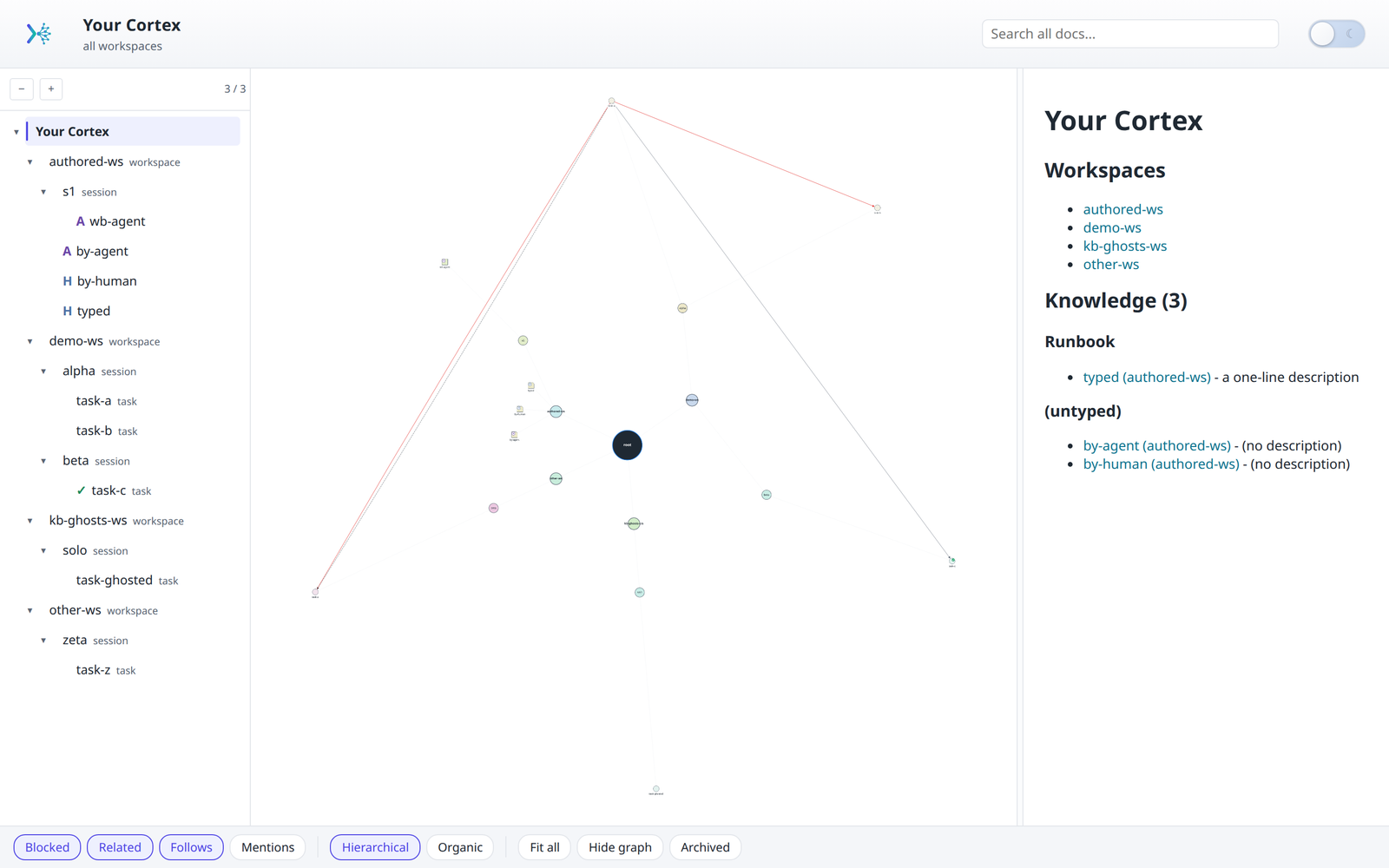
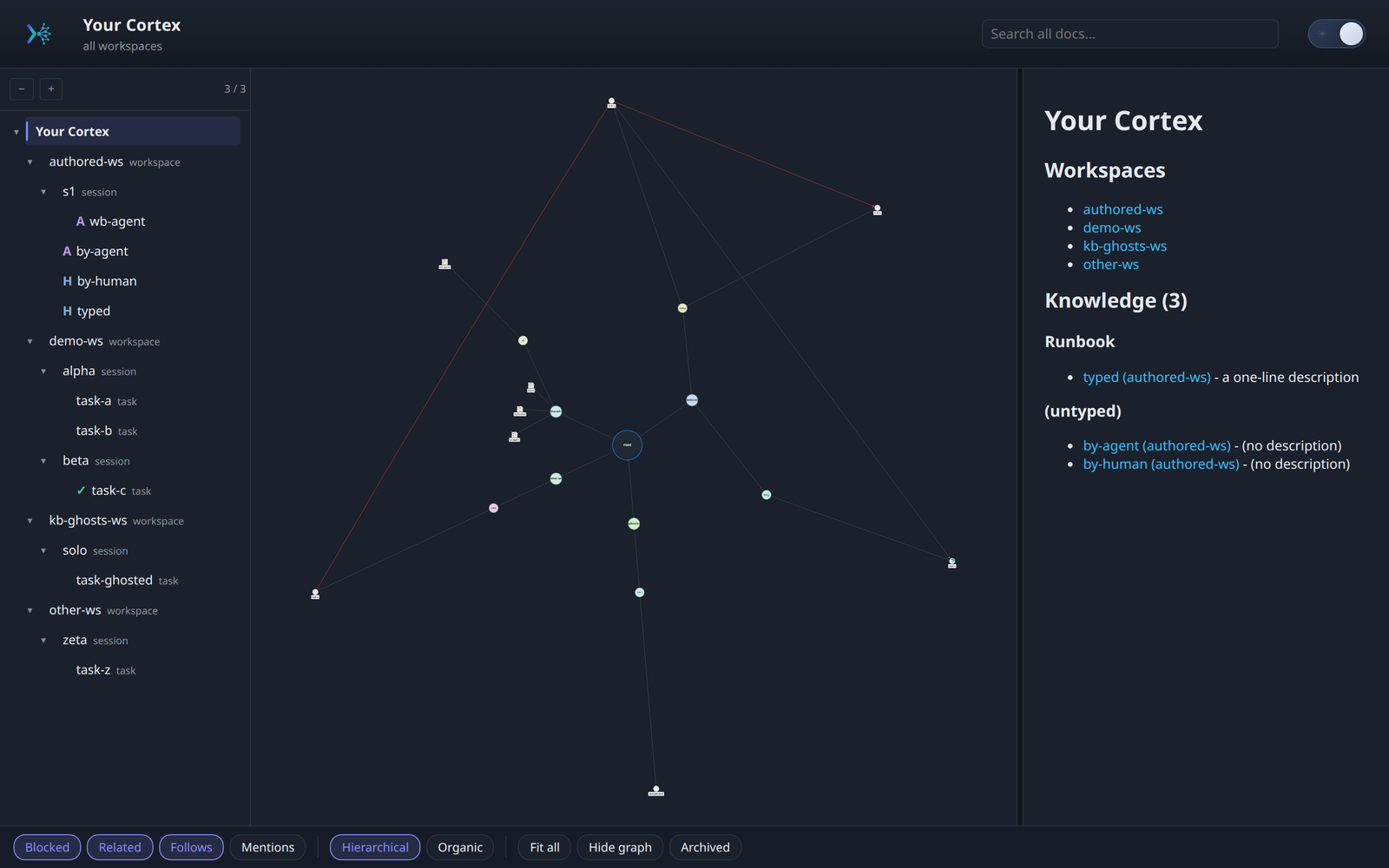
cortex viz builds a static, browser-based view of every workspace, session, and task: a collapsible tree, a hub-and-spoke graph of typed links, and a rendered-markdown content pane. Read-only by default; theme-aware (light + dark).
Light theme
Dark theme
Five nouns carry the model:
| Concept | Scope | Lifetime |
|---|---|---|
| Workspace | One project, resolved from your git remote or directory name | Permanent |
| Session | A stretch of related work | Weeks, then archived |
| Task | One piece of that work, with a status | Days |
| Knowledge note | The workspace | Outlives every session |
| Workbench note | One session | Dies with the session |
A workspace contains sessions; a session contains tasks plus its workbench notes; knowledge notes sit at the workspace level so every session can reach them.
The distinction that earns its keep is the last two. Workbench is the low-stakes place to think out loud, and it stops mattering when the session closes. Knowledge is what you want to still have three months from now. When a workbench note turns out to matter, promote it.
Task status is one of Open, In Progress, Blocked, Resolved. There is
deliberately no "won't do": abandoned work is archived with its tasks still
Open, so the archive records what happened rather than a completion that never
occurred.
Full treatment in docs/concepts.md.
| Skill | Purpose |
|---|---|
cortex-tracking | Main skill — file-based session/task tracking across workspaces, with global + local stores and concurrent-agent support. |
cortex-github | Optional PR/commit drift detection via the gh CLI, invoked by the main skill when a session has github: frontmatter. |
cortex-migration | Move a session between the global store (~/.cortex/) and a repo-local store. |
cortex-sync | Optional cross-device sync of ~/.cortex/ via a private GitHub repo. See skills/cortex-sync/docs/ for design. |
cortex-viz | Browser-based viewer for ~/.cortex/: three-pane tree + Cytoscape graph + rendered markdown, plus a cross-workspace dashboard. Ships a cortex viz CLI with build and serve (plus opt-in serve --edit). |
cortex-kb | Author and bulk-ingest knowledge/workbench docs (cortex kb CLI): structured frontmatter, a pull-based index, and codebase ingestion. Rendered by cortex-viz, replicated by cortex-sync. |
cortex-inject | Optional, off-by-default session-start context injection (cortex inject CLI). The single exception to the otherwise pull-based, no-auto-injection design. |
Only cortex-tracking, cortex-kb, and cortex-viz are ones you trigger. The
rest are sub-skills the main skill invokes when it needs them. See
docs/skills.md.
cortex CLIOne command fronts the family. Installing the package puts it on your PATH.
It exists for two reasons, both about what an agent would otherwise do instead.
It standardizes the environment. Without it, every skill would describe its
own file paths, frontmatter rules, and slug resolution in prose, and each agent
would reimplement them slightly differently. One binary means one definition of
where a workspace lives, how a slug resolves, and what valid frontmatter is. A
skill says cortex kb new knowledge <slug> instead of explaining a directory
layout and hoping the agent gets it right.
It optimizes token usage. Every verb is designed so the agent reads a small
bounded artifact rather than a large unbounded one. cortex kb index returns a
one-line-per-document table of contents instead of the documents. cortex query neighbors returns a document's links with one-line summaries instead of the
linked files. cortex query search returns ranked one-line hits instead of the
matching documents, and cortex query related returns link candidates for one
doc without reading the rest of the store.
cortex inject here emits a byte-bounded block. The pattern is
the same everywhere: answer the question at hand with the smallest artifact
that can answer it, and let the agent open the full file only when it decides
to.
The alternative is the agent globbing directories, reading whole files to find one field, and re-deriving the layout every session. The CLI turns that into one call with a bounded response.
| Verb | Does |
|---|---|
cortex kb | Author and audit knowledge / workbench docs (new, update, index, log, ingest, lint) |
cortex okf | Exchange OKF bundles with other tools (export, import) |
cortex viz | Build and serve the dashboard (build, serve) |
cortex query | Explore a doc's links and backlinks (neighbors), search its content (search), rank the links it is missing (related) |
cortex inject | Opt-in session-start injection (enable, disable, status, here) |
cortex sync | Replicate the store to a private repo (push, pull, setup, status) |
cortex migrate-store | Move a legacy ~/.work store to ~/.cortex |
Workspace and session are resolved from the active session pointer, so most commands need no arguments:
cortex kb new knowledge token-expiry --type Gotcha --description "TTL is 15m"
cortex query neighbors token-expiry
cortex query search token expiry
cortex query related token-expiry
cortex viz serve
Full reference in docs/cli.md.
| Guide | Covers |
|---|---|
| docs/README.md | Start here: the idea, and a first-session walkthrough |
| docs/concepts.md | Workspace, session, task, knowledge, workbench |
| docs/skills.md | All seven skills and how they connect |
| docs/cli.md | Every cortex verb and flag |
| docs/store.md | File layout, frontmatter, and typed links |
| docs/hooks-and-plugins.md | The opt-in hook, plugin manifests, /close-day |
Beyond sessions and tasks, a workspace can hold durable notes. cortex-kb
(the cortex kb CLI) owns writing them:
knowledge/<slug>.md is workspace-scoped (context
shared across tasks); workbench/<slug>.md is session-scoped (drafts, spec /
plan / brainstorm output).title and description, a required
type, plus auto-maintained author / created / updated. type is a
documented, evolvable convention (Decision, Design, Reference,
Runbook, Investigation, Gotcha, Convention, Comparison; custom
values allowed), and it is required on knowledge/ because OKF §11 makes it
the one mandatory field. workbench/ keeps it optional: it is session-scoped
and never exported.cortex kb new / cortex kb update. Create-only vs modify-only (field merge
and a pure updated-bump touch).cortex kb index. A compact, pull-based table of contents so agents can see
what already exists before authoring a duplicate. Prints to stdout, or
--write regenerates a derived knowledge/index.md (like SUMMARY.md, never
hand-maintained, never injected) in OKF §8 form, uncapped, because a
catalog that silently omits entries is not one.cortex kb index --workspace=all aggregates
every global workspace's knowledge into one dictionary grouped by type; the
viz root page renders the same data as a wiki whose concepts link across
workspaces. Derived and regenerable, never hand-authored. Scope is the global
store (~/.cortex/workspaces/*); repo-local .cortex stores are not included.cortex kb log. The knowledge layer's change log, derived rather than
maintained: it reads the structured commit subjects cortex sync writes
(track(kb): new knowledge <slug>), groups them by date newest first, and
renders OKF §9. Prints to stdout, or --write derives
knowledge/log.md. It says so and writes nothing when the store is not a git
repo, and its header names the range it actually covers rather than implying
completeness.cortex kb ingest. Bulk-ingest a codebase into a workspace's knowledge/:
a deterministic path documents OpenAPI/Swagger and SQL DDL, and everything
fuzzier (Prisma, README ## API / ## Schema sections, runbooks, model dirs)
is surfaced as an agent worklist. Dry-run by default; --write is the gate;
existing docs are never overwritten. --from <src> names the codebase to read,
--workspace <dest> the KB to write.cortex kb lint. The health check for a store that has been accumulating.
Six deterministic checks (references that resolve to nothing, backticked
paths / symbols / flags that no longer exist in the repo, unlinked knowledge
docs, stale updated dates, missing descriptions, OKF §11
conformance), then a judgment worklist
for the contradiction and superseded-claim readings a machine should not
assert. Report-only by default; --strict exits 1 for CI, and --fix is
narrow on purpose: it repairs a reference whose target exists under a
different unambiguous address, and touches nothing else.cortex okf export / cortex okf import. The bundle boundary. Export
writes a workspace's knowledge/ as a self-contained OKF bundle,
rewriting [[wikilinks]] into markdown links so a consumer sees the edges and
not only the concepts, leaving unresolved references as plain text rather than
as broken links, and validating its own output against §11 before reporting
success. Import is the way in that kb ingest never was: it reads somebody
else's bundle, translates the links back, carries unknown frontmatter through,
never overwrites, and is a dry run until --write. A bundle is untrusted
input, so every string it yields is sanitized before it can reach the
injection block.cortex query related <slug>. The other half of the orphan check.
lint can say a doc has nothing linking to it; it cannot say what should.
related runs the same BM25 ranking as search with the document itself as
the query, excludes the doc and everything already linked to it in either
direction, and prints the shared terms that earned each candidate its rank.
Deriving the query from the doc is what makes a sweep reproducible: an agent
choosing its own search terms per document returns different candidates on
the second run. The CLI ranks and never writes an edge; deciding between a
related_to: key, a [[link]] in prose, a supersession, and nothing at all
is judgment, and it lives in the cortex-kb skill.--workspace all, on lint, query search, and query related as on
index, is the global store and only that. Where index stops there, the
other three also name a repo-local <repo>/.cortex they skipped: a clean
report or (no matches) over a corpus that excluded the store you are
standing in is indistinguishable from a real answer. Omit --workspace to
use that store.cortex kb writes knowledge/workbench docs; cortex-viz renders
them (tree, graph, content, with the frontmatter fields above); and
cortex-sync replicates the whole ~/.cortex/ store. All three
share one file layout and the same cortex sync push hook.cortex-tracking skill invokes cortex-kb at its knowledge
checkpoints (capturing durable notes, resolving [[knowledge/...]] ghost
links, recording spec/plan output).cortex kb ingest reads a codebase and writes into a KB workspace. It is
unrelated to cortex-migration, which moves a session between the
global and local stores. Different verbs, opposite direction, different data.A knowledge base that starts empty tends to stay empty. cortex kb ingest
bootstraps one by reading a codebase and writing knowledge docs from what it
finds.
cortex kb ingest --from ~/some-service              # dry run: report only
cortex kb ingest --from ~/some-service --write      # actually write
cortex kb ingest --from ~/some-service --only sql   # narrow the extractors
It splits sources by whether a parser can be trusted with them.
Deterministic extraction, done by real parsers rather than model judgment:
| Source | Produces |
|---|---|
OpenAPI / Swagger (openapi*.yaml|json, swagger*) | One doc per schema, with fields and types preserved exactly |
SQL DDL (*.sql) | One doc per CREATE TABLE, columns and types intact |
$ref targets become [[schema-<slug>]] links, so the extracted docs arrive
already cross-referenced rather than as a flat pile.
An agent worklist for everything a parser should not guess at: *.prisma
schemas, README*.md files carrying an ## API or ## Schema section, and
runbook* files. These are reported, never auto-written. The agent decides what
they mean.
Two safety properties worth knowing. It is dry-run by default, and --write
is the only gate. And it never overwrites: a doc that already exists is
skipped and reported, so re-running after adding sources only fills gaps.
cortex installs in two parts: the engine, which provides the cortex
command, and the skills, which are symlinked into each harness's own
skills/ directory. install.sh does both. It serves Claude Code, Codex and
Copilot CLI; Antigravity installs itself from the repo and needs no symlinks,
and Claude Code additionally has a /plugin route.
curl -fsSL https://raw.githubusercontent.com/FredDsR/cortex/main/install.sh | bash
Or install the engine yourself and let it link its own skills:
uv tool install agentic-cortex && cortex install-skills
pip install agentic-cortex && cortex install-skills   # same thing, via pip
uvx --from agentic-cortex cortex --help               # try it without installing
Upgrade with cortex upgrade, or cortex upgrade --to 0.2.0 to pin a version.
install.sh picks one automatically, and CORTEX_INSTALL_MODE overrides it.
Package mode (the default when uv or pip is available) installs the
engine from PyPI, then runs cortex install-skills. Nothing is cloned, and the
engine and its skills always come from one version.
Clone mode (the fallback) is the original path: a git checkout plus symlinks
into each harness. Piped, it clones to ~/cortex and re-runs itself from there;
re-running updates that checkout rather than cloning again, and if ~/cortex
exists but is not a cortex checkout it stops rather than writing over it. Clone
mode installs the skills only, not the cortex command, and update-skills.sh
is how you update it.
| Setting | Effect |
|---|---|
CORTEX_INSTALL_MODE | auto (default), package, or clone |
CORTEX_SPEC | What package mode installs (default agentic-cortex) |
CORTEX_DIR | Clone mode: where to clone (default ~/cortex) |
CORTEX_REPO | Clone mode: which repo to clone, for forks |
--project [path] | Install into <path>/.<harness>/skills/ instead of $HOME (defaults to $PWD) |
-h, --help | install.sh usage |
CORTEX_* are environment variables; the flags belong to install.sh and reach
it through bash -s --:
curl -fsSL .../install.sh | CORTEX_DIR=~/src/cortex bash
curl -fsSL .../install.sh | bash -s -- --project ~/some-repo
Clone anywhere, then run install.sh. It detects which agent harnesses you have on this device (by probing ~/.claude/, ~/.codex/, ~/.copilot/) and symlinks each skill into their respective skills/ directories.
git clone git@github.com:FredDsR/cortex.git ~/cortex
bash ~/cortex/install.sh
Put the clone anywhere you like — install.sh uses its own directory as the source, so symlinks will always point at wherever you cloned.
Agents support skills at two scopes:
$HOME/.<harness>/skills/<name>/ — visible to every project.<repo>/.<harness>/skills/<name>/ — visible only when the agent is run from that project.install.sh supports both:
# Global (default) — all your agent sessions see these skills
bash install.sh

# Project-scoped — only this repo's agent sessions see them
cd ~/some-repo
bash /path/to/cortex/install.sh --project            # defaults to $PWD
bash /path/to/cortex/install.sh --project ~/some-repo  # or explicit path
Project-scoped install creates <repo>/.claude/skills/, <repo>/.codex/skills/, etc. as needed (but only for harnesses you already use globally, detected via presence of $HOME/.<harness>/). Re-run after git pull in the skills clone to refresh.
/plugin (experimental)Claude Code is covered by install.sh above. It also has a second option: a
.claude-plugin/marketplace.json + plugin.json make this repo addable as a
plugin marketplace.
/plugin marketplace add FredDsR/cortex
/plugin install cortex
Some cross-skill invocations hardcode $HOME/.claude/skills/<sub-skill>/...,
which only the symlink install produces, so that route stays the first-class
one. Use /plugin if you prefer the UX; behavior is best-effort.
agy plugin installAntigravity installs from the repo directly, reading skills/ out of the git
URL. There is nothing to symlink, so install.sh does not target it:
agy plugin install https://github.com/FredDsR/cortex
Re-running the same command updates it.
cortex ships no session-start hook, so nothing auto-loads here: skills are
discovered and invoked on demand. cortex inject adds injection, but wires a
Claude Code hook only.
Unverified. This follows Antigravity's documented behavior but has not been
run against a real agy install. Confirm the skills are discoverable before
relying on it.
Package mode: one command, which upgrades the engine and relinks the skills so the two cannot drift apart.
cortex upgrade                 # newest release
cortex upgrade --to 0.2.0      # pin a version, or roll back to one
Clone mode: because install.sh symlinks each skill into the harness
directories, a single git pull in this clone is enough for content changes;
you only need to re-run install.sh when a new skill folder appears, a new
harness is detected, or vendored assets need refreshing.
The bundled update-skills.sh does both in one shot, fails fast on uncommitted
changes, and prints which commits arrived:
bash <wherever-you-cloned-it>/update-skills.sh
It forwards extra arguments to install.sh, so project-scoped updates work the
same way:
bash <wherever-you-cloned-it>/update-skills.sh --project ~/some-repo
Or do it manually:
cd <wherever-you-cloned-it>
git pull
bash install.sh   # only if a new skill / harness / vendor asset
uninstall.sh removes what the installer created: the skill symlinks in each
harness and the close-day slash command. It also prunes a cortex bin left
by an older install. A wired session-start hook is unwired first.
bash uninstall.sh
| Flag | Effect |
|---|---|
--project [path] | Remove a project-scoped install (defaults to $PWD) |
--dry-run | Print every action; change nothing |
--purge-store | Also delete your work data in ~/.cortex/. Requires typed confirmation |
--yes | Skip that confirmation. Refused without sync unless passed twice |
Your work data is never touched without --purge-store.
Only symlinks pointing into this repo are removed; a real directory, or a
symlink into another checkout, is reported and left in place. Removing the
PATH line from your shell rc is the one manual step left.
Off by default. cortex inject enable --wire-hook claude-code wires a Claude
Code SessionStart hook that injects the active workspace's knowledge index,
workbench, and open tasks at session start. Per-workspace opt-in via a sentinel;
cortex inject disable --unwire-hook claude-code reverses it. See
skills/cortex-inject/SKILL.md. This is the family's single exception to
its otherwise pull-based, no-auto-injection design.
See CONTRIBUTING.md for setup, how to run the five test
suites, and the commit conventions. Note that PR titles are gated on
Conventional Commits, because this repo
squash-merges and the title becomes the commit on main.
These skills are the code. Your actual session/task data lives in ~/.cortex/ on each machine. If you enable cortex-sync, that data is synced via a separate private repo (created by cortex sync setup). This repo contains no personal work data.
Download counts and popularity will appear here as the collector receives them.
| Version | Published | Direct dependencies | Open version |
|---|---|---|---|
| 0.2.3 | 11 Sept 2026 | 2 |
This describes our collected data; it is not a security assessment.
Observed since 20 Oct, 22:14 UTC
No superseded metadata states collected. Unchanged observations do not create new revisions.
package:0cb96e9dcce8a83f2be79344baa68f02fdf6c764eb96b3c2a921aecd414c6821