

 Repository
Current collected state Current
Observed since 20 Oct, 22:16 UTC
No superseded metadata states collected. Unchanged observations do not create new revisions.
Context graphs that give AI agents memory they can trace to its sources.





Agentic GraphRAG is an open source Python framework that connects your documents, agent activity, and decisions in one graph. Your agents can find evidence, continue work across sessions, and revisit decisions when their sources change.
Turn documents into searchable knowledge shaped by your own schema. Give agents tools to follow relationships, read source passages, and cite what they use. Keep decisions linked to the evidence behind them. Use the Python library, connect your agent through MCP, or start with the built-in agent.
For example, a contract-review agent can record a recommendation with passages from a contract and a policy. A later session retrieves the task and its decision. When the policy changes, the decision is flagged for review against the new evidence.
Documents, agent work, and decisions live together, so every answer can be traced back to its source.
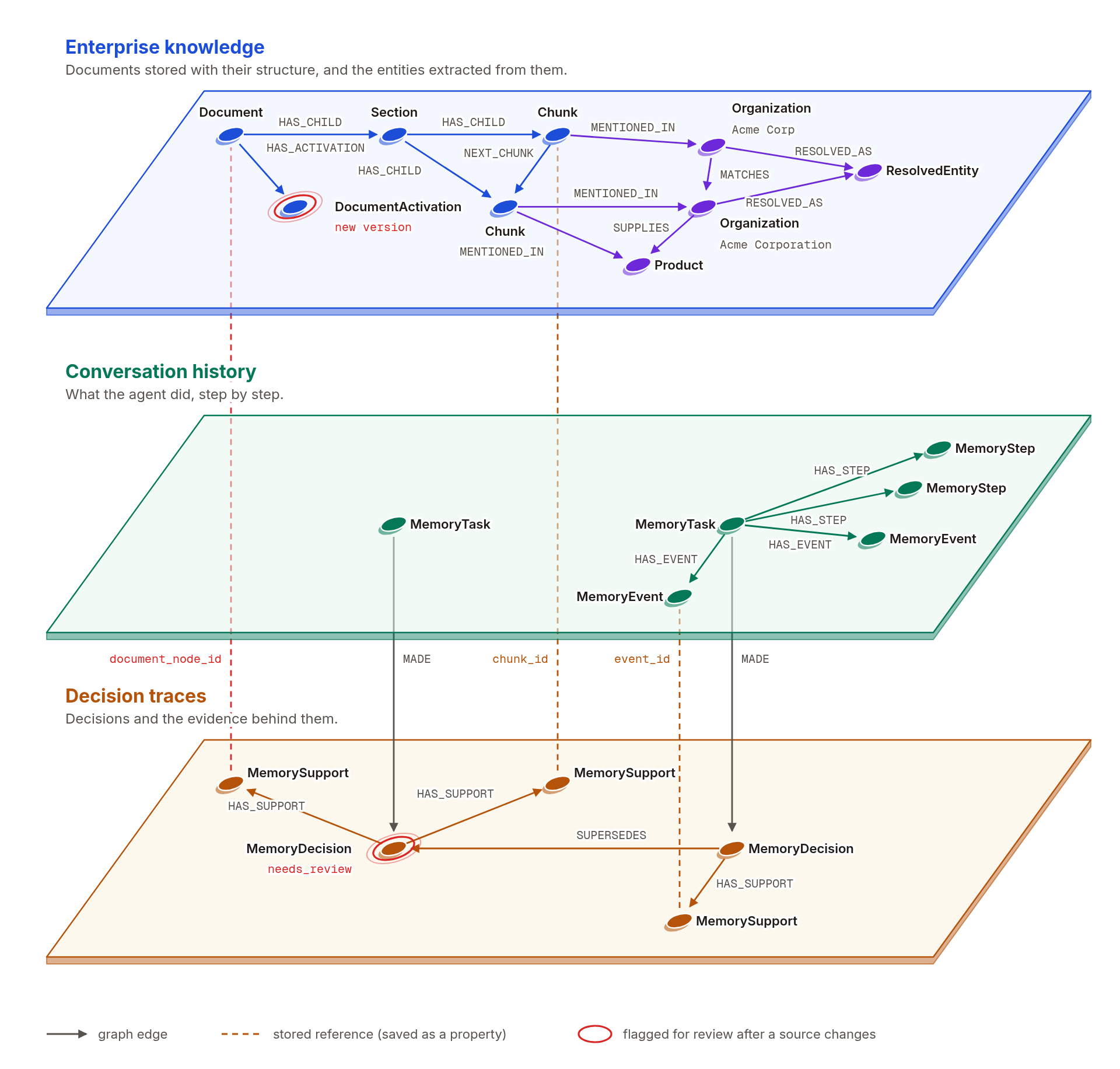
You decide which things matter, and the graph is built around them.
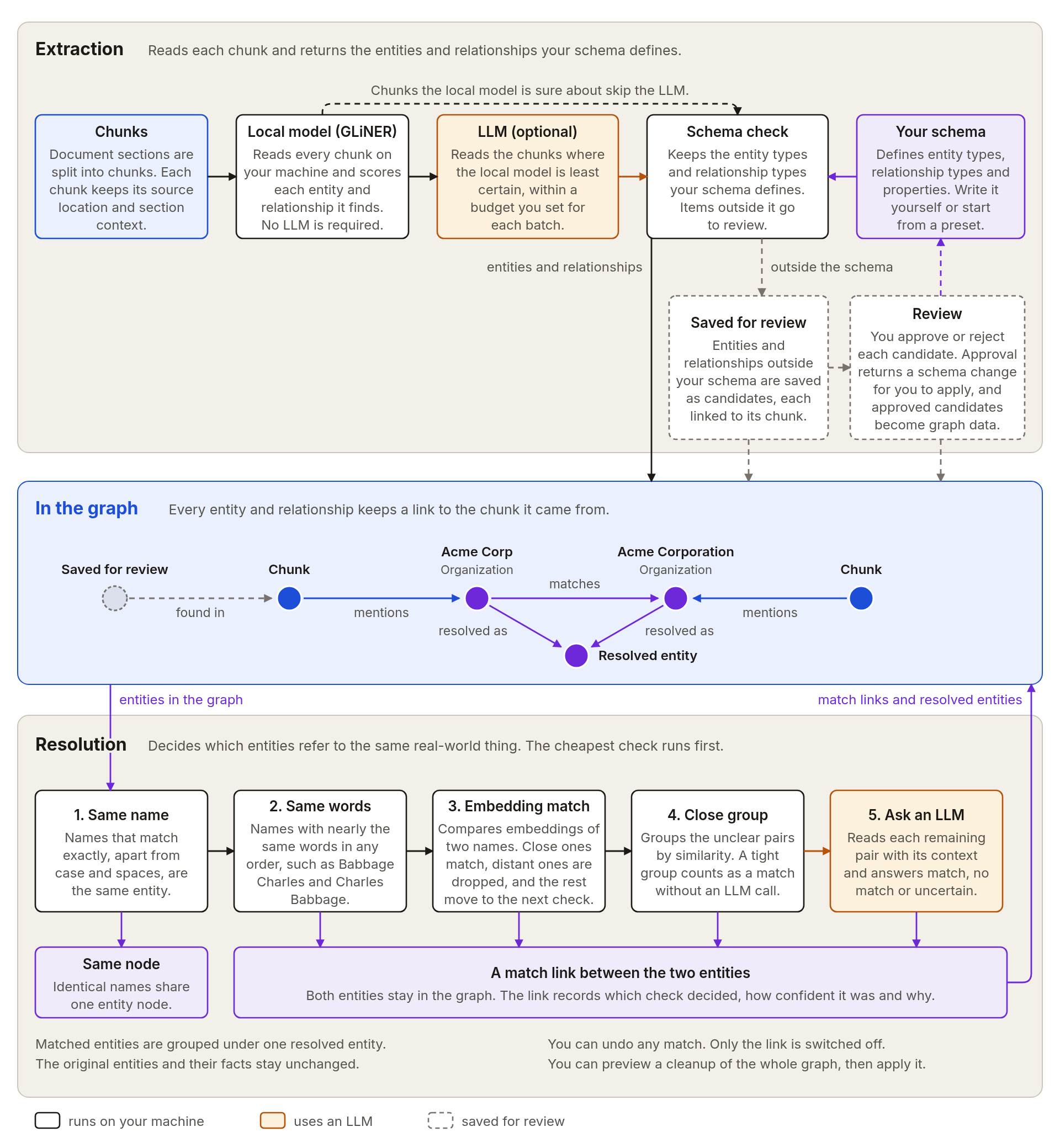
Agents find passages, read the exact text, and move around a document the way a person would.
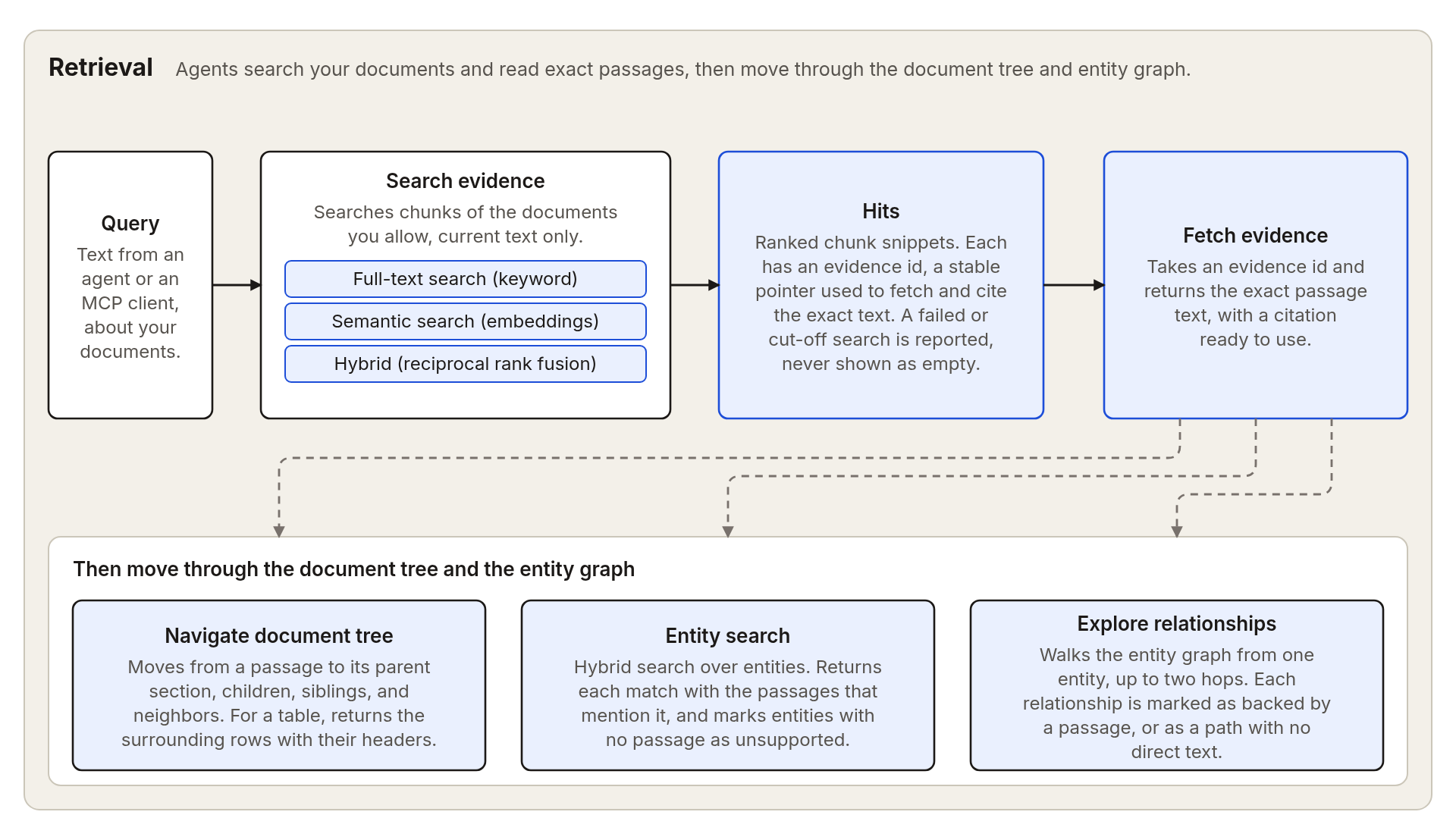
The memory layer records an agent's work and decisions as it runs, keeps them current when sources change, and recalls them to inform later decisions.
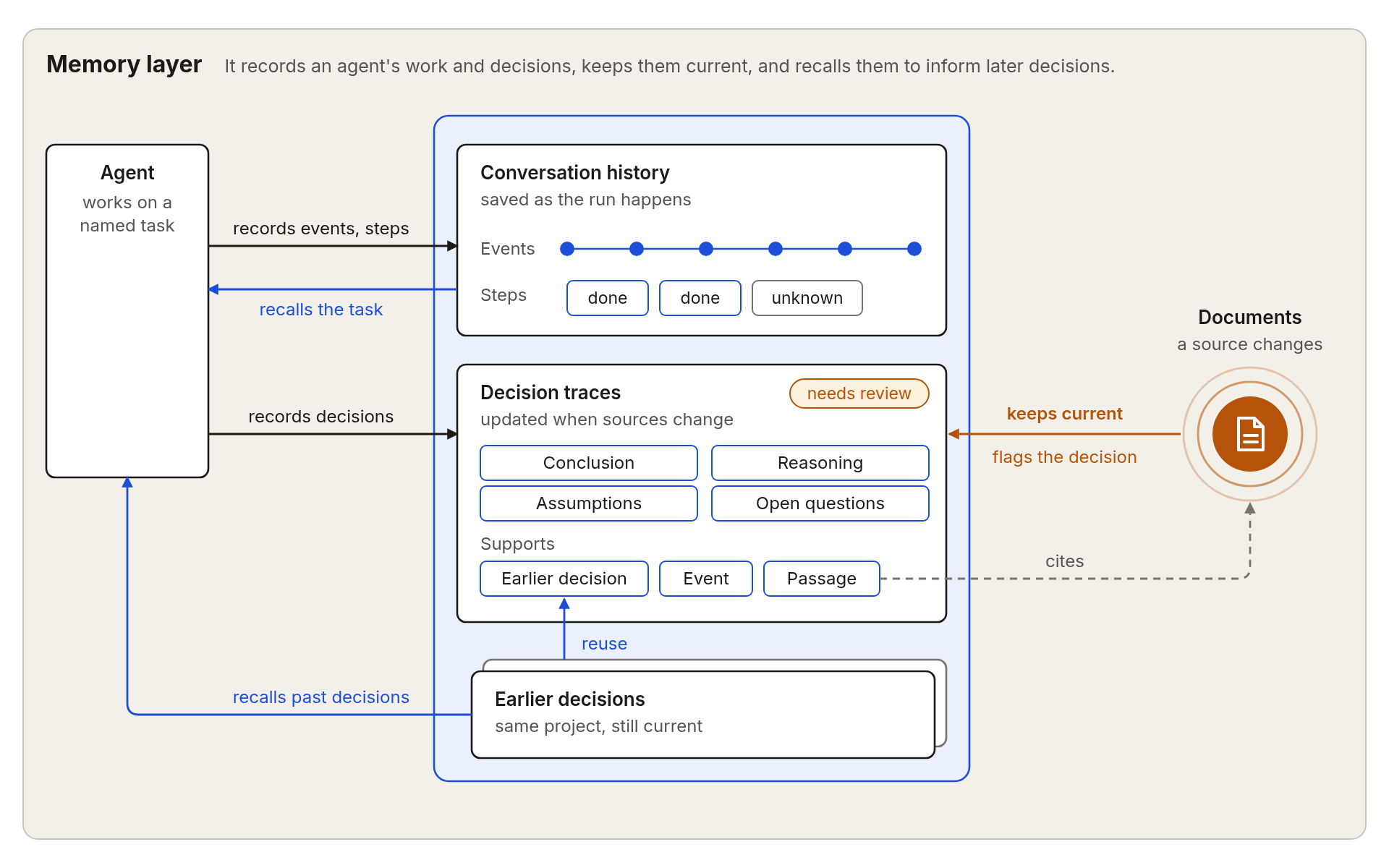
Use the agent that ships with the library, or connect your own through MCP.
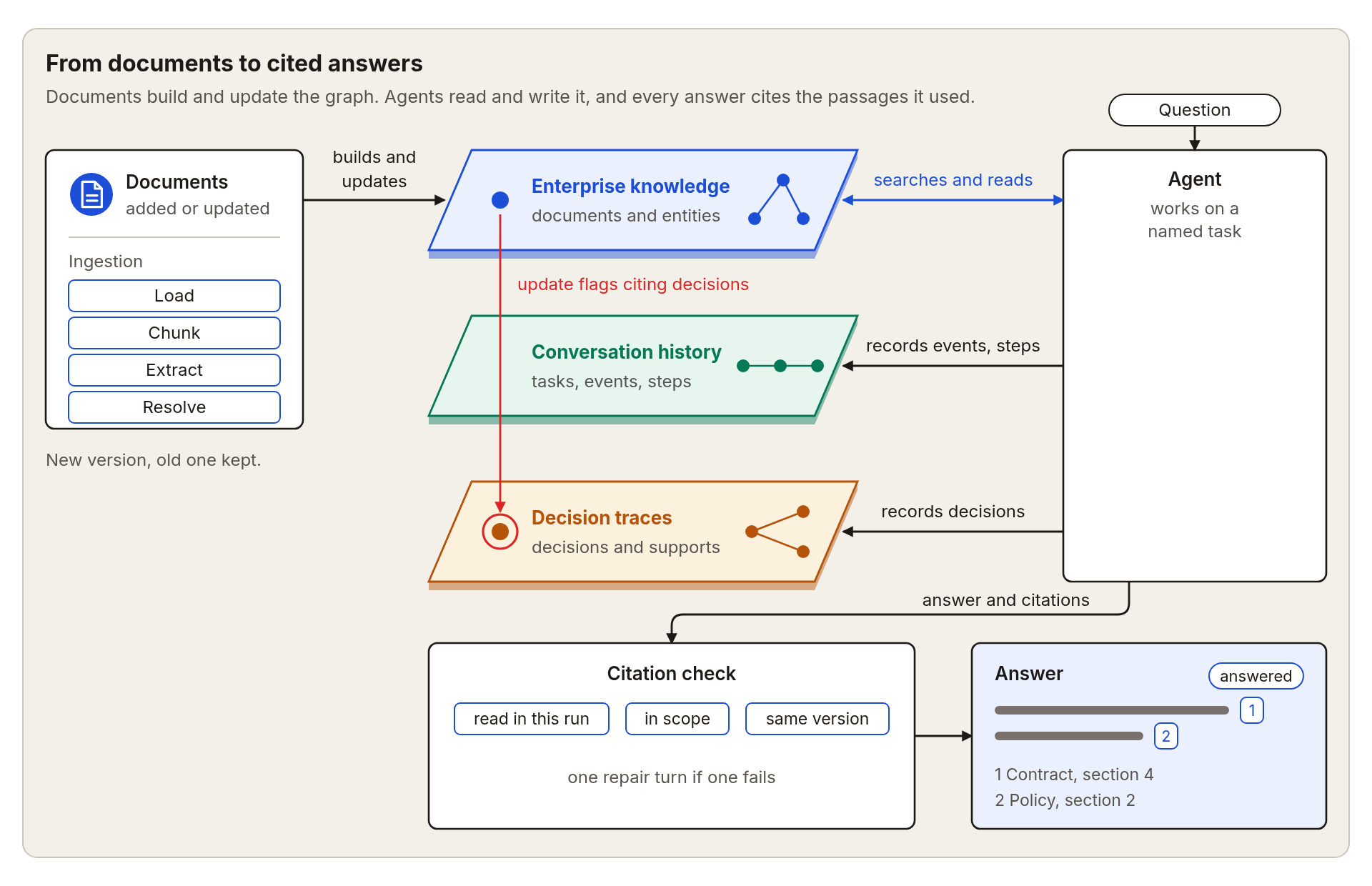
See the features page for the complete list, including supported file formats, chunking, keeping the graph current as documents change, and community summaries.
In this example you add one document, ask a question about it, and get an answer with numbered sources. You need Python 3.11 or newer, a running Neo4j database, and an OpenAI-compatible LLM endpoint. See the quickstart guide for starting Neo4j with Docker or Neo4j Aura.
Install the package from PyPI into a fresh virtual environment:
uv venv
source .venv/bin/activate
uv pip install "agentic-graphrag[neo4j,extract,agents]" --torch-backend=auto
See Installation for other package managers and the optional parts you can add.
Create a file named .env in the folder where you will run the example. Replace the values with your own, and keep the file out of version control.
NEO4J_URI=bolt://localhost:7687
NEO4J_USERNAME=neo4j
NEO4J_PASSWORD=your-neo4j-password
AGENT_LLM_BASE_URL=https://your-endpoint.example.com/v1
AGENT_LLM_API_KEY=your-api-key
AGENT_LLM_MODEL_ID=your-model-id
The last three lines are the address, key, and model of your OpenAI-compatible LLM endpoint. For a Neo4j database on another machine, see Configuration.
Put any Markdown or text file in the same folder and name it your-document.md. Save the following as example.py and run python example.py.
import asyncio
from pathlib import Path

from agrag.agents import AgentLLMSettings, build_agent
from agrag.embedding import build_embedder
from agrag.graphdb import build_graph_store
from agrag.ingestion import ExtractionSettings, Graph

# Any Markdown or text file you have.
DOCUMENT = Path("your-document.md").resolve()


async def main() -> None:
    # Connect to the database and load the model that turns text into vectors.
    store = build_graph_store("neo4j")
    embedder = build_embedder("ibm-granite/granite-embedding-small-english-r2")
    try:
        # Read the document into the graph. This step runs on your machine.
        graph = await Graph.open(
            schema="operations",
            graph_store=store,
            embedder=embedder,
            extraction_settings=ExtractionSettings(mode="gliner"),
            max_llm_pairs=0,
        )
        await graph.add(DOCUMENT)

        # Create an agent that may read only this document.
        agent = build_agent(
            graph_store=store,
            embedder=embedder,
            scope=frozenset({str(DOCUMENT)}),
            project_id="my-project",
            agent_id="researcher",
            llm_settings=AgentLLMSettings.from_openai_compatible_env(),
        )

        # Ask a question about the document.
        result = await agent.ainvoke({
            "task_name": "first-question",
            "question": "What are the main points of this document? Cite your sources.",
        })
        print(result["answer"])
    finally:
        await store.close()


asyncio.run(main())
The script prints an answer that ends with a numbered list of sources. Run it again with the same task name and the agent continues where it stopped.
Run agrag-mcp to give any MCP client tools that search your documents, read exact passages, check citations, and keep task and decision memory.
Install the server in the same virtual environment as before:
uv pip install "agentic-graphrag[neo4j,mcp]"
Then add the server to your MCP client. Replace the document path with the full path of a file you added to the graph.
{
  "mcpServers": {
    "agrag": {
      "command": "agrag-mcp",
      "env": {
        "NEO4J_URI": "bolt://localhost:7687",
        "NEO4J_USERNAME": "neo4j",
        "NEO4J_PASSWORD": "your-neo4j-password",
        "AGRAG_MCP_SCOPE_DOCUMENT_KEYS": "/full/path/to/your-document.md",
        "AGRAG_MCP_PROJECT_ID": "my-project",
        "AGRAG_MCP_AGENT_ID": "researcher"
      }
    }
  }
}
If your client cannot find agrag-mcp, use its full path inside the virtual environment, for example /full/path/to/.venv/bin/agrag-mcp. The server starts read-only and reads only the documents you list. The project and agent IDs enable task and decision memory tools; writes remain disabled until you change the server settings. See the MCP server guide for the other settings.
We welcome bug fixes, new features, documentation improvements, and other contributions. Please read our Contributing guide before submitting a pull request.
Agentic GraphRAG builds on the work behind these papers and projects.
Agentic GraphRAG is licensed under the Apache License 2.0.
Download counts and popularity will appear here as the collector receives them.
| Version | Published | Direct dependencies | Open version |
|---|---|---|---|
| 0.0.6 | 19 Oct 2026 | 35 |
This describes our collected data; it is not a security assessment.
Observed since 20 Oct, 22:16 UTC
No superseded metadata states collected. Unchanged observations do not create new revisions.
package:659e369a50f25d80d0d69e854f29a61d60040e89b133620a2f82a576aba6056e