

 Repository
Current collected state Current
Observed since 20 Oct, 22:33 UTC
No superseded metadata states collected. Unchanged observations do not create new revisions.
Find out why your coding agent is expensive — offline waste detection, loop detection and skill generation across 7 coding agents.
Your coding agent costs more than it should. AgentLens tells you why — from your own session history, entirely offline.


Claude Code · Codex CLI · Junie · OpenCode · Gemini CLI · Copilot CLI · Goose — one lens
There are already good tools that tell you how much your coding agent cost. This one tells you why, and what to type differently tomorrow.
$ agentlens waste

╭─────────────────── Change this ───────────────────╮
│ $1.38 of $3.09 (45%) traced to habits you repeat. │
│ Across 5 session(s). Ranked by what it costs you. │
╰───────────────────────────────────────────────────╯

1. Re-asking without new information  $0.15  ·  2×  ·  35,100 tokens
   Why it costs: The whole conversation is re-sent as input on every turn, so a
   second attempt costs more than the first — and with no new evidence the model
   just repeats the same guess in different words.
   → Say what "wrong" means before you re-send: the exact command you ran, the
     output you observed, and the output you expected.

     "still not working, please fix it"
       2026-08-04 09:30 · $0.10 · Reports failure without saying what failed
       ("the webhook handler is broken, can you fix it") — no error text, path
       or output was supplied.

2. Huge command output flooding the context window  $0.16  ·  1×  ·  174,024 tokens
   → Pipe it: `| head -40`, `--quiet`, `-q`. Ask for the lines you need.

     "npm ls --all"
       2026-08-05 10:30 · $0.16 · 113 KB of output (~29,004 tokens)
       re-sent as input on 6 later turns.
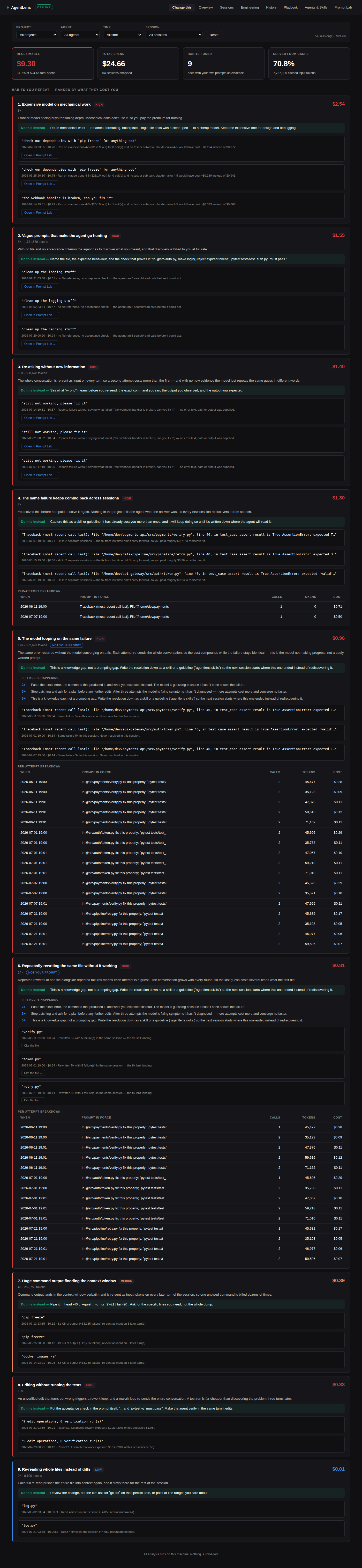
Every finding quotes your own prompt, attaches a dollar figure, and gives
one concrete rewrite. That is the whole design brief. Note the filter row,
"not your prompt" on findings that are the model's fault, and the per-attempt
breakdown under loop/churn findings — this is the same waste output above,
running as the live dashboard (synthetic data, fixtures/demo_data.py, not
anyone's real history):
uvx agentlens-cli doctor        # zero-install, see what it finds
# or
pipx install agentlens-cli
Python 3.10+. One dependency (rich). No Node, no Docker, no account, no API key.
If you cloned the repo instead of installing the published package, skip the manual venv/pip dance and use the bundled runner — it creates the venv, installs everything, ingests your local history and starts the dashboard:
git clone https://github.com/jalpesh/AgentLens.git && cd AgentLens
./run.sh                  # setup + ingest + start, all in one
run.sh always uses python3 explicitly (never bare python), is safe to
re-run (it won't reinstall an already-good venv or start a second server on
top of one it already started), and has explicit subcommands too:
./run.sh setup            # create .venv, install agentlens-cli + dev deps
./run.sh ingest [args]     # parse local agent history into the local db
./run.sh start [--port N]  # start the dashboard (default port 7878)
./run.sh stop              # stop the dashboard, if this script started it
./run.sh restart           # stop, then start
./run.sh status            # is a server running, and on what port/pid
./run.sh test              # ruff + pytest
Running from source via
./run.sh? These commands assumeagentlensis on yourPATH, which is only true for thepipx/uvxinstall above. From a source checkout, eithersource .venv/bin/activatefirst, or prefix every command with.venv/bin/agentlens(e.g..venv/bin/agentlens export).run.shonly wrapsingest/start/stop/etc. — everything else below, you run directly.
agentlens doctor            # which agents are on this machine
agentlens ingest            # parse local history into a local SQLite db
agentlens waste             # why it was expensive, with evidence   ← the point
agentlens skills            # hooks/skills/commands to fix what it found
agentlens playbook          # ranked, paste-ready rules generated from YOUR findings
agentlens report            # cost and token summary
agentlens report --html out.html   # same dashboard, one file, no server — share it
agentlens projects          # list projects available to --project
agentlens sessions          # per-session breakdown
agentlens lab "..."         # score a prompt BEFORE you send it
agentlens serve             # live dashboard on http://127.0.0.1:7878
agentlens export            # redacted JSON for your own analysis
Every reporting command takes the same filters:
agentlens waste --project payments-api      # one project (name or id; prefixes work)
agentlens waste --provider claude-code      # one agent
agentlens waste --days 30                   # one time window
agentlens waste --session <id>              # one session
The live dashboard (agentlens serve) has the same filters plus an explicit
From/To date range next to the preset "Last N days" dropdown, for "show me
last October" instead of only relative windows. On a large history, the first
page load can take a visible moment to parse and analyse — the dashboard
shows a loading screen for that instead of a blank page while it works.
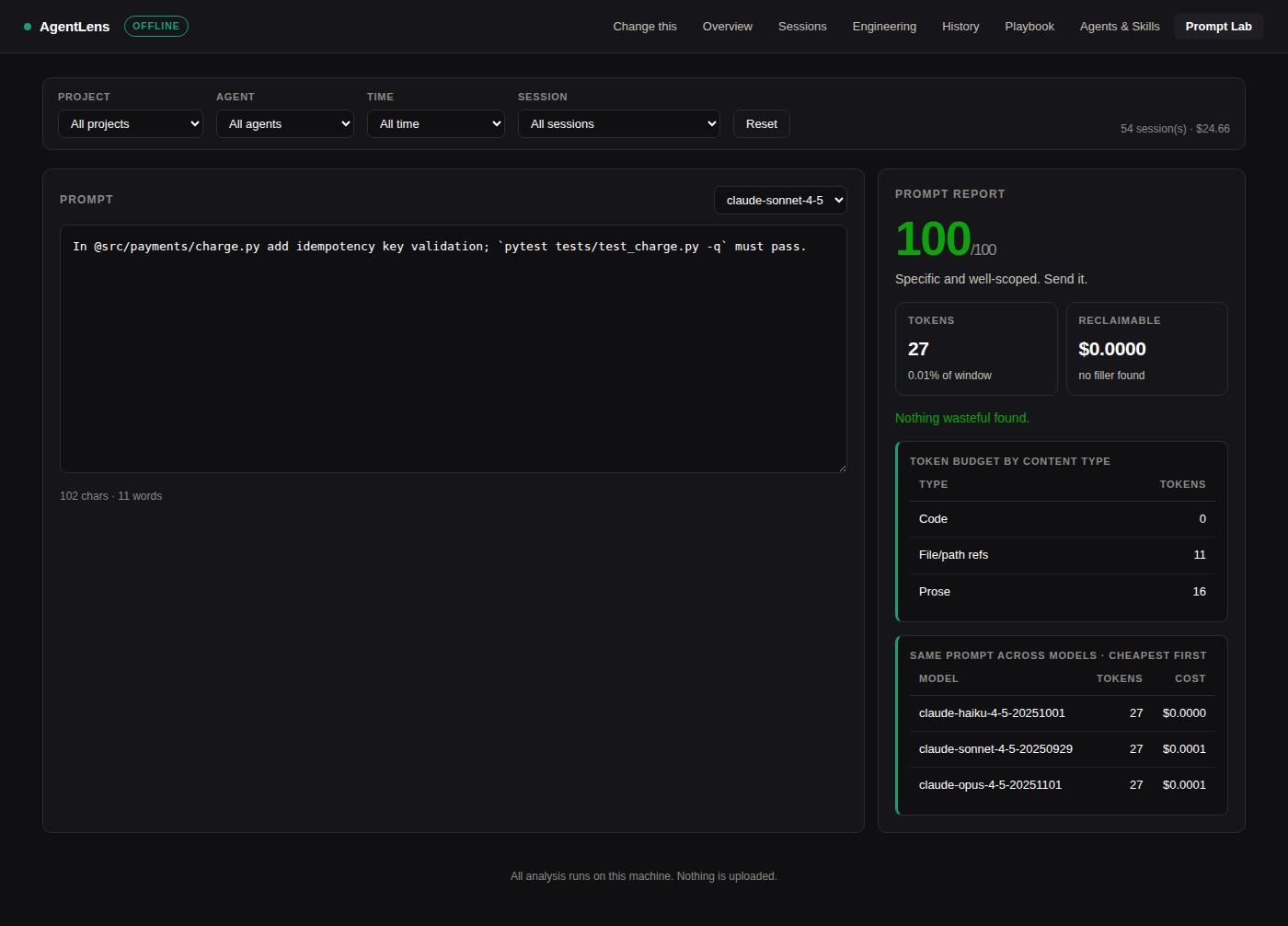
Score a prompt before you spend anything on it. Local tokenizer, no API call.
$ agentlens lab "fix the auth stuff, maybe clean it up if possible. thanks!"

╭──────────────────── Prompt report ─────────────────────╮
│ 33/100   Rewrite this. As written it will cost several │
│          turns to converge.                            │
│ 17 tokens · 0.01% of 200,000 window · $0.0001 to send  │
╰────────────────────────────────────────────────────────╯

  −22  No file or path referenced
       → Name the file with @path/to/file. Without it the agent greps your
         repo to find out what you meant, and that search is billed to you.
  −18  No acceptance check
       → State what "done" looks like — "`pytest -q` must pass".
  −15  Opens with a vague instruction   found: "fix"
  −12  Hedging language (3×)            found: "if possible, maybe, try to"
A scorer that never says no is decoration. This one is opinionated enough to occasionally annoy you — that is the feature.
The dashboard version of the rewrite has a Copy button, and if the rewrite
still has an unfilled placeholder (no matching file found in the session it
was generated from, so it reads @<FILE> instead of a real path) that's
called out in a warning banner above the text, and stays flagged on the
button itself after you copy it. This exists because someone's real prompt to
their agent turned out to literally contain @<FILE> — a leftover,
unfilled placeholder copied forward without noticing — and the scorer now
also catches the milder version of the same mistake: typing a bare stand-in
like @FILE yourself, which used to silently pass as if it named something
real.
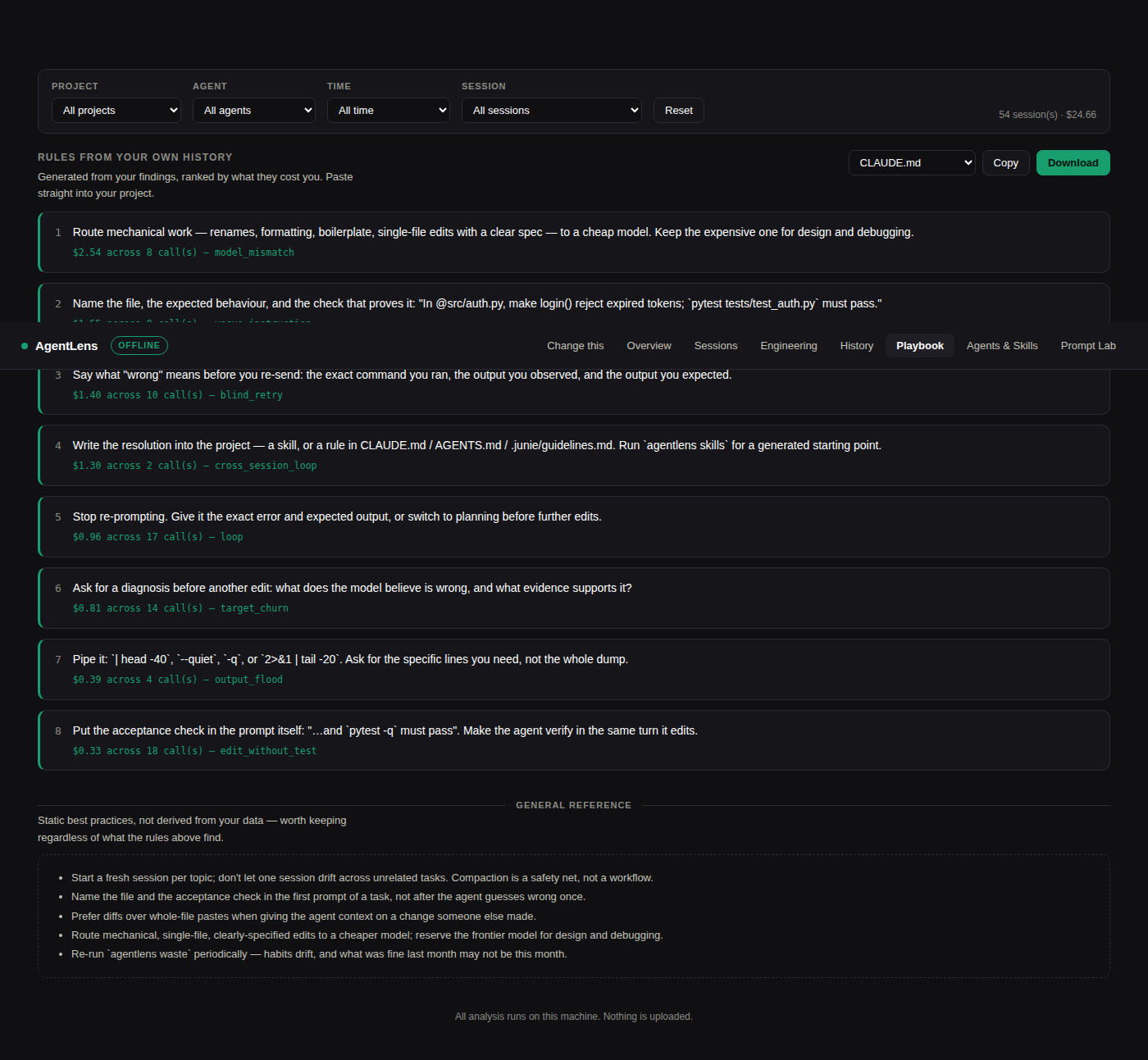
Every finding already carries a rewrite. The Playbook turns the ones that actually cost you money into a ranked, paste-ready rules file — closing the loop most tools leave open.
agentlens playbook --format claude --out CLAUDE.md
agentlens playbook --format agents --out AGENTS.md
agentlens playbook --format junie  --out .junie/guidelines.md
Two sections, always kept visually and structurally separate:
Every other detector here identifies something you did. This one identifies something the model did — the same failure, over and over, without converging — and says so.
3. The model looping on the same failure  $0.22 · 8× · 135,800 tokens · not your prompt
   Why it costs: The same error recurred without the model converging on a fix.
   Each attempt re-sends the whole conversation, so the cost compounds while the
   failure stays identical — this is the model not making progress, not a badly
   worded prompt.
     If it keeps happening:
       ▸ 2+ → Paste the exact error, the command, and what you expected instead.
       ▸ 3+ → Stop patching. Ask for a plan before any further edits.
       ▸ 5+ → This is a knowledge gap, not a prompting gap. Write it down as a skill.
Failures are fingerprinted into a signature — the error with line numbers, paths, addresses and timings stripped out — so two occurrences of the same underlying problem match even though their raw text differs. Three of one signature means the model is circling.
The suppression that keeps it honest: iteration that ends in success is just debugging, and is silenced. A detector that fires on every productive fix-it session would make the whole report worthless, so the converged case has its own fixture and its own test.
A tool willing to tell you when something isn't your fault is more believable when it says it is.
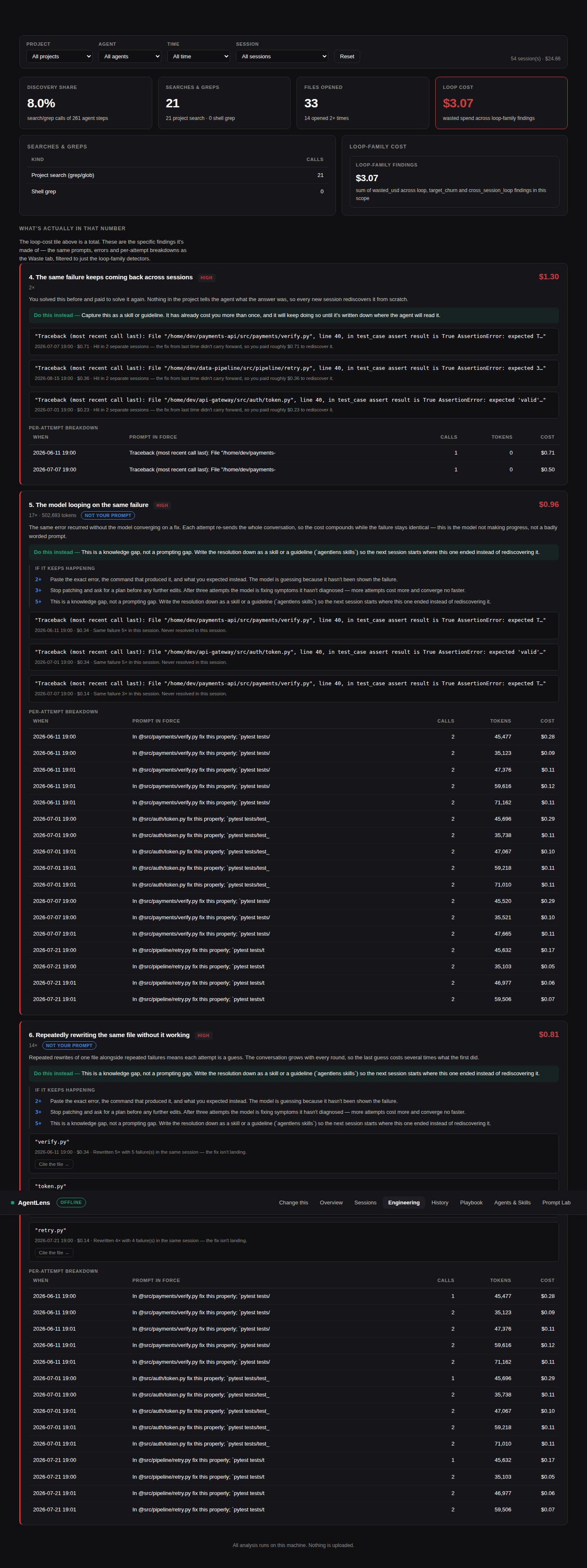
Per-attempt breakdown. A loop/churn finding no longer stops at "5×, $0.22" — expand it and see every attempt: the prompt in force, calls, tokens, and cost, in order, so you can see the conversation growing turn over turn rather than just the total.
Loop citations. When a loop finding's evidence names a specific file, the dashboard offers a collapsed "Cite the file →" drill-down. This is the one place in AgentLens that reads file content off disk rather than session-log metadata — narrow, opt-in per click, never cached, and it degrades to "file not available locally" rather than crashing when the repo has moved or you're reviewing history on a different machine. See the "Loop citations" section in SECURITY.md for the exact contract.
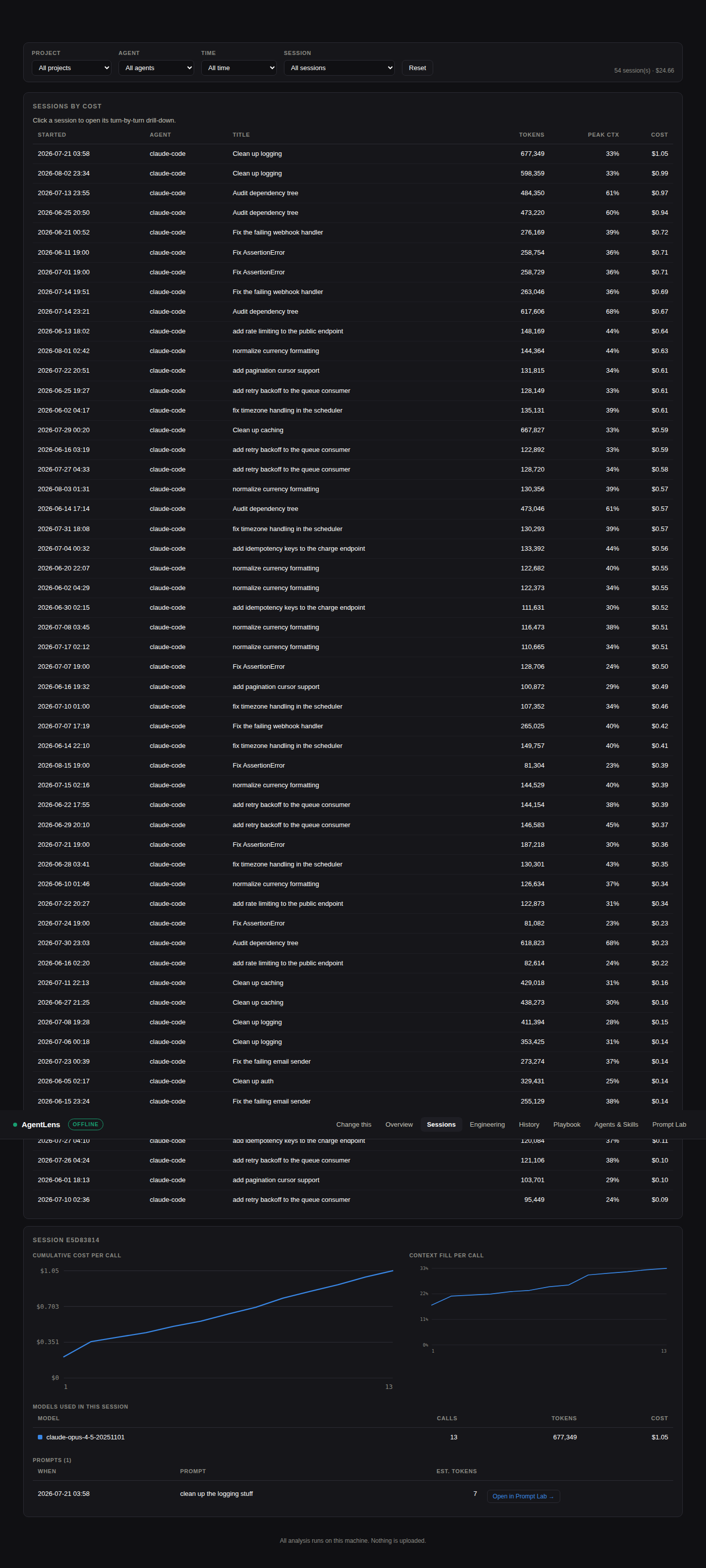
Sessions used to show totals only. Click one in the Sessions tab and it opens into the turn-by-turn story: cumulative cost per call, context-window fill per call, a per-session model table, and the full prompt list — each prompt wired to the same "Open in Prompt Lab" flow the Waste tab uses, so you can re-score a prompt from three weeks ago without hunting for the original text.
agentlens skills turns findings into files you can actually install — a hook,
a slash command, a skill, an MCP config, a guideline.
$ agentlens skills

╭──────────────── Detected project ────────────────╮
│ python project · tests: pytest tests/test_x.py -q │
│ Inferred from 190 events. No filesystem scan.     │
╰───────────────────────────────────────────────────╯

post-edit-tests  [hook]  Run your tests automatically after every edit  $0.52
   Editing without running the tests cost you $0.52 across 23 occurrence(s).
   triggered by: edit_without_test
   → .claude/settings.json

$ agentlens skills --init post-edit-tests            # preview
$ agentlens skills --init post-edit-tests --write    # write it
Two rules make this different from a list of tool recommendations:
No suggestion without a triggering finding or a detected fact. Every entry
names its trigger. "Here are ten good MCP servers" is content anyone can write;
"add this hook, because edit_without_test cost you $0.52 across 23 edits" can
only come from something that read your history.
No package named that hasn't been verified to exist. Where a category is right but no specific implementation has been confirmed, AgentLens says so and emits a config stub rather than inventing a plausible-sounding package. A recommendation for software that doesn't exist is the same credibility failure as claiming support for a log format you never tested.
The project profile is inferred from your session history, not a filesystem scan — file extensions the agent touched, commands it ran, manifests it opened. It works on a machine where the project is no longer checked out, and it describes what your agent actually did rather than what a config file claims.
Below the triggered list sits a second, visually distinct section: "Generic
best practices — not derived from your data." Four entries verified to
actually exist (ast-grep for structural search, codegraph for a local
code-graph MCP server, codebase-memory-mcp for persistent code memory, and
cost-routing subagents — a downloadable skill that plans in whatever
model is running the conversation and dispatches the mechanical, well-spec'd
parts of a task to a cheaper model via Claude Code's own per-subagent model
parameter (sonnet/opus/haiku on the Task tool — a real, documented
mechanism, not a hypothetical one; see
the docs). It's the manual
equivalent of "plan in a strong model, implement in a cheap one" for setups
that don't have that routing built in already), shown the same way every time
regardless of what your history contains. It never sets a triggered_by —
that would be claiming a receipt this section doesn't have — and it never
replaces the triggered list, only sits alongside it under its own heading.
(One evaluated, ambiguous package —
code-review-graph, which resolves to at least four unrelated projects with
no canonical implementation — was left out rather than guessed at; see
PLAN_PHASE4.md.)
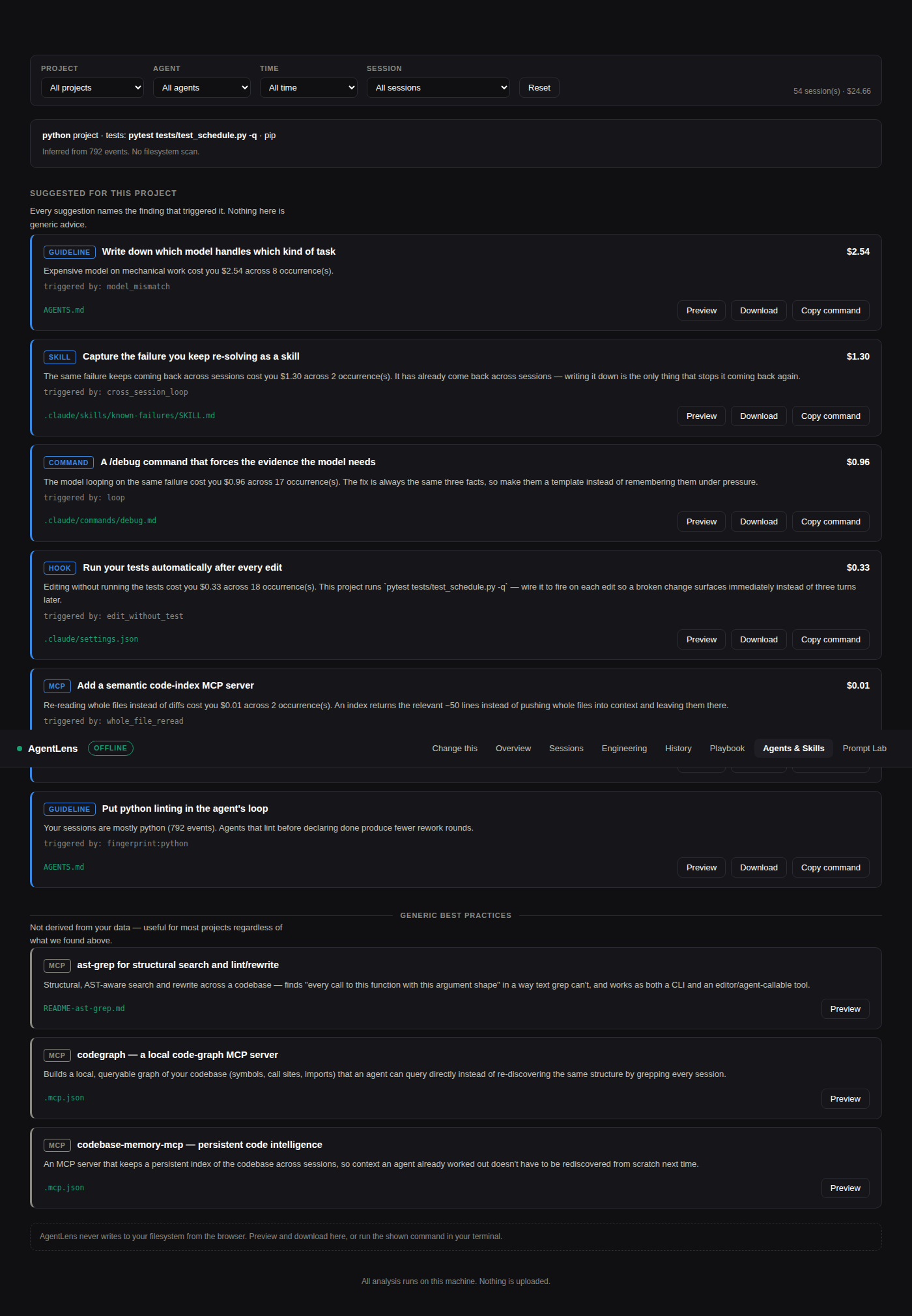
The dashboard never writes to your filesystem. It previews, downloads, and copies the CLI command. There is exactly one POST endpoint in the whole server (
/api/lab, the prompt scorer) and no file-write endpoint at any flag or setting — a browser-reachable arbitrary-write endpoint isn't something a privacy-positioned tool should ship to save a copy-paste.
| Habit | What it looks for | Typical fix |
|---|---|---|
| Loop ★ | The same failure 3+ times in a session without converging | Escalates: better prompt → plan mode → write a skill |
| Cross-session loop ★ | The same failure recurring in different sessions | Write it down — the knowledge isn't persisting |
| Target churn ★ | One file rewritten 4+ times with failures in between | Ask for a diagnosis before another edit |
| Blind retry | Follow-up prompt reporting failure with no error text, path or output | Say what "wrong" means |
| Output flood | Huge tool output re-sent as input on every later turn | Pipe through head/-q |
| Vague instruction | No file reference, no acceptance criterion, agent has to go hunting | Name file + acceptance check |
| Edit without test | Many edits, few verification runs | Put the check in the prompt |
| Whole-file re-read | Same file read 3+ times in one session | Review the diff, not the file |
| Compaction thrash | Session runs until the window fills | Start fresh when the topic changes |
| Uncached docs | Same URL fetched repeatedly | Cache it in CLAUDE.md/AGENTS.md |
| Model mismatch | Frontier model on mechanical work | Route mechanical work to a cheap model |
Each is one small file in analytics/detectors/
with its own test. Adding one is a pull request, not a redesign.
| Agent | Source | Status |
|---|---|---|
| Claude Code | ~/.claude/projects/**/*.jsonl | ✅ full — usage, cache split, tools, compaction |
| Codex CLI | $CODEX_HOME/{sessions,archived_sessions} | ✅ full — cumulative counters resolved to deltas |
| Junie | ~/.junie/history.json | ✅ full |
| OpenCode | ~/.local/share/opencode/storage/message/**/*.json | ✅ full — one JSON file per message, documented layout |
| Gemini CLI | ~/.gemini/tmp/<project-hash>/chats/ | ⚠️ experimental — location confirmed by Google's docs, on-disk format isn't, so this tolerates several plausible shapes |
| GitHub Copilot CLI | ~/.copilot/session-store.db | ⚠️ experimental — undocumented SQLite; parses via schema introspection, included anyway for its install base |
| Goose | ~/.local/share/goose/sessions/sessions.db (≥1.10) or *.jsonl (<1.10) | ⚠️ experimental — vendor changed formats between versions; both are handled |
| Cursor · Windsurf | Multiple undocumented SQLite stores | 🔜 Phase 3 |
What "⚠️ experimental" means in practice: the on-disk schema isn't
published, so these adapters introspect column/key names at read time instead
of hardcoding a query — the same approach Junie's adapter uses for its
history-key drift, just applied to a database instead of a JSON key. agentlens doctor labels these explicitly and tells you if a root exists but nothing
readable was found in it. If it finds nothing on your install, that's the
honest failure mode for an unverified format — please open an issue with
PRAGMA table_info(<table>) output (no real data needed) rather than a bug
report; that feedback is exactly how Claude Code and Codex went from
experimental to full.
Adding an agent means implementing one interface — discover(), detect(),
parse() — and committing a synthetic fixture. Nothing else in the codebase
changes. See adapters/base.py.
AgentLens is a plain local process — no elevated privileges, no bundled
runtime. It relies on ordinary OS file permissions, which differ enough across
platforms that a flat "permission denied" isn't actionable on its own, so
agentlens doctor prints OS-specific guidance instead: macOS sandboxed-terminal
/ Full Disk Access hints, Windows Controlled Folder Access hints, and a plain
chmod hint on Linux. A directory that exists but can't be listed is reported
as "found, 0 readable" rather than silently counted as "not installed."
This reads your session history, which contains repo paths, hostnames, client names and occasionally credentials. So:
127.0.0.1 and the default install works
with the network off.agentlens lab --llm sends the
prompt you're editing to Anthropic or OpenAI for a rewrite. It requires the
flag and your own API key, it is never automatic, and without it the
rewrite is generated locally. See SECURITY.md for the exact
boundary.checkout-service, not
/Users/you/work/AcmeCorp/checkout-service — enough for a filter, not enough
to leak your employer. Stripped entirely from exports.export and report --html redact by default — URLs, home directories,
emails, IPs. Secrets are stripped even with --raw.fixtures/generate.py. No real session data is in
this repository.Overview — the table-stakes cost charts every competitor also has:
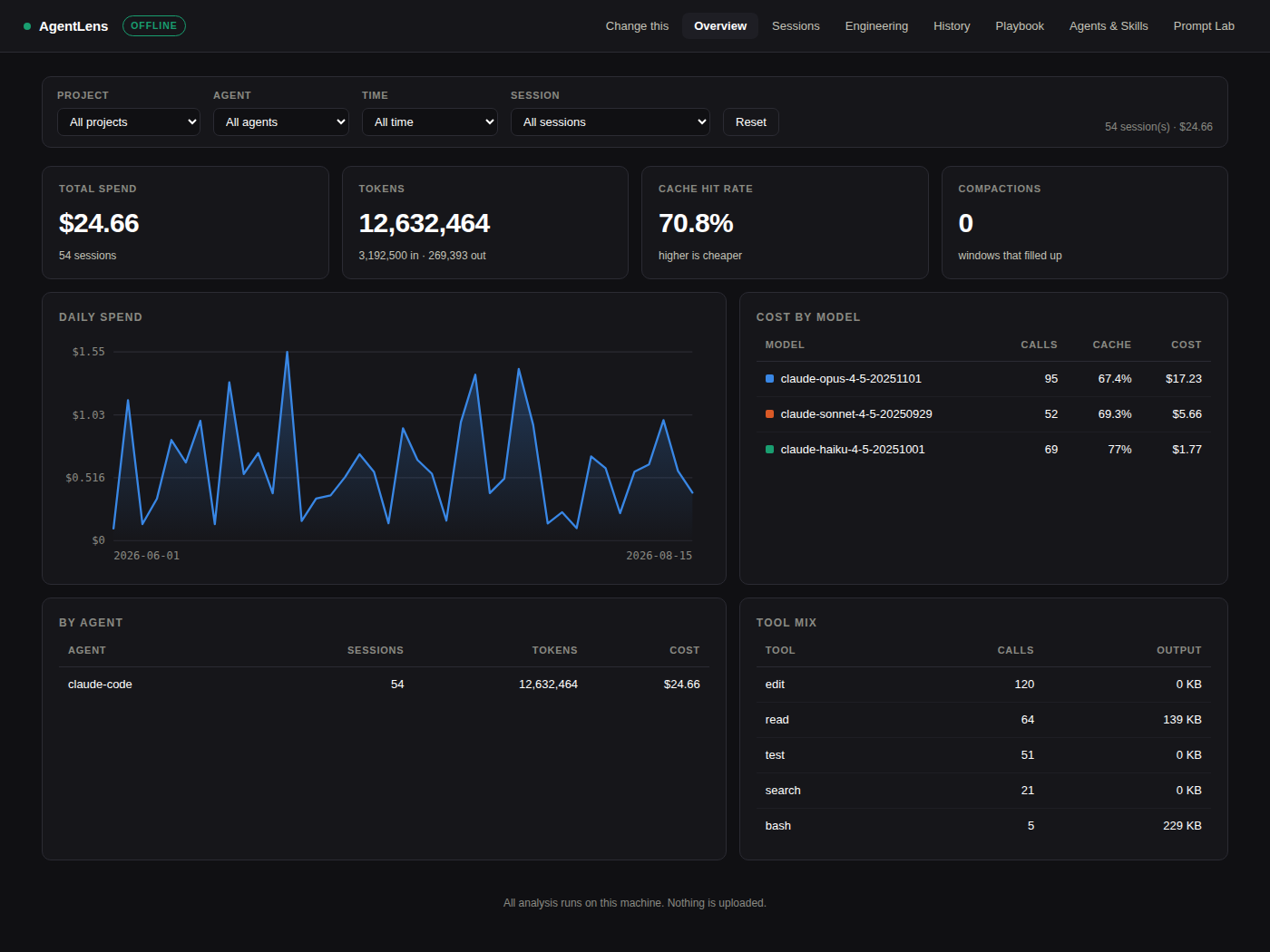
Engineering — discovery share, searches & greps, files opened, and
loop-family cost, rolled up from the same events, no new detector:
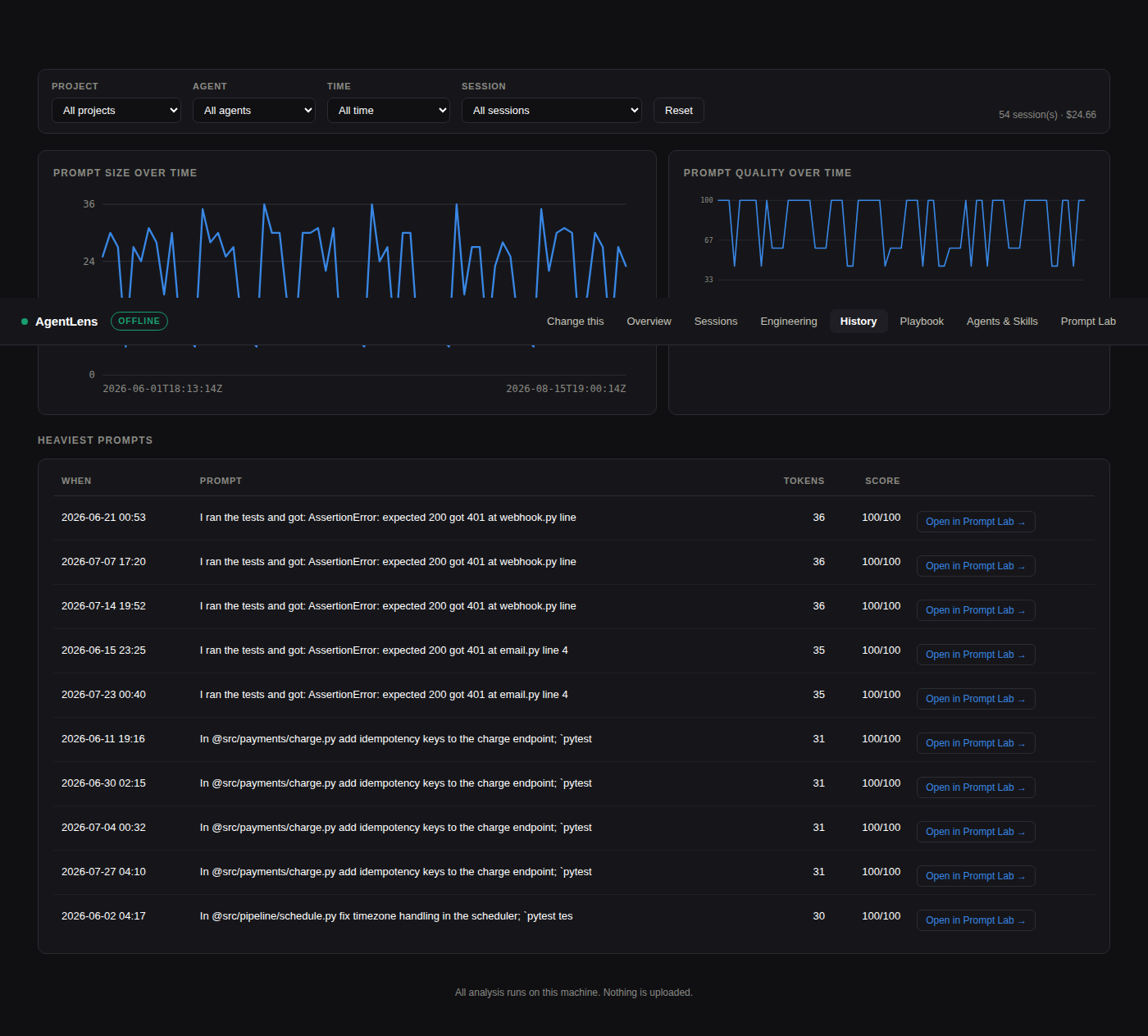
History — prompt size and quality over time, plus the heaviest prompts
you've sent:
 ~/.claude/projects/**/*.jsonl        ─┐
 $CODEX_HOME/sessions/*.jsonl         ─┤
 ~/.junie/history.json                ─┤
 ~/.local/share/opencode/storage/     ─┼─→ [Adapter] ─→ Event[] ─→ [SQLite]
 ~/.gemini/tmp/**/chats/         ⚠️    ─┤                              │
 ~/.copilot/session-store.db     ⚠️    ─┤                              ▼
 ~/.local/share/goose/sessions/  ⚠️    ─┘         ┌────────────────────────────┐
                                                   │  cost · context · rollups  │
                                                   │  WASTE DETECTORS  ★        │
                                                   │  LOOP DETECTION   ★        │
                                                   │  prompt scorer + rewrite ★ │
                                                   │  PLAYBOOK GENERATOR  ★     │
                                                   │  SKILL/HOOK GENERATOR ★    │
                                                   └─────────────┬──────────────┘
                                                                 ▼
                                       CLI + local dashboard :7878 + static export
The whole design rests on one decision: every agent reduces to the same
Event stream (schema.py). Get that right and a
new agent is ~150 lines. Get it wrong and you rebuild the app per tool.
Three details that matter more than they look:
event_id is a content hash, so re-ingesting is idempotent. Without it you
double-count and stop trusting your own numbers.seq is derived from wall-clock time, not a per-file counter, for any
adapter where one session spans many files (OpenCode: one JSON file per
message). A counter that resets to 0 every process would silently reorder
events the moment two ingest runs happen on separate days — the fix,
Adapter.seq_from_ts, is one of the more subtle bugs this project caught on
itself before it shipped.git clone https://github.com/jalpesh/AgentLens.git && cd AgentLens
./run.sh setup && ./run.sh test # venv + install + ruff + pytest, in one step
That's the same [dev] install and the same ruff check + pytest -q CI
runs — good for a quick clean-checkout sanity check. For more control
(installing manually, generating synthetic history yourself, pointing
individual adapters at a demo directory), do it by hand instead:
pip install -e ".[dev]"
python fixtures/generate.py --demo ~/agentlens-demo   # synthetic history, all 7 agents
pytest -q                                              # 163 tests

# fixtures/generate.py prints the exact export lines for your shell; e.g.:
export CLAUDE_CONFIG_DIR=~/agentlens-demo/.claude
export OPENCODE_HOME=~/agentlens-demo/.opencode
export GEMINI_HOME=~/agentlens-demo/.gemini
export COPILOT_HOME=~/agentlens-demo/.copilot
export GOOSE_HOME=~/agentlens-demo/.goose/sessions
export AGENTLENS_HOME=/tmp/agentlens-demo-db

agentlens doctor && agentlens ingest && agentlens waste
ccusage covers cost accounting across many more agents
and does it well — if all you want is spend reporting, use it. AgentLens
deliberately supports fewer agents in order to go deeper on one question those
tools don't ask: which of my own habits is causing this, and what do I type
instead?
MIT
Download counts and popularity will appear here as the collector receives them.
| Version | Published | Direct dependencies | Open version |
|---|---|---|---|
| 0.4.0 | 18 Aug 2026 | 6 |
This describes our collected data; it is not a security assessment.
Observed since 20 Oct, 22:33 UTC
No superseded metadata states collected. Unchanged observations do not create new revisions.
package:b7a67704d3ddee42bf5f6d72acdd84537aab474c95148cb6113f5d323c19da49