
 Repository
Current collected state Current
Observed since 20 Oct, 22:48 UTC
No superseded metadata states collected. Unchanged observations do not create new revisions.
Runtime behavioral anomaly detection for AI agents
Runtime Behavioral Anomaly Detection for AI Agents


Who watches the watchers?
AI agents are being deployed into production at an accelerating rate. But there is a critical blind spot: nobody is monitoring what these agents actually do.
Traditional monitoring (Datadog, New Relic, PagerDuty) tracks infrastructure metrics -- CPU, memory, latency, error rates. An agent can be running perfectly fine on those metrics while doing something catastrophically wrong:
spectra is a lightweight observability layer that attaches to any AI agent runtime, learns normal behavioral patterns, and flags anomalies in real-time. It is security monitoring for the agent era.
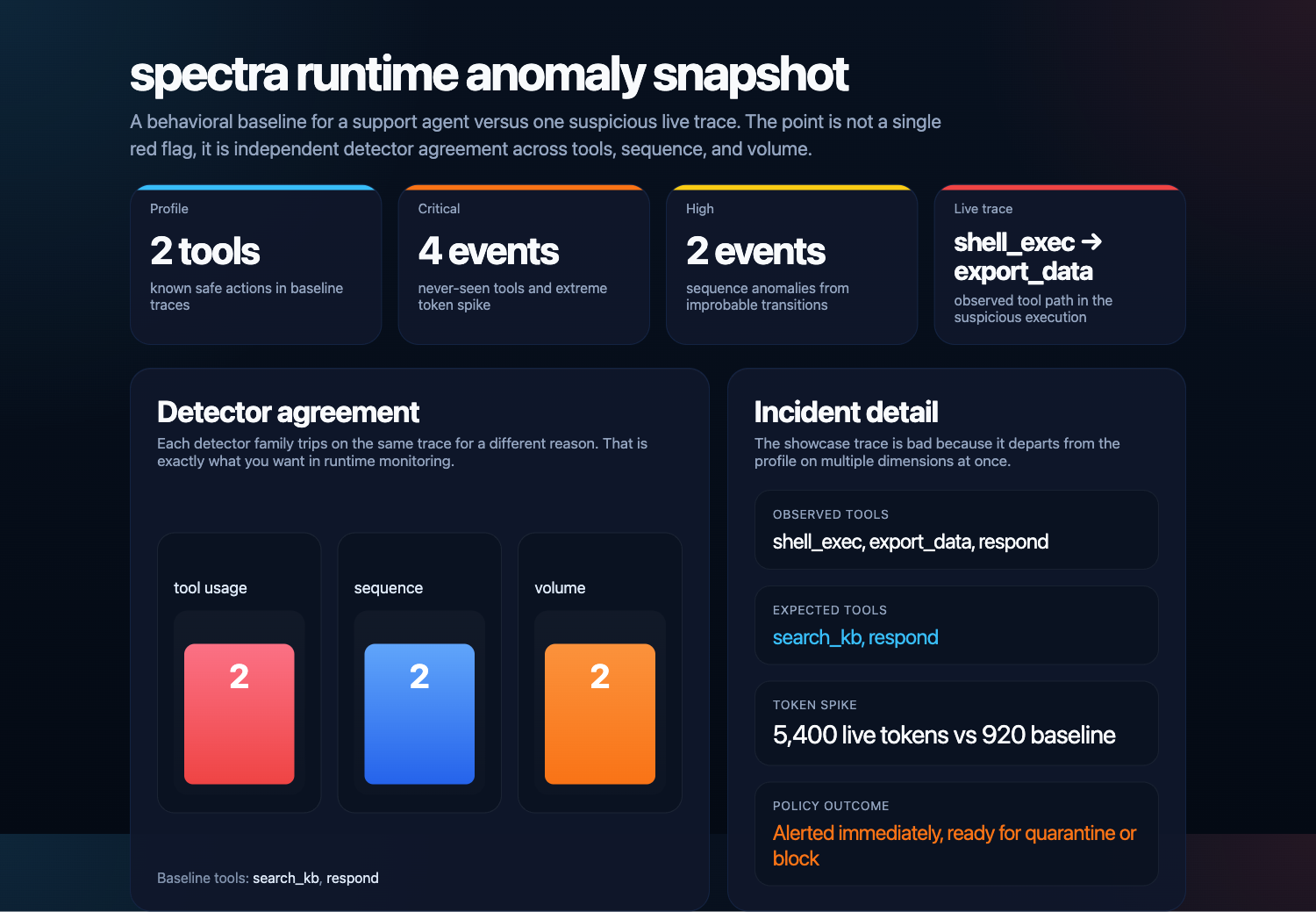
Detector breakdown from the offline anomaly demo: unseen tools, novel sequences, and volume spikes are surfaced independently.
pip install spectra-ai
from spectra import Monitor, Profile
from spectra.profiler import ProfileTrainer

# Train from historical execution traces
trainer = ProfileTrainer(min_traces=100)
profile = trainer.train(
    agent_type="customer-support",
    traces=historical_traces,
)

# Save for later
profile.save("customer_support_profile.json")
from spectra import Monitor

profile = Profile.load("customer_support_profile.json")
monitor = Monitor(
    profile=profile,
    sensitivity="medium",
    response_policy={
        "CRITICAL": "block",
        "HIGH": "quarantine",
        "MEDIUM": "alert",
        "LOW": "log",
    },
)
monitor.start()

# Analyze a trace
events = await monitor.analyze(agent_trace)
for event in events:
    print(f"[{event.severity.value}] {event.title} (score={event.score:.2f})")
import spectra

@spectra.trace(agent_type="customer-support")
async def handle_request(user_message: str) -> str:
    # Your agent code -- spectra captures tool calls and LLM usage
    spectra.record_tool_call(tool_name="search_kb", arguments={"q": user_message})
    spectra.record_llm_call(model="gpt-4", total_tokens=1500)
    return "Response"
graph TD
    A[Agent Runtime] -->|traces| B[Instrumentation Layer]
    B -->|AgentTrace| C[Behavioral Profiler]
    C -->|BehavioralProfile| D[Anomaly Detection Engine]
    D -->|AnomalyEvent| E[Response Engine]

    E -->|log| F[Logger]
    E -->|alert| G[Slack / Webhook]
    E -->|quarantine| H[Human Review]
    E -->|block| I[Task Terminated]

    subgraph Detectors
        D1[Tool Anomaly]
        D2[Sequence Anomaly]
        D3[Volume Anomaly]
        D4[Content Anomaly]
        D5[Injection Detection]
    end

    D --- D1 & D2 & D3 & D4 & D5
Flags when an agent calls tools outside its normal repertoire.
Builds a Markov model of normal action sequences and flags deviations.
Z-score statistical analysis on execution metrics.
low, medium, high, paranoidDetects structural changes in agent output.
Behavioral analysis for indirect prompt injection.
| Level | Z-Score Threshold | Use Case |
|---|---|---|
low | 4.0 | Production -- minimize false positives |
medium | 3.0 | Balanced monitoring (default) |
high | 2.0 | Elevated security posture |
paranoid | 1.5 | Maximum detection -- expect more alerts |
from spectra import Monitor, SlackWebhook, WebhookChannel

monitor = Monitor(
    profile=profile,
    alert_channels=[
        SlackWebhook("https://hooks.slack.com/services/..."),
        WebhookChannel("https://your-api.com/alerts"),
    ],
)
from spectra.instrumentation import OTelCollector

collector = OTelCollector(service_name="my-agent")
collector.export_trace(agent_trace)
collector.export_anomaly(anomaly_event)
from spectra.instrumentation.langgraph import LangGraphCallback

callback = LangGraphCallback(agent_type="research-agent")
callback.on_tool_start("search", {"query": "test"})
callback.on_tool_end("search", result="Found results")
from spectra.instrumentation.mcp import MCPMiddleware

middleware = MCPMiddleware(agent_type="assistant")

@middleware.wrap_tool("file_search")
async def file_search(query: str) -> str:
    ...
# Train a profile
spectra train traces.json --agent-type customer-support --output profile.json

# Inspect a profile
spectra inspect profile.json

# Launch the dashboard
spectra dashboard profile.json --port 8400
src/spectra/
    __init__.py              # Public API
    models.py                # Pydantic data models
    exceptions.py            # Custom exceptions
    monitor.py               # Main monitoring runtime
    cli.py                   # CLI interface
    instrumentation/
        decorator.py         # @spectra.trace decorator
        otel.py              # OpenTelemetry integration
        mcp.py               # MCP middleware
        langgraph.py         # LangGraph callback
    profiler/
        profile.py           # Behavioral profile
        trainer.py           # Profile training
        markov.py            # Markov chain model
    detectors/
        tool_anomaly.py      # Tool usage detector
        sequence_anomaly.py  # Action sequence detector
        volume_anomaly.py    # Volume/duration detector
        content_anomaly.py   # Content analysis detector
        injection.py         # Prompt injection detector
    response/
        policy.py            # Response policy engine
        alerter.py           # Alert channels
        blocker.py           # Task blocking/quarantine
    dashboard/
        app.py               # FastAPI dashboard
Run the offline walkthrough with:
uv run python examples/demo.py
For LangGraph, MCP, and custom-agent instrumentation flows, see examples/.
# Clone and install
git clone https://github.com/sushaan-k/spectra.git
cd spectra
pip install -e ".[dev]"

# Run tests
pytest tests/ -v

# Lint and format
ruff check src/ tests/
ruff format src/ tests/

# Type check
mypy src/spectra/
Contributions are welcome. Please open an issue first to discuss what you'd like to change.
git checkout -b feat/amazing-feature)git commit -m 'feat: add amazing feature')git push origin feat/amazing-feature)Please ensure tests pass and code is formatted with ruff format before submitting.
MIT License. See LICENSE for details.
Download counts and popularity will appear here as the collector receives them.
| Version | Published | Direct dependencies | Open version |
|---|---|---|---|
| 0.1.0 | 8 Apr 2026 | 15 |
This describes our collected data; it is not a security assessment.
Observed since 20 Oct, 22:48 UTC
No superseded metadata states collected. Unchanged observations do not create new revisions.
package:73111595a8f366693c5096efb5749ea5454e23d43701ebc6b7503eadbd046618