
 Repository
Current collected state Current
Observed since 20 Oct, 22:49 UTC
No superseded metadata states collected. Unchanged observations do not create new revisions.
Production-Ready AI Agent Runtime - Automate everything with LLM-powered agents


AgentOS is a production-ready runtime for autonomous AI agents with built-in memory management, safe tool sandboxing, and multi-provider LLM support.
Then run the installer:
# Linux
python3 install_linux.py

# Windows
python install_windows.py
agent.yaml):name: my_assistant
model_provider: github
model_version: openai/gpt-4o-mini
isolated: false
agentos run agent.yaml --task "create a Python script that prints hello world"
agentos ps
../ and absolute path escapesagentos run <manifest> --task "<task>" [--timeout 300] [--verbose]
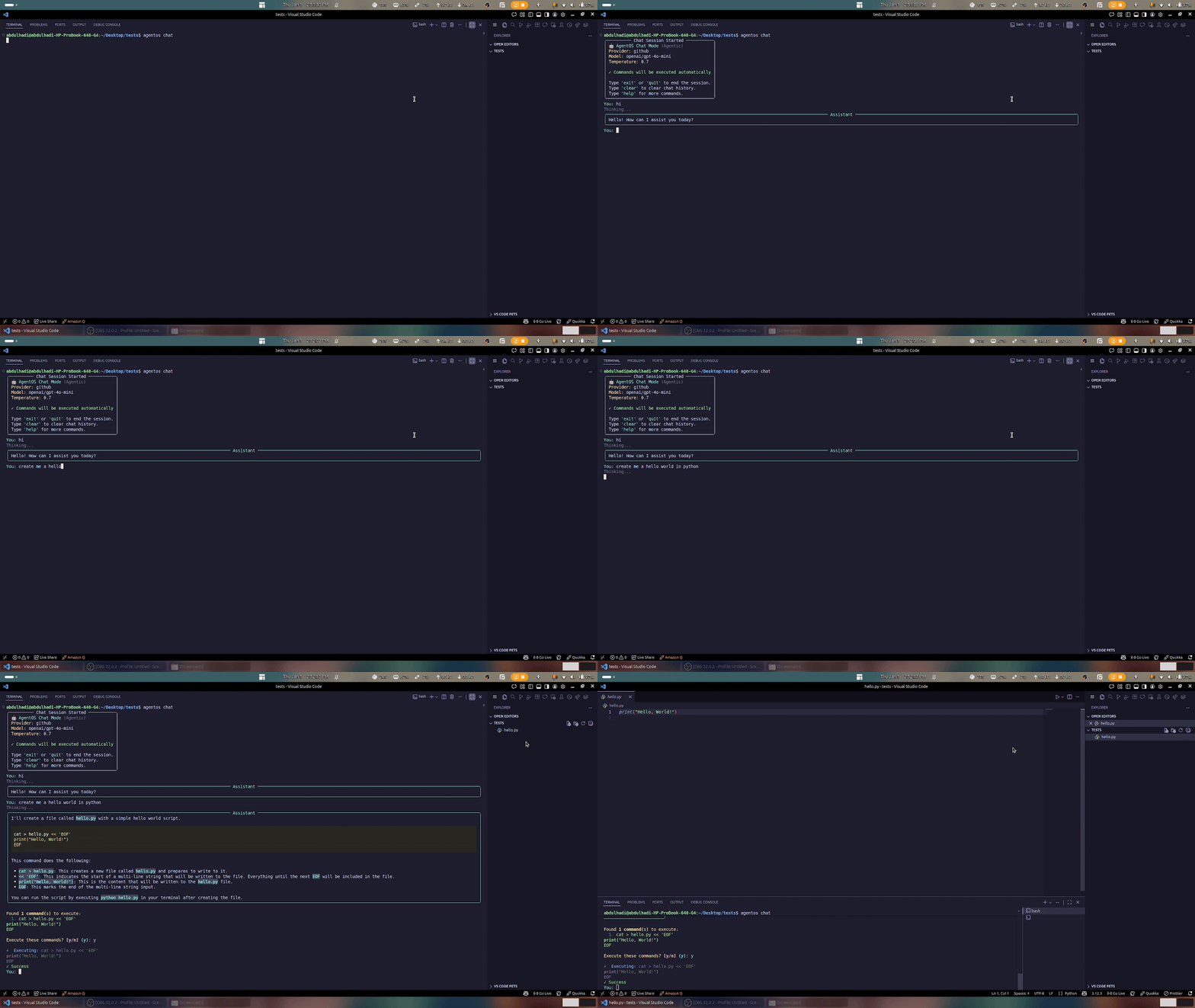
Chat with any LLM provider in a conversational interface:
# Start chat with default OpenAI
agentos chat

# Use different providers
agentos chat --provider claude
agentos chat --provider gemini --temperature 0.3
agentos chat --provider ollama  # Local models, no API key needed

# Customize the experience
agentos chat --system-prompt "You are a Python expert"
agentos chat --provider openai --model gpt-4
In-chat commands: exit / quit (end), clear (history), help (commands), status (info)
See Chat Mode Guide for detailed usage.
agentos ps
agentos logs <agent_name> [--tail 50]
agentos stop <agent_name>
agentos prune # Remove stopped agents
name: research_assistant
model_provider: github
model_version: openai/gpt-4o-mini
isolated: false

DESTRUCTIVE_COMMANDS:
  - rm
  - rmdir
  - sudo
  - dd
  - mkfs
  - format
name: Agent identifiermodel_provider: LLM provider (github, openai, claude, gemini, cohere, ollama)model_version: Specific model to useisolated: Enable Docker sandboxing (default: true)DESTRUCTIVE_COMMANDS: Custom list of blocked commandsCreate .env file:
# API Keys (set as needed)
GIT_HUB_TOKEN=your_github_token
OPENAI_API_KEY=your_openai_key
CLAUDE_API_KEY=your_claude_key
GEMINI_API_KEY=your_gemini_key
COHERE_API_KEY=your_cohere_key
Logs are stored in ~/.agentos/logs/:
agentos.log - Main system log<agent_name>_<id>.log - Per-agent execution logsAgent registry stored in ~/.agentos/runtime.db (SQLite)
AgentOS can prefer MCP servers (Model Context Protocol) instead of emitting shell commands.
mcp:
  enabled: true
  servers:
    - name: local_tools
      kind: stdio
      command: my-mcp-server --stdio
pip install mcp
# or install the official Model Context Protocol Python SDK if available
Enable isolation for safe execution:
name: secure_agent
model_provider: github
model_version: openai/gpt-4o-mini
isolated: true
Requires Docker daemon running.
Blocks dangerous commands automatically:
rm, rmdir, shredsudo, su, chown, chmoddd, mkfs, fdisk, formatkill, killall, pkillnc, netcat, wget, curl (to unknown hosts)Prevents command injection attacks:
;, &&, ||, |`, $()$VAR, ${VAR}../, absolute paths outside workspaceConfigure per-agent resource constraints:
resource_limits:
  max_steps: 50 # Maximum execution steps
  timeout: 300 # Timeout in seconds
  max_memory_mb: 512 # Memory limit (Docker only)
  max_cpu_percent: 50 # CPU limit (Docker only)
Track and audit agent actions:
from agentos.core.security import SecurityContext, validate_command

with SecurityContext(agent_id="my_agent") as ctx:
    result = validate_command("ls -la")
    if result.is_safe:
        # Execute command
        pass
    # All actions logged automatically
Configure retry behavior for LLM API calls:
retry_config:
  max_retries: 3 # Maximum retry attempts
  initial_delay: 1.0 # Initial delay in seconds
  max_delay: 30.0 # Maximum delay cap
  exponential_base: 2.0 # Exponential backoff multiplier
  jitter: true # Add randomness to prevent thundering herd
from agentos.core.retry import DEFAULT_LLM_RETRY, AGGRESSIVE_RETRY, GENTLE_RETRY

# Default: 3 retries, 1-30s delay
config = DEFAULT_LLM_RETRY

# Aggressive: 5 retries, 0.5-60s delay (for critical operations)
config = AGGRESSIVE_RETRY

# Gentle: 2 retries, 2-10s delay (for user-facing features)
config = GENTLE_RETRY
Persistent chat history with SQLite backend:
from agentos.core.chat_history import ChatHistoryManager

# Initialize manager
history = ChatHistoryManager()

# Create conversation
conv_id = history.create_conversation(
    agent_id="assistant",
    title="Python Help Session"
)

# Add messages
history.add_message(conv_id, "user", "How do I read a file?")
history.add_message(conv_id, "assistant", "Use open() function...")

# Search history
results = history.search_messages("file", agent_id="assistant")

# Export conversation
history.export_conversation(conv_id, "chat.md", format="markdown")
Enhanced Docker isolation for safe execution:
name: secure_agent
model_provider: github
model_version: openai/gpt-4o-mini
isolated: true
from agentos.core.docker_sandbox import DockerSandbox

sandbox = DockerSandbox(
    memory_limit="256m",      # Memory constraint
    cpu_quota=50000,          # CPU microseconds per period
    network_mode="none",      # No network access
    read_only=True,           # Read-only filesystem
    working_dir="/workspace"
)

result = sandbox.run_in_sandbox("python script.py")
Requires Docker daemon running.
Real-time process monitoring and lifecycle management:
from agentos.core.process_manager import ProcessMonitor, AgentLifecycle

# Get singleton monitor
monitor = ProcessMonitor()

# Use lifecycle context manager
with AgentLifecycle("my_agent", task="Process data") as agent:
    # Agent is registered and tracked
    # CPU/memory monitored in real-time
    pass  # Do work
# Automatically cleaned up

# Query running agents
agents = monitor.get_running_agents()
for agent_id, info in agents.items():
    print(f"{agent_id}: {info['status']} - CPU: {info['cpu_percent']}%")
Signal handling for clean termination:
from agentos.core.shutdown import ShutdownManager, ShutdownContext

# Register cleanup callbacks
manager = ShutdownManager()
manager.register_callback(lambda: print("Cleaning up..."))

# Use context manager
with ShutdownContext():
    # Protected execution
    # SIGTERM/SIGINT handled gracefully
    pass
running: Agent is executingcompleted: Task finished successfullyfailed: Task failed with errorstopped: Manually terminated0: Success1: General error124: Timeout130: User interrupt (Ctrl+C)agentos/
├── agent/ # Agent execution and planning
├── cli/ # Command-line interface
├── core/ # Core utilities
│ ├── config.py # Configuration management
│ ├── retry.py # Retry logic with backoff
│ ├── security.py # Security validation
│ ├── chat_history.py # Persistent chat storage
│ ├── shutdown.py # Graceful shutdown
│ ├── docker_sandbox.py # Docker isolation
│ └── process_manager.py # Process monitoring
├── database/ # SQLite backend
├── llm/ # LLM provider integrations
├── mcp/ # Model Context Protocol
└── web/ # Web UI
git clone https://github.com/agents-os/agentos
cd agentos
python -m venv .venv
source .venv/bin/activate
pip install -r requirements.txt
python -m pytest tests/
black .
flake8 .
MIT License - see LICENSE file.
git checkout -b feature/amazing-feature)git commit -m 'Add amazing feature')git push origin feature/amazing-feature)AgentOS - Making AI agents production-ready, secure, and scalable.
Download counts and popularity will appear here as the collector receives them.
| Version | Published | Direct dependencies | Open version |
|---|---|---|---|
| 1.1.7 | 17 Jan 2026 | 28 |
This describes our collected data; it is not a security assessment.
Observed since 20 Oct, 22:49 UTC
No superseded metadata states collected. Unchanged observations do not create new revisions.
package:4dae13a22ee93b62efaf631bd47878534200fbf7471e036fc205ca4100a73192