
 Repository
Current collected state Current
Observed since 20 Oct, 23:28 UTC
No superseded metadata states collected. Unchanged observations do not create new revisions.
Locally running chat agent with access to Claude Code, Codex, and bash
    🦑 AGENT
    ██████╗ ██████╗ ██╗   ██╗██╗██████╗
   ██╔════╝██╔═══██╗██║   ██║██║██╔══██╗
   ╚█████╗ ██║   ██║██║   ██║██║██║  ██║
    ╚═══██╗██║▄▄ ██║██║   ██║██║██║  ██║
   ██████╔╝╚██████╔╝╚██████╔╝██║██████╔╝
   ╚═════╝  ╚══▀▀═╝  ╚═════╝ ╚═╝╚═════╝
| Backend | CLI | Install |
|---|---|---|
| Claude Code | claude | curl -fsSL https://claude.ai/install.sh | bash |
| OpenAI Codex | codex | curl -fsSL https://chatgpt.com/codex/install.sh | sh |
| Cursor Agent | cursor-agent | curl -fsS https://cursor.com/install | bash |
| OpenCode | opencode | curl -fsSL https://opencode.ai/install | bash |
| Pi | pi | curl -fsSL https://pi.dev/install.sh | sh |
| Ollama (optional, local models) | ollama | curl -fsSL https://ollama.com/install.sh | sh |
curl -fsSL https://agentsquid.ai/install.sh | bash
http://127.0.0.1:8000
Create agents in the UI. An agent is a named config:
agent name (@agent) = harness (Claude Code) + provider (Claude) + model (claude-sonnet-5) + working directory (CLAUDE.md, etc.)
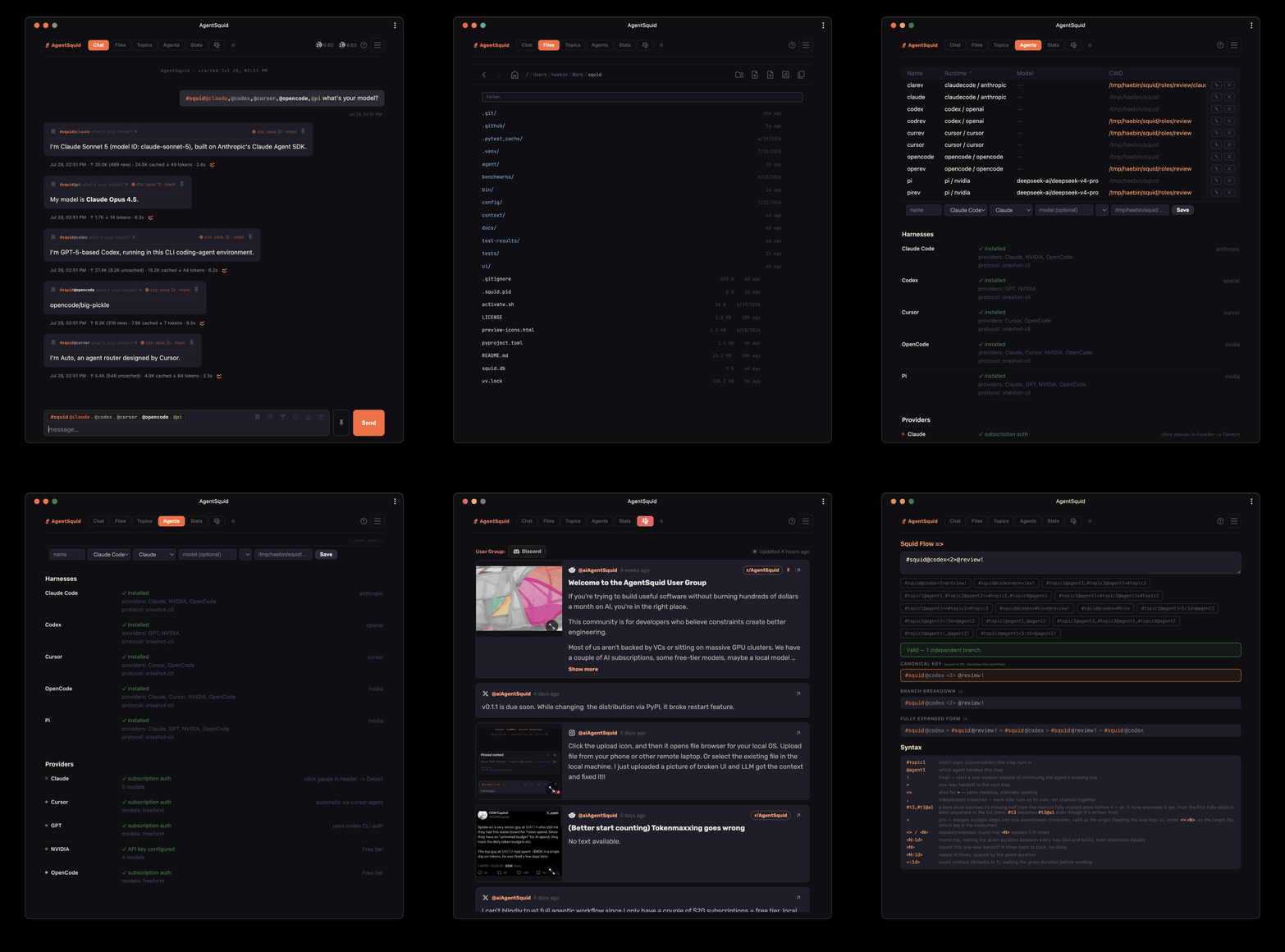
Agent-Squid is a meta harness orchestrator which lets you run Claude Code, OpenAI Codex, Cursor Agent, OpenCode, Pi coding agents with multiple providers, such as, Claude, GPT, Cursor, OpenCode, NVIDIA, DeepSeek, local LLMs via one browser UI. Your agents still run on your own machine, with your repo, shell tools, credentials, and native CLI sessions. Squid gives those sessions names, history, queues, controls, and phone/tablet access.
Use it when your workflow has become a wall of unnamed terminal tabs or you need to use multiple coding agents; a couple of $20 agents alongside a free coding agent.
#launch@claude write the release notes
#launch@codex! review the diff for regressions
#bug@cursor reproduce the auth failure
#ops@opencode summarize the incident notes
#research@pi compare the implementation options
NOTE: These topics are sticky. Once you are in the topic, no need to type it. :)
CLI agents are useful, but the workflow gets messy quickly:
Squid turns those local agents into named, durable lanes you can control from a single chat thread with filter support.
Topics and agents are not a rigid setup step. You can create a new #topic the moment you type it, switch agents with @agent, and clean up old workstreams when they are done. Squid treats tags as the UI for your agent work: lightweight enough to create dynamically, durable enough to recover later, and visible enough that you are not guessing which terminal was doing what.
#topic@agent gives every workstream a durable identity.#topic@agent! runs a fresh one-off job immediately without polluting the main session. You can add the adhoc output to session context easily. (merging context)| Syntax | Meaning |
|---|---|
#topic@agent message | Continue that topic/agent session |
#topic@agent! message | Run a parallel adhoc turn with no session history |
#topic@agent!3 message | Run adhoc with only the last 3 exchanges (normal, searched, filtered) as context |
/stop | Stop the current process scope |
/stopall | Stop and drain the current topic |
/clear | Create new session |
/f, /filter | Filter history to the current topic/agent lane |
/s, /search | Search history to the current topic/agent lane |
/remote | Show QR code for mobile/tablet access via Tailscale |
Session turns are queued per #topic@agent for the tasks with order matters. Adhoc ! turns are independent and run immediately.
This makes comparison easy. Ask the session with #topic@agent, then ask a limited-context version with #topic@agent!3, #topic@agent!1, or #topic@agent!. You can see whether the long session is helping, whether stale context is hurting, and how much token usage each path costs.
Tags are created dynamically. If you send #release@claude ..., Squid creates or updates the release topic and remembers claude as its sticky agent. Later, #release ... continues that lane without retyping the agent. Topic autocomplete lets you browse existing tags, and old topics can be hidden or deleted when they are no longer useful.
While an agent is running, Squid shows progress in a thought bubble instead of leaving you staring at a frozen terminal. You can see queue position, status output, tool activity, and streamed partial content. If the job is going in the wrong direction, stop it from the bubble’s UI control or type /stop, /stopall, or deq just like you would use CLI control commands, but with clearer scope and feedback.
After completion, the response carries usage metadata. Instead of guessing what a turn cost, you can inspect tokens, cache reads/writes, reasoning tokens where available, duration, cost, and quota deltas. The analytics view rolls this up by time, topic, and agent so you can see which lanes are expensive and which models are doing the most work.
Squid is most useful when your local machine can keep working while you are away from the desk.
Tailscale is a good fit for this. Its Personal plan is free for non-commercial personal use, and it creates a private WireGuard-based network across your own devices. Your phone, tablet, laptop, Mac mini, and workstation can talk inside the tailnet without opening a public port.
Squid always binds to 127.0.0.1, it never exposes itself directly on the network. Starting squid automatically configures two tailscale serve rules if Tailscale is installed, and prints both URLs to the console:
agentsquid start   # run in the background and configure tailscale serve
agentsquid         # run in the foreground for debugging
agentsquid is up -> http://127.0.0.1:8000
  https://<machine-name>.<tailnet>.ts.net/
  http://<tailscale-ip>:8000/
Two different URLs work, for two different reasons:
https://<machine-name>.<tailnet>.ts.net/ — the default HTTPS port
(443), so no port in the URL. This needs MagicDNS
enabled on your tailnet to resolve; squid checks this at startup and warns
in the printed URL if MagicDNS looks disabled. The full domain is required
here — the short hostname alone (https://<machine-name>/) won't work
because Tailscale's TLS cert is scoped to *.ts.net and browsers enforce
an exact match.http://<tailscale-ip>:<port>/ — reachable by IP even without
MagicDNS. Under the hood this is a tailscale serve --tcp=<port> raw TCP
forward, not --http: tailscale serve --http routes by Host header even
for plain HTTP, so hitting the IP directly (Host: <ip>:<port>) matches no
rule and gets Tailscale's own 404 before squid ever sees the request.
--tcp forwards at the TCP layer with no Host matching, so it works by IP.
https://<tailscale-ip>:<port>/ still won't work — Tailscale's cert only
covers the *.ts.net domain, not the IP, so TLS validation fails
regardless of which rule serves it. The traffic is still
WireGuard-encrypted at the tailnet layer either way — this isn't sending
anything in the clear over the internet.Type /remote in the chat to get a QR code with the HTTPS domain URL —
point your phone camera at it to open squid in one tap:
https://<machine-name>.<tailnet>.ts.net/
If this machine also runs other local servers — an Ollama
or oMLX instance for local model inference, for example — you can give each
of them the same one-tap, no-VPN-on-the-client remote access squid gets,
from your phone or any other device on the tailnet, without setting up
anything beyond Tailscale itself. tailscale serve supports multiple
concurrent rules at different ports on the same node, so this doesn't touch
or compete with squid's own rule at 443 — each service gets its own port.
Example — Ollama, which listens on 11434 by default:
ollama serve                                            # already running as a background service after install, usually
tailscale serve --bg --https=11434 127.0.0.1:11434
Now https://<machine-name>.<tailnet>.ts.net:11434/ reaches Ollama's API
from any device on the tailnet, same as squid's URL reaches squid.
The pattern is the same for any other local server — substitute whatever port it actually listens on:
tailscale serve --bg --https=<their-port> 127.0.0.1:<their-port>
https://<machine-name>.<tailnet>.ts.net:<their-port>/
Useful for hitting a local model server from your phone or another machine on the tailnet without exposing it to the public internet or opening a router port.
Squid is not another general AI chat app. Open WebUI and LibreChat are broad self-hosted chat platforms for many providers, RAG, plugins, users, memory, and web search.
Squid is narrower: it controls real local coding-agent CLIs and preserves their session behavior.
Most chat UIs send messages to a model API and render text back. Even when they support tools or agents, the chat app is usually the runtime. Squid is different: the runtime is still the local CLI agent. Claude Code, Codex, Cursor Agent, OpenCode, and Pi are the process doing the work on your machine. Squid is the interactive control layer around those processes.
That difference matters:
#topic@agent is closer to a named terminal workspace than a chat room. You can easily filter it to look like a chat room./stop, /stopall, /clear, /compact, and /filter.| Category | Examples | Squid's difference |
|---|---|---|
| Self-hosted AI chat | Open WebUI, LibreChat | Squid runs local CLI coding agents instead of replacing them with a provider chat UI. |
| Single-agent CLIs | Claude Code, Codex CLI, Cursor Agent, OpenCode, Pi | Squid gives them shared browser/mobile UI, topics, queues, history, controls, and analytics. |
| IDE agents | Cursor, Cline, VS Code Copilot | Squid is editor-agnostic and works even when the IDE is not open. |
| Terminal pair programmers | Aider, OpenCode | Squid is an orchestration layer, not a coding engine. |
Use the agent directly when one terminal is enough. Use Squid when you want several local agents, named sessions, mobile access, process control, recoverable long-running work, and analytics that explain what each lane is costing you.
Browser / phone / tablet
        |
        | HTTP + SSE
        v
FastAPI Squid server
        |
        +-- SQLite history, stats, topics, session handles
        |
        +-- TopicDispatcher
              |
              +-- FIFO worker per #topic@agent session lane
              +-- ephemeral worker per adhoc ! turn
        |
        +-- local CLI subprocesses
              claude / codex / cursor-agent / opencode / pi
The CLI owns the real conversation context. Squid stores history, stats, topics, active session IDs, cwd locks, and UI state needed to make the workflow manageable. Session turns use native resume. Adhoc turns build an explicit limited-context prompt, which makes the two modes easy to compare.
Squid is a good fit if:
It may be overkill if:
Download counts and popularity will appear here as the collector receives them.
| Version | Published | Direct dependencies | Open version |
|---|---|---|---|
| 0.1.5 | 28 Aug 2026 | 6 |
This describes our collected data; it is not a security assessment.
Observed since 20 Oct, 23:28 UTC
No superseded metadata states collected. Unchanged observations do not create new revisions.
package:57eeec607747a3fc980762dea01c1a9db937da73c277fa82a9ab49004b187b72