
 Repository
Current collected state Current
Observed since 21 Oct, 09:16 UTC
No superseded metadata states collected. Unchanged observations do not create new revisions.
一个简洁的 Python 智能体工作流引擎,支持同步与异步节点、分支、循环、流程图渲染。


中文 | English
agnflow pursues simplicity, ease of use, and extensibility, suitable for rapid prototyping, customized LLM workflows, and Agent task flows.
| Agent Type | Code Example | Flowchart |
|---|---|---|
| Complex Node Connection | n1 >> [n2 >> n3, n3 >> n4] >> n5 | 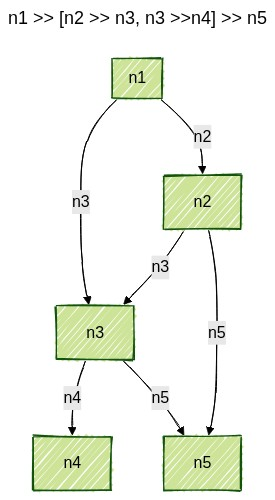 |
| Complex Workflow Connection | f1[n1 >> n2 >> f2[n3]] >> f3[n4] |  |
| Supervisor Agent First node bidirectionally connected to other nodes | s1[n1, n2, n3] >> n4 | 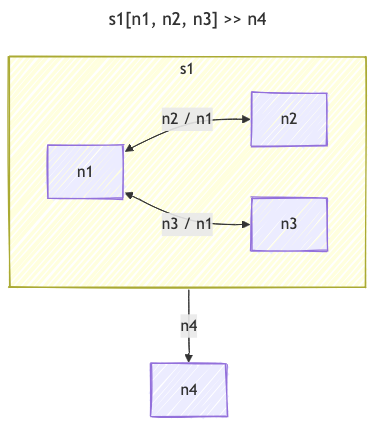 |
| Basic Swarm Connection Arbitrary nodes bidirectionally connected | s1[n1, n2, n3, n4] |  |
| Node-Swarm Connection | n1 >> s1[n2, n3] >> n4 |  |
| Multiple Swarm Connection | s1[n1, n2] >> s2[n3, n4] | 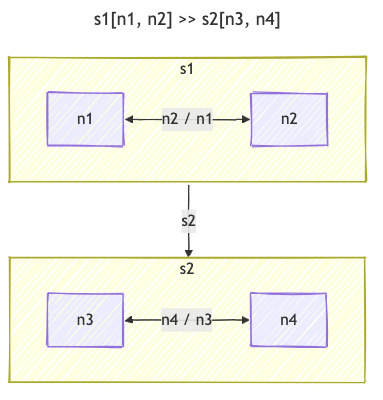 |
The above are future extensible intelligent agent/reasoning/tool integration directions. Contributions and suggestions are welcome.
# Install using pip
pip install agnflow

# Install using rye
rye add agnflow

# Install using poetry
poetry add agnflow

# Install specific version
pip install agnflow==0.1.4

# Install latest development version
pip install --upgrade agnflow
Recommended to use rye for dependency and virtual environment management:
# Clone repository
git clone https://github.com/jianduo1/agnflow.git
cd agnflow

# Install dependencies
rye sync

# Development mode installation
rye sync --dev
Note: Generating images requires additional tools
Dot format image generation (Recommended):
# macOS
brew install graphviz

# Ubuntu/Debian
sudo apt-get install graphviz

# CentOS/RHEL
sudo yum install graphviz

# Windows
# Download and install: https://graphviz.org/download/
Mermaid format image generation:
# Install mermaid-cli
npm install -g @mermaid-js/mermaid-cli

# Install puppeteer browser (for rendering)
npx puppeteer browsers install chrome-headless-shell
Use rye to manage development environment:
# Install dependencies
rye sync

# Run tests
rye run test

# Code formatting
rye run format

# Code linting
rye run lint

# Run examples
rye run example
# Clean previous builds
rye run clean

# Build package
rye run build

# Upload to test PyPI (recommended to test first)
rye run upload-test

# Upload to official PyPI
rye run upload
Note: First upload to PyPI requires:
~/.pypirc file or use environment variablesfrom agnflow import Node, Flow
def hello_exec(state):
print("hello", state)
return {"msg": "world"}
def world_exec(state):
print("world", state)
n1 = Node("hello", exec=hello_exec)
n2 = Node("world", exec=world_exec)
n1 >> n2
flow = Flow(n1, name="demo")
flow.run({"msg": "hi"})
import asyncio
async def ahello(state):
    print("async hello", state)
    return {"msg": "async world"}
n1 = Node("hello", aexec=ahello)
flow = Flow(n1)
asyncio.run(flow.arun({"msg": "hi"}))
print(flow.render_dot())      # Output dot format
print(flow.render_mermaid())  # Output mermaid format

# Save as image file
flow.render_dot(saved_file="./flow.png")      # Save dot format image
flow.render_mermaid(saved_file="./flow.png")  # Save mermaid format image
agnflow supports multiple function input parameter methods and automatically retrieves parameters from the state based on function signatures:
def my_node(state):
    """Receive the entire state dictionary"""
    print(f"Received state: {state}")
    return {"result": "processed"}

n1 = Node("my_node", exec=my_node)
def my_node(user_id, message, data):
    """Automatically get values from state by parameter names"""
    print(f"User ID: {user_id}")
    print(f"Message: {message}")
    print(f"Data: {data}")
    return {"processed": True}

# Pass state containing these fields when calling
flow.run({
    "user_id": "123",
    "message": "hello",
    "data": {"key": "value"}
})
def my_node(user_id, state):
    """Mixed approach: partial parameters + entire state"""
    print(f"User ID: {user_id}")
    print(f"Complete state: {state}")
    return {"user_processed": True}
Node functions support multiple return value formats:
def my_node(state):
    """Only update state, use default action"""
    return {"new_data": "value", "timestamp": time.time()}
def my_node(state):
    """Return action and updated state"""
    if state.get("condition"):
        return "success", {"result": "success"}
    else:
        return "error", {"result": "error"}
def my_node(state):
    """Return only action, don't update state"""
    if state.get("condition"):
        return "success"
    else:
        return "error"
def my_node(state):
    """Return None to end workflow"""
    if state.get("should_stop"):
        return None
    return "continue", {"step": "completed"}
Asynchronous node functions use the aexec parameter and support all synchronous function features:
import asyncio

async def async_node(state):
    """Asynchronous node function"""
    await asyncio.sleep(0.1)  # Simulate async operation
    return {"async_result": "done"}

async def async_node_with_action(user_id, state):
    """Asynchronous node function - mixed parameters + action"""
    await asyncio.sleep(0.1)
    return "next", {"user_id": user_id, "processed": True}

# Create asynchronous nodes
n1 = Node("async_node", aexec=async_node)
n2 = Node("async_node_with_action", aexec=async_node_with_action)

# Asynchronous execution
asyncio.run(flow.arun({"user_id": "123"}))
Besides function methods, you can also create nodes by inheriting from the Node class:
class MyNode(Node):
    def exec(self, state):
        """Synchronous execution method"""
        print(f"Executing node: {self.name}")
        return {"class_result": "success"}

    async def aexec(self, state):
        """Asynchronous execution method"""
        print(f"Asynchronously executing node: {self.name}")
        return {"async_class_result": "success"}

# Use class node
n1 = MyNode("my_class_node")
Nodes support error handling and retry mechanisms:
def risky_node(state):
    """Node that might fail"""
    if random.random() < 0.5:
        raise Exception("Random error")
    return {"success": True}

# Create node with retry support
n1 = Node("risky_node", exec=risky_node, max_retries=3, wait=1)

# Custom error handling
class SafeNode(Node):
    def exec_fallback(self, state, exc):
        """Custom error handling"""
        return "error", {"error": str(exc), "recovered": True}

    async def aexec_fallback(self, state, exc):
        """Custom asynchronous error handling"""
        return "error", {"error": str(exc), "recovered": True}
from agnflow import Node, Flow
import time

# Define different types of node functions
def start_node(user_id, message):
    """Receive specific parameters"""
    return "n2", {"user_id": user_id, "message": message}

def process_node(state):
    """Receive entire state"""
    processed = f"Processed: {state['message']}"
    return "n3", {"processed": processed, "timestamp": time.time()}

def complete_node(result, state):
    """Mixed parameters"""
    print(f"Result: {result}")
    print(f"State: {state}")
    return {"final_result": "success"}

# Create nodes
n1 = Node("start", exec=start_node)
n2 = Node("process", exec=process_node)
n3 = Node("complete", exec=complete_node)

# Connect nodes
n1 >> n2 >> n3

# Create workflow
flow = Flow(n1, name="example_flow")

# Run workflow
result = flow.run({
    "user_id": "123",
    "message": "Hello agnflow!"
})

print(f"Workflow result: {result}")
agnflow provides multiple flexible node connection methods:
# Method 1: Forward connection
a >> b >> c

# Method 2: Reverse connection
c << b << a
# Branch based on node return value
a >> [b, c]
# Connect sub-flows
d1 >> flow >> d2
After running the example code src/agnflow/example.py, the following flowcharts will be generated:
Workflow definition:
a >> [b >> flow, c >> a]
d1 >> flow >> d2


These flowcharts illustrate:
agnflow references and benchmarks against the following mainstream intelligent agent/workflow frameworks:


MIT
Download counts and popularity will appear here as the collector receives them.
| Version | Published | Direct dependencies | Open version |
|---|---|---|---|
| 0.1.4 | 27 Jun 2025 | 7 |
This describes our collected data; it is not a security assessment.
Observed since 21 Oct, 09:16 UTC
No superseded metadata states collected. Unchanged observations do not create new revisions.
package:f9e61e75711ecf728690843de90af613d6e28967315fb98b608771211465769c