

 Repository
Current collected state Current
Observed since 21 Oct, 09:22 UTC
No superseded metadata states collected. Unchanged observations do not create new revisions.
Ambulatory glucose profile analysis tool

This tool is for research and educational purposes only. It is NOT a medical device and has NOT been validated for clinical diagnosis or treatment decisions.
Do not adjust medications, change diet, or make health decisions based solely on this output. Exercise caution and always consult a qualified healthcare professional for interpretation of glucose data and any treatment adjustments.
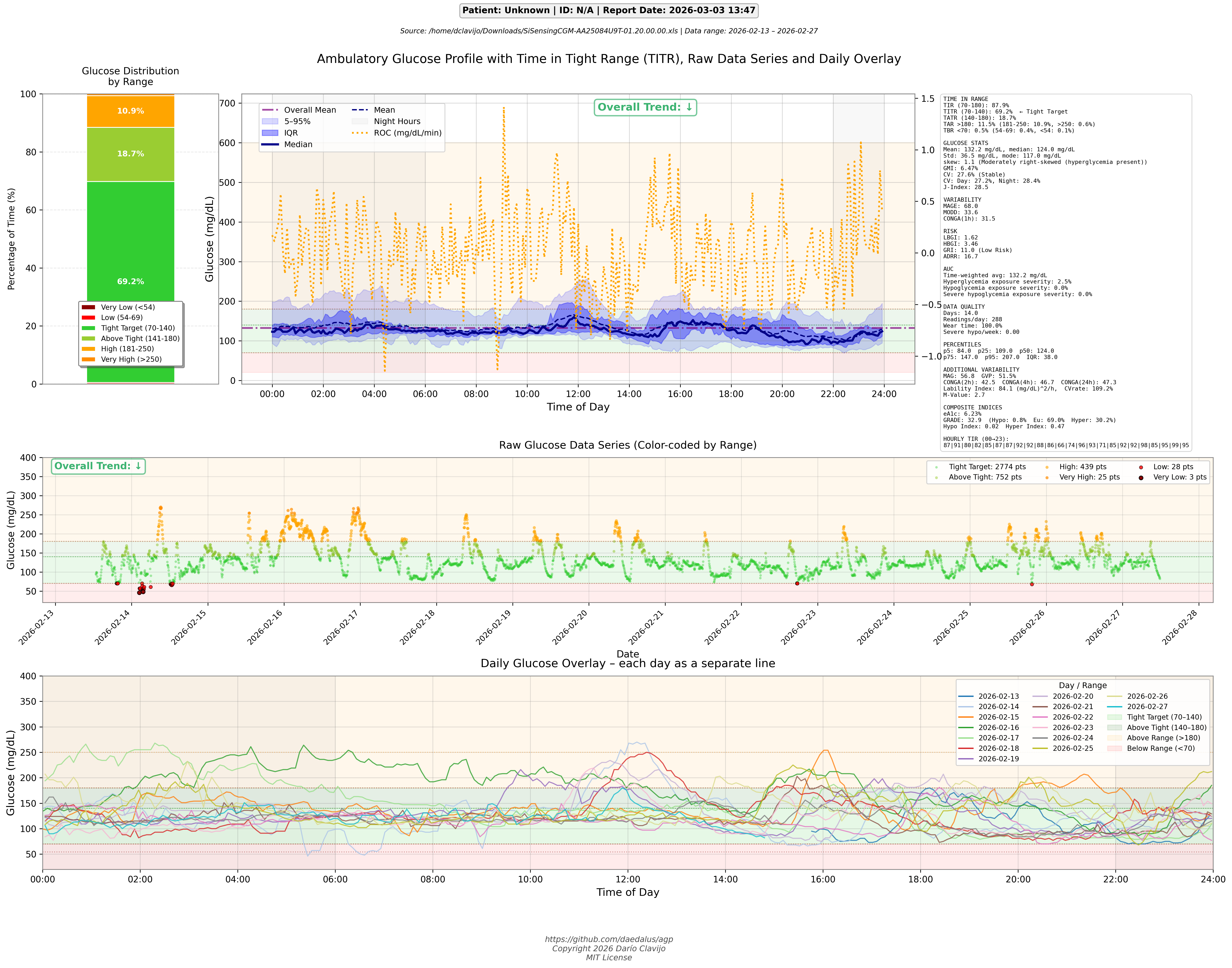
This tool generates a comprehensive Ambulatory Glucose Profile (AGP) with extended clinical metrics, including Time in Tight Range (TITR) metric. It processes continuous glucose monitoring (CGM) data and produces both a visual AGP plot and detailed statistical analysis.
This application should work with data from any CGM, however it was only tested with Sibionics GS1. For other models we need more data.
Install from PyPI:
pip install agp_tool
Install from source (editable mode, recommended for development):
pip install -e .
Or install the dependencies only:
pip install -r requirements.txt
Install the build tool and build sdist + wheel:
pip install build
python -m build
The artifacts will be placed in the dist/ directory. Run twine check dist/*
to verify the distribution metadata before publishing.
Releases are published to PyPI automatically via GitHub Actions using Trusted Publishing (OIDC). To trigger a release:
v1.0.0).Publish to PyPI workflow will build and upload the distribution
artifacts automatically — no API token required.agp is designed to be used both as a CLI tool and as an importable Python
library. It exposes two complementary APIs:
ReportGenerator class – instantiable object that accepts an input
file at construction time, computes all metrics immediately, and exposes
them as instance attributes. Graph generation and export are available
as methods so they can be invoked on demand.generate_report function – a thin wrapper around ReportGenerator
that provides full backward compatibility.import matplotlib
matplotlib.use("Agg") # use non-interactive backend when no display is available
from agp import ReportGenerator
# Instantiate with an input file (all config params are keyword-only)
report = ReportGenerator("data.csv", patient_name="Jane Doe", patient_id="P-001")
# ── Access metrics ─────────────────────────────────────────────────────────
# Individual metric attributes (computed once at construction time)
print(f"Time in Range: {report.tir:.1f}%")
print(f"Mean glucose: {report.mean_glucose:.1f} mg/dL")
print(f"GMI: {report.gmi:.2f}%")
print(f"GRI: {report.gri:.1f} ({report.gri_txt})")
# Full metrics dict
m = report.metrics # property
m = report.get_metrics() # equivalent callable form
# ── Generate graphs ────────────────────────────────────────────────────────
fig_agp = report.plot_agp(output="agp.png") # main AGP figure
fig_daily = report.plot_daily(output="daily.png") # daily overlay figure
# Figures are standard matplotlib Figure objects
fig_agp.savefig("agp_hires.png", dpi=300, bbox_inches="tight")
# Omit output path to use the default (set at construction time)
fig = report.plot_agp() # saves to "ambulatory_glucose_profile.png"
# ── Print clinical summary ─────────────────────────────────────────────────
report.print_summary()
# ── Export metrics to file ─────────────────────────────────────────────────
report.export("metrics.json") # JSON
report.export("metrics.csv") # CSV
report.export("metrics.xlsx") # Excel
# ── Custom thresholds and options ──────────────────────────────────────────
report = ReportGenerator(
"data.xlsx",
output="my_report.png",
low_threshold=65,
high_threshold=200,
patient_name="Jane Doe",
patient_id="P-001",
doctor="Dr. Smith",
heatmap=True,
heatmap_cmap="coolwarm",
)
fig = report.plot_agp()
fig_daily = report.plot_daily()
ReportGenerator parameters| Parameter | Type | Default | Description |
|---|---|---|---|
input_file | str | (required) | Path to glucose data file |
output | str | "ambulatory_glucose_profile.png" | Default output PNG path used by plot_agp() |
very_low_threshold | int | 54 | Very low glucose threshold (mg/dL) |
low_threshold | int | 70 | Low glucose threshold (mg/dL) |
high_threshold | int | 180 | High glucose threshold (mg/dL) |
very_high_threshold | int | 250 | Very high glucose threshold (mg/dL) |
tight_low | int | 70 | Tight range lower limit (mg/dL) |
tight_high | int | 140 | Tight range upper limit (mg/dL) |
bin_minutes | int | 5 | Circadian bin size in minutes |
sensor_interval | int | 5 | CGM sensor interval in minutes |
min_samples | int | 5 | Minimum samples per bin |
verbose | bool | False | Print detailed progress |
config | str|None | None | JSON config file path |
patient_name | str | "Unknown" | Patient name for report header |
patient_id | str | "N/A" | Patient ID for report header |
doctor | str | "" | Doctor name for report header |
notes | str | "" | Additional notes for report header |
heatmap | bool | False | Enable circadian glucose heatmap in plot_agp() |
heatmap_cmap | str | "RdYlGn_r" | Colormap for the heatmap |
dark_mode | bool | False | Use dark background theme for all plots |
ReportGenerator methods and properties| Member | Description |
|---|---|
report.metrics | Full computed metrics dict (property) |
report.get_metrics() | Same as above (callable form) |
report.<metric_name> | Any individual metric, e.g. report.tir, report.mean_glucose |
report.plot_agp(output, show, close) | Generate and return the main AGP figure |
report.plot_daily(output, show, close) | Generate and return the daily overlay figure |
report.print_summary() | Print the clinical summary to stdout |
report.export(path) | Export metrics to .json, .csv, or .xlsx |
generate_report is retained for backward compatibility as a thin wrapper
around ReportGenerator. The public entry-point is generate_report,
which accepts every option available in the CLI and returns a
matplotlib.figure.Figure.
import matplotlib
matplotlib.use("Agg")          # use non-interactive backend when no display is available

from agp import generate_report

# Basic call – returns a Figure and saves ambulatory_glucose_profile.png
fig = generate_report("data.csv")

# Custom thresholds, patient info, and export
fig = generate_report(
    "data.xlsx",
    output="my_report.png",
    low_threshold=65,
    high_threshold=200,
    patient_name="Jane Doe",
    patient_id="P-001",
    doctor="Dr. Smith",
    export="metrics.json",
)

# The returned Figure can be used directly with matplotlib
fig.savefig("report.png", dpi=150, bbox_inches="tight")

# Skip plot generation (returns None)
result = generate_report("data.csv", no_plot=True)
assert result is None

# Enable the circadian heatmap
fig = generate_report("data.csv", heatmap=True, heatmap_cmap="coolwarm")

# Generate the main AGP report and a daily overlay graph
fig = generate_report("data.csv", daily_plot=True)

# Show interactively (e.g. in a Jupyter notebook)
fig = generate_report("data.csv", show=True)
generate_report does not call plt.show() or plt.close() by default,
so it is safe to use inside automated pipelines and Jupyter notebooks without
popping up GUI windows.
| Parameter | Type | Default | Description |
|---|---|---|---|
input_file | str | (required) | Path to glucose data file |
output | str | "ambulatory_glucose_profile.png" | Output PNG path |
very_low_threshold | int | 54 | Very low glucose threshold (mg/dL) |
low_threshold | int | 70 | Low glucose threshold (mg/dL) |
high_threshold | int | 180 | High glucose threshold (mg/dL) |
very_high_threshold | int | 250 | Very high glucose threshold (mg/dL) |
tight_low | int | 70 | Tight range lower limit (mg/dL) |
tight_high | int | 140 | Tight range upper limit (mg/dL) |
bin_minutes | int | 5 | Circadian bin size in minutes |
sensor_interval | int | 5 | CGM sensor interval in minutes |
min_samples | int | 5 | Minimum samples per bin |
no_plot | bool | False | Skip plot; return None |
verbose | bool | False | Print detailed progress |
export | str | "" | Export metrics to .json / .csv path |
config | str|None | None | JSON config file path (same as CLI --config) |
patient_name | str | "Unknown" | Patient name for report header |
patient_id | str | "N/A" | Patient ID for report header |
doctor | str | "" | Doctor name for report header |
notes | str | "" | Additional notes for report header |
heatmap | bool | False | Enable circadian glucose heatmap |
heatmap_cmap | str | "RdYlGn_r" | Colormap for the heatmap |
pdf | bool | False | Also produce a PDF alongside the PNG |
daily_plot | bool | False | Generate a daily overlay plot (each day as a separate colored line, saved as <stem>_daily.<ext>) |
show | bool | False | Call plt.show() (interactive use only) |
close | bool | False | Call plt.close() after building figure |
dark_mode | bool | False | Use dark background theme for all plots |
pip install -r requirements.txt
Dependencies include pandas, numpy, matplotlib, openpyxl (xlsx), xlrd (xls), odfpy (ods), Pillow (image reading), and fpdf2 (PDF generation).
Supported file formats:
| Extension | Format |
|---|---|
.xlsx | Excel 2007+ |
.xls | Excel 97-2003 |
.csv | Comma-separated values |
.ods | OpenDocument Spreadsheet |
usage: agp_tool [-h] [--output OUTPUT] [--very-low-threshold VERY_LOW_THRESHOLD] [--low-threshold LOW_THRESHOLD] [--high-threshold HIGH_THRESHOLD]
               [--very-high-threshold VERY_HIGH_THRESHOLD] [--tight-low TIGHT_LOW] [--tight-high TIGHT_HIGH] [--bin-minutes BIN_MINUTES]
               [--sensor-interval SENSOR_INTERVAL] [--min-samples MIN_SAMPLES] [--no-plot] [--verbose] [--export EXPORT] [--config CONFIG] [--version]
               [--patient-name PATIENT_NAME] [--patient-id PATIENT_ID] [--doctor DOCTOR] [--notes NOTES] [--heatmap] [--heatmap-cmap HEATMAP_CMAP]
               [--pdf]
               input_file

Generate Ambulatory Glucose Profile from sensor data

positional arguments:
  input_file            Path to glucose data file (.xlsx, .xls, .csv, .ods)

options:
  -h, --help            show this help message and exit
  --output, -o OUTPUT   Output PNG filename (default: ambulatory_glucose_profile.png)
  --very-low-threshold VERY_LOW_THRESHOLD
                        Very low glucose threshold in mg/dL (default: 54)
  --low-threshold LOW_THRESHOLD
                        Low glucose threshold in mg/dL (default: 70)
  --high-threshold HIGH_THRESHOLD
                        High glucose threshold in mg/dL (default: 180)
  --very-high-threshold VERY_HIGH_THRESHOLD
                        Very high glucose threshold in mg/dL (default: 250)
  --tight-low TIGHT_LOW
                        Tight range lower limit in mg/dL (default: 70)
  --tight-high TIGHT_HIGH
                        Tight range upper limit in mg/dL (default: 140)
  --bin-minutes BIN_MINUTES
                        Time bin size in minutes for AGP (default: 5)
  --sensor-interval SENSOR_INTERVAL
                        CGM Sensor interval (default: 5)
  --min-samples MIN_SAMPLES
                        Minimum samples per bin (default: 5)
  --no-plot             Calculate metrics only, do not generate plot
  --verbose, -v         Print detailed metrics during execution
  --export, -e EXPORT   Export metrics to file. Use .csv or .json extension (e.g. metrics.json)
  --config, -c CONFIG   Configuration file with parameters
  --version             show program's version number and exit
  --patient-name, -n PATIENT_NAME
                        Patient name for report header
  --patient-id, -id PATIENT_ID
                        Patient ID for report header
  --doctor, -d DOCTOR   Doctor name for report header
  --notes, -note NOTES  Additional notes for report header
  --heatmap             Enable the circadian glucose heatmap (disabled by default)
  --heatmap-cmap HEATMAP_CMAP
                        Colormap for circadian heatmap (default: RdYlGn_r, requires --heatmap)
  --pdf                 Also produce a PDF file with the PNG embedded as an image and metadata copied from the PNG. The PDF page size matches the source PNG dimensions exactly (derived from the PNG pHYs DPI metadata, defaulting to 72 DPI), with no margins, so the image is never cropped.
  --daily-plot          Generate an additional daily overlay plot where each day is shown as a separate colored line
  --dark-mode           Use a dark background theme for all generated plots
Basic usage
agp_tool data.xlsx
Or with CSV/ODS input
agp_tool data.csv
agp_tool data.ods
Custom output file and thresholds
agp_tool data.xlsx -o my_agp.png --low-threshold 65 --high-threshold 200
Custom tight range and bin size
agp_tool data.xlsx --tight-low 80 --tight-high 150 --bin-minutes 10
Calculate only metrics, no plot
agp_tool data.xlsx --no-plot --verbose
Generate PNG and also export a PDF
agp_tool data.xlsx --pdf
Generate the main AGP report and a daily overlay graph
agp_tool data.xlsx --daily-plot
The daily overlay is saved as <output-stem>_daily.<ext> (e.g. ambulatory_glucose_profile_daily.png). Each calendar day in the dataset is drawn as a separate colored line so that day-to-day glucose patterns can be compared at a glance.
With config file
agp_tool data.xlsx --config my_settings.json
See all options
agp_tool -h
| Metric | Description | Clinical Target |
|---|---|---|
| TIR | Time in Range (70–180 mg/dL) | ≥70% |
| TITR | Time in Tight Range (70–140 mg/dL) | ≥50% |
| TBR | Time Below Range (<70 mg/dL) | <4% |
| TAR | Time Above Range (>180 mg/dL) | <25% |
| CV | Coefficient of Variation | <36% |
| GMI | Glucose Management Indicator (estimated HbA1c from CGM mean) | <7% |
| eA1c | Estimated A1c — Nathan/DCCT formula: (mean + 46.7) / 28.7 | <7% |
| J-Index | Combined mean + variability index: 0.001 × (mean + SD)² | <20 |
| GRI | Glycemia Risk Indicator — weighted composite of hypo/hyper exposure | 0–100 (lower better) |
| Metric | Description |
|---|---|
| p5, p25, p50, p75, p95 | 5th, 25th, 50th (median), 75th, 95th percentile of all glucose readings |
| IQR | Interquartile range = p75 − p25; core spread of the AGP profile |
| Metric | Description |
|---|---|
| MAGE | Mean Amplitude of Glycemic Excursions — average of oscillations exceeding 1 SD |
| MODD | Mean of Daily Differences — day-to-day glucose reproducibility |
| CONGA(1h/2h/4h/24h) | Continuous Overall Net Glycemic Action at 1-, 2-, 4-, and 24-hour lags |
| MAG | Mean Absolute Glucose rate of change — mean |ΔG/Δt| in mg/dL/hr |
| GVP | Glucose Variability Percentage — extra trace length vs. a flat baseline, expressed as % |
| Lability Index | Sum of squared successive glucose differences divided by time; sensitive to rapid swings |
| CVrate | Coefficient of variation of the glucose rate-of-change series |
| ADRR | Average Daily Risk Range — daily maximum risk excursion (Kovatchev) |
| Metric | Description |
|---|---|
| LBGI | Low Blood Glucose Index — weighted hypoglycaemia risk score |
| HBGI | High Blood Glucose Index — weighted hyperglycaemia risk score |
| Hypo Index | Rodbard hypoglycaemia exposure index: mean ((LOW − g) / LOW)² × 100 for g < LOW |
| Hyper Index | Rodbard hyperglycaemia exposure index: mean ((g − HIGH) / HIGH)² × 100 for g > HIGH |
| M-Value | Schlichtkrull M-value — mean |10 × log₁₀(g / 120)|³; penalises deviations from 120 mg/dL |
| Metric | Description |
|---|---|
| GRADE | Glycaemic Risk Assessment in Diabetes Equation — 0–50 composite quality score |
| GRADE Hypo % | % contribution from readings below 70 mg/dL |
| GRADE Euglycaemia % | % contribution from readings 70–140 mg/dL |
| GRADE Hyper % | % contribution from readings above 140 mg/dL |
| Metric | Description |
|---|---|
| Time-weighted avg | AUC_total / duration — equivalent to mean glucose weighted by time |
| Hyperglycaemia exposure | AUC above HIGH as % of total AUC |
| Hypoglycaemia exposure | AUC below LOW as % of total AUC |
| Severe hypo exposure | AUC below VERY_LOW as % of total AUC |
| Metric | Description |
|---|---|
| TIR by hour | Percentage of readings within LOW–HIGH for each clock hour (00–23) |
| Metric | Description | Warning Threshold |
|---|---|---|
| Readings/day | Average daily CGM readings | <24/day |
| Wear time | % of possible readings captured | <70% |
| Severe hypo/week | Events <40 mg/dL per week | Any |
Key parameters at script top:
Continuous Glucose Monitoring (CGM) Metrics – Verified References
Mazze RS, Lucido D, Langer O, Hartmann K, Rodbard D.
Ambulatory glucose profile: representation of verified self-monitored blood glucose data.
Diabetes Care. 1987;10(1):111–117.
DOI: 10.2337/diacare.10.1.111
Mazze RS, Strock E, Wesley D, Borgman S, Morgan B, Bergenstal R, Cuddihy R.
Characterizing glucose exposure for individuals with normal glucose tolerance using continuous glucose monitoring and ambulatory glucose profile analysis.
Diabetes Technology & Therapeutics. 2008;10(3):149–159.
DOI: 10.1089/dia.2007.0293
Battelino T, Danne T, Bergenstal RM, et al.
Clinical Targets for Continuous Glucose Monitoring Data Interpretation: Recommendations From the International Consensus on Time in Range.
Diabetes Care. 2019;42(8):1593–1603.
DOI: 10.2337/dci19-0028
This project uses Black for formatting and Ruff for linting.
Install the development tools:
pip install -e ".[dev]"
Check and apply formatting:
black .
Run the linter (and auto-fix safe issues):
ruff check .
ruff check --fix .
Both tools are enforced in CI – PRs must pass black --check . and ruff check . before merging.
This project is licensed under the MIT License – see the LICENSE file for details.
Download counts and popularity will appear here as the collector receives them.
| Version | Published | Direct dependencies | Open version |
|---|---|---|---|
| 0.1.0.7 | 3 Mar 2026 | 12 |
This describes our collected data; it is not a security assessment.
Observed since 21 Oct, 09:22 UTC
No superseded metadata states collected. Unchanged observations do not create new revisions.
package:20c42aaa409c5011452cf9e8f38b6f575497ef77af4c60768ea0a375a404ba42