
 Repository
Current collected state Current
Observed since 21 Oct, 09:27 UTC
No superseded metadata states collected. Unchanged observations do not create new revisions.
A Client module for Agrothon









First Install the dependencies
sudo apt-get update
sudo apt-get install python3-opencv python3-rpi.gpio
from Pypi
pip3 install AgroClient
From git
pip3 install -U git+https://github.com/viswanathbalusu/Agrothon-Client
Using Docker
First install docker
curl -sSL https://get.docker.com | sudo sh
sudo usermod -aG docker ${USER}
Get the docker-compose.yml and agrothonclient.env to a local directory
wget -q https://raw.githubusercontent.com/viswanathbalusu/Agrothon-Client/main/docker-compose.yml
wget -q https://raw.githubusercontent.com/viswanathbalusu/Agrothon-Client/main/agroclient-sample.env -O agroclient.env
Edit the Variables in agroclient.env and start docker container
pip3 -q install docker-compose
docker-compose up -d
Docker method only works one arm-v7 host OS
usage: AgroClient [-h] -y HOSTNAME -a APIKEY [-u USB] [-p1 PIR1] [-p2 PIR2]
                  [-p3 PIR3] [-p4 PIR4] [-br BAUDRATE] [-r RELAY]

optional arguments:
  -h, --help, show this help message and exit
  -y, --hostname HOSTNAME, API Server host name
  -a, --apikey APIKEY, API Key of host
  -u, --usb USB, USB Port of Arduino
  -p1, --pir1 PIR1, GPIO Pin of PIR1
  -p2, --pir2 PIR2, GPIO Pin of PIR2
  -p3, --pir3 PIR3, GPIO Pin of PIR3
  -p4, --pir4 PIR4, GPIO Pin of PIR4
  -br, --baudrate BAUDRATE, Baud rate of USB Port to read sensor data
  -r, --relay RELAY, Relay Signalling GPIO pin
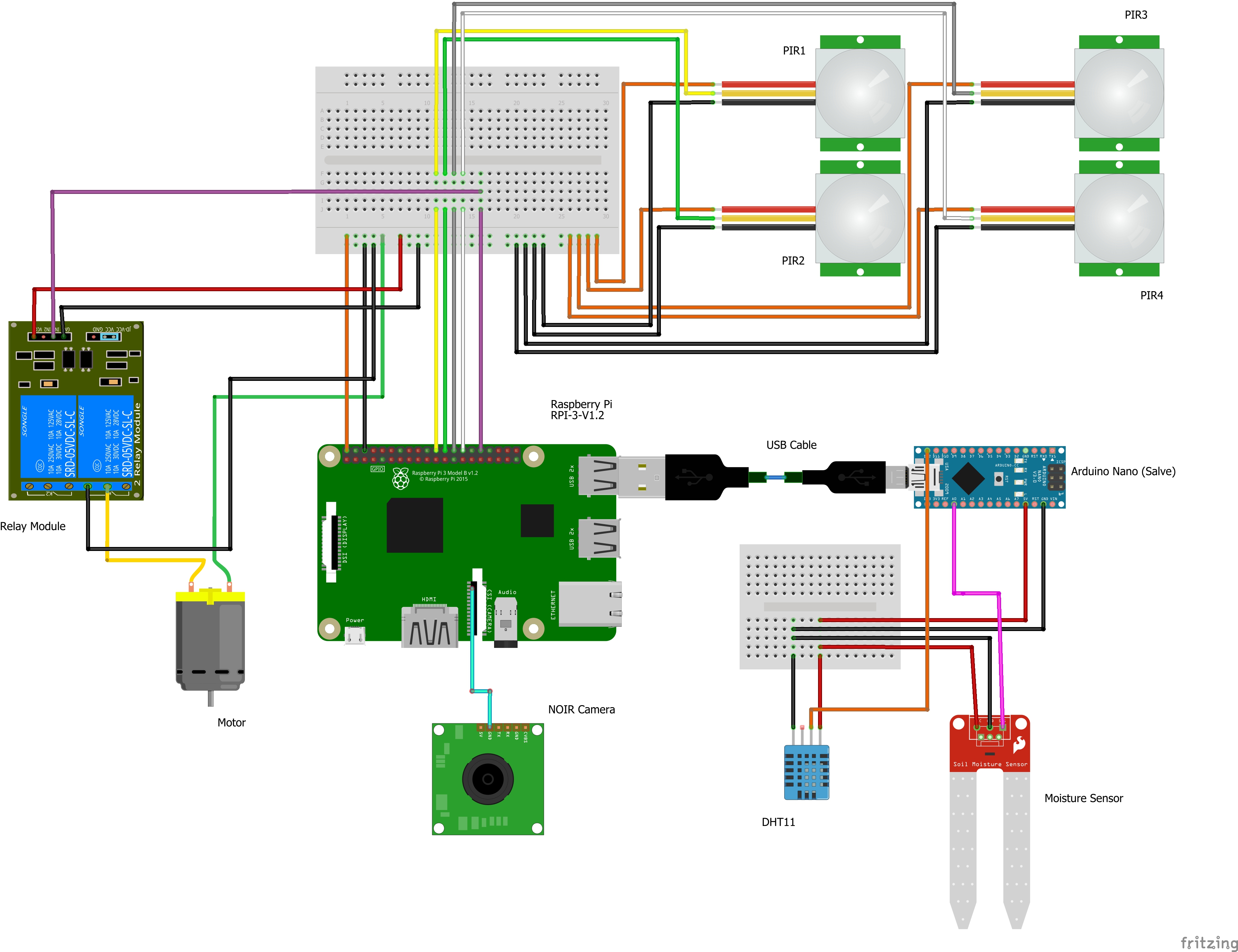
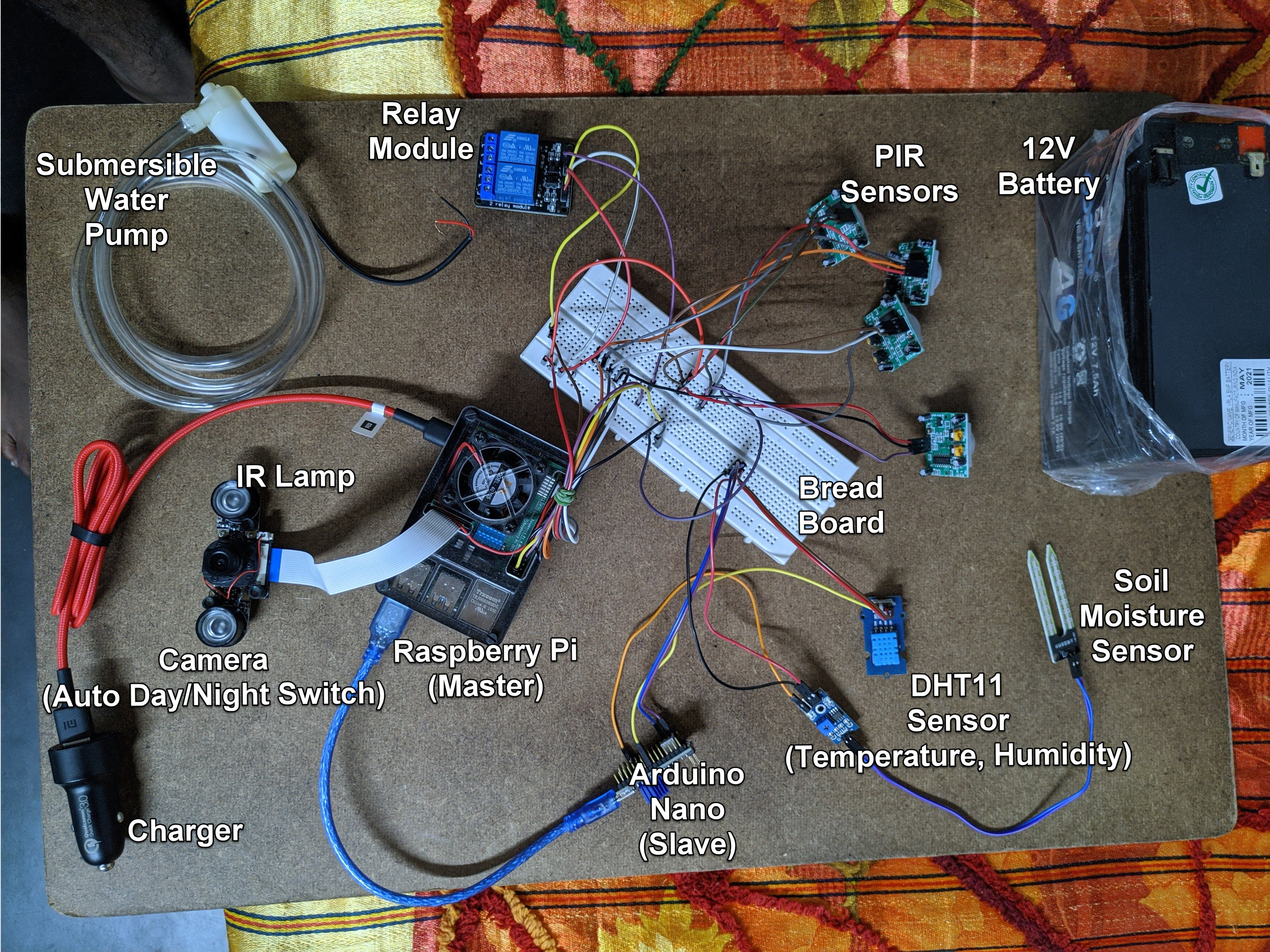
Raspberry Pi
| GPIO | Device | Use | Mode |
|---|---|---|---|
12 | Relay | To Switch on/off Relay | OUT |
25 | PIR1 | Motion Detection | IN |
8 | PIR2 | Motion Detection | IN |
7 | PIR3 | Motion Detection | IN |
1 | PIR3 | Motion Detection | IN |
Arduino nano
| Pin | Device | Device pin | Mode |
|---|---|---|---|
A0 | Moisture Sensor* | Analog Out | IN |
D12 | DHT11 | Signal | IN |
* For multiple sensors use differnet Analog pins
Connect the Pi camera to CSI Port
Use SSH to access the terminal and run the Python Code
Connect all the Vdd's and GND's to 5V and GND (or as per instructions given in spec sheet)
To get the USB Device ID, Use
ls /dev/tty*
Most Probably the Value will be /dev/ttyUSB0
Sensor data should be sent in the following pattern
mositure1,moisture2,moisture3, .... ,moistureN, Temperature,Humidity
ex : 55.29,52.59,32.5,65.26
Download counts and popularity will appear here as the collector receives them.
| Version | Published | Direct dependencies | Open version |
|---|---|---|---|
| 1.1.3 | 25 Jun 2021 | 5 |
This describes our collected data; it is not a security assessment.
Shared repository data · GitHub
Observed since 21 Oct, 09:27 UTC
No superseded metadata states collected. Unchanged observations do not create new revisions.
package:fb9e1207ece869cf487f2384a15207f76cb4d900067605c345caa45e7c9a4f77