
 Repository
Current collected state Current
Observed since 21 Oct, 10:19 UTC
No superseded metadata states collected. Unchanged observations do not create new revisions.
Daily AI usage cost analysis with before/after comparison and model health signals
Daily AI spend (Claude Code, Cursor), before/after windows, and model routing health — in your terminal.




Turn local usage data into three Rich tables: daily cost, split-window comparison, and per-model verdicts. Claude via ccusage; Cursor via dashboard CSV (or optional API token).
Not a ccusage fork — an interpretation layer on top. ccusage reports what you spent; this CLI adds before/after windows, mix shifts, and routing health verdicts.
Quick start · Demo · ccusage vs this tool · Install · Usage · How it works
Claude Code usage can spike fast — especially when Opus routing leaks or Sonnet/Haiku tiers stop doing their job. This CLI answers three questions at a glance:
| Question | Table |
|---|---|
| What did I spend each day? | Daily cost — cost, tokens, model mix |
| Did things change after a date? | Before vs After — avg/day, totals, mix shift |
| Are models routed correctly? | Real Signal — Opus / Sonnet / Haiku verdicts |
No cloud upload. Reads your local ccusage JSON and prints a terminal report.
| ccusage | ai-cost-compare | |
|---|---|---|
| Role | Usage analytics — read local logs, report spend | Interpretation layer — explain what changed and if routing looks healthy |
| Scope | Many agents, daily/weekly/monthly/session views | Claude Code focus: before/after split + model mix verdicts |
| Output | Descriptive tables & totals | Daily cost + Before vs After + Real Signal (Opus/Sonnet/Haiku) |
| Install both? | ✅ Required (data source) | ✅ Optional companion on top |
Use ccusage for “what did I spend?” Use this when “did something break after I changed config on Tuesday?”
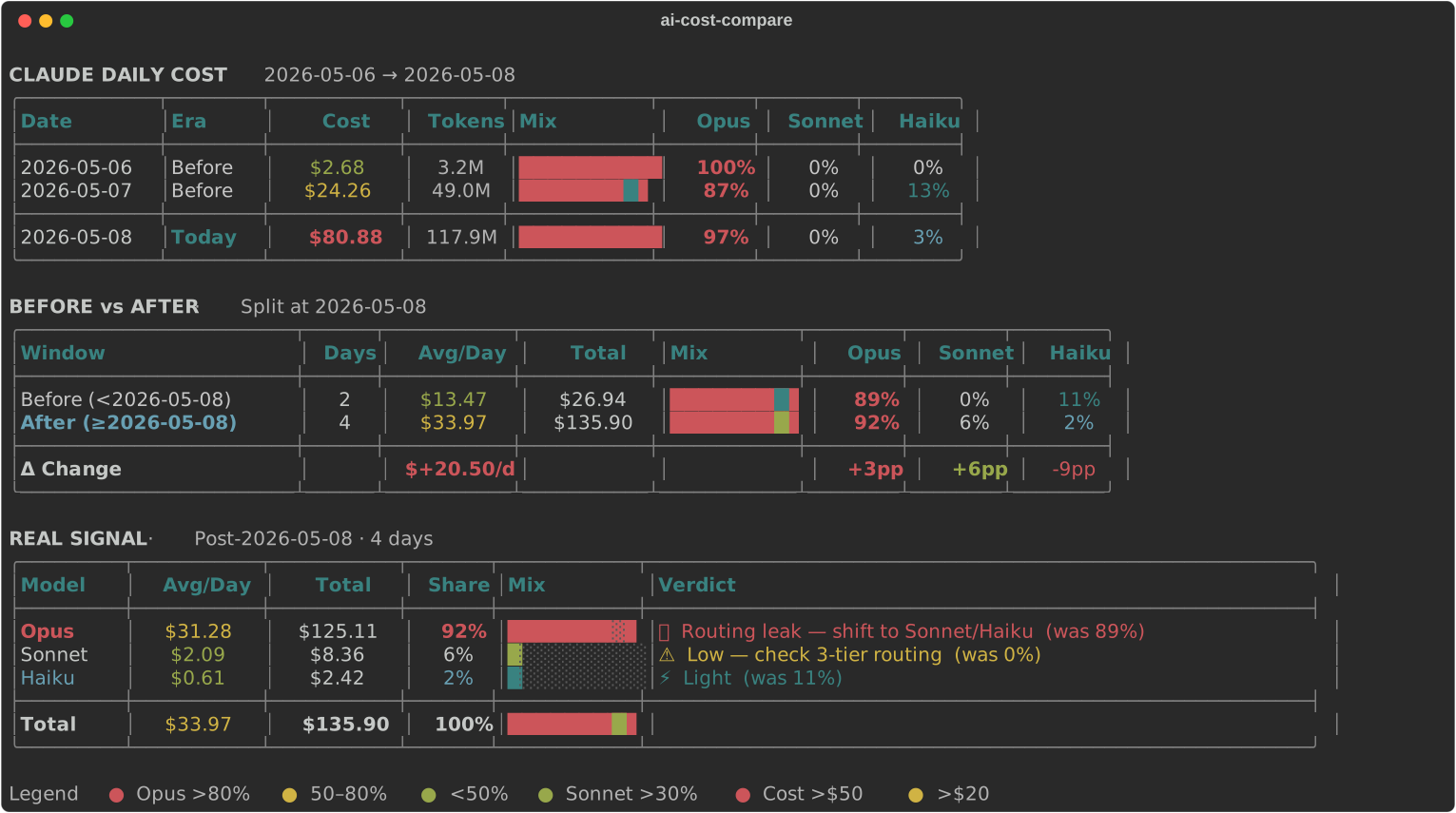
Sample fixture output · --range 7 --cutoff 2026-05-08
ai-cost-compare --range 7 --cutoff 2026-05-08
CLAUDE DAILY COST  ·  2026-05-06 → 2026-05-08
┌─────────────┬────────┬───────────┬────────┬───────────┬──────┬────────┬──────┐
│ Date        │ Era    │      Cost │ Tokens │ Mix       │ Opus │ Sonnet │ Haiku│
├─────────────┼────────┼───────────┼────────┼───────────┼──────┼────────┼──────┤
│ 2026-05-06  │ Before │     $2.68 │   3.2M │ ████████… │ 100% │     0% │   0% │
│ 2026-05-07  │ Before │    $24.26 │  49.0M │ ████████… │  87% │     0% │  13% │
│ 2026-05-08  │ Today  │    $80.88 │ 117.9M │ ████████… │  97% │     0% │   3% │
└─────────────┴────────┴───────────┴────────┴───────────┴──────┴────────┴──────┘

BEFORE vs AFTER  ·  Split at 2026-05-08
REAL SIGNAL      ·  Post-2026-05-08 · per-model routing verdicts
1. Install ccusage (peer dependency — reads your local usage data):
npm install -g ccusage
2. Install the CLI:
pip install ai-cost-compare
# or
uv tool install ai-cost-compare
3. Run:
ai-cost-compare --range 5
pip install ai-cost-compare
uv tool install ai-cost-compare
uvx ai-cost-compare --help          # run without installing
brew tap mazulo/ai-cost-compare https://github.com/mazulo/ai-cost-compare
brew install ai-cost-compare
npm install -g ccusage                  # still required
One-liner (no tap):
brew install https://raw.githubusercontent.com/mazulo/ai-cost-compare/main/Formula/ai-cost-compare.rb
PATH (v18+; v20 period JSON field supported)ai-cost-compare and ai-cost-compare claude are equivalent. Legacy installs: claude-cost-compare / cccompare still work.
# Last 5 days vs today (default)
ai-cost-compare --range 5

# 7-day window split at a specific date
ai-cost-compare claude --range 7 --cutoff 2026-05-13

# Daily summary only — skip comparison tables
ai-cost-compare --summary --since 2026-05-01
Requires ccusage on your PATH.
Option A — CSV export:
ai-cost-compare cursor --file ~/Downloads/usage.csv --range 7 --cutoff 2026-05-13
Option B — session token (auto-fetch):
pip install 'ai-cost-compare[cursor-api]'cursor.comWorkosCursorSessionToken~/.config/ai-cost-compare/config.toml (created automatically on first run):[cursor]
session_token = "paste-your-token-here"
ai-cost-compare cursor --range 5
The config file is created with instructions the first time you run ai-cost-compare cursor.
| Flag | Short | Description |
|---|---|---|
--range | -r | Days before cutoff for the "before" window (default: 5) |
--cutoff | -c | Before/after split date YYYY-MM-DD (default: today) |
--since | -s | Explicit start date — overrides --range |
--summary | Daily cost table only | |
--plain | Disable color | |
--file | -f | Cursor only: path to exported CSV |
--cursor-token | Cursor only: session token (overrides config) |
flowchart LR
  P[Provider] --> B[Parser]
  B --> C[Window stats]
  C --> D[Before / After deltas]
  C --> E[Model verdicts]
  D --> F[Rich terminal report]
  E --> F
claude (ccusage JSON) or cursor (CSV / optional API).--cutoff, computes averages and mix shifts.git clone https://github.com/mazulo/ai-cost-compare.git
cd ai-cost-compare
uv sync --dev
uv run pytest
uv run ai-cost-compare --range 5
Regenerate the README demo SVG after UI changes:
uv run python scripts/export_demo.py
Bump version in pyproject.toml and src/ai_cost_compare/__init__.py, push to main, then run the Publish workflow from GitHub Actions. It will:
Details: docs/RELEASING.md
MIT — see LICENSE.
Built for developers who want spend visibility across Claude Code and Cursor without leaving the terminal.
⭐ Star on GitHub if this saves you from an Opus routing surprise.
Download counts and popularity will appear here as the collector receives them.
| Version | Published | Direct dependencies | Open version |
|---|---|---|---|
| 0.3.2 | 22 Jun 2026 | 2 |
This describes our collected data; it is not a security assessment.
Observed since 21 Oct, 10:19 UTC
No superseded metadata states collected. Unchanged observations do not create new revisions.
package:d3864582de9a479ecf85fdbf9fddf9573e8641fcf2d9fd3731cd53ad7b1ba7e8