
 Repository
Current collected state Current
Observed since 21 Oct, 10:56 UTC
No superseded metadata states collected. Unchanged observations do not create new revisions.
A distributed reinforcement learning experimentation platform running in a terminal
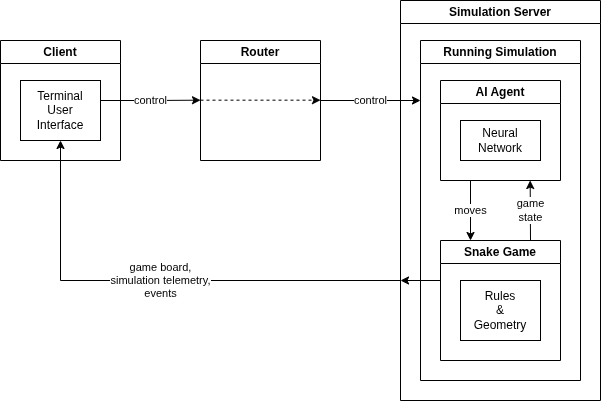
AI Hydra is a distributed reinforcement learning platform composed of three core components:
All components communicate over ZeroMQ, forming a clean separation between control, execution, and visualization.
The client sends control messages (e.g., handshake, start) to the router, which forwards them to the server. The server runs the simulation and publishes telemetry via PUB/SUB sockets. The client subscribes to these streams and renders the system state in real time.
Telemetry is split into two channels:
This separation allows fine-grained control over performance and observability.
   $ python3 -m venv hydra-venv
   $ . hydra-venv/bin/activate
   hydra-venv> pip install ai-hydra
Start each component in its own terminal:
1. Client
    $ . hydra-venv/bin/activate
    hydra-venv> ai-hydra-client
2. Router
    $ . hydra-venv/bin/activate
    hydra-venv> ai-hydra-router
3. Server
    $ . hydra-venv/bin/activate
    hydra-venv> ai-hydra-mgr
After starting the three processes:
This sends a HANDSHAKE message through the router to the server.
If the client cannot connect to the server, then nothing will happen.
If the server is reachable, then the Start button appears, and the simulation settings will also appear and be editable.
To launch the simulation, click on the Start button. Upon starting, the Pause and Reset buttons will appear. These allow the user to pause a running simulation, or reset the simulation, which takes you back to the post-handshake display.
In this early release, the server can only be stopped by hitting Control-C in the terminal where it's running. The client is stopped by hitting the Quit key. The HydraRouter can be shut down by clicking the Quit button.
The shutdown process is not 100% clean, so you may be required to also hit Control-C on the client to fully stop it.
AI Hydra components run independently and can be deployed across different machines. The runtime configuration can be viewed in Settings widget under the Network tab.
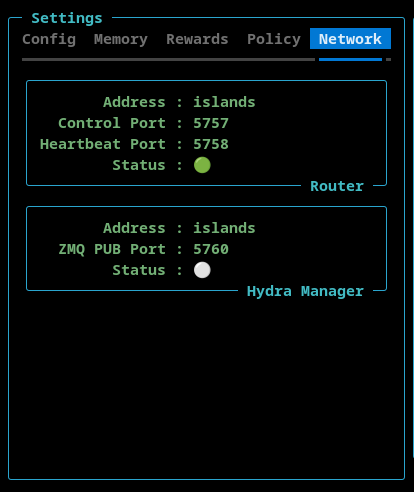
This configuration demonstrates a fully distributed setup where simulation, routing, and visualization are physically separated across hosts. This example also uses custom ports. The Hydra Client is running locally, the Hydra Router is running on bingo, and the Hydra Manager is running on islands.
1. Client
    # Client (local machine)
    $ . hydra-venv/bin/activate
    hydra-venv> ai-hydra-client --router-port 6757 --router-hb-port 6758 --server-pub-port 6760 --router-address bingo --server-address islands
2. Router
    # Router (bingo)
    $ . hydra-venv/bin/activate
    hydra-venv> ai-hydra-router --port 6757 --hb-port 6758
3. Server
    # Manager / Simulation (islands)
    $ . hydra-venv/bin/activate
    hydra-venv> ai-hydra-mgr --port 5759 --router-port 6757 --router-hb-port 6758 --router-address bingo

The client supports a Turbo mode that disables per-step updates. This removes rendering overhead and allows the simulation to run 15×+ faster, making it ideal for rapid experimentation.

AI Hydra is fully deterministic and the random seed for a simulation run is visible and can be set in the TUI.
When the a simulation is not running in turbo mode, the movement of the snake is too fast to see clearly. The move delay introduces a delay between steps that slows the simulation down.
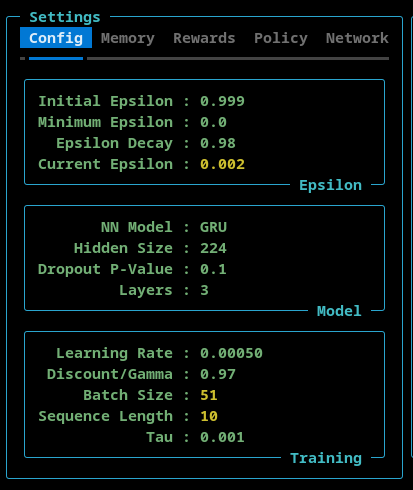
The Config settings tab allows the user to set:
IMPORTANT NOTE: The different models (Linear, RNN, and GRU) had different default values associated with them. When you select a model from the NN model dropdown menu, the defaults for that model are loaded into the TUI. So, if you want a custom setting you must do that after you select the model type.
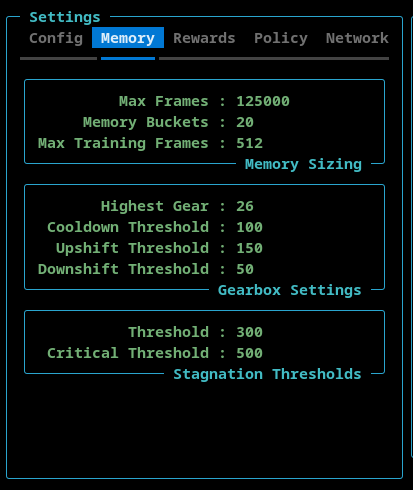
The Memory tab allows the user to configure the ATH Memory.
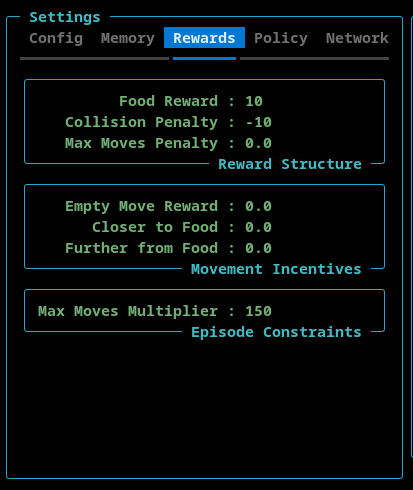
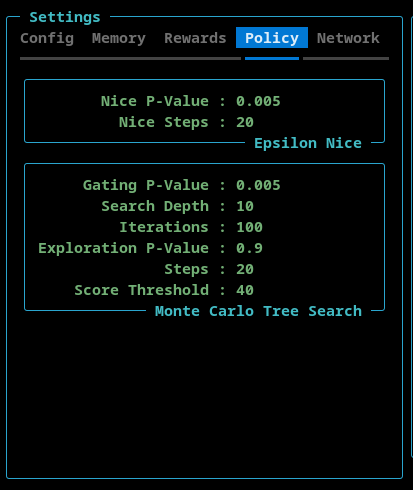
This tab contains settings for EpsilonNice and the Monte Carlo Tree Search features.
EpsilonNice
This policy execute a configurable number of steps in a random direction such that the move does not result in a collision (if possible).
Monte Carlo Tree Search
This policy implements a limited Monte Carlo Tree Search (MCTS). The goal is not to replace the neural network, but to selectively enrich the training data in complex situations.
By design, MCTS operates sparingly and in bursts.
A burst is a short sequence of consecutive steps during which decision-making is temporarily delegated from the neural network to the MCTS. Outside of these bursts, the system behaves normally.
IMPORTANT NOTE: If the EpsilonNice algorithm is active, then the MCTS will not trigger.
This section shows the hostnames and port numbers that AI Hydra is using. These can be configured during startup using command line switches.
Simulations are fully deterministic.
Given the same configuration and random seed:
This enables reliable experimentation and reproducibility.
You can also vary only the random seed to validate that results are not artifacts of a “lucky run.”
Model selection is available directly in the TUI.
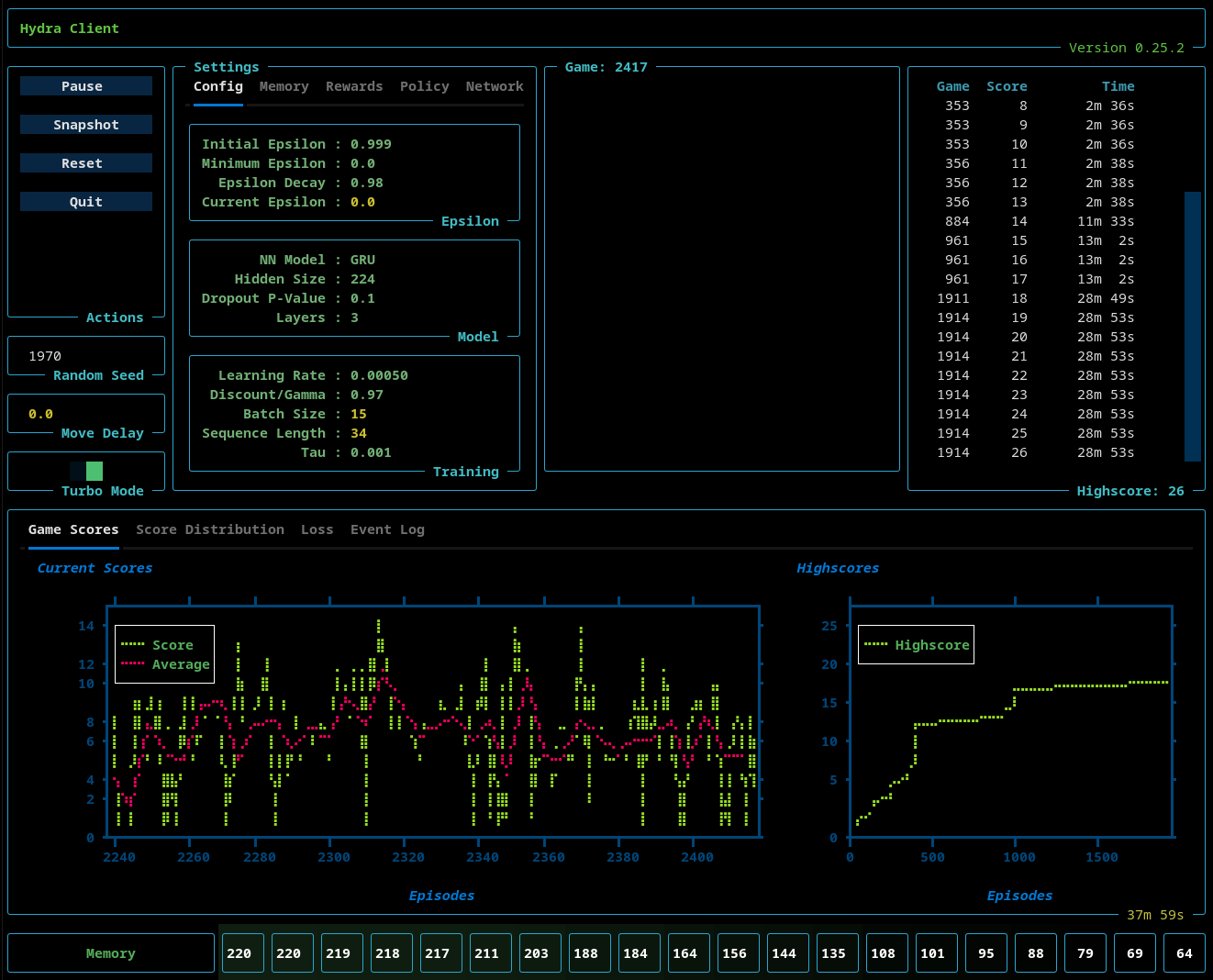
The TUI provides real-time insight into training:
Views include:
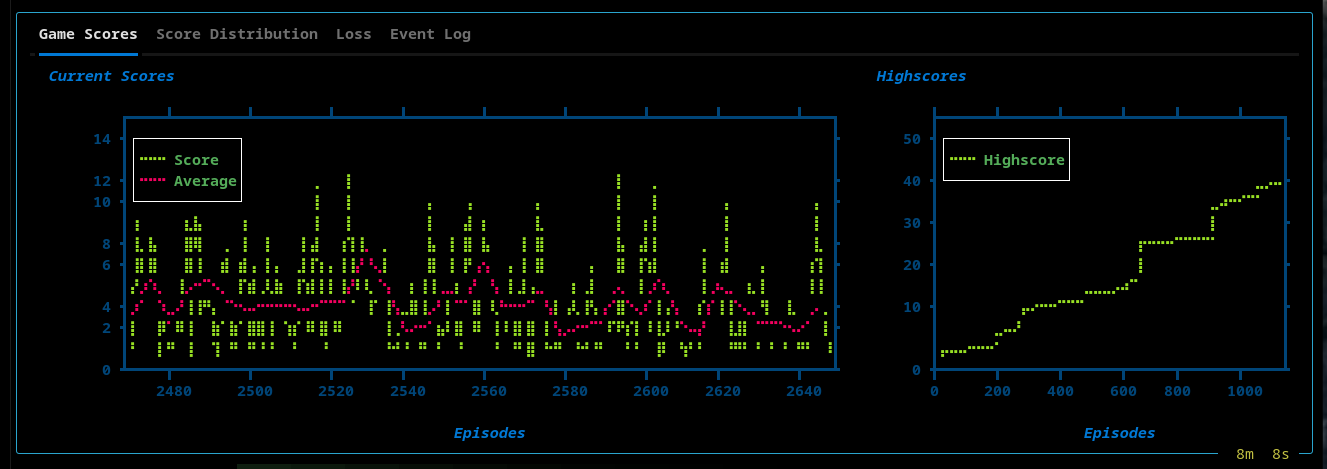
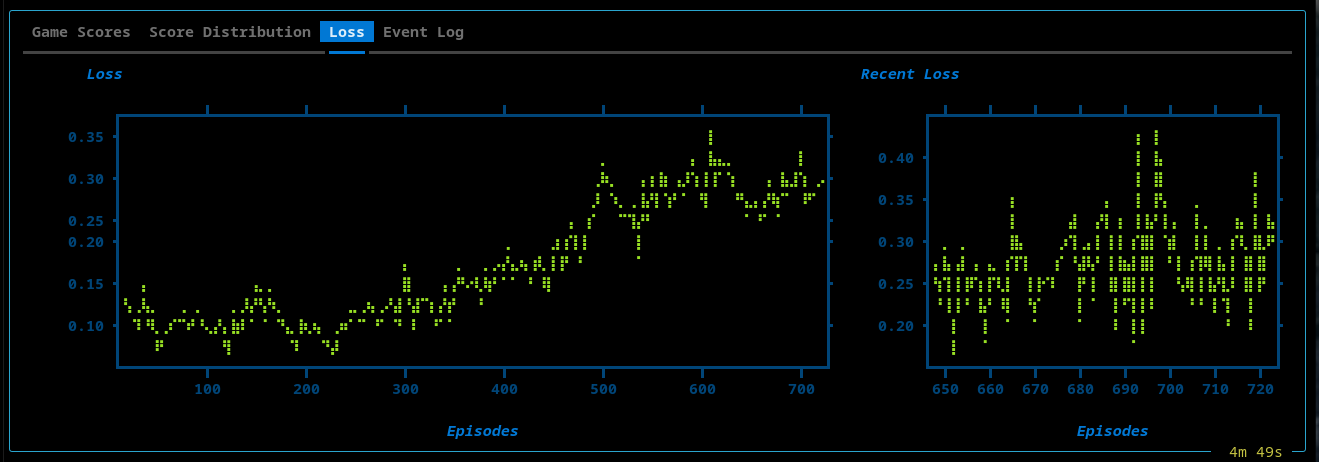
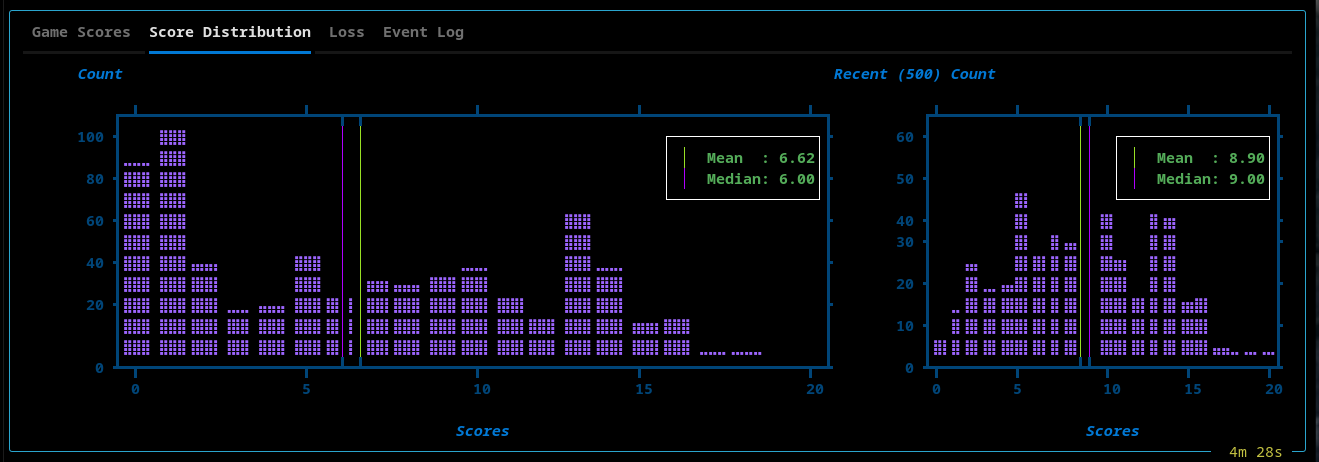
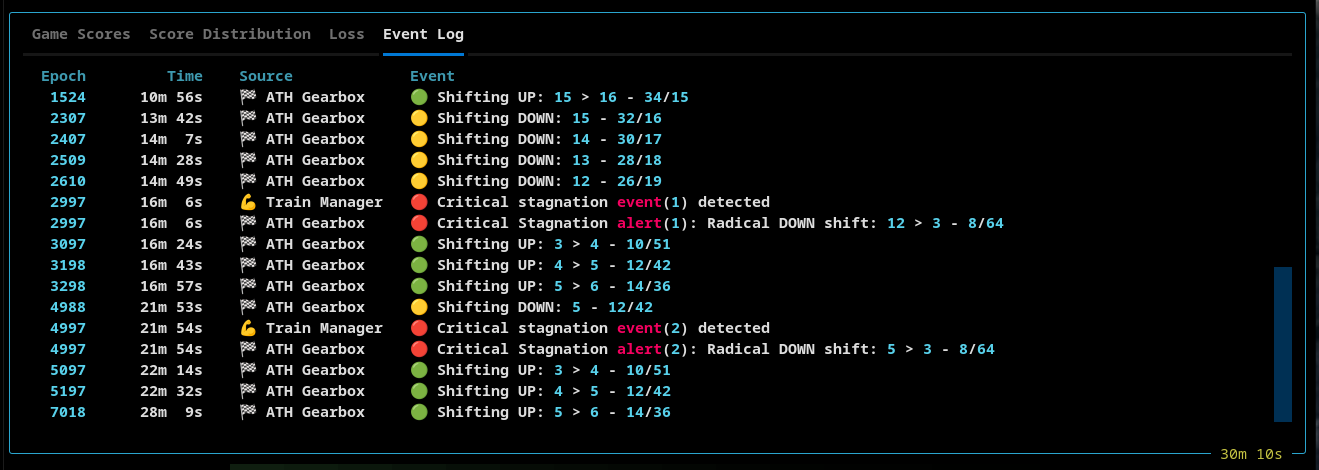
A structured event stream capturing system behavior:
The ATH Replay Memory is a core component of AI Hydra.
It sits between the simulation and the Trainer, and controls how experience is stored, organized, and sampled for learning. It is a key driver of emergent behavior.
A key takeaway is that the AI can learn new policies even when it is trained on the same underlying data, simply by changing how that data is sampled.
In particular, reducing the sequence length can expose patterns that are not learned when using longer sequences. Evidence suggests that some behaviors are easier to learn from shorter temporal windows, and are diluted or obscured when the sequence length is too long.
In effect, changing the sequence length changes the temporal resolution at which the agent learns.
At the core of ATH Memory is the concept of a gear.
One of the ATH Memory settings is the Max Training Frames parameter.
The batch size is determined by this simple calculation:
batch_size = max_training_frames // sequence_length
The minimum size of a batch is one.
The ATH Memory contains 20 buckets. The number 20 was arrived at by experimentation and was determined to be a useful number.
As outlined above, a stored game is broken down into sequences, or ordered sets of frames.
For example:
When the system shifts to the second gear, the data is reorganized using the new sequence length of 6:
Warmed Buckets
A bucket is defined as being warm when it contains at least one game.
When the Trainer asks the ATH Memory for training data, the goal is to construct a batch of sequences that all have the same length.
Key Concept: Sampling occurs across time.
In a traditional replay memory, sequences from the ends of long-running games are underrepresented.
The ATH Replay Memory contains an ATH Gearbox module that is responsible for changing gears. Its behavior depends on the following settings:
Upshift threshold
Downshift threshold
Cooldown threshold
If the last three buckets combined contain at least upshift threshold games, the ATH Gearbox will shift up
If the last three buckets combined contain fewer than downshift threshold games, the ATH Gearbox will shift down
The gearbox will not perform any shifting until cooldown threshold episodes have elapsed
The Train Manager also plays a role in gear shifting. Its behavior is determined by the following stagnation settings:
Stagnation threshold
Critical stagnation threshold
If stagnation threshold episodes elapse without a new high score, the Train Manager sends a stagnation alert to the ATH Gearbox
If critical stagnation threshold episodes elapse without a new high score, the Train Manager sends a critical stagnation alert to the ATH Gearbox
The TUI memory widget shows the number of games each bucket contains. Note that this number changes when the gear changes.

Lifecycle events such as warm-up, pruning, and gear shifts are emitted and tracked in real time and can be seen in the Event Log tab of the TUI.
TrainMgr is the central coordinator for AI Hydra’s learning loop.
It is responsible for constructing and wiring together:
TrainMgr does more than orchestrate training. It also acts as the system’s
recovery controller.
When progress stalls, TrainMgr emits stagnation alerts to adaptive subsystems
so they can respond in different ways:
Additionally, when a new high score is achieved the Train Manager calls
reset_cooldown() on the ATH Gearbox delaying an upshift to allow the AI
to fully exploit the opportunities at the current sequence length and batch
size.
This makes stagnation a first-class runtime signal rather than a passive metric.
The result is a coordinated feedback system where memory dynamics and policy behavior can both adapt when learning plateaus.
Epsilon Nice is a conditionally enabled policy wrapper that can temporarily redirect action selection into a short safe-detour mode.
It is not a one-step correction and it is not always active.
Instead, once normal epsilon exploration has effectively ended, Epsilon Nice may be enabled by the training system. When enabled, it can probabilistically arm a temporary intervention window. During that window, action selection is redirected toward safe alternatives for a fixed number of steps.
This allows the agent to break out of locally bad or stagnant behavior without permanently replacing the underlying learned policy.
At each step:
p_value, Nice arms a detoursteps turnsSo:
p_value controls how often a Nice detour beginssteps controls how long the detour lastsDuring an active Nice detour, the policy looks at the other available actions and gathers the non-colliding alternatives.
This means Nice does not simply “block fatal moves.”
It temporarily moves the policy into a safe-alternative action mode for a
bounded number of steps.
Key Properties
p_value controls entry into Nice modesteps defines the length of the detourEpsilon Nice tracks and reports:
These statistics are emitted on rolling windows, allowing the TUI to show how often Nice is being consulted and how often it actually changes behavior.
AI Hydra is designed for high-throughput training on consumer hardware, without relying on a GPU.
Its performance comes from two complementary design pillars:
The training path is tightly aligned across memory, batching, and model execution.
This creates a continuous pipeline:
memory → sequence assembly → batched training → model forward
Because each stage is designed to match the next, the system avoids unnecessary copying, slicing, or recomputation.
The core run loop is intentionally minimal and stays focused on simulation and training only.
This keeps the hot path free of UI and analysis overhead, allowing the simulation to run at full speed.
AI Hydra achieves speed not through hardware, but through alignment and separation of concerns. The system is optimized so that the cost of learning is dominated by model computation, not data movement or orchestration.
The TUI includes a Snapshot feature that captures:
Snapshots are saved to a AI-Hydra directory that the system creates in the user's home directory.
Example:
📸 AI Hydra - Snapshot Report
════════════════════════════
Timestamp              : 2026-04-05 12:00:13
Simulation Run Time    : 1h 17m
Current Episode Number : 5449
AI Hydra Version       : v0.25.2
Random Seed            : 1970

🎯 Epsilon Greedy
════════════════
Initial Epsilon    : 0.999
Minimum Epsilon    : 0.0
Epsilon Decay Rate : 0.98

🧠 GRU Model
═══════════
Input Size            : 23
Hidden Size           : 224
Dropout Layer P-Value : 0.1
Layers                : 3
Learning Rate         : 0.0005
Discount/Gamma        : 0.97
Tau                   : 0.001

💰 Rewards
═════════
Food Reward          : 10.0
Collision Penalty    : -10.0
Max Moves Penalty    : 0.0
Empty Move Reward    : 0.0
Closer to Food       : 0.0
Further from Food    : 0.0
Max Moves Multiplier : 150

💾 Replay Memory
═══════════════
Max Frames                  : 125000
Memory Buckets              : 20
Max Training Frames         : 512
Highest Gear                : 26
Cooldown Threshold          : 100
Upshift Threshold           : 150
Downshift Threshold         : 50
Stagnant Threshold          : 300
Critical Stagnant Threshold : 500

🎲 Monte Carlo Tree Search
═════════════════════════
Gating P-Value      : 0.005
Search Depth        : 10
Iterations          : 100
Exploration P-Value : 0.9
Score Threshold     : 40
Steps               : 20

📚 Event Log Messages
════════════════════
      -           0s    💻 Hydra Client    🔵 Initialized...
      -           0s    ⚡ Simulation      🔵 Connected to simulation server
      -           0s    ⚡ Simulation      🔵 Simulation started
    100          24s    🏁 ATH Gearbox     🟢 Shifting UP: 1 > 2 - 6/85
    201       1m  2s    🏁 ATH Gearbox     🟢 Shifting UP: 2 > 3 - 8/64
    302       2m  0s    🏁 ATH Gearbox     🟢 Shifting UP: 3 > 4 - 10/51
    342       2m 26s    🧭 Epsilon         🔵 Exploration complete: ε = 0.0
    403       3m 24s    🏁 ATH Gearbox     🟢 Shifting UP: 4 > 5 - 12/42
    420       3m 39s    💾 ATH Data Mgr    🔵 Memory is full (125000), pruning initiated
    504       5m  4s    🏁 ATH Gearbox     🟢 Shifting UP: 5 > 6 - 14/36
    604       6m 44s    🏁 ATH Gearbox     🟢 Shifting UP: 6 > 7 - 16/32
    656       7m 44s    💪 Train Manager   🟡 Stagnation alert raised
    656       7m 44s    🙂 Nice Policy     🔵 Enabling EpsilonNice
    706       8m 34s    🏁 ATH Gearbox     🟢 Shifting UP: 7 > 8 - 18/28
    807      10m 16s    🏁 ATH Gearbox     🟢 Shifting UP: 8 > 9 - 20/25
    856      11m  6s    💪 Train Manager   🔴 Critical stagnation alert(1). New threshold set: 1000
    856      11m  6s    🏁 ATH Gearbox     🔴 Critical Stagnation alert(1): Radical DOWN shift: 9 > 1 - 4/128
    884      11m 33s    💪 Train Manager   🔵 Stagnation alert cleared (new highscore: 14)
    884      11m 33s    🙂 Nice Policy     🔵 Disabling EpsilonNice
    956      12m 56s    🏁 ATH Gearbox     🟢 Shifting UP: 1 > 2 - 6/85
   1057      14m 54s    🏁 ATH Gearbox     🟢 Shifting UP: 2 > 3 - 8/64
   1158      16m 38s    🏁 ATH Gearbox     🟢 Shifting UP: 3 > 4 - 10/51
   1259      18m 25s    🏁 ATH Gearbox     🟢 Shifting UP: 4 > 5 - 12/42
   1261      18m 26s    💪 Train Manager   🟡 Stagnation alert raised
   1261      18m 26s    🙂 Nice Policy     🔵 Enabling EpsilonNice
   1360      20m  7s    🏁 ATH Gearbox     🟢 Shifting UP: 5 > 6 - 14/36
   1461      21m 39s    🏁 ATH Gearbox     🟢 Shifting UP: 6 > 7 - 16/32
   1562      23m  8s    🏁 ATH Gearbox     🟢 Shifting UP: 7 > 8 - 18/28
   1662      24m 54s    🏁 ATH Gearbox     🟢 Shifting UP: 8 > 9 - 20/25
   1764      26m 29s    🏁 ATH Gearbox     🟢 Shifting UP: 9 > 10 - 22/23
   1865      28m  4s    🏁 ATH Gearbox     🟢 Shifting UP: 10 > 11 - 24/21
   1911      28m 49s    💪 Train Manager   🔵 Stagnation alert cleared (new highscore: 18)
   1911      28m 49s    🙂 Nice Policy     🔵 Disabling EpsilonNice
   1966      29m 57s    🏁 ATH Gearbox     🟢 Shifting UP: 11 > 12 - 26/19
   2067      31m 57s    🏁 ATH Gearbox     🟢 Shifting UP: 12 > 13 - 28/18
   2168      33m 57s    🏁 ATH Gearbox     🟢 Shifting UP: 13 > 14 - 30/17


🏆 Highscore Events
══════════════════
Epoch  Highscore  Time     Epsilon
═════  ═════════  ═══════  ═══════
0      0          0s       0.9900
1      1          0s       0.9990
93     2          21s      0.1557
118    3          30s      0.0921
218    4           1m 11s  0.0122
218    5           1m 11s  0.0122
326    6           2m 14s  0.0014
326    7           2m 14s  0.0014
353    8           2m 36s  0.0000
353    9           2m 36s  0.0000
353    10          2m 36s  0.0000
356    11          2m 38s  0.0000
356    12          2m 38s  0.0000
356    13          2m 38s  0.0000
884    14         11m 33s  0.0000
961    15         13m  2s  0.0000
961    16         13m  2s  0.0000
961    17         13m  2s  0.0000
1911   18         28m 49s  0.0000
1914   19         28m 53s  0.0000
1914   20         28m 53s  0.0000
1914   21         28m 53s  0.0000
1914   22         28m 53s  0.0000
1914   23         28m 53s  0.0000
1914   24         28m 53s  0.0000
1914   25         28m 53s  0.0000
1914   26         28m 53s  0.0000


🙂 Epsilon Nice
══════════════
P-Value    : 0.005
Nice Steps : 20

🙂 Epsilon Nice Events
═════════════════════
Window     Epoch  Calls  Triggered  Fatal Suggested  Overrides  No Safe Alt  Trigger Rate  Override Rate
═════════  ═════  ═════  ═════════  ═══════════════  ═════════  ═══════════  ════════════  ═════════════
1-100      100    0      0          0                0          0            0.0000        0.0000
101-200    200    0      0          0                0          0            0.0000        0.0000
201-300    300    0      0          0                0          0            0.0000        0.0000
301-400    400    0      0          0                0          0            0.0000        0.0000
401-500    500    0      0          0                0          0            0.0000        0.0000
501-600    600    0      0          0                0          0            0.0000        0.0000
601-700    700    27186  2480       1                2353       127          0.0912        0.0866
701-800    800    63755  5620       7                5397       223          0.0882        0.0847
801-900    900    54906  5360       6                5131       229          0.0976        0.0935
901-1000   1000   0      0          0                0          0            0.0000        0.0000
1001-1100  1100   0      0          0                0          0            0.0000        0.0000
1101-1200  1200   0      0          0                0          0            0.0000        0.0000
1201-1300  1300   22060  1840       4                1774       66           0.0834        0.0804
1301-1400  1400   64134  5900       2                5630       270          0.0920        0.0878
1401-1500  1500   52335  4800       2                4612       188          0.0917        0.0881
1501-1600  1600   63740  5860       0                5591       269          0.0919        0.0877
1601-1700  1700   64478  5660       0                5362       298          0.0878        0.0832
1701-1800  1800   62157  5540       1                5248       292          0.0891        0.0844
1801-1900  1900   60779  5211       1                4919       292          0.0857        0.0809
1901-2000  2000   5620   609        0                587        22           0.1084        0.1044
2001-2100  2100   0      0          0                0          0            0.0000        0.0000
2101-2200  2200   0      0          0                0          0            0.0000        0.0000


🎲 Monte Carlo Tree Search Events
════════════════════════════════
Window     Calls  Triggered  Trigger Rate
═════════  ═════  ═════════  ════════════
1-100      11492  0          0.0000
101-200    17179  0          0.0000
201-300    31776  0          0.0000
301-400    51512  0          0.0000
401-500    68785  0          0.0000
501-600    66006  0          0.0000
601-700    73588  0          0.0000
701-800    63755  0          0.0000
801-900    68050  0          0.0000
901-1000   83468  0          0.0000
1001-1100  70904  0          0.0000
1101-1200  66845  0          0.0000
1201-1300  66127  0          0.0000
1301-1400  64134  0          0.0000
1401-1500  52335  0          0.0000
1501-1600  63740  0          0.0000
1601-1700  64478  0          0.0000
1701-1800  62157  0          0.0000
1801-1900  60779  0          0.0000
1901-2000  75966  0          0.0000
2001-2100  81013  0          0.0000
2101-2200  86708  0          0.0000


⚙️  ATH Shift / Mean / Median
═════════════════════════════
Epoch  Gear  Seq Length  Batch Size  Mean  Median  Recent Mean  Recent Median
═════  ════  ══════════  ══════════  ════  ══════  ═══════════  ═════════════
100    2     6           85          0.30  0.00    0.30         0.00
200    2     6           85          0.55  0.00    0.55         0.00
300    3     8           64          0.91  1.00    0.91         1.00
400    4     10          51          1.59  1.00    1.59         1.00
500    5     12          42          2.12  1.00    2.12         1.00
600    6     14          36          2.51  2.00    2.95         3.00
700    7     16          32          2.80  3.00    3.70         4.00
800    8     18          28          2.99  3.00    4.24         5.00
900    1     4           128         3.23  3.00    4.53         5.00
1000   2     6           85          3.42  3.00    4.73         5.00
1100   3     8           64          3.48  3.00    4.64         5.00
1200   4     10          51          3.50  3.00    4.49         5.00
1300   5     12          42          3.58  3.00    4.54         5.00
1400   6     14          36          3.66  4.00    4.44         5.00
1500   7     16          32          3.73  4.00    4.34         4.00
1600   8     18          28          3.83  4.00    4.61         5.00
1700   9     20          25          3.90  4.00    4.85         5.00
1800   10    22          23          3.98  4.00    5.00         5.00
1900   11    24          21          4.11  4.00    5.37         5.00
2000   12    26          19          4.33  5.00    6.13         6.00
2100   13    28          18          4.54  5.00    6.82         7.00
2200   14    30          17          4.67  5.00    7.31         7.00


🪣 ATH Memory Bucket Usage
═════════════════════════
Epoch  Gear  b2   b3   b4   b5   b6   b7   b8   b9   b10  b11  b12  b13  b14  b15  b16  b17  b18  b19  b20  b21
═════  ════  ═══  ═══  ═══  ═══  ═══  ═══  ═══  ═══  ═══  ═══  ═══  ═══  ═══  ═══  ═══  ═══  ═══  ═══  ═══  ═══
100    2     108  108  107  106  100  92   82   74   69   67   64   61   57   54   53   48   47   40   34   32
200    3     208  206  203  188  172  157  145  140  132  119  115  107  103  95   88   85   79   74   71   68
300    4     308  304  296  270  246  235  219  200  191  182  169  160  152  145  141  136  132  120  115  108
400    5     406  403  381  350  334  316  297  283  267  257  247  237  231  227  212  200  194  185  177  172
500    6     202  202  201  201  201  201  200  196  195  191  191  189  185  182  179  178  176  174  170  167
600    7     183  183  183  181  181  179  177  174  173  171  169  168  165  162  160  159  155  149  143  141
700    8     178  178  177  176  174  173  170  167  165  162  162  157  153  152  148  144  140  139  134  133
800    9     186  186  186  186  184  182  178  175  174  174  170  170  168  167  167  163  157  154  152  148
900    1     189  189  189  189  189  189  189  189  189  188  188  188  188  188  188  188  188  188  188  188
1000   2     156  156  156  156  156  156  156  156  156  156  156  156  156  156  156  156  156  156  156  156
1100   3     163  163  163  163  163  163  162  162  161  161  161  161  161  161  160  160  160  159  159  159
1200   4     179  179  179  178  178  178  177  177  177  176  176  173  172  172  171  171  169  168  168  164
1300   5     182  182  181  180  180  178  178  177  176  175  173  172  169  168  166  166  162  161  159  158
1400   6     192  192  191  191  190  190  188  183  181  180  178  175  174  173  170  168  166  164  162  161
1500   7     214  214  214  214  214  211  205  203  201  199  195  194  187  184  180  176  173  166  158  157
1600   8     211  211  211  211  209  206  205  204  202  200  196  191  187  182  177  170  164  159  151  147
1700   9     190  190  190  188  188  188  188  185  184  183  180  175  170  168  164  158  149  147  145  144
1800   10    202  202  201  200  198  196  194  192  189  184  179  176  172  167  160  154  152  147  142  135
1900   11    204  202  201  201  198  194  194  192  186  181  180  177  168  166  163  160  151  144  119  116
2000   12    172  170  169  169  167  165  163  160  157  155  153  148  142  140  139  134  129  114  111  108
2100   13    158  157  156  155  153  152  152  150  148  143  140  132  130  130  126  124  108  105  101  98
2200   14    148  148  148  147  145  145  143  139  139  135  132  127  123  120  117  110  105  102  98   96
AI Hydra is not just a simulation engine — it is a learning ecosystem.
Its components — adaptive replay memory, dynamic policy layers, and real-time orchestration — do not operate in isolation. They interact.
Together, they form a system where behavior is not explicitly programmed, but emerges from the interaction of these parts.
The result is a tightly coupled environment where:
AI Hydra is not just running games.
It is evolving behavior.
Download counts and popularity will appear here as the collector receives them.
| Version | Published | Direct dependencies | Open version |
|---|---|---|---|
| 0.27.0 | 10 Apr 2026 | 29 |
This describes our collected data; it is not a security assessment.
Observed since 21 Oct, 10:56 UTC
No superseded metadata states collected. Unchanged observations do not create new revisions.
package:ee48f73e605d8fac73d214c53938806365608bf2a4fdd5dec6ef17fb52dd5ca1