Catalog PyPI
PACKAGE EXPLORERView in registry

ai-launcher

PyPI

Universal AI CLI launcher with local context management for multi-project environments

aiclicontext-managementlauncherlocalproductivityproject-switcher
Versions collected1
Direct dependencies11From release 0.8.0
Last observed21 Oct, 11:08 UTC

README

Version 0.8.0 documentation

AI Launcher

Universal AI CLI launcher with local context management. Launch any AI coding assistant from a single entry point with persistent context across sessions.


PyPI version PyPI downloads CI codecov Python 3.8+ License: MIT

Local-First Design - All context and data stays on your machine. No cloud dependencies.
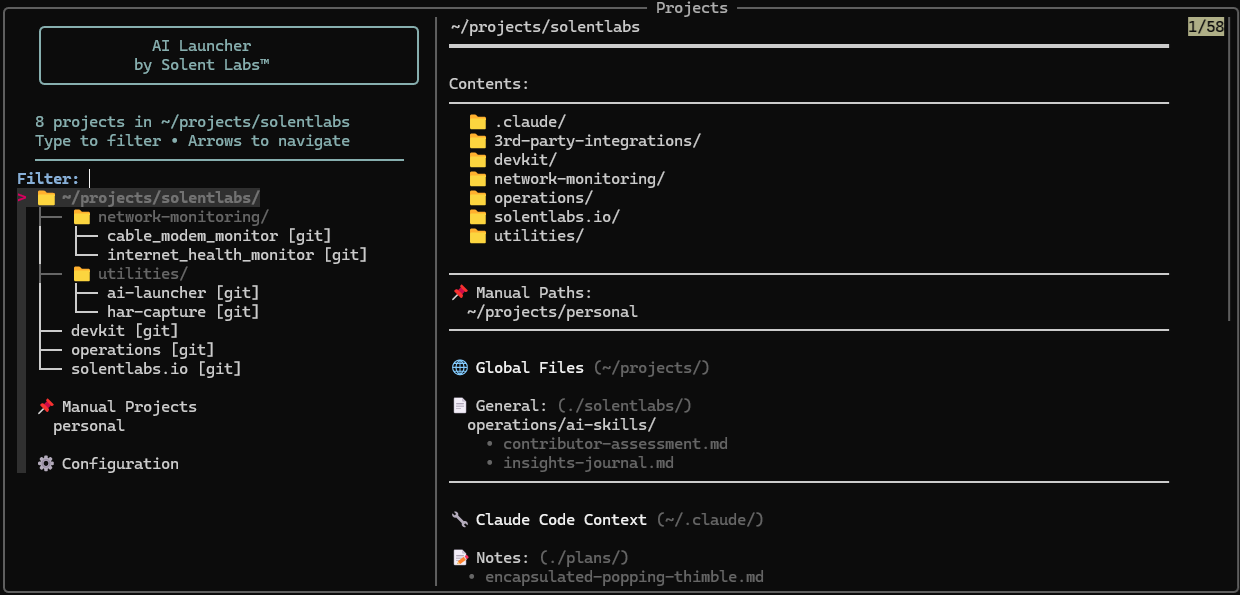
AI Launcher - Project Selector

Interactive project selector with tree view and context preview
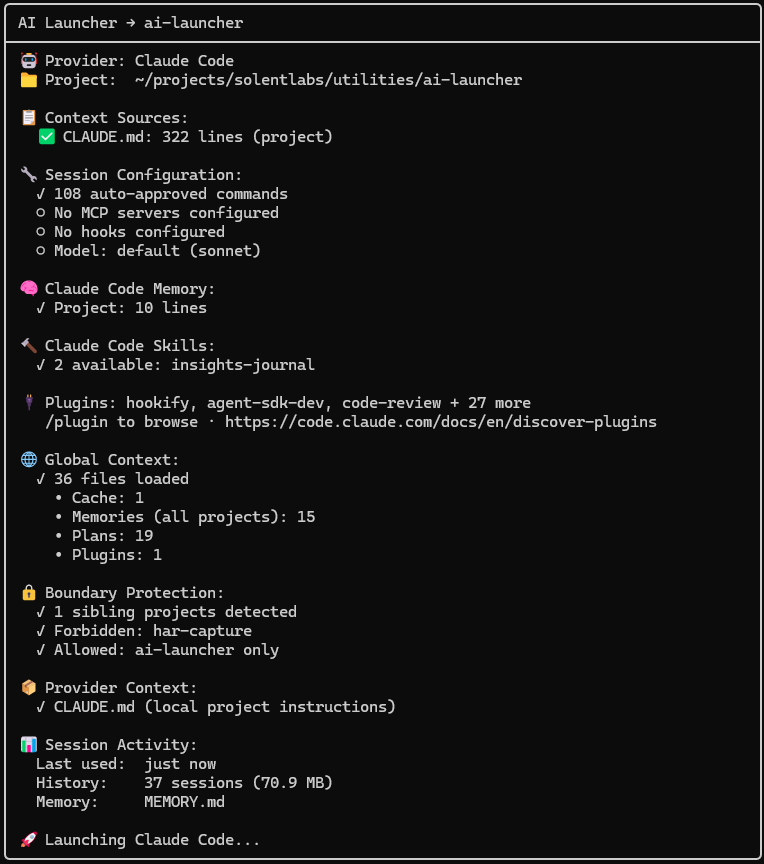
AI Launcher - Startup Report

Startup transparency report showing context, plugins, and session details

What Is This?

A terminal-first launcher that:

  • 🎯 Single Entry Point - One command to access all your AI coding tools
  • 🧠 Context Management - Maintains persistent context across sessions
  • 🔒 Local-Only - Everything stays on your machine
  • 🔍 Project Switching - Fuzzy search across all your projects
  • 🤖 Multi-Tool Support - Works with Claude Code, Gemini CLI, and more
  • 👁️ Context Transparency - See exactly what files AI tools access
  • 🖥️ Cross-Platform - Native support for Linux, macOS, WSL, and Windows

Install

Linux / macOS / WSL
# Install ai-launcher (fzf auto-downloads if missing)
pipx install ai-launcher
Windows (PowerShell)
# Install ai-launcher (fzf auto-downloads if missing)
pipx install ai-launcher

# Or with pip (use py -m to avoid launcher issues)
py -m pip install ai-launcher
From source
git clone https://github.com/solentlabs/ai-launcher.git
cd ai-launcher
pip install -e .

Use

Linux / macOS / WSL
ai-launcher claude ~/projects
Windows (PowerShell)
ai-launcher claude C:\Users\you\projects

# If ai-launcher is not in PATH
py -m ai_launcher claude C:\Users\you\projects

See what's available:

ai-launcher claude --discover ~/projects
ai-launcher claude --context

Select a project, and your AI tool opens with full context. Press Ctrl-O instead of Enter to open the project with another installed tool, or in a plain shell.

Features

Project Management

  • 🔍 Fuzzy search - Type to filter projects instantly
  • 📁 Tree navigation - See your project structure at a glance
  • 📋 Preview pane - Git status, context files, directory contents
  • ⚡ Last opened - Cursor starts on your most recent project
  • ➕ Manual projects - Add non-git directories
  • 🔗 Symlink support - Works with linked directories

Multi-Provider Support

  • 🤖 Provider abstraction - Switch between Claude Code, Gemini, and more
  • 🔀 Open with - Ctrl-O on a project lists your installed tools and a plain shell
  • 🔧 Per-project configuration - Different AI tools for different projects
  • 📊 Discovery mode - See what providers are installed
  • 👁️ Context visualization - View what files AI tools access
  • 🧠 Context awareness - Detects CLAUDE.md, GEMINI.md, and other context files

Project Scope

  • 🔒 One session, one project - Claude Code is told which project it was launched in and flags a request meant for another project before starting
  • ✋ Asks before cross-project writes - A write into another project under your scan folder stops for your approval, even with broad allow rules like Bash(*)
  • 📖 Reads stay free - Looking at other projects never prompts
  • 📓 Shared folders - --allow-writes ~/projects/journal lets every session write to a folder they all share without asking (Claude Code and Gemini)

See Project Scope.

Cache and Scratch

  • 💾 One-line notice - A launch notice when scratch or cache use, or free disk, needs attention
  • 🧹 Cache page - Sizes, ages and safety classes for agent scratch, browsers, package caches and editor servers, ranked, with summary rows you can clear in one key
  • ✅ Allowlist only - Only locations in the launcher's registry can be deleted, each tool's own clean command first, and a confirm step lists exactly what goes
  • 📂 Per-session scratch - AI_SCRATCH_DIR gives each session one folder to prune later

See Cache and Scratch.

Terminal Window Title

  • 📺 Auto title setting - Terminal shows "project → provider" for easy window identification
  • 🎨 Customizable format - Configure your preferred title style
  • 🪟 Multi-window workflow - Instantly identify which terminal has which project
  • 🖥️ Broad compatibility - Works with xterm, iTerm2, GNOME Terminal, Windows Terminal, tmux, and more

Requirements

  • Python 3.8+
  • fzf (auto-downloaded if missing)
  • An AI CLI tool (Claude Code, Gemini CLI, Cursor, Aider, or GitHub Copilot CLI)

Providers

Each AI tool is a subcommand:

ai-launcher claude ~/projects     # Anthropic's Claude Code
ai-launcher gemini ~/projects     # Google's Gemini CLI
ai-launcher cursor ~/projects     # Cursor IDE
ai-launcher aider ~/projects      # Aider pair programmer
ai-launcher copilot ~/projects    # GitHub Copilot CLI

See Configuration for all CLI options.

Why Local-Only?

Your code and context should stay on your machine. AI Launcher:

  • Never sends data to external services
  • Works offline
  • Respects your privacy
  • Gives you full control

Documentation

License

MIT - see LICENSE


Made by Solent Labs™ - Building tools for developers who value privacy and local-first software.

Downloads & popularity

Awaiting observations

No metric observations yet

Download counts and popularity will appear here as the collector receives them.

Versions 1

Collected releases
VersionPublishedDirect dependenciesOpen version
0.8.015 Oct 202611

Package advisories

0
No matching advisories collected

This describes our collected data; it is not a security assessment.

Repository

PENDING
solentlabs/ai-launcher

Shared repository data · GitHub

License detected in repository
Not collected

Metadata history

Meaningful changes
Current collected state Current

Observed since 21 Oct, 11:08 UTC

No superseded metadata states collected. Unchanged observations do not create new revisions.

Record identity

package:10ad1f6dd0d87291b3c417f3fa8116b115c151c73e8099b630f570c41acdf2af