
 Repository
Current collected state Current
Observed since 21 Oct, 09:46 UTC
No superseded metadata states collected. Unchanged observations do not create new revisions.
AI-assisted generator for Gaussian (.gjf) input files - describe the job in plain English, get a ready-to-submit input file.
Describe your computational job in one sentence; get a properly formatted Gaussian input file (
.gjf).
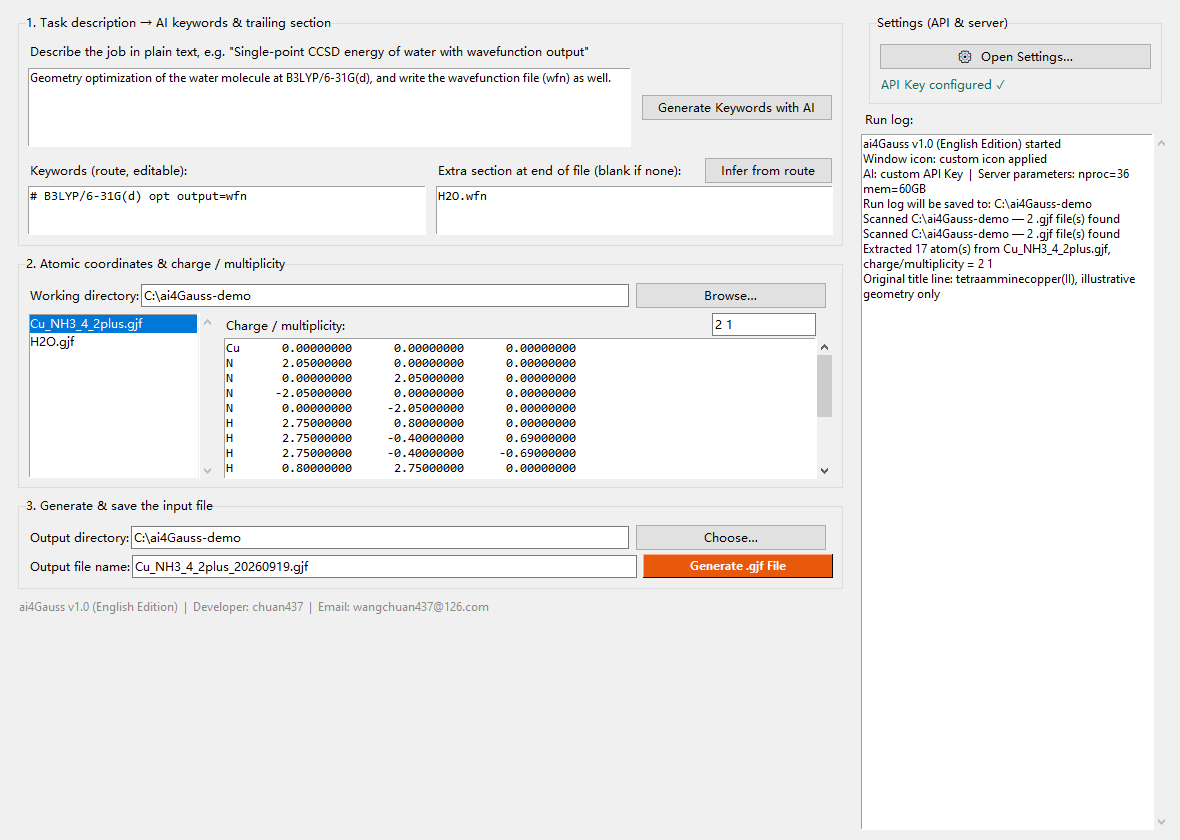
ai4Gauss is a small tkinter desktop application for people who run quantum chemistry
calculations. You describe the job in plain English, an LLM writes the Gaussian route section,
and the program combines it with the atomic coordinates taken from an existing .gjf file and
with your server parameters (%nproc / %mem) into a complete, ready-to-submit input file.
Zero dependencies — Python standard library only. No bundled credentials — you supply your own OpenAI-compatible API key, and requests go straight from your machine to the endpoint you configured.
pip install ai4gauss
Then launch it:
ai4gauss
or, equivalently:
python -m ai4gauss
Requirements: Python 3.8 or newer with tkinter enabled. tkinter ships with the official Windows and macOS installers, but on many Linux distributions it is a separate package:
sudo apt install python3-tk        # Debian / Ubuntu
sudo dnf install python3-tkinter   # Fedora / RHEL
A standalone Windows
.exe(no Python required) is available from the Releases page.
Click ⚙ Open Settings… in the top-right panel and fill in:
| Field | What to enter |
|---|---|
%nproc / %mem | CPU cores and memory written into the .gjf header, e.g. 36 / 60GB |
| API Key | Your own key for any OpenAI-compatible endpoint |
| Base URL | Must end in /v1, e.g. https://api.deepseek.com/v1 |
| Model name | e.g. deepseek-v4-flash |
No API key is bundled. Until you save one the status line stays red ("No API Key — open Settings to add your own ✗") and the program offers to open Settings for you at launch. Only Generate Keywords with AI needs a key — coordinate parsing and file generation work fully offline, and you can always type the route line yourself.
output=wfn requires the file name on its
own line after the coordinate block; gen / genecp require a basis-set definition block.
Miss one line and Gaussian stops with an error;| Feature | Description |
|---|---|
| Two-step keyword generation | Step 1 turns your description into the route line plus the reasoning behind it; step 2, given that route line, decides the trailing section (e.g. the .wfn file name required by output=wfn, or a gen/genecp block) |
| Consistency check | Route and trailing section are cross-checked and obvious gaps filled automatically; every fix or warning is logged. gen/genecp with an empty block is reported instead of guessed |
| Coordinate extraction | Reads charge/multiplicity and all atomic coordinates from an existing .gjf, reformatted to the standard 8-decimal layout; connectivity blocks are dropped on purpose |
| Never overwrites | Output names carry a date suffix (input1_20260920.gjf) |
| Self-contained dialogs | Custom-drawn message boxes with fixed English buttons, so the interface does not change with the system language |
| Zero dependencies | Standard library only (tkinter / urllib / json / re) |
| No bundled credentials | Nothing is routed through a third-party server |
Because an installed package lives inside site-packages — normally not writable, and wiped by
pip install -U — user data is written to the standard per-user location instead:
| Platform | Folder |
|---|---|
| Windows | %APPDATA%\ai4Gauss |
| Linux / macOS | ~/.config/ai4Gauss |
| File | Contents |
|---|---|
ai4Gauss_en_config.json | nproc / mem / your API key / base URL / model |
keywords.txt | Timestamped log of every route line the AI produced |
<timestamp>.log | Full run log, saved when you close the window |
Set the AI4GAUSS_HOME environment variable to force a different folder. The built-in Windows
.exe keeps writing next to the executable, so it stays portable.
The working directory shown in the interface defaults to the folder you started the program from, so generated files land where you expect.
The full user guide, a step-by-step quick start, a build script for making your own .exe, and
two worked examples (an output=wfn job and a genecp job, both produced by this program against
a real model) live in the repository:
Does it need the internet? Only Generate Keywords with AI does. Coordinate parsing, parameter entry and file generation all work offline.
Is my API key safe?
It is written in plain text to ai4Gauss_en_config.json in the folder shown above, and is only
ever sent to the endpoint you configured. Keep that file to yourself.
Why does the AI suggest such an expensive level of theory? It is a suggestion, not a peer-reviewed protocol. Read the rationale in the run log, then edit the route line by hand — the extra section can be re-derived from it with Infer from route.
Windows flags the .exe as malicious. A well-known false positive for PyInstaller single-file builds; add it to your trusted list.
gen / genecp basis-set blocks are model-generated — always review them before submitting;.gjf in the working directory, and keeps its AI prompt in an external
system_prompt field; this build keeps its prompts in the source.CC BY-NC 4.0 — free to use, modify and share with attribution, no commercial use. Study, research and teaching require no permission.
Note that this is not an OSI-approved licence, which is why the package reports it as a non-standard licence.
Developer: chuan437 · Email: wangchuan437@126.com
Issues, feature requests and "the keywords look wrong" reports are all welcome at https://github.com/wangchuan437/ai4Gauss-EN/issues.
Download counts and popularity will appear here as the collector receives them.
| Version | Published | Direct dependencies | Open version |
|---|---|---|---|
| 1.0.0 | 20 Sept 2026 | 0 |
This describes our collected data; it is not a security assessment.
Observed since 21 Oct, 09:46 UTC
No superseded metadata states collected. Unchanged observations do not create new revisions.
package:f87f8f36935cb46d368e2abc1d13e6069efa7e1584c6703f081d3fbad8d05286