
 Repository
Current collected state Current
Observed since 21 Oct, 10:08 UTC
No superseded metadata states collected. Unchanged observations do not create new revisions.
AI Hooks for SQLAlchemy
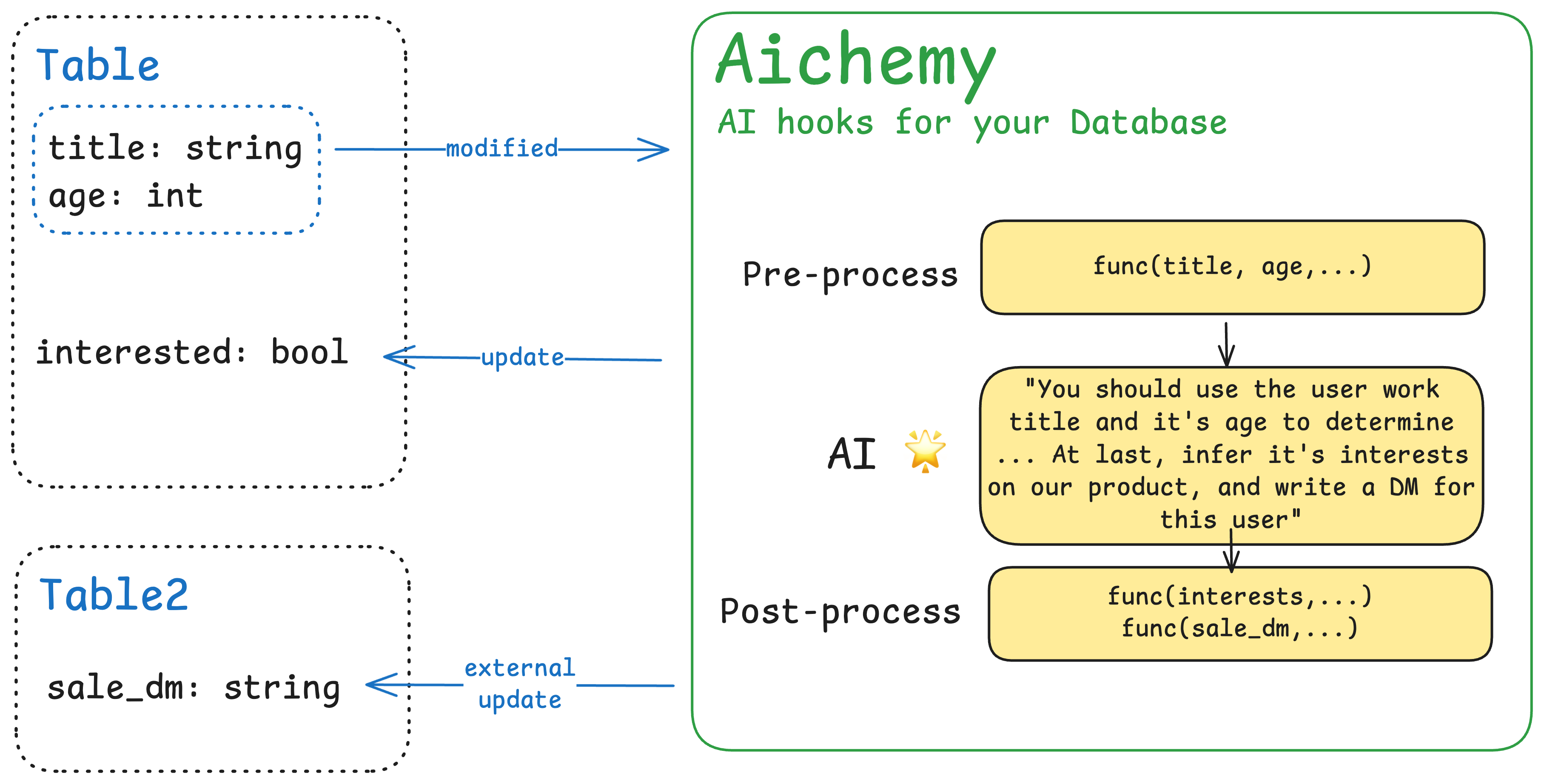
🚧AI Hooks for your Database🚧


Aichemy is still in development and everything in this readme is a possible concept yet.
Aichemy makes it easy to use AI in your database. Consider this as an observation layer that watch the changes in DB and act when possible. With powerful AI, many seemingly complex update logics can be implemented:
age is updated, combining with title to guess interested(bool, if user wants to buy our services).bio is updated, combing with name to generate a personalized sale_dm(string, content of DM)All you need to do is focusing on the business logic, and write the instructions clearly.
pip install aichemy SQLAlchemy
aichemy only supports SQLAlchemy for now.
from sqlalchemy import create_engine, Column, Integer, String
from sqlalchemy.orm import declarative_base, sessionmaker


class User(Base):
    __tablename__ = "users"
    id = Column(Integer, primary_key=True)
    name = Column(String)
    title = Column(String)
    intro = Column(String)
    dm_message = Column(String, nullable=True)


engine = create_engine("sqlite:///test.db")
Base.metadata.create_all(engine)
Session = sessionmaker(bind=engine)
aichemy functionsimport aichemy as ac
@ac.watch(User.intro).with(User.name, User.title).to(User.dm_message)
def write_dm(row: dict, results: dict):
"""Based on the user information, write a thank-you DM for our AI product.
### Information
Name: {users.name}
Title: {users.title}
Self-Intro: {users.intro}
"""
# pre-processes
row['users.name'] = row['users.name'].capitalize()
yield
# post-process
results['users.dm_message'] = results['users.dm_message'][:200]
row is a dict containing the values of (User.intro, User.name, User.title)docstring of the function to write your instructionsyield, you can modify the values inside row for pre-process. At this time, results is always empty and any changes to results is meaningless.yield, you can modify the return values inside results before they're committed to Databasewrite_dm.start()
with Session() as session:
user = User(name="John", title="Software Engineer", intro="I love AI and basketball")
session.add(user)
session.commit()
Debug the prompt is easy in aichemy:
write_dm.debug({
  "users.name": "Gus",
  "title": "Founder of Memobase",
	"users.intor": "I'm a programmer",
})
Download counts and popularity will appear here as the collector receives them.
| Version | Published | Direct dependencies | Open version |
|---|---|---|---|
| 0.0.1 | 28 Jan 2025 | 3 |
This describes our collected data; it is not a security assessment.
Observed since 21 Oct, 10:08 UTC
No superseded metadata states collected. Unchanged observations do not create new revisions.
package:c2107d174131d9c046eb89a3a46f3af66b1fe55badb9e4d7854bb8c90571b37a