
 Repository
Current collected state Current
Observed since 21 Oct, 10:32 UTC
No superseded metadata states collected. Unchanged observations do not create new revisions.
AI-powered documentation generator for web applications. Install docs commands into your Claude Code project.
AI-powered documentation generator for web applications.

aidocs generates comprehensive documentation by combining three sources of truth:
This produces documentation that's accurate to both the code AND the actual user experience.
┌─────────────────┐     ┌──────────────────┐     ┌─────────────────┐
│  📸 Screenshots │  +  │  📄 Code Analysis │  +  │  🖱️ UI Testing   │
│  (what users    │     │  (validation,     │     │  (conditional   │
│   see)          │     │   routes, models) │     │   fields, flows)│
└────────┬────────┘     └────────┬─────────┘     └────────┬────────┘
         │                       │                        │
         └───────────────────────┼────────────────────────┘
                                 ▼
                    ┌────────────────────────┐
                    │  📚 Smart Documentation │
                    │  that stays in sync    │
                    └────────────────────────┘
# 1. Install the CLI
brew install binarcode/aidocs/aidocs

# 2. Add to your project
cd your-project
aidocs init .

# 3. Generate docs (in Claude Code)
/docs:generate https://myapp.com/dashboard
Alternative installation:
# Homebrew (macOS/Linux)
brew install binarcode/aidocs/aidocs

# uv (recommended for Python users)
uv tool install aidocs

# pipx
pipx install aidocs

# From GitHub (latest)
uv tool install aidocs --from git+https://github.com/binarcode/aidocs-cli.git
Updating:
brew upgrade aidocs            # Homebrew
aidocs update                  # PyPI (uv/pipx/pip)
aidocs update --github         # GitHub (latest)
aidocs init . --force          # Reinstall commands in project
┌──────────────────────────────────────────────────────────────────────────────┐
│                              SETUP (once)                                    │
├──────────────────────────────────────────────────────────────────────────────┤
│                                                                              │
│  $ aidocs init .                    Install commands into project            │
│           │                                                                  │
│           ▼                                                                  │
│  /docs:init                         Configure: name, auth, style, output     │
│                                                                              │
└──────────────────────────────────────────────────────────────────────────────┘
                                      │
                                      ▼
┌──────────────────────────────────────────────────────────────────────────────┐
│                    OPTION A: Document a Single Page                          │
├──────────────────────────────────────────────────────────────────────────────┤
│                                                                              │
│  /docs:generate https://myapp.com/users    ← Give it any URL!                │
│           │                                                                  │
│           ├──→ Takes screenshots with Playwright                             │
│           ├──→ Analyzes codebase for that route                              │
│           ├──→ Documents UI elements and interactions                        │
│           └──→ Creates docs/users/index.md                                   │
│                                                                              │
└──────────────────────────────────────────────────────────────────────────────┘
                                      │
                                      ▼
┌──────────────────────────────────────────────────────────────────────────────┐
│                    OPTION B: Document a Code Flow                            │
├──────────────────────────────────────────────────────────────────────────────┤
│                                                                              │
│  /docs:flow "sync users from discord"    ← Describe the flow in words!       │
│           │                                                                  │
│           ├──→ Searches codebase for relevant files                          │
│           ├──→ Traces execution path and builds call graph                   │
│           ├──→ Generates mermaid sequence diagram                            │
│           ├──→ Captures UI screenshots (if Playwright + route detected)      │
│           └──→ Creates docs/flows/sync-users-from-discord.md                 │
│                                                                              │
└──────────────────────────────────────────────────────────────────────────────┘
                                      │
                                      ▼
┌──────────────────────────────────────────────────────────────────────────────┐
│                    OPTION C: Document Entire Project                         │
├──────────────────────────────────────────────────────────────────────────────┤
│                                                                              │
│  /docs:discover                     Scan codebase, find all modules          │
│           │                                                                  │
│           ▼                                                                  │
│  /docs:plan                         Create ordered documentation plan        │
│           │                         → Outputs docs/plan.yml                 │
│           ▼                                                                  │
│  /docs:execute                      Run through plan, generate all docs      │
│                                     → Resume with --continue if interrupted  │
│                                                                              │
└──────────────────────────────────────────────────────────────────────────────┘
                                      │
                                      ▼
┌──────────────────────────────────────────────────────────────────────────────┐
│                         KEEP DOCS IN SYNC                                    │
├──────────────────────────────────────────────────────────────────────────────┤
│                                                                              │
│  # After implementing a feature:                                             │
│  /docs:update --base main           Detect changes, update affected docs     │
│                                                                              │
└──────────────────────────────────────────────────────────────────────────────┘
                                      │
                                      ▼
┌──────────────────────────────────────────────────────────────────────────────┐
│                      ENABLE SEMANTIC SEARCH (optional)                       │
├──────────────────────────────────────────────────────────────────────────────┤
│                                                                              │
│  # After docs are generated, setup RAG for AI-powered search:                │
│  /docs:rag                          ← One command does it all!               │
│           │                                                                  │
│           ├──→ Chunks your docs into searchable pieces                       │
│           ├──→ Creates database migration (pgvector)                         │
│           ├──→ Generates OpenAI embeddings                                   │
│           └──→ Outputs sync.sql ready to import                              │
│                                                                              │
└──────────────────────────────────────────────────────────────────────────────┘
# Simple: Generate docs for one page
/docs:generate https://myapp.com/dashboard

# Flow: Document a feature (user-focused by default)
/docs:flow "how to create employees"
/docs:flow "import payments" --technical    # Developer docs

# Batch: Document entire project
/docs:discover && /docs:plan && /docs:execute

# Maintain: Update after code changes
/docs:update --base main

# RAG: Setup semantic search for your docs
/docs:rag
aidocs init [PROJECT_NAME]Initialize the docs module in a project.
aidocs init .                  # Current directory
aidocs init my-project         # New directory
aidocs init . --force          # Overwrite existing
aidocs init . --ai cursor      # Use with Cursor
Options:
| Option | Description |
|---|---|
--ai | AI assistant: claude, cursor, copilot (default: claude) |
--force, -f | Overwrite existing files |
--no-git | Skip git initialization |
aidocs checkCheck for required tools and dependencies.
aidocs check
aidocs versionShow version information.
aidocs updateUpdate aidocs to the latest version.
aidocs update              # Update from PyPI
aidocs update --github     # Update from GitHub (latest)
Options:
| Option | Description |
|---|---|
--github | Install latest from GitHub instead of PyPI |
Automatically detects and uses the appropriate package manager (uv, pipx, or pip).
aidocs ragPrepare documentation for RAG: chunk files and generate embeddings in one command.
aidocs rag                      # Chunk and generate embeddings
aidocs rag docs/users           # Specific directory
aidocs rag --dry                # Preview only
aidocs rag --force              # Re-process everything
aidocs rag --skip-vectors       # Only chunk, no embeddings
Options:
| Option | Description |
|---|---|
--force, -f | Re-chunk and re-sync all files |
--dry | Preview without making changes |
--table, -t | Target table name (default: doc_embeddings) |
--skip-vectors | Only chunk files, skip embedding generation |
What it does:
## headings (creates .chunks.json files)OPENAI_API_KEY)docs/.chunks/sync.sql for database importWorkflow:
# Prepare docs for MCP server
aidocs rag docs/

# Start MCP server
aidocs mcp docs/
Note: If OPENAI_API_KEY is not set, chunking completes but embeddings are skipped. The MCP server works with just chunks (keyword search).
Environment: Reads OPENAI_API_KEY from .env file in current directory or global environment.
aidocs rag-chunksChunk markdown files for vector database import.
aidocs rag-chunks                   # Chunk all files in docs/
aidocs rag-chunks docs/users        # Chunk specific directory
aidocs rag-chunks --force           # Re-chunk all files
aidocs rag-chunks --dry             # Preview only
Options:
| Option | Description |
|---|---|
--force, -f | Re-chunk all files (ignore cache) |
--dry | Preview without writing files |
What it does:
.md files## headings into chunks.chunks.json files alongside each .mddocs/.chunks/manifest.json for change trackingOutput structure:
docs/
├── users/
│   ├── lifecycle.md
│   └── lifecycle.chunks.json    # Chunks for this file
├── campaigns/
│   ├── lifecycle.md
│   └── lifecycle.chunks.json
└── .chunks/
    └── manifest.json            # Tracking file
Next step: Run aidocs rag-vectors to generate embeddings
aidocs export-pdfExport markdown documentation to PDF with auto-generated table of contents.
aidocs export-pdf docs/projects/index.md                    # Export to docs/exports/
aidocs export-pdf docs/flows/sync-users.md -o manual.pdf    # Custom output path
Options:
| Option | Description |
|---|---|
--output, -o | Output PDF path (default: docs/exports/{name}.pdf) |
What it does:
Output:
╭──────────── Success ────────────╮
│ PDF exported successfully!      │
│                                 │
│ Title: Projects Overview        │
│ TOC entries: 8                  │
│ Size: 245.3 KB                  │
│                                 │
│ Output: docs/exports/index.pdf  │
╰─────────────────────────────────╯
Requirements:
aidocs rag-vectorsGenerate embeddings and SQL for vector database import.
aidocs rag-vectors                  # Generate embeddings and SQL
aidocs rag-vectors --dry            # Preview what would be synced
aidocs rag-vectors --force          # Re-sync all files
aidocs rag-vectors --table my_docs  # Custom table name
Options:
| Option | Description |
|---|---|
--force, -f | Re-sync all files (ignore last sync) |
--dry | Preview without generating embeddings |
--table, -t | Target table name (default: doc_embeddings) |
Requires: OPENAI_API_KEY (from .env file or environment variable)
What it does:
docs/.chunks/docs/.chunks/sync.sql with INSERT statementsOutput: docs/.chunks/sync.sql
BEGIN;
INSERT INTO doc_embeddings (file_path, content, chunk_index, title, metadata, embedding)
VALUES ('docs/users/lifecycle.md', '...', 0, 'Overview', '{...}'::jsonb, '[0.001, ...]'::vector);
-- ... more inserts
COMMIT;
Import to database:
psql $DATABASE_URL -f docs/.chunks/sync.sql
aidocs uiLaunch a web-based documentation editor with a visual markdown editor, file tree, live preview, and GitHub PR integration.

aidocs ui                      # First run: interactive setup, then serve
aidocs ui                      # Next runs: just serve (config saved)
aidocs ui --reconfigure        # Re-run setup prompts
aidocs ui --port 3000          # Custom port
aidocs ui --no-open            # Don't auto-open browser
First run prompts:
GitHub token: ****
GitHub owner (org or user): myorg
GitHub repository name: myrepo
Base branch [main]: stage
Docs path (e.g. website/docs): website/docs
Media path for image uploads: website/public/docs-media
Configuration is saved to aidocs-config.yml under the ui: key. Subsequent runs skip prompts entirely.
Options:
| Option | Description |
|---|---|
--port, -p | Port to serve on (default: 8377) |
--host | Host to bind to (default: 127.0.0.1) |
--open/--no-open | Open browser automatically (default: --open) |
--reconfigure | Re-run setup prompts even if config exists |
Features:
Installation:
# Install with UI extras
uv tool install 'aidocs[ui]'

# Or for development
uv pip install -e '.[ui]'
Environment variables (alternative to config file):
| Variable | Description |
|---|---|
DOCS_EDITOR_GITHUB_TOKEN | GitHub personal access token |
DOCS_EDITOR_GITHUB_OWNER | GitHub repository owner |
DOCS_EDITOR_GITHUB_REPO | GitHub repository name |
DOCS_EDITOR_GITHUB_BRANCH | Base branch for PRs |
DOCS_EDITOR_DOCS_PATH | Path to docs directory |
DOCS_EDITOR_MEDIA_PATH | Path for media uploads |
aidocs serveServe documentation with live reload using MkDocs Material theme.
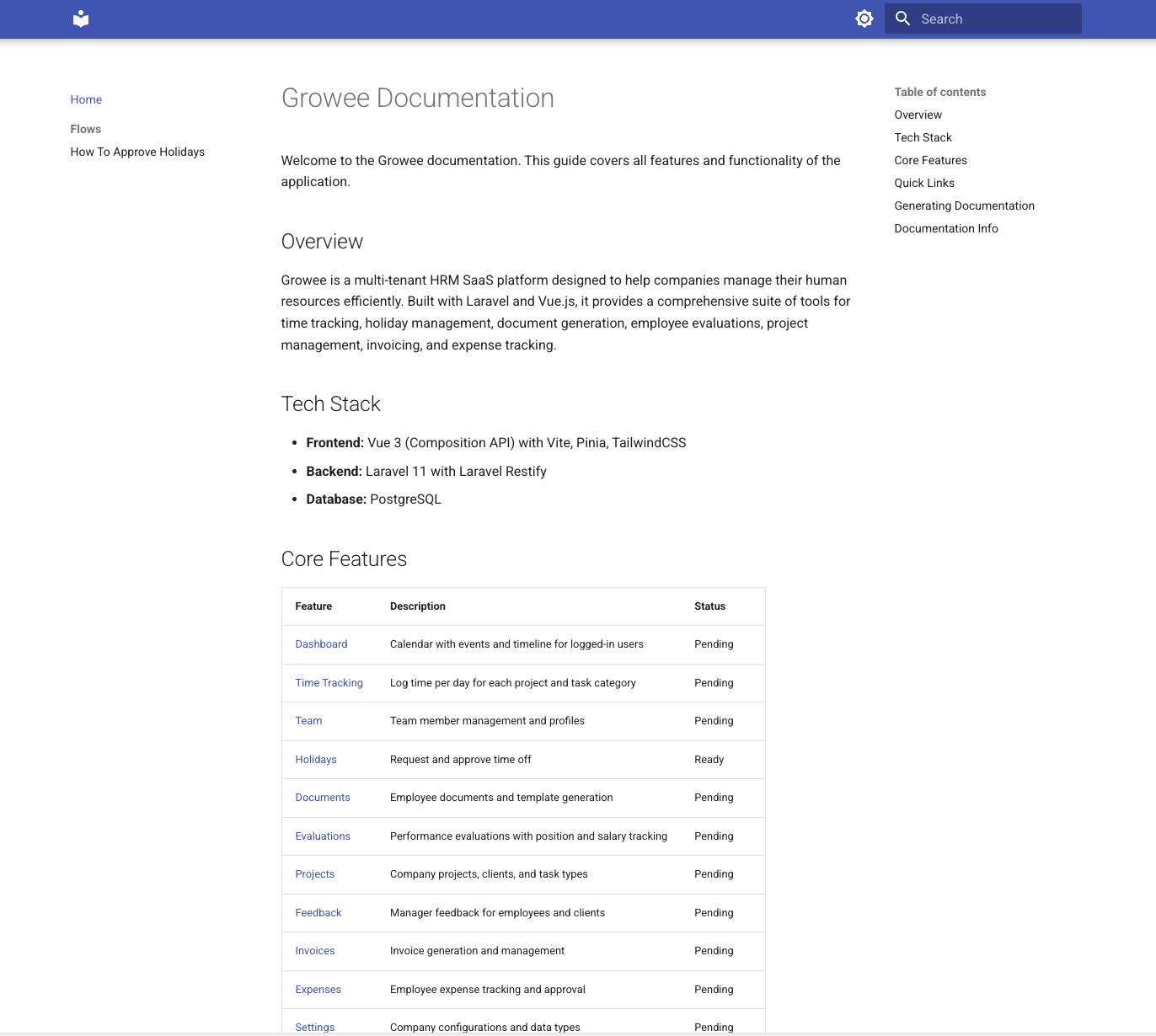
aidocs serve                    # Serve docs/ on port 8000
aidocs serve --port 3000        # Custom port
aidocs serve docs/users         # Serve specific subdirectory
aidocs serve --build            # Build static site only
aidocs serve --build -o ./site  # Build to custom output
aidocs serve --no-open          # Don't auto-open browser
Options:
| Option | Description |
|---|---|
--port, -p | Port to serve on (default: 8000) |
--host | Host to bind to (default: 127.0.0.1) |
--open/--no-open | Open browser automatically (default: --open) |
--build, -b | Build static site only, no server |
--output, -o | Output directory for built site |
Features:
aidocs mcpStart a local MCP server to expose documentation via tools. Allows Claude Code and other MCP clients to search and read your docs.
aidocs mcp                      # Serve docs/ directory
aidocs mcp docs/users           # Serve specific subdirectory
MCP Tools exposed:
| Tool | Description |
|---|---|
list_docs | List all documentation files with chunk counts |
search_docs | Search through documentation by keyword |
read_doc | Read full content of a file or specific chunk |
get_doc_structure | Get heading hierarchy for navigation |
Configuration (.mcp.json):
{
  "mcpServers": {
    "aidocs": {
      "command": "aidocs",
      "args": ["mcp", "docs/"]
    }
  }
}
Features:
.chunks.json files if available (faster)Example search result:
{
  "file_path": "users/lifecycle.md",
  "chunk_index": 2,
  "title": "Creating Users",
  "hierarchy": ["Users", "Creating Users"],
  "content_preview": "To create a new user, navigate to...",
  "score": 12
}
Usage Examples in Claude Code:
Once configured, Claude Code can use these tools automatically. You can prompt:
# Search documentation
"Search our docs for authentication setup"
"Find documentation about API rate limits"

# Read specific docs
"Read the user lifecycle documentation"
"Show me the API reference section"

# Explore structure
"What documentation do we have?"
"List all docs about payments"
Best Practices:
aidocs rag docs/ before starting MCP server for faster searches## headings, clear titles improve searchaidocs rag --force after major doc changes.mcp.json to your repo so the team shares the same setupTroubleshooting:
| Issue | Solution |
|---|---|
| MCP not connecting | Restart Claude Code or run /mcp to reload servers |
| Empty search results | Ensure docs directory has .md files |
| Slow searches | Run aidocs rag to pre-chunk files |
aidocs watchWatch documentation directory for changes and automatically re-chunk files and regenerate embeddings.
aidocs watch                    # Watch docs/ with auto-embeddings
aidocs watch --with-vectors     # Generate also embeddings
aidocs watch --debounce 5       # Wait 5 seconds before processing
aidocs watch docs/users         # Watch specific subdirectory
Options:
| Option | Description |
|---|---|
--with-vectors | Include embedding generation |
--debounce, -d | Seconds to wait after last change (default: 10) |
--table, -t | Target table name for embeddings (default: doc_embeddings) |
What it does:
.md file changesOPENAI_API_KEY is set (use --with-vectors to enable)Real-time display:
╭─────────────────────────────────────────╮
│ Watching docs/                          │
│                                         │
│ Last update: 14:32:05                   │
│ Files: 12 | Chunks: 45 | Embeddings: 45 │
│                                         │
│ Embeddings: enabled                     │
│                                         │
│ Recent:                                 │
│   ✓ users/index.md (3 chunks)          │
│   ✓ api/auth.md (5 chunks)             │
│                                         │
│ Press Ctrl+C to stop                    │
╰─────────────────────────────────────────╯
Use cases:
aidocs serve for a complete dev workflowExample workflow:
# Terminal 1: Watch for changes
aidocs watch

# Terminal 2: Serve documentation
aidocs serve

# Edit docs in your editor - changes auto-sync!
aidocs coverageAnalyze documentation coverage for your codebase. Scans for routes, components, and models, then checks which items are mentioned in your documentation.
aidocs coverage                     # Show coverage summary
aidocs coverage --format json       # Machine-readable output
aidocs coverage --format csv        # CSV export
aidocs coverage --ci                # Exit code 1 if below 80%
aidocs coverage --threshold 70      # Custom threshold
aidocs coverage -c ./src            # Specify codebase path
aidocs coverage --all               # Show all items
Options:
| Option | Description |
|---|---|
--codebase, -c | Path to codebase root (default: parent of docs dir) |
--format, -f | Output format: summary, json, or csv |
--threshold, -t | Minimum coverage percentage (exit 1 if below) |
--ci | CI mode: exit 1 if coverage below 80% |
--save/--no-save | Save report to .chunks/coverage.json (default: save) |
--all, -a | Show all items (documented and undocumented) |
Example output:
╭───────────────────────────────────────────────╮
│ Documentation Coverage Report                 │
│ ───────────────────────────────────────────── │
│                                               │
│   Routes:       12/15  ( 80%)  █████████░░░   │
│   Components:    8/20  ( 40%)  ████░░░░░░░░   │
│   Models:        5/5   (100%)  ████████████   │
│                                               │
│   Overall:    25/40  (63%)  ███████░░░░░      │
╰───────────────────────────────────────────────╯

Missing documentation:
  Routes:
    ✗ POST /api/webhooks/stripe
      src/app/api/webhooks/stripe/route.ts:1
  Components:
    ✗ PaymentForm
      src/components/PaymentForm.tsx:1
Supported frameworks:
CI/CD integration:
# GitHub Actions example
- name: Check documentation coverage
  run: aidocs coverage --ci
After running aidocs init, these commands are available in Claude Code:
| Command | Description | Requires Playwright |
|---|---|---|
/docs:init | Configure project settings, credentials, output style | No |
/docs:generate <url> | Generate docs for a single page with screenshots | Yes |
/docs:analyze <route> | Analyze codebase for a route (no browser) | No |
/docs:batch | Generate docs for multiple pages | Yes |
/docs:update | Update docs based on git diff | Optional |
/docs:discover | Scan codebase, discover all modules | No |
/docs:plan | Create ordered documentation plan | No |
/docs:execute | Execute plan, generate all docs | Yes |
/docs:explore <module> | Interactive UI exploration with Playwright | Yes |
/docs:flow "<description>" | Document a feature with screenshots (use --technical for dev docs) | Optional |
/docs:rag-vectors | Generate embeddings and SQL for vector DB import | No |
/docs:rag-init | Generate database migration for vector embeddings | No |
/docs:rag | Setup RAG: chunks → migration → embeddings (all-in-one) | No |
/docs:export-pdf | Export markdown documentation to PDF with TOC | Yes (Playwright) |
/docs:initInteractive setup wizard that:
/docs:generate <url>Generate documentation for a single page:
/docs:generate https://myapp.com/campaigns
/docs:generate /campaigns                      # Uses base URL from config
/docs:generate /settings --auth user:pass      # With authentication
Features:
/docs:updateUpdate existing documentation based on code changes:
/docs:update                    # Compare against main
/docs:update --base staging     # Compare against staging branch
/docs:update --dry-run          # Preview changes without applying
/docs:update --screenshots      # Also refresh screenshots
What it does:
Perfect for: Running before creating a PR to ensure docs stay in sync with code.
/docs:analyze <route>Analyze codebase without browser automation:
/docs:analyze /campaigns
/docs:analyze /api/users
/docs:batchGenerate documentation for multiple pages:
/docs:batch urls.txt                           # From file
/docs:batch --discover --base-url https://myapp.com  # Auto-discover routes
/docs:discoverScan your codebase to discover all modules and their structure:
/docs:discover                     # Discover all modules
/docs:discover --dry               # Preview without saving
/docs:discover campaigns           # Analyze only one module
What it analyzes:
Creates docs/.knowledge/ with:
docs/.knowledge/
├── _meta/
│   ├── project.json              # Project-level info
│   └── modules-index.json        # List of discovered modules
├── modules/
│   ├── campaigns/
│   │   ├── entity.json           # Fields, types, relationships
│   │   ├── routes.json           # API endpoints
│   │   ├── components.json       # UI components
│   │   └── validation.json       # Validation rules
│   └── users/
│       └── ...
└── relationships/                # Cross-module relationships
Next step: Run /docs:plan to create documentation plan
/docs:planCreate an ordered documentation plan based on discovered modules:
/docs:plan                         # Create plan interactively
/docs:plan --auto                  # Auto-generate plan (no prompts)
/docs:plan --show                  # Show existing plan
What it does:
docs/.knowledge/docs/plan.yml with the planOutput: docs/plan.yml
modules:
  - name: users
    priority: 1
    reason: "Core module - other modules depend on it"
    document:
      lifecycle: true
      include_errors: true
    status: pending

  - name: campaigns
    priority: 2
    document:
      lifecycle: true
      flows:
        - "duplicate campaign"
    status: pending

cross_module_flows:
  - name: "user registration to first campaign"
    modules: [users, campaigns]
    status: pending
Next step: Run /docs:execute to generate documentation
/docs:executeExecute the documentation plan and generate all docs:
/docs:execute                      # Execute full plan
/docs:execute --module campaigns   # Execute only one module
/docs:execute --continue           # Continue from where it stopped
/docs:execute --dry                # Preview what would be generated
What it does:
docs/plan.ymldocs/{module}/Output structure:
docs/
├── index.md                    # Auto-generated with links
├── users/
│   ├── index.md               # Module overview
│   ├── lifecycle.md           # CRUD documentation
│   ├── user-registration-to-campaign.md  # Cross-module flow (first module)
│   └── images/
└── campaigns/
    ├── index.md
    ├── lifecycle.md
    ├── duplicate-campaign.md  # Custom flow
    └── images/
Resume support: If execution stops, run /docs:execute --continue to resume
/docs:explore <module>Interactively explore a module's UI with Playwright:
/docs:explore campaigns                    # Explore all campaign pages
/docs:explore users --page /users/create   # Specific page
/docs:explore orders --depth deep          # Thorough exploration
What it discovers:
/docs:flow "<description>"Document a feature with screenshots and step-by-step instructions. By default, creates user-focused documentation. Use --technical for developer documentation.
/docs:flow "how to create employees"              # User guide with screenshots
/docs:flow "import payments from csv"             # User guide with screenshots
/docs:flow "payment processing" --technical       # Developer docs with code
/docs:flow "stripe webhooks" --technical          # Developer docs with code
/docs:flow "user registration" --no-screenshots   # Skip screenshots
Arguments:
--technical - Generate developer-focused documentation with code snippets--no-screenshots - Skip UI screenshot captureOutput modes:
| Mode | Audience | Output |
|---|---|---|
| Default | End users | Screenshots, plain English, step-by-step guide |
--technical | Developers | Code snippets, file paths, mermaid diagrams |
Output: docs/flows/{kebab-case-title}.md
Example: User-focused (default)
# How to Import Payments
Import payment records from a CSV file.
## Before You Start
- Prepare a CSV with columns: date, amount, description
- Maximum 10,000 rows per import
## Steps
### Step 1: Go to Payroll
Navigate to **Payroll** from the sidebar.

### Step 2: Click Import
Click the **Import Payments** button.

### Step 3: Upload Your File
Select your CSV file and click **Start Import**.
## What Happens Next
- Import runs in background
- You'll receive an email when complete
Example: Technical (--technical)
# Import Payments Flow

## Architecture
sequenceDiagram: User → Controller → Job → Database

## Entry Points
| Trigger | Route |
|---------|-------|
| UI | POST /payroll/import |
| CLI | php artisan payments:import |

## Execution Flow

**File:** `app/Http/Controllers/PayrollController.php:45`
public function import(Request $request) { ... }

**File:** `app/Jobs/ImportPaymentsJob.php:28`
public function handle() { ... }
Screenshots require:
urls.base configured in docs/config.yml/docs:rag-vectorsGenerate embeddings and SQL for syncing documentation to a PostgreSQL vector database.
/docs:rag-vectors                    # Generate sync SQL (smart)
/docs:rag-vectors --dry              # Preview what would be synced
/docs:rag-vectors --force            # Re-sync all files
Prerequisites:
aidocs rag-chunks first to create chunk filesOPENAI_API_KEY environment variableWhat it does:
docs/.chunks/manifest.jsondocs/.chunks/sync.sql with INSERT statementsSmart sync:
Output:
📊 Sync Summary:
   Unchanged: 12 files (skipped)
   Changed: 2 files (8 chunks)
   New: 1 file (3 chunks)

📄 Generated: docs/.chunks/sync.sql

Run with:
   psql $DATABASE_URL -f docs/.chunks/sync.sql
/docs:rag-initGenerate a database migration for storing documentation embeddings with pgvector.
/docs:rag-init                     # Default: 1536 dimensions
/docs:rag-init --dimensions 3072   # For text-embedding-3-large
/docs:rag-init --table my_docs     # Custom table name
What it does:
Supported Frameworks:
| Framework | Detection | Output |
|---|---|---|
| Laravel | composer.json | PHP migration with $table->vector() |
| Prisma | schema.prisma | Prisma schema addition |
| TypeORM | package.json | TypeScript migration class |
| Drizzle | drizzle-orm | Schema + SQL migration |
| Django | manage.py | Django migration with pgvector |
| Fallback | None detected | Raw PostgreSQL SQL |
Table Structure:
doc_embeddings
├── id             UUID PRIMARY KEY
├── file_path      VARCHAR(500)      # Path to .md file
├── content        TEXT              # Document content
├── chunk_index    INTEGER           # For large docs split into chunks
├── title          VARCHAR(255)      # Document title
├── metadata       JSONB             # Tags, module, category, etc.
├── embedding      VECTOR(1536)      # OpenAI embedding
├── created_at     TIMESTAMP
└── updated_at     TIMESTAMP
Indexes:
file_path - B-tree index for path lookupsembedding - HNSW index for fast vector similarity searchRequirements:
Example workflow:
# 1. Generate migration
/docs:rag-init

# 2. Run migration
php artisan migrate          # Laravel
npx prisma migrate dev       # Prisma
python manage.py migrate     # Django

# 3. Chunk your docs
aidocs rag-chunks

# 4. Generate embeddings and sync
aidocs rag-vectors
/docs:ragThe easy way - Setup RAG (Retrieval Augmented Generation) for your documentation in one command:
/docs:rag                     # Full setup
/docs:rag --skip-migration    # Skip migration (table already exists)
/docs:rag --force             # Re-chunk and re-sync everything
/docs:rag --dry               # Preview what would happen
What it does automatically:
aidocs rag-chunks)/docs:rag-init)aidocs rag-vectors)Output:
✅ RAG Setup Complete!

📊 Summary:
   Documentation files: 8
   Chunks created: 24
   Embeddings generated: 24

📄 Files created:
   ✓ docs/.chunks/manifest.json
   ✓ database/migrations/..._create_doc_embeddings_table.php
   ✓ docs/.chunks/sync.sql

🚀 Final step:
   psql $DATABASE_URL -f docs/.chunks/sync.sql
Requirements:
OPENAI_API_KEY environment variable/docs:export-pdfExport markdown documentation to PDF with auto-generated table of contents using Playwright MCP.
/docs:export-pdf docs/pages/dashboard.md                    # Export single file
/docs:export-pdf docs/flows/sync-users.md --output manual.pdf  # Custom filename
What it does:
docs/exports/ directoryOutput: docs/exports/{filename}.pdf
Features:
Example:
📄 Exporting: docs/pages/dashboard.md

📑 Table of Contents:
   • Dashboard Overview
     • Key Metrics
     • Navigation
   • Components
   • Configuration

🖨️ Rendering PDF...
   Format: A4
   Pages: 5

✅ PDF exported!
   📁 docs/exports/dashboard.pdf (245 KB)
Requirements:
The intelligent commands build a docs/.knowledge/ folder:
docs/.knowledge/
├── _meta/                    # Project info
├── modules/
│   ├── campaigns/
│   │   ├── entity.json       # Entity definition
│   │   ├── routes.json       # API routes
│   │   ├── validation.json   # Validation rules
│   │   ├── flows/            # User flows
│   │   └── ui-states/        # Conditional UI
│   └── users/
│       └── ...
├── relationships/            # Cross-module relationships
└── cross-module-flows/       # Flows spanning modules
This knowledge powers smarter documentation generation.
/docs:flow "sync users from discord"    → Analyzes code, generates docs with diagrams
/docs:flow "import payments from csv"   → Includes UI screenshots if route detected
/docs:discover               → Scans codebase, finds all modules
         ↓
/docs:plan                   → Creates ordered documentation plan
         ↓
/docs:execute                → Generates all docs with screenshots
# Option A: Document a specific flow
/docs:flow "sync users from discord"       # Backend integration
/docs:flow "import payments from csv"      # Import with UI screenshots
/docs:flow "how stripe webhooks work"      # Webhook handling

# Option B: Document entire project
/docs:discover                             # Find all modules
/docs:plan                                 # Create plan (docs/plan.yml)
/docs:execute                              # Generate all documentation

# Resume if interrupted
/docs:execute --continue

# After code changes
/docs:update --base main
| Capability | How It Works |
|---|---|
| Conditional UI | Clicks checkboxes/toggles, observes what fields appear |
| Validation Discovery | Submits empty/invalid forms, captures error messages |
| Cross-Page Tracking | Creates data, verifies it appears in lists/dashboards |
| Entity Lifecycle | Documents full create → view → edit → delete flow |
| Modular Analysis | One module at a time, scales to large projects |
| Code + UI Correlation | Matches frontend components to backend validation |
After running /docs:init, a docs/config.yml is created:
project:
  name: "My App"
  type: saas

style:
  tone: friendly  # friendly | professional | technical | minimal

urls:
  base: "https://myapp.com"

auth:
  method: file    # file | env | manual

output:
  directory: ./docs
| Method | Description |
|---|---|
file | Credentials stored in docs/.auth (gitignored) |
env | Read from DOCS_AUTH_USER and DOCS_AUTH_PASS |
manual | Pass --auth user:pass each time |
Generated documentation includes:
Add to your ~/.claude.json or project .mcp.json:
{
  "mcpServers": {
    "playwright": {
      "command": "npx",
      "args": ["@anthropic/mcp-playwright"]
    }
  }
}
git clone https://github.com/binarcode/aidocs-cli.git
cd aidocs-cli
uv venv && uv pip install -e '.[ui,test]'
aidocs check
Running tests:
pytest tests/ -v
MIT
Download counts and popularity will appear here as the collector receives them.
| Version | Published | Direct dependencies | Open version |
|---|---|---|---|
| 0.21.1 | 25 Mar 2026 | 15 |
This describes our collected data; it is not a security assessment.
Observed since 21 Oct, 10:32 UTC
No superseded metadata states collected. Unchanged observations do not create new revisions.
package:1f5a77276dfff18b510c0782c42a5e839266f25714529ffc44e96cce2df99879