
 Repository
Current collected state Current
Observed since 21 Oct, 10:46 UTC
No superseded metadata states collected. Unchanged observations do not create new revisions.
Closes the gap between model development and production deployment by automating GCP infrastructure, Docker builds, Cloud Scheduler pipelines, and Kubernetes gRPC model serving.
Installation · Quick Start · Tutorial · CLI Reference · Configuration Guide · Cost Estimation
Aigear is a Python package that closes the gap between model development and production deployment. Instead of coordinating across data science, MLOps, and DevOps teams to set up cloud infrastructure, containerize pipelines, and expose model APIs, you describe your project once in env.json and let Aigear handle the rest—provisioning GCP resources, building Docker images, scheduling pipeline runs on ephemeral compute, and deploying models as gRPC microservices.
Aigear provisions GCP resources and manages Kubernetes deployments. The following CLI tools must be installed and authenticated before use:
gcloud auth login
aigear-model)pip install -U aigear
aigear-init --name my_ml_service --pipeline_versions v1,v2
This creates the following project structure:
my_ml_service/
├── cloudbuild/
│   └── cloudbuild.yaml
├── docs/
├── kms/
├── src/
│   └── pipelines/
│       ├── v1/
│       │   ├── fetch_data/
│       │   ├── preprocessing/
│       │   ├── training/
│       │   └── model_service/
│       └── v2/
│           ├── fetch_data/
│           ├── preprocessing/
│           ├── training/
│           └── model_service/
├── Dockerfile.pl               # Pipeline container
├── Dockerfile.pl.dockerignore
├── docker-compose-pl.yml
├── requirements_pl.txt
├── Dockerfile.ms               # Model service container
├── Dockerfile.ms.dockerignore
├── docker-compose-ms.yml
├── requirements_ms.txt
├── env.sample.json
└── README.md
Two Dockerfiles:
Dockerfile.plis for the training pipeline;Dockerfile.msis for the gRPC model serving service.
env.jsonCopy env.sample.json to env.json and fill in your GCP project, bucket, service accounts, etc. See the configuration guide.
aigear-infra --create
aigear-env-schema --generate
# Force regenerate after env.json changes
aigear-env-schema --generate --force
# Show current schema
aigear-env-schema --show
# Delete schema
aigear-env-schema --delete
Auto-generates a Pydantic model from your env.json. This gives you full type hints and IDE auto-complete when reading configuration, so you can navigate from any variable directly back to its definition in env.json instead of looking up string keys manually.
Fill in the generated scaffold with your own code:
src/pipelines/v1/ (e.g., fetch_data/, preprocessing/, training/, model_service/).Dockerfile.pl (training pipeline) and Dockerfile.ms (model service) to install your dependencies. The generated files include working templates you can build on.requirements_pl.txt and/or requirements_ms.txt.# Build both pipeline and model service images
aigear-image --create
# Build and push to Artifact Registry in one step
aigear-image --create --push
# Push a previously built image without rebuilding
aigear-image --push
Creates a Cloud Scheduler job on GCP that triggers the specified pipeline steps on a cron schedule defined in env.json.
aigear-scheduler --create --version v1 --step_names fetch_data,preprocessing,training
To trigger a run immediately, pause, or manage the job lifecycle:
aigear-scheduler --run    --version v1
aigear-scheduler --pause  --version v1
aigear-scheduler --resume --version v1
aigear-scheduler --status --version v1
See
aigear-scheduler --helpor the CLI Reference for all available commands.
For a complete end-to-end walkthrough — from writing pipeline code and building images to deploying a gRPC model service on Kubernetes — see the Tutorial.
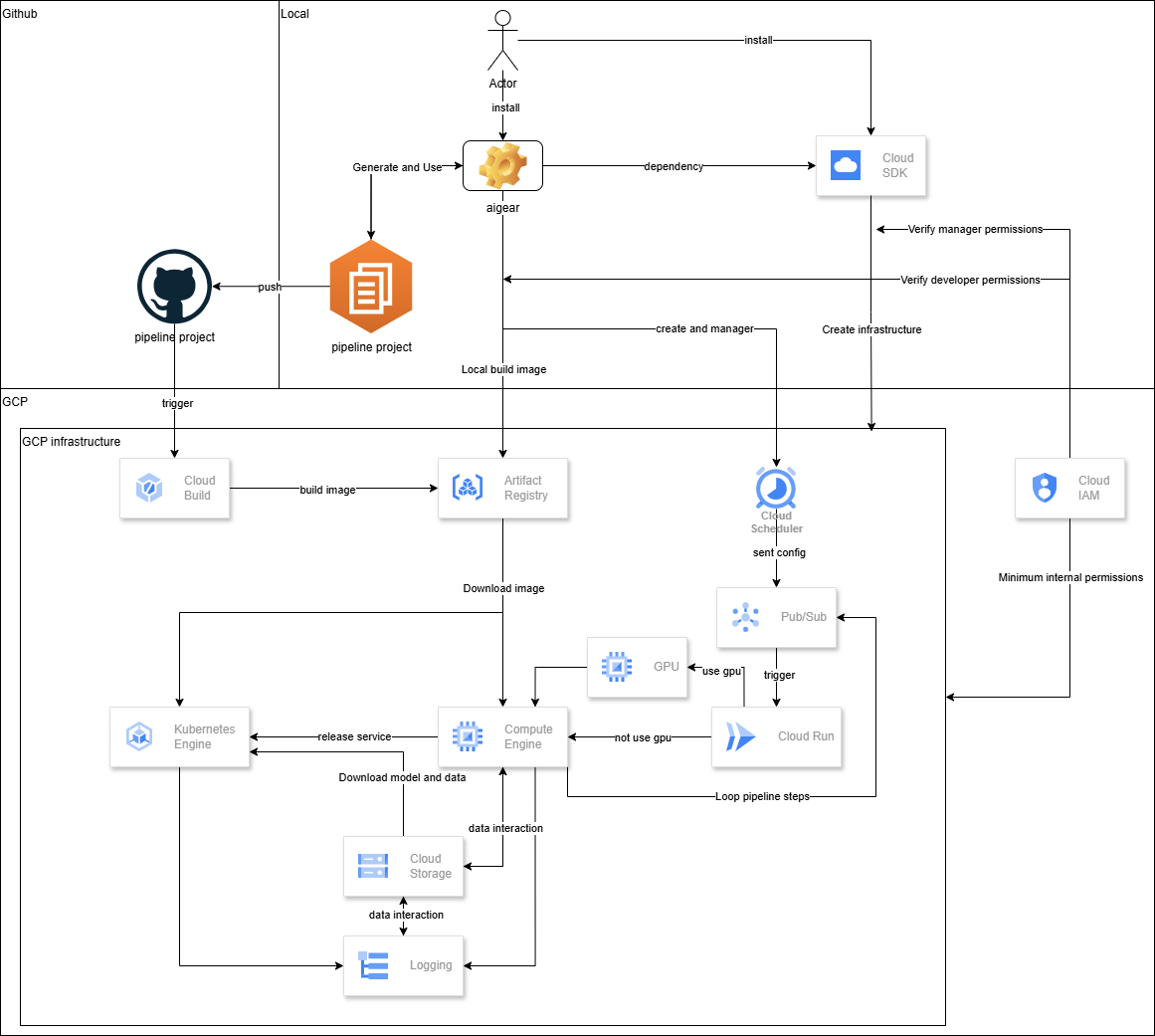
env.json—no more hunting across repos, scripts, and dashboards.| Scenario | Without Aigear | With Aigear |
|---|---|---|
| Security & permissions | No clear permission boundaries — access control becomes unmanageable as the team grows | Clear separation of two roles: owner (full GCP access for infrastructure provisioning, recommended to run in Cloud Shell) and developer (limited permissions for day-to-day pipeline work) |
| Deploy a model | Wait days/weeks for DevOps to provision buckets, IAM, and schedulers | Run aigear-infra --create — infrastructure ready in approximately 2 hours |
| Multi-team consistency | Each team requests resources manually; mismatched names and roles cause repeated delays | One env.json config shared across teams; Aigear creates what's missing and validates the rest |
| Reproducibility | "Works on my laptop" — Python version mismatches, scattered secrets, failed re-runs | Every pipeline runs in a versioned Docker container with validated config and automatic result logging |
| Cost control | Forgotten VMs run all week; surprise cloud bills | All VMs are ephemeral — spin up for the job, delete on completion; pay only for what runs |
See the full CLI Reference for all commands and arguments.
| Command | Description |
|---|---|
aigear-init | Initialize a new project scaffold |
aigear-infra | Provision or tear down infrastructure (buckets, IAM, Pub/Sub, Cloud Build, etc.) |
aigear-task | Run a pipeline step (workflow) or start a gRPC model server (grpc) |
aigear-scheduler | Manage Cloud Scheduler jobs (create / update / delete / run / pause / resume) |
aigear-image | Build and/or push Docker images to Artifact Registry |
aigear-model | Generate YAML and manage the full lifecycle of a gRPC model service (deploy, update, delete, status) |
aigear-env-schema | Generate, delete, or show the Pydantic schema derived from env.json |
aigear-kms-env | Encrypt or decrypt env.json using Cloud KMS |
Currently supported:
Known limitations:
Planned:
Contributions, issues, and PRs are welcome. Share internal use-cases to help evolve common conventions. For questions or feature requests, open an issue in the repository or contact the maintainers.
Built with ❤️ by Retail AI Inc.
Star this repo if you find it helpful!
Download counts and popularity will appear here as the collector receives them.
| Version | Published | Direct dependencies | Open version |
|---|---|---|---|
| 0.2.1 | 21 Aug 2026 | 19 |
This describes our collected data; it is not a security assessment.
Observed since 21 Oct, 10:46 UTC
No superseded metadata states collected. Unchanged observations do not create new revisions.
package:f24d33c9a60327937806fead6b2c4a7e22bf33b44a229ccb8209e711f240c034