
 Repository
Current collected state Current
Observed since 20 Oct, 22:29 UTC
No superseded metadata states collected. Unchanged observations do not create new revisions.
agentjo
Towards Human-Friendly, Fast Learning and Adaptable Agent Communities

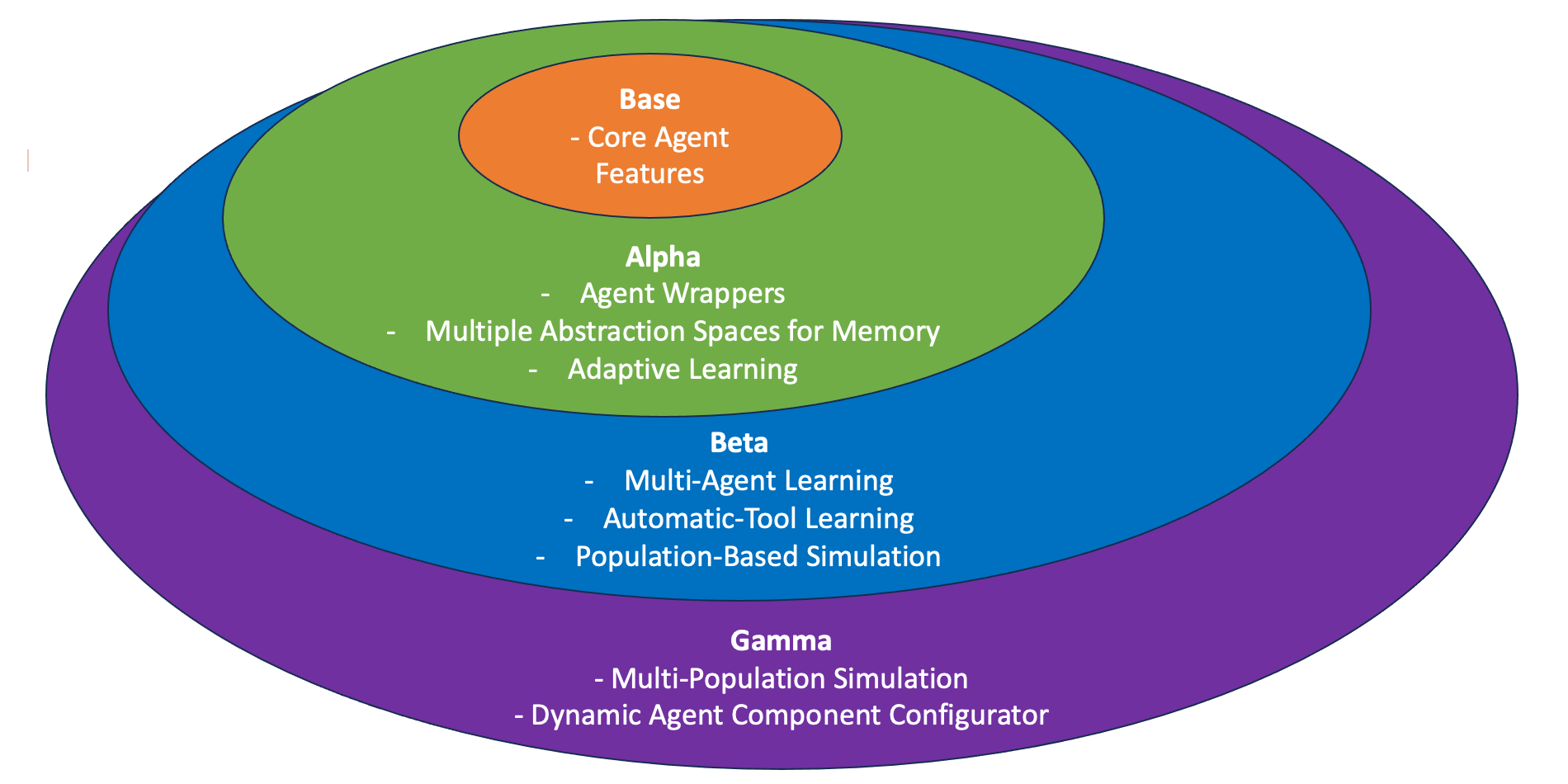
Road Map (Currently at Alpha):
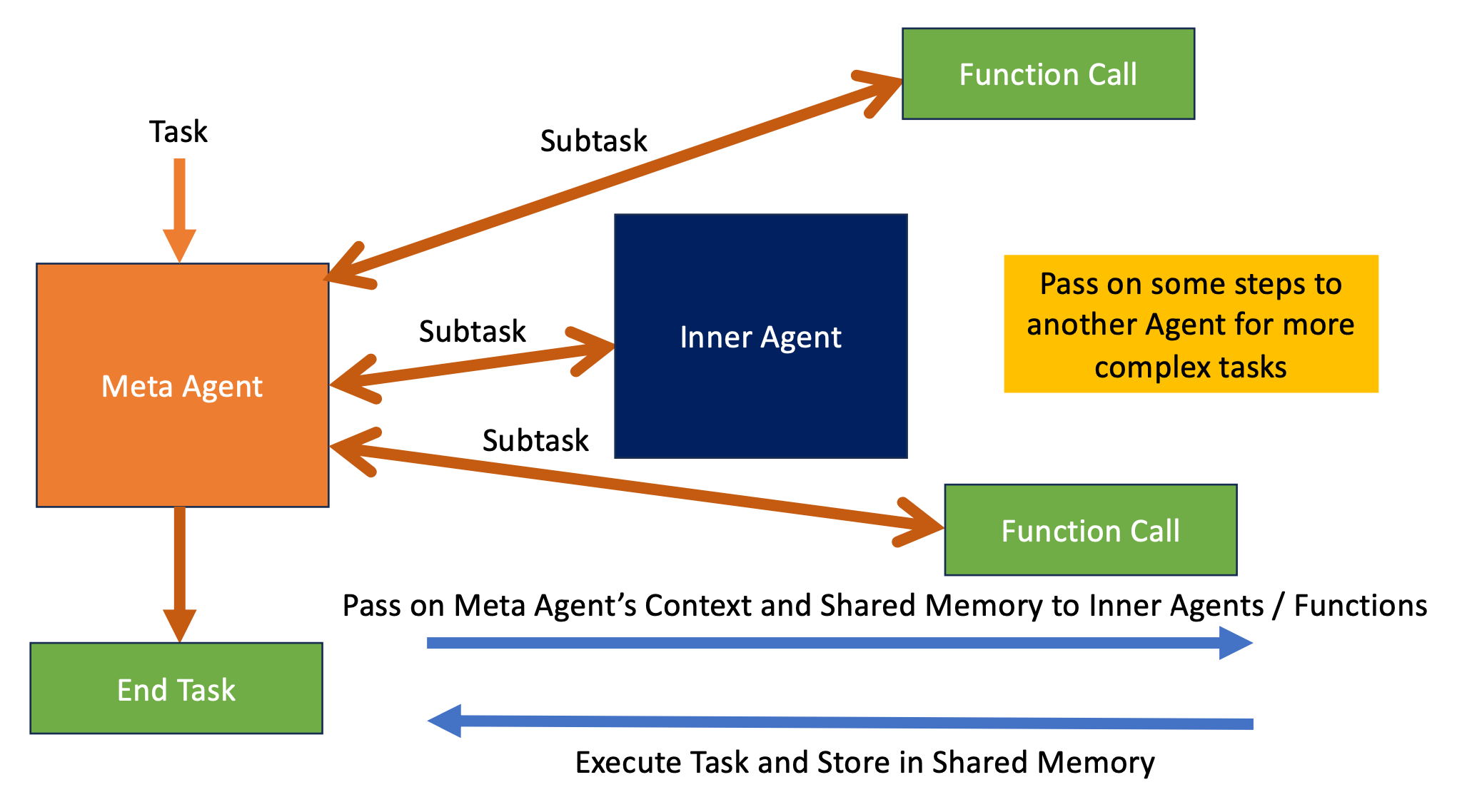
Agentic System Overview:
Discussion Channel + AgentJo Logo Design Competition (John's AI Group): https://discord.gg/bzp87AHJy5
Grand Vision of AgentJo: https://www.youtube.com/watch?v=u1BHvKRnhYY
AgentJo v0 (TaskGen) Paper: https://web3.arxiv.org/pdf/2407.15734
AgentJo v0 (TaskGen) Video: https://www.youtube.com/watch?v=F3usuxs2p1Y
Related Repositories: StrictJSON (https://github.com/tanchongmin/strictjson) [Do help star this as well!]
Happy to share that we are beginning the phase to augment agents and incorporate them in larger systems.
What has been done:
strict_json, parse_yamlI am quite sure that this is the best open-source agentic framework for task-based execution out there! Existing frameworks like AutoGen rely too much on conversational text which is lengthy and not targeted. AgentJo uses StrictJSON (LLM structured output parser with type checking and more!) as the core, and agents are efficient and are able to do Chain of Thought natively using structured output.
What can you do to help (see contrib folder for more details):
I can't wait to see what this new framework can do for you!
strict_json / parse_yaml helps to ensure all output fields are there and of the right format required for downstream processingpip install agentjo
(For file reading capabilities in memory, use pip install agentjo[full])agentjo and use them!output_format will suffice and is quicker to processCreate an agent by entering your agent's name and description
Agents are task-based, so they will help generate subtasks to fulfil your main task
Agents are made to be non-verbose, so they will just focus only on task instruction (Much more efficient compared to conversational-based agentic frameworks like AutoGen)
Agent's interactions will be stored into subtasks_completed by default, which will serve as a memory buffer for future interactions
Inputs for Agent:
Agent Internal Parameters:
Task Running
Give User Output
query to the user. If query is not given, then it replies based on the current task the agent is doing. If stateful is True, saves this query and reply into subtasks_completed
Check status of Agent:
my_agent = Agent('Helpful assistant', 'You are a generalist agent', llm = llm)
output = my_agent.run('Give me 5 words rhyming with cool, and make a 4-sentence poem using them')
Subtask identified: Find 5 words that rhyme with 'cool'
Getting LLM to perform the following task: Find 5 words that rhyme with 'cool'
pool, rule, fool, tool, school
Subtask identified: Compose a 4-sentence poem using the words 'pool', 'rule', 'fool', 'tool', and 'school'
Getting LLM to perform the following task: Compose a 4-sentence poem using the words 'pool', 'rule', 'fool', 'tool', and 'school'
In the school, the golden rule is to never be a fool. Use your mind as a tool, and always follow the pool.
Task completed successfully!
my_agent.status()
Agent Name: Helpful assistant
Agent Description: You are a generalist agent
Available Functions: ['use_llm', 'end_task']
Task: Give me 5 words rhyming with cool, and make a 4-sentence poem using them
Subtasks Completed:
Subtask: Find 5 words that rhyme with 'cool'
pool, rule, fool, tool, school
Subtask: Compose a 4-sentence poem using the words 'pool', 'rule', 'fool', 'tool', and 'school'
In the school, the golden rule is to never be a fool. Use your mind as a tool, and always follow the pool.
Is Task Completed: True
output = my_agent.reply_user()
Here are 5 words that rhyme with "cool": pool, rule, fool, tool, school. Here is a 4-sentence poem using these words: "In the school, the golden rule is to never be a fool. Use your mind as a tool, and always follow the pool."
Function (see Tutorial 0), or just any Python function with input and output types defined in the signature and with a docstringassign_functions to assign a list of functions of class Function, or general Python functions (which will be converted to AsyncFunction)run()# This is an example of an LLM-based function
sentence_style = Function(fn_description = 'Output a sentence with <number> and <entity> in the style of <emotion>',
output_format = {'output': 'sentence'},
fn_name = 'sentence_with_number_entities_emotion',
llm = llm)
# This is an example of an external user-defined function
def binary_to_decimal(binary_number: str) -> int:
'''Converts binary_number to integer of base 10'''
return int(str(binary_number), 2)
# Initialise your agent and assign the functions
my_agent = Agent('Helpful assistant', 'You are a generalist agent',
llm = llm).assign_functions([sentence_style, binary_to_decimal])
# Run the Agent
output = my_agent.run('First convert binary string 1001 to a number, then generate me a happy sentence with that number and a ball')
Subtask identified: Convert the binary number 1001 to decimal
Calling function binary_to_decimal with parameters {'x': '1001'}
{'output1': 9}
Subtask identified: Generate a happy sentence with the decimal number and a ball
Calling function sentence_with_number_entities_emotion with parameters {'number': '9', 'entity': 'ball', 'emotion': 'happy'}
{'output': 'I am so happy with my 9 balls.'}
Task completed successfully!
Approach 1: Automatically Run your agent using run()
Approach 2: Manually select and use functions for your task
function_name with function_params. stateful controls whether the output of this function will be saved to subtasks_completed under the key of subtask
Assign/Remove Functions:
Show Functions:
AsyncAgent works the same way as Agent, only much faster due to parallelisation of tasksAsyncFunction, or general Python functions (which will be converted to AsyncFunction)AsyncFunction, you should define the fn_name as well if it is not an External Functionawait keyword to any function that you run with the AsyncAgentasync def llm_async(system_prompt: str, user_prompt: str):
''' Here, we use OpenAI for illustration, you can change it to your own LLM '''
# ensure your LLM imports are all within this function
from openai import AsyncOpenAI
# define your own LLM here
client = AsyncOpenAI()
response = await client.chat.completions.create(
model='gpt-4o-mini',
temperature = 0,
messages=[
{"role": "system", "content": system_prompt},
{"role": "user", "content": user_prompt}
]
)
return response.choices[0].message.content
# This is an example of an LLM-based function
sentence_style = AsyncFunction(fn_description = 'Output a sentence with <number> and <entity> in the style of <emotion>',
                     output_format = {'output': 'sentence'},
                     fn_name = 'sentence_with_number_entities_emotion',
                     llm = llm_async)

# This is an example of an external user-defined function (see Tutorial 0)
def binary_to_decimal(binary_number: str) -> int:
    '''Converts binary_number to integer of base 10'''
    return int(str(binary_number), 2)

# Initialise your Agent and assign functions
my_agent = AsyncAgent('Helpful assistant', 'You are a generalist agent',
                      llm = llm_async).assign_functions([sentence_style, binary_to_decimal])

# Run the Agent
output = await my_agent.run('First convert binary string 1001 to a number, then generate me a happy sentence with that number and a ball')
"Because text is not enough" - Anonymous
shared_variables is a dictionary, that is initialised in Agent (default empty dictionary), and can be referenced by any function of the agent (including Inner Agents and their functions)subtasks_completed directlyshared_variables as the first input variable, from which you can access and modify shared_variables directlyshared_variables['agent'], so you can change the agent's internal parameters via shared_variablesshared_variables, the default return value will be {'Status': 'Completed'}shared_variables# Use shared_variables as input to your external function to access and modify the shared variables
def generate_quotes(shared_variables, number_of_quotes: int, category: str):
''' Generates number_of_quotes quotes about category '''
# Retrieve from shared variables
my_quote_list = shared_variables['Quote List']
# Generate the quotes
res = strict_json(system_prompt = f'''Generate {number_of_quotes} sentences about {category}.
Do them in the format "<Quote> - <Person>", e.g. "The way to get started is to quit talking and begin doing. - Walt Disney"
Ensure your quotes contain only ' within the quote, and are enclosed by " ''',
user_prompt = '',
output_format = {'Quote List': f'list of {number_of_quotes} quotes, type: List[str]'},
llm = llm)
my_quote_list.extend([f'Category: {category}. '+ x for x in res['Quote List']])
# Store back to shared variables
shared_variables['Quote List'] = my_quote_list
Global Context is a very powerful feature in AgentJo, as it allows the Agent to be updated with the latest environmental state before every decision it makes
It also allows for learnings in shared_variables to be carried across tasks, making the Agent teachable and learn through experiences
A recommended practice is to always store the learnings of the Agent during the External Function call, and reset the Agent after each task, so that subtasks_completed will be as short as possible to avoid confusion to the Agent
There are two ways to use Global Context, and both can be used concurrently:
global_contextshared_variables without any modification to it, then you can use global_contextglobal_context is a string with <shared_variables_name> enclosed with <>. These <> will be replaced with the actual variable in shared_variablesget_global_contextget_global_context is a function that takes in the agent's internal parameters (self) and outputs a string to the LLM to append to the prompts of any LLM-based calls internally, e.g. get_next_subtask, use_llm, reply_to_usershared_variables as required and configure a global prompt to the agentglobal_context : Inventory ManagerGlobal Context to keep track of inventory stateadd_item_to_inventory and remove_item_from_inventory to modify the shared_variable named InventoryGlobal Contextdef add_item_to_inventory(shared_variables, item: str) -> str:
''' Adds item to inventory, and returns outcome of action '''
shared_variables['Inventory'].append(item)
return f'{item} successfully added to Inventory'
def remove_item_from_inventory(shared_variables, item: str) -> str:
''' Removes item from inventory and returns outcome of action '''
if item in shared_variables['Inventory']:
shared_variables['Inventory'].remove(item)
return f'{item} successfully removed from Inventory'
else:
return f'{item} not found in Inventory, unable to remove'
agent = Agent('Inventory Manager',
'Adds and removes items in Inventory. Only able to remove items if present in Inventory',
shared_variables = {'Inventory': []},
global_context = 'Inventory: <Inventory>', # Add in Global Context here with shared_variables Inventory
llm = llm).assign_functions([add_item_to_inventory, remove_item_from_inventory])
parse_yaml function in StrictJSON repo. It is currently the default in AgentJo and is meant to be the more robust choice for longer text, nested outputs and code blocks.parse_yaml does not work for you, to revert back to strict_json, simply set llm_parser to be strict_json and llm_parser_async to be strict_json_async when you declare your Agents and Functions.Download counts and popularity will appear here as the collector receives them.
| Package / target | Requirement | Relationship |
|---|---|---|
strictjsonEnvironment{
"extras": "",
"marker": null,
"requires_python": ">=3.8",
"evaluation": "NOT_EVALUATED"
} | strictjson>=6.1.2 | runtime |
openaiEnvironment{
"extras": "",
"marker": null,
"requires_python": ">=3.8",
"evaluation": "NOT_EVALUATED"
} | openai>=1.3.6 | runtime |
dillEnvironment{
"extras": "",
"marker": null,
"requires_python": ">=3.8",
"evaluation": "NOT_EVALUATED"
} | dill>=0.3.7 | runtime |
termcolorEnvironment{
"extras": "",
"marker": null,
"requires_python": ">=3.8",
"evaluation": "NOT_EVALUATED"
} | termcolor>=2.3.0 | runtime |
requestsEnvironment{
"extras": "",
"marker": null,
"requires_python": ">=3.8",
"evaluation": "NOT_EVALUATED"
} | requests | runtime |
pandasEnvironment{
"extras": "",
"marker": null,
"requires_python": ">=3.8",
"evaluation": "NOT_EVALUATED"
} | pandas | runtime |
pydanticEnvironment{
"extras": "",
"marker": null,
"requires_python": ">=3.8",
"evaluation": "NOT_EVALUATED"
} | pydantic | runtime |
PyPDF2Environment{
"extras": "",
"marker": "extra == \"full\"",
"requires_python": ">=3.8",
"evaluation": "NOT_EVALUATED"
} | PyPDF2; extra == "full" | runtime |
python-docxEnvironment{
"extras": "",
"marker": "extra == \"full\"",
"requires_python": ">=3.8",
"evaluation": "NOT_EVALUATED"
} | python-docx; extra == "full" | runtime |
xlrdEnvironment{
"extras": "",
"marker": "extra == \"full\"",
"requires_python": ">=3.8",
"evaluation": "NOT_EVALUATED"
} | xlrd; extra == "full" | runtime |
sentence_transformersEnvironment{
"extras": "",
"marker": "extra == \"full\"",
"requires_python": ">=3.8",
"evaluation": "NOT_EVALUATED"
} | sentence_transformers; extra == "full" | runtime |
bdist_wheel · 35.21 KB · Python py3
sdist · 39.74 KB · Python source
Observed since 20 Oct, 22:29 UTC
No superseded metadata states collected. Unchanged observations do not create new revisions.
package_version:0a97552e6c6d815156d158aa3873d4e187617fff82eaae0792cd34af5da0be92