
 Repository
Current collected state Current
Observed since 20 Oct, 23:35 UTC
No superseded metadata states collected. Unchanged observations do not create new revisions.
agent-trajviz
Parse and analyze LLM agent trajectories (Claude Code, Cursor, OpenCode, CodeArts, ICode, Codex CLI, Pi, DeepSeek Harness): every metric and chart as JSON, with optional figures and dashboards






Parse and analyze LLM agent trajectories: as a Python library, as JSON, or in a dashboard.
agent-trajviz reads the trajectories coding agents record, normalizes them
into one step model, and computes tokens, timing, tool use, health checks,
failure and anti-pattern detections, step labels and run-to-run comparisons.
Every chart and table is a view: plain JSON data with a published schema,
which your own code, the optional Plotly figures and HTML report, and the
Gradio dashboards all draw from. The core needs only the standard library.
Supports trajectories from Claude Code, Cursor, OpenCode, CodeArts, ICode, Codex CLI, Pi, and DeepSeek Harness out of the box, and formats of your own through a plugin hook.
import agent_trajviz as tv

run = tv.load("trajectory.json")            # the format is detected from the content
print(run.format_label, run.metrics["tokens"]["total"])
print(run.view("tool_usage").data)          # any chart or table, as JSON data
tv.export_json(run, "out/")                 # every view, plus trajectory.json to reload
TrajViz ingests raw agent-trajectory JSON, normalizes it into a shared step model, runs single- and cross-trajectory analysis over that model, and exposes the results through its public API as views. The optional layers (figures, the HTML report, the dashboards) are built on the same views.
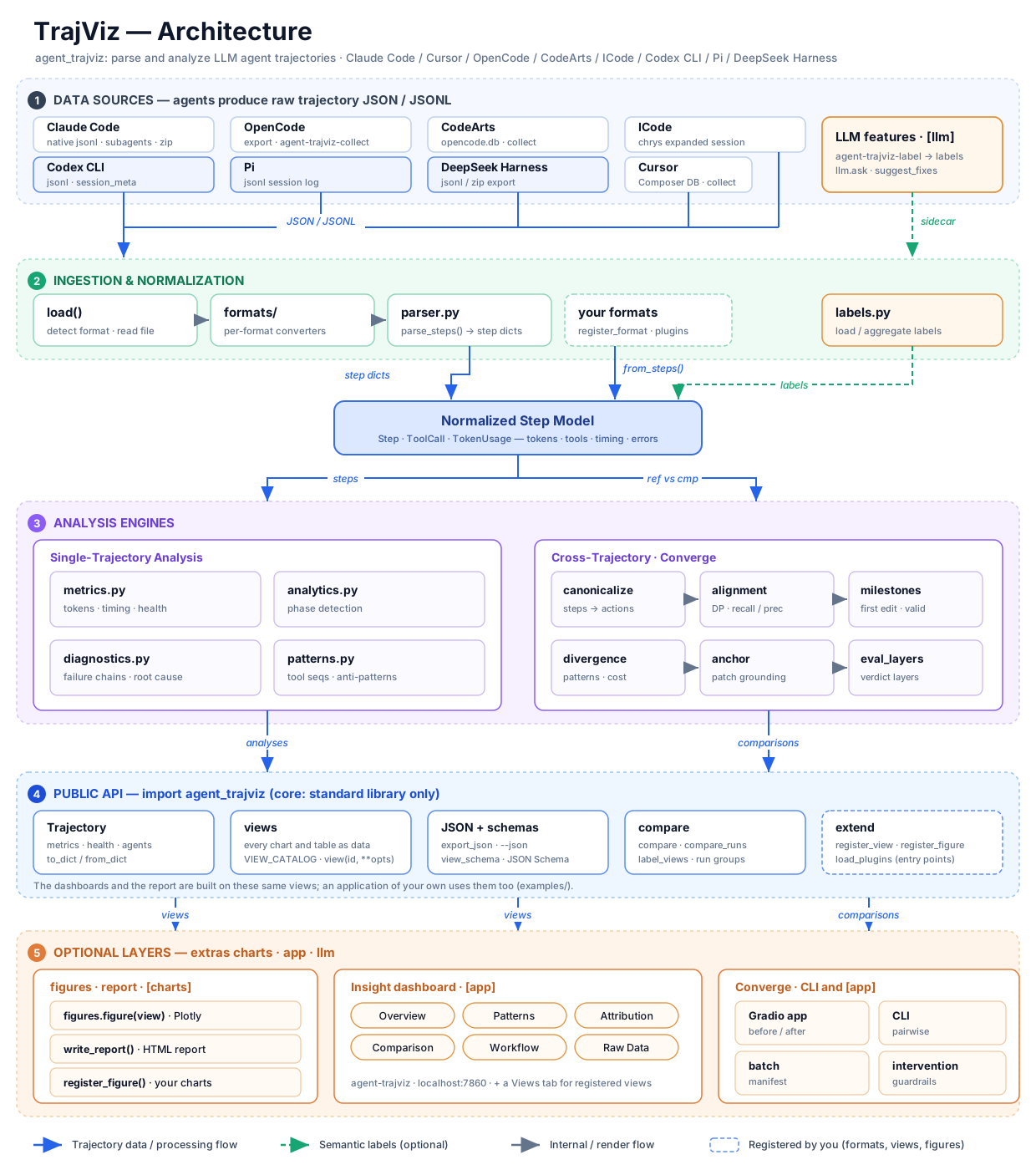
Requires Python 3.11+.
pip install "agent-trajviz[app]"     # dashboards, HTML report, LLM features
pip install agent-trajviz            # library + collection tools: no third-party dependencies
| Extra | Adds | Enables |
|---|---|---|
charts | plotly, pygments | figures and the static HTML report (agent-trajviz --report) |
llm | requests | the AI analysis sidebar, the Issues judge, agent-trajviz-label |
app | gradio + charts + llm | the Insight and Converge dashboards |
all | everything above |
A command whose extra is missing says which one to install instead of failing with a traceback.
git clone https://github.com/rshu/TrajViz.git
cd TrajViz
uv sync --extra app          # or: pip install -e ".[app]"
uv sync --extra dev          # contributors: everything plus the test and lint tools
Launch the dashboard:
# uv
uv run agent-trajviz
# or
uv run python -m agent_trajviz.insight

# pip / activated venv
python -m agent_trajviz.insight
# or
agent-trajviz
Default: http://localhost:7860. Upload a trajectory JSON via the file picker at the top of the UI. After load, Export HTML downloads a standalone Overview + charts + Patterns snapshot (charts stay interactive via Plotly's CDN).
Headless report, no dashboard:
python -m agent_trajviz.insight --report path/to/trajectory.json -o report.html
# fully offline: embed plotly.js instead of loading it from the CDN (adds several MB)
python -m agent_trajviz.insight --report path/to/trajectory.json -o report.html --inline-plotly
With -o pointing at a directory, the file name comes from the trajectory's
name; a report built from a different trajectory that happens to share that
name is never overwritten (a numbered sibling is written instead).
The AI Trajectory Analysis sidebar starts closed; open it from the
labeled control on the right edge. It runs an automatic analysis
when a trajectory loads, then answers follow-up questions. It uses the same
dashboard statistics (health verdicts, bottlenecks, failures, fruitless
streaks) and replies in English by default (set ANALYZE_LANGUAGE, e.g.
Simplified Chinese or German, to change it — the Issues fix judge follows the same setting). It does not
re-upload the raw file. Configure the model in .env:
cp .env.example .env
# set ANALYZE_BASE_URL / ANALYZE_API_KEY / ANALYZE_MODEL
# (LABEL_* from the step labeler is used if ANALYZE_* is omitted)
| Variable | Meaning |
|---|---|
ANALYZE_BASE_URL | API base URL (OpenAI-compatible, or Anthropic messages) |
ANALYZE_API_KEY | API key |
ANALYZE_MODEL | Model name, e.g. gpt-4o-mini, glm-4.6 |
Optional: ANALYZE_PROVIDER (openai | anthropic, default openai),
ANALYZE_TEMPERATURE (default 0.2), ANALYZE_MAX_TOKENS (default 2048),
ANALYZE_TIMEOUT (default 120), ANALYZE_LANGUAGE (default English).
.env is gitignored, and only ANALYZE_* / LABEL_* keys are read from it.
Custom port or host (prefix any of these with uv run when using uv):
# Different port
agent-trajviz --port 8080

# Access from other machines on the network, behind a login
TRAJVIZ_AUTH=alice:change-me agent-trajviz --host 0.0.0.0
# Then open http://YOUR_IP:7860

# Create a public share link, behind a login
TRAJVIZ_AUTH=alice:change-me agent-trajviz --share

# Accept uploads larger than the default 500 MB
agent-trajviz --max-file-size 2gb
The dashboard binds to 127.0.0.1 by default. Anyone who can reach an
exposed one (--host 0.0.0.0, --share) can upload files and use the LLM
key configured on your machine, so set TRAJVIZ_AUTH=user:password before
exposing it; TrajViz warns at startup when you do not. The login is read
from the environment so it never appears in your shell history or the
process list. An exposed dashboard also hides the inputs that name paths on
your machine (the Attribution tab's reference-data root).
The trajectory-comparison dashboard takes the same server options and listens on port 7861 by default, so it can run beside Insight:
python -m agent_trajviz.converge --data-root path/to/trajectories
Paths inside an uploaded batch manifest resolve against --data-root
(default: the current directory), and a manifest naming a file outside it is
refused.
The library parses trajectories and analyzes them; everything it computes is
plain data. The core needs no third-party packages (pip install agent-trajviz):
import agent_trajviz as tv

run = tv.load("trajectory.json")            # any supported format, detected from the content
run = tv.load("trajectory.json", format="codex")   # or required (LoadError "mismatch" otherwise)
print(run.format_label, len(run.steps))      # e.g. "Codex CLI", 66
print(run.metrics["tokens"]["total"], run.metrics["tool_success_rate"])

# Every chart and table the dashboard shows is a view: id, title, kind, description, JSON data.
for view_id, info in tv.VIEW_CATALOG.items():  # 35 views: summary, health, issues, agents,
    print(view_id, info["kind"], info["title"])  # token_usage, tool_usage, workflow, ...
tools = run.view("tool_usage").data           # calls per tool, split by agent
agent = run.view("context_pressure").data["agents"][-1]["key"]
ctx = run.view("context_pressure", agent=agent, window_limit=200_000)  # views can take options
tv.export_json(run, "out/")                   # <id>.json per view + index.json + trajectory.json
again = tv.load("out/trajectory.json")        # an export reloads to the same views
data = run.to_dict(include_raw=True)          # or keep it yourself: tv.Trajectory.from_dict(data)

report = tv.compare(run, "other_run.json", anchor_patch="gold.patch")  # two runs of a task
tv.export_json(tv.comparison_views(report), "out/compare/")
group = tv.compare_runs(["a.json", "b.json", "c.json"])   # N runs: scorecard, behaviour, timelines
labels = tv.label_views("trajectory_labeled.json")       # step labels from agent-trajviz-label
Every view's data has a JSON Schema (draft 2020-12) in the package:
tv.view_schema("tool_usage") returns one, tv.view_schemas() all of them, and
agent-trajviz --schemas DIR writes them out for consumers in other languages.
A view written by export_json() validates against its schema with any JSON
Schema validator.
tv.load raises tv.LoadError (with .code and .path) for a file it cannot
read; every error the package raises on purpose is a tv.TrajVizError. Steps
are plain dicts described by the tv.Step, tv.ToolCall and tv.TokenUsage
typed records, and the package ships type information (py.typed). From the
shell, agent-trajviz --json trajectory.json -o out/ writes every view
(--list-views prints the catalog, --view ID picks some).
Optional layers build on the views:
| Module | Extra | What it adds |
|---|---|---|
agent_trajviz.figures | charts | figure(view): the dashboard's Plotly figure for any chart view |
agent_trajviz.dashboard | app | the Insight and Converge dashboards (launch_insight(), insight_app()), and view_component(view) for your own Gradio app |
agent_trajviz.llm | llm | ask(run, question) and suggest_fixes(run): the AI analysis, on the endpoint you configure, redacted |
agent_trajviz.attribution | — | diagnose(run): DECAF failure attribution when a DECAF checkout is available |
examples/ has the dashboard rebuilt on this API alone and a
small app of your own; both are tested end to end.
Extending. For an agent TrajViz does not read, parse the file yourself
and hand over the steps: only role is required, and whatever a step lacks
is filled the way it is for a format that does not record it, so every view
works. Register the parser and tv.load() and the agent-trajviz command read
such files directly. Views and figures of your own join the catalog the same
way, so views(), export_json(), --json and the dashboards include them:
run = tv.Trajectory.from_steps([
    {"role": "user", "text_preview": "Fix the failing test"},
    {"role": "assistant", "tokens": {"input": 1200, "output": 80},
     "tool_calls": [{"tool_name": "bash", "input": {"command": "pytest"}, "error": "exit 1"}]},
], format="myagent")

tv.register_format(tv.Format(
    key="myagent", label="My Agent",
    detect=lambda doc: isinstance(doc, dict) and "myagent_version" in doc,  # the parsed JSON (JSONL: records)
    parse=lambda doc: [{"role": t["role"], "text_preview": t["text"]} for t in doc["turns"]],
))
tv.register_view("call_count", lambda run: {"calls": sum(len(s["tool_calls"]) for s in run.steps)},
                 title="Tool calls", kind="summary")
# charts extra: agent_trajviz.figures.register_figure("my_chart", lambda data, dark: go.Figure(...))
A package registers them for everyone who installs it with an entry point
in the agent_trajviz.plugins group that names a function taking no
arguments; tv.load_plugins() runs those hooks, and agent-trajviz runs
them on start. The dashboard reads files with tv.load() and draws from the
same views, so a registered format opens there too, and registered views
appear in a Views tab.
Scale. Analysis is linear in the number of steps and a test holds it so. A 15,000-step, 70 MB export loads in about 1.6 s and produces every view in about 3.6 s; the whole file is read into memory, so peak memory is about ten times its size (~0.7 GB there). The dashboard draws at most the first 2,000 steps of a run; the library analyzes all of them.
Only the names exported from agent_trajviz and the modules above are
public. The insight and converge subpackages are internal and may change
between minor versions.
If the dashboard fails to start or shows connection errors, your environment may be using a proxy configuration that interferes with localhost connections. Add 127.0.0.1,localhost to the no_proxy environment variable:
# Linux/Mac
export no_proxy="127.0.0.1,localhost,$no_proxy"

# Windows (PowerShell)
$env:no_proxy = "127.0.0.1,localhost,$env:no_proxy"

# Windows (CMD)
set no_proxy=127.0.0.1,localhost;%no_proxy%
If port 7860 is already in use, specify a different port:
python -m agent_trajviz.insight --port 8080
TrajViz normalizes the following formats. Auto-detect is the default —
upload a .json / .jsonl / .zip file and load it. Pick a specific format only to
override detection. An explicit pick is a requirement, not a hint: a file that is
detected as a different format is rejected with a "Format mismatch" message
(so leave the dropdown on Auto-detect unless detection fails):
| Format | Detection | Notes |
|---|---|---|
| Claude Code | Native .jsonl session records with type, message, and Claude session metadata | Tokens, cache, tool calls/results, thinking, and subagent logs. Local loading discovers associated children; upload a ZIP to preserve them on a hosted dashboard. Format key: claude_code. |
| Cursor | export_metadata.source_format: cursor_composer | Consolidated from local agent-transcripts JSONL + Composer state.vscdb. Tool inputs always; tool outputs, step clocks (startedAtMs/completedAtMs), and context-window occupancy when the DB row is present. Per-step token bars are ≈4-chars/token estimates of logged text and tools — Cursor does not persist billed per-request tokens. |
| OpenCode | info + messages shape | Includes sub-agent sessions |
| CodeArts | export_metadata.source_format: codearts_opencode_sqlite with schema version 2 | Preserved token breakdown and consolidated parent/sub-agent sessions |
| ICode | _chrys_export.format: chrys-expanded-session-v1 (or meta + state.messages) | Normalized from a Chrys expanded-session JSON; glob / grep / sh / explore_agent mapped into the shared step model. Nested _chrys_sub_agent_sessions are flattened. |
| Codex CLI | .jsonl rollout starting with a session_meta event | Normalized into the shared step model (Auto-detect recognizes .jsonl uploads); tool intent (Read / Grep / Glob / Write / Bash) inferred from classic exec_command calls and modern exec / apply_patch records |
| Pi | .jsonl session starting with a session event | Normalized from ~/.pi/agent/sessions/ exports; bash / read / write / edit / grep mapped into the shared step model |
| DeepSeek Harness | .jsonl session starting with a session header that has createdAt (epoch ms) and slash-typed body events (user/message, tool/call, …) | Normalized from a DSH export folder or zip (session.jsonl + subagents/<id>/session.jsonl); bash / read / write / glob / todo_write / subagent_fork mapped into the shared step model. Child logs drop the inherited parent prefix (seedLength). |
The Attribution tab explains why a failed run failed: it diagnoses which of seven workflow capabilities broke — Requirement Understanding, Task Planning, Code Localization, Code Editing, Code Verification, Self-Repair Loop, Tool Use — and grounds each fault in tiered evidence (deductive set-arithmetic / associational trajectory fact / model-inferred LLM judge). It shows a primary-cause banner, a per-capability scorecard, and a collapsible evidence chain (observation → inference → conclusion, with verbatim trajectory quotes and a tamper-evidence audit verdict) for each fault.
The attribution is computed by DECAF (awe), imported as a library through
agent_trajviz/insight/attribution.py. The feature needs a DECAF checkout: point
AWE_DECAF_PATH at it (default: a sibling ../DECAF directory). Without DECAF,
TrajViz runs fully standalone and the Attribution tab degrades to an informative
notice. It is gold-grounded — it needs the task's reference patch and test
outcome — so it works on trajectories from reference data laid out as
<reference_root>/data/{requirements,patch,trajectory}/ plus
eval_<agent>.json, with trajectories at
.../trajectory/<agent>/<instance_id>.json. Set the reference root with the
TRAJVIZ_REFERENCE_ROOT environment variable (default: a sibling directory with
that layout, if exactly one exists). When a trajectory is loaded from such a
path, its (agent, instance_id) are auto-detected and the tab populates on load;
for an uploaded file, set them in the tab's override fields. The uploaded file
must be byte-identical to the reference copy of that run — a re-formatted or
re-saved export, or your own fresh run of the same instance, is refused, because
the gold-grounded verdict is only valid for the exact canonical trajectory bytes.
Without a reference patch the tab degrades honestly (trajectory-only signals)
rather than guessing.
The deductive/associational slice (five capabilities) runs fully offline with
no API key; the two judge capabilities and the arbiter are read back from
cached verdicts when present. DECAF caches verdicts per judge model, and a
cached verdict is used only if its recorded provenance (trajectory, task,
prompt and evidence schema) matches the current inputs. By default the tab reads
the model whose cached verdicts carry DECAF's current evidence schema; set
AWE_JUDGE_MODEL to choose one explicitly. DECAF is stdlib-only and located at
runtime via AWE_DECAF_PATH (default: a sibling ../DECAF checkout).
agent_trajviz/insight/attribution.py documents the integration.
TrajViz only reads trajectory files — producing them is the agent's responsibility. This section shows how to obtain a valid trajectory file for each supported agent.
TrajViz reads Claude Code's saved session logs directly. No export or conversion
is needed. Find the parent log under
~/.claude/projects/<project-directory>/<session-id>.jsonl. A run with
subagents typically has this layout:
<project-directory>/
├── <session-id>.jsonl
└── <session-id>/
    └── subagents/
        ├── agent-<id>.jsonl
        └── agent-<other-id>.jsonl
Load the parent file on the same machine to include its associated subagent logs automatically:
import agent_trajviz as tv

run = tv.load("/path/to/project-directory/SESSION_ID.jsonl")
assert run.format == "claude_code"
You can also load a directory containing one unambiguous parent session, or a
child .jsonl by itself. Older sibling agent-*.jsonl logs are included only
when their session metadata associates them with the selected parent.
For a hosted dashboard, ZIP the parent .jsonl and its matching session folder,
keeping the relative paths above, then upload the ZIP. Uploading only the parent
file cannot transfer its subagent logs from your machine. From the project
directory, for example (replace SESSION_ID with the actual session ID):
zip -r session.zip SESSION_ID.jsonl SESSION_ID/
The loader retains message text, thinking, tool inputs and outputs, provider
usage, timestamps, and agent relationships. Non-conversation bookkeeping records
are skipped. Tool timing uses reported execution durations when available, or
the observed transcript interval; a final response timestamp alone does not
provide a generation duration. A missing or unreadable referenced child produces a load warning
while the available parent data remains usable. Claude Code's
--output-format json returns a final result rather than a saved session
transcript; use the native session .jsonl for trajectory analysis.
The old ccsession-trajectory wrapper is no longer an input format. Existing
TrajViz trajectory.json exports remain loadable through the public round-trip
format.
Cursor stores each Agent chat as JSONL under
~/.cursor/projects/<workspace>/agent-transcripts/<chat-id>/ plus Composer
metadata in state.vscdb. TrajViz does not read those stores live — export
with the consolidator:
agent-trajviz-collect cursor <chat-id> cursor_trajectory.json
state.vscdb on its own, trying in order:
CURSOR_STATE_VSCDB, CURSOR_USER_DATA_DIR, then
%APPDATA%\Cursor\User\globalStorage\state.vscdb (Windows),
~/.config/Cursor/User/globalStorage/state.vscdb (Linux),
~/Library/Application Support/Cursor/User/globalStorage/state.vscdb (macOS)
and /mnt/c/Users/<user>/AppData/Roaming/Cursor/... (WSL). Pass --db to
point at a specific file. CURSOR_PROJECTS_DIR overrides ~/.cursor/projects.agent-trajviz-collect cursor --list
cursor_trajectory.json in the Insight dashboard. The loader
detects export_metadata.source_format: cursor_composer. Context occupancy
(promptTokenBreakdown and tokens.context_window) is a window snapshot.
Per-step duration comes from Composer tool/thinking clocks. Per-step token
bars use a ≈4 chars/token estimate of logged text and tools, not billed
API usage.OpenCode stores sessions in its local store (~/.local/share/opencode/; on
Windows %USERPROFILE%\.local\share\opencode\) and
exposes an export command that writes trajectory JSON to stdout.
Run an OpenCode session as normal.
List recent sessions and pick the one you want — run this from the same
working directory where the session was created; opencode session list
is scoped to the current directory's project ID:
cd /path/to/your/project
opencode session list --format json -n 10
Export the chosen session to JSON. Two paths depending on whether the session spawned sub-agents:
Typical case — no special sub-agents. Use OpenCode's built-in exporter (banner output goes to stderr, so redirection produces a clean file):
opencode export <session-id> > op_trajectory.json
Customized case — session has special sub-agents. Sub-agent invocations live
under their own session IDs, so opencode export on the parent only gives
you the parent's messages. Use agent-trajviz-collect opencode to
recursively pull the parent and every child session into one JSON:
agent-trajviz-collect opencode <session-id> op_trajectory.json
The consolidator follows tool-call metadata to discover child session IDs
and emits a flat {"sessions": [...]} structure that the loader threads
into a single trajectory. It looks for opencode.db under
~/.local/share/opencode/ (and on Windows also %LOCALAPPDATA%\opencode\
and %APPDATA%\opencode\). Override with OPENCODE_DATABASE if needed:
$env:OPENCODE_DATABASE = "$env:USERPROFILE\.local\share\opencode\opencode.db"
agent-trajviz-collect opencode <session-id> op_trajectory.json
Upload op_trajectory.json in the Insight dashboard. The loader detects the
info + messages shape automatically; sub-agent sessions are threaded in.
Current CodeArts AgentKernel builds persist sessions in an opencode.db
SQLite store. Export a root session together with all child/sub-agent
sessions using the read-only consolidator:
agent-trajviz-collect codearts path/to/opencode.db \
  --session-id <session-id> --output ca_trajectory.json
The consolidator follows both session.parent_id and tool-result session
metadata, preserves stored token dictionaries and precise part timing, and
emits the info + messages envelope with an export_metadata block whose
source_format is codearts_opencode_sqlite — the marker the dashboard
detects. Pass --no-children only when a root-only export is intentional. A
bare session ID can also be used when CODEARTS_DATABASE or
OPENCODE_DATABASE points at the database.
Upload the export JSON and select CodeArts. Already-consolidated export files can of course be uploaded directly.
The consolidator can also merge an old folder-based session
(chat_baseInfo.json + every messages_<n>.json shard) into a single
archival JSON. That legacy output preserves the original message records for
reproducibility but is not loadable by the dashboard, which only supports
the current export format.
ICode (Chrys) expanded-session exports are a JSON object with meta,
state.messages, and _chrys_export.format: chrys-expanded-session-v1.
Sub-agent runs are nested under _chrys_sub_agent_sessions in the same file.
.json file. Auto-detect recognizes the Chrys envelope.
glob / grep / sh / explore_agent map into the shared tool
vocabulary, and nested sub-agent sessions are threaded into the step model.Codex CLI records every session automatically as a JSONL rollout under
~/.codex/sessions/ (date-bucketed rollout-<timestamp>-<session-id>.jsonl
files) — no exporter needed.
rollout-*.jsonl under ~/.codex/sessions/..jsonl file. Auto-detect (the default) recognizes the
leading session_meta event and threads the rollout into the shared
step model. Per-step tool intent (Read / Grep / Glob / Write / Bash)
is inferred from classic exec_command calls and modern exec /
apply_patch records.Pi records every session automatically as JSONL under
~/.pi/agent/sessions/<url-encoded-cwd>/. No exporter is needed.
*.jsonl under
~/.pi/agent/sessions/ (directories are named from the working folder)..jsonl file. Auto-detect (the default) recognizes the
leading session event and threads messages, thinking, tool calls
(bash / read / write / …), and token usage into the shared step
model.DeepSeek Harness (DSH) records each session as JSONL. The GUI export is a
folder (or zip) named dsh-session-<session-id>/ containing the parent
session.jsonl and, when the run spawned sub-agents, subagents/<id>/session.jsonl.
session.jsonl and subagents/ at
the zip root). That is the path that works on a hosted dashboard — the
server never sees the uploader's ~/Downloads. Auto-detect recognizes the
leading session header (createdAt, slash-typed events) and does not
treat it as a Pi log. Child sessions are merged from zip members, or from a
sibling subagents/ tree when you load a session directory (or
session.jsonl next to that tree) on the same machine. Uploading a
lone session.jsonl on a hosted dashboard cannot pick up children —
the server has no access to the uploader's filesystem. Operators can
set TRAJVIZ_DSH_EXPORT_ROOT to a directory on the host that contains
the export (or dsh-session-<id>/). Inherited parent turns at the
front of each child log are skipped.Installed with the package (each takes --help):
| Command | Purpose |
|---|---|
agent-trajviz | The Insight dashboard; --report TRAJECTORY writes the standalone HTML report instead. See Run above. |
agent-trajviz-converge | Compare two runs of a task (REF CMP), a batch manifest (--batch), or two batches before and after an intervention (--before/--after); JSON or --output summary. The comparison dashboard is python -m agent_trajviz.converge. |
agent-trajviz-collect cursor | Read-only export of a Cursor Agent chat: JSONL transcripts + Composer state.vscdb, including subagent sessions. See the Cursor collection section above. |
agent-trajviz-collect codearts | Read-only export from a CodeArts opencode.db with recursive child sessions, or lossless archival merge of legacy messages_<n>.json shards. See the CodeArts collection section above. |
agent-trajviz-collect opencode | Recursively merge an OpenCode parent session and child sub-agent sessions into a single JSON. See the OpenCode collection section above. |
agent-trajviz-label | LLM step classifier. Emits one label record for every parsed step: assistant steps via the LLM, user steps as deterministic user/user_prompt, with index/raw_index preserved for exact source mapping; --assistant-only keeps just the assistant records. |
agent_trajviz/labeling/taxonomy.md | Authoritative list of phase and action tags the labeler emits. Bundled with the package and loaded by default; --taxonomy overrides it. |
agent-trajviz-label makes live LLM calls via requests (the llm extra).
The labeler needs three config values — provide them via a .env file (in
the repo root or CWD) or as CLI flags. A sample
.env.example ships with the repo; copy it and fill in
your own key:
cp .env.example .env
# then edit .env and set LABEL_BASE_URL / LABEL_API_KEY / LABEL_MODEL
Required variables and their CLI-flag equivalents:
| Variable | CLI flag | Meaning |
|---|---|---|
LABEL_BASE_URL | --base-url | API base URL (OpenAI-compatible) |
LABEL_API_KEY | --api-key | API key |
LABEL_MODEL | --model | Model name, e.g. gpt-4o-mini, glm-4.6 |
Optional: LABEL_PROVIDER (openai | anthropic, default openai),
LABEL_TEMPERATURE (default 0.3), LABEL_MAX_TOKENS (default 1024).
Example invocations:
# One record per step (default output: cc_trajectory_labeled.json)
agent-trajviz-label cc_trajectory.json

# Assistant steps only
agent-trajviz-label cc_trajectory.json --assistant-only --output cc_trajectory_assistant_labels.json

# Overriding config on the command line
agent-trajviz-label cc_trajectory.json \
    --output cc_trajectory_labeled.json \
    --base-url https://api.openai.com/v1 \
    --api-key sk-... \
    --model gpt-4o-mini
Prefer LABEL_API_KEY over --api-key: a key on the command line is
visible to other users in the process list and stays in your shell history.
Upload the trajectory and its labels sidecar in the dashboard's two upload slots to unlock phase-aware analytics and label-phase charts.
uv sync --extra dev                          # locked environment with every extra
uv run pytest                                # test suite
uv run ruff check agent_trajviz tests examples   # lint
uv run --with mypy mypy --strict agent_trajviz/__init__.py agent_trajviz/api.py \
    agent_trajviz/errors.py agent_trajviz/model.py agent_trajviz/views.py \
    agent_trajviz/plugins.py                 # the typed public API
uv run --with pdoc pdoc --docformat restructuredtext -o site agent_trajviz \
    agent_trajviz.figures agent_trajviz.dashboard agent_trajviz.llm agent_trajviz.attribution
                                             # the API reference, as HTML in site/
uv build                                     # sdist + wheel into dist/
uv lock --upgrade                            # refresh the locked test environment
Dependency lower bounds in pyproject.toml are the oldest releases the suite
passes with; CI installs them (uv pip install --resolution lowest-direct ".[dev]") on the oldest and newest supported Python. CI runs the suite on
Linux (Python 3.11 to 3.14) and macOS, and the public API from the installed
wheel on Windows (.github/scripts/smoke_core.py). Releases are published
to PyPI from a v* tag by .github/workflows/release.yml.
CONTRIBUTING.md has the ground rules (fixtures, the pinned API, view schemas) and the release steps.
CI builds the same API reference from the docstrings on every push and keeps
it as the api-reference artifact; a test holds every public name to having a
docstring.
Tests that need the optional DECAF checkout skip when it is absent. Changes are recorded in CHANGELOG.md; see SECURITY.md for reporting vulnerabilities.
MIT — see LICENSE.
Download counts and popularity will appear here as the collector receives them.
| Package / target | Requirement | Relationship |
|---|---|---|
gradioEnvironment{
"extras": "",
"marker": "extra == \"all\"",
"requires_python": ">=3.11",
"evaluation": "NOT_EVALUATED"
} | gradio>=6.14.0; extra == "all" | runtime |
plotlyEnvironment{
"extras": "",
"marker": "extra == \"all\"",
"requires_python": ">=3.11",
"evaluation": "NOT_EVALUATED"
} | plotly>=5.15; extra == "all" | runtime |
pygmentsEnvironment{
"extras": "",
"marker": "extra == \"all\"",
"requires_python": ">=3.11",
"evaluation": "NOT_EVALUATED"
} | pygments>=2.13; extra == "all" | runtime |
requestsEnvironment{
"extras": "",
"marker": "extra == \"all\"",
"requires_python": ">=3.11",
"evaluation": "NOT_EVALUATED"
} | requests>=2.32.4; extra == "all" | runtime |
gradioEnvironment{
"extras": "",
"marker": "extra == \"app\"",
"requires_python": ">=3.11",
"evaluation": "NOT_EVALUATED"
} | gradio>=6.14.0; extra == "app" | runtime |
plotlyEnvironment{
"extras": "",
"marker": "extra == \"app\"",
"requires_python": ">=3.11",
"evaluation": "NOT_EVALUATED"
} | plotly>=5.15; extra == "app" | runtime |
pygmentsEnvironment{
"extras": "",
"marker": "extra == \"app\"",
"requires_python": ">=3.11",
"evaluation": "NOT_EVALUATED"
} | pygments>=2.13; extra == "app" | runtime |
requestsEnvironment{
"extras": "",
"marker": "extra == \"app\"",
"requires_python": ">=3.11",
"evaluation": "NOT_EVALUATED"
} | requests>=2.32.4; extra == "app" | runtime |
plotlyEnvironment{
"extras": "",
"marker": "extra == \"charts\"",
"requires_python": ">=3.11",
"evaluation": "NOT_EVALUATED"
} | plotly>=5.15; extra == "charts" | runtime |
pygmentsEnvironment{
"extras": "",
"marker": "extra == \"charts\"",
"requires_python": ">=3.11",
"evaluation": "NOT_EVALUATED"
} | pygments>=2.13; extra == "charts" | runtime |
gradioEnvironment{
"extras": "",
"marker": "extra == \"dev\"",
"requires_python": ">=3.11",
"evaluation": "NOT_EVALUATED"
} | gradio>=6.14.0; extra == "dev" | runtime |
hypothesisEnvironment{
"extras": "",
"marker": "extra == \"dev\"",
"requires_python": ">=3.11",
"evaluation": "NOT_EVALUATED"
} | hypothesis>=6.100; extra == "dev" | runtime |
jsonschemaEnvironment{
"extras": "",
"marker": "extra == \"dev\"",
"requires_python": ">=3.11",
"evaluation": "NOT_EVALUATED"
} | jsonschema>=4.18; extra == "dev" | runtime |
plotlyEnvironment{
"extras": "",
"marker": "extra == \"dev\"",
"requires_python": ">=3.11",
"evaluation": "NOT_EVALUATED"
} | plotly>=5.15; extra == "dev" | runtime |
pygmentsEnvironment{
"extras": "",
"marker": "extra == \"dev\"",
"requires_python": ">=3.11",
"evaluation": "NOT_EVALUATED"
} | pygments>=2.13; extra == "dev" | runtime |
pytestEnvironment{
"extras": "",
"marker": "extra == \"dev\"",
"requires_python": ">=3.11",
"evaluation": "NOT_EVALUATED"
} | pytest>=8.0; extra == "dev" | runtime |
requestsEnvironment{
"extras": "",
"marker": "extra == \"dev\"",
"requires_python": ">=3.11",
"evaluation": "NOT_EVALUATED"
} | requests>=2.32.4; extra == "dev" | runtime |
ruffEnvironment{
"extras": "",
"marker": "extra == \"dev\"",
"requires_python": ">=3.11",
"evaluation": "NOT_EVALUATED"
} | ruff>=0.16; extra == "dev" | runtime |
requestsEnvironment{
"extras": "",
"marker": "extra == \"llm\"",
"requires_python": ">=3.11",
"evaluation": "NOT_EVALUATED"
} | requests>=2.32.4; extra == "llm" | runtime |
bdist_wheel · 503.69 KB · Python py3
sdist · 436.29 KB · Python source
Observed since 20 Oct, 23:35 UTC
No superseded metadata states collected. Unchanged observations do not create new revisions.
package_version:0e022644bd4667e2e8243b1c244cf9c9d0764c005cebd0adf141ee7a816e0ef9