
 Repository
Current collected state Current
Observed since 20 Oct, 18:39 UTC
No superseded metadata states collected. Unchanged observations do not create new revisions.
actor-debugger
Drop-in remote debugging for Apify Python Actors: debugpy plus a browser debugger UI served over the run's container URL.
An in-browser Python debugger for the Apify platform. Set breakpoints, step through your Actor, walk the call stack, inspect variables and evaluate expressions in the paused frame — in a browser tab, straight from the run detail in Apify Console. No IDE, no tunnel, no SSH, nothing to install on your machine.
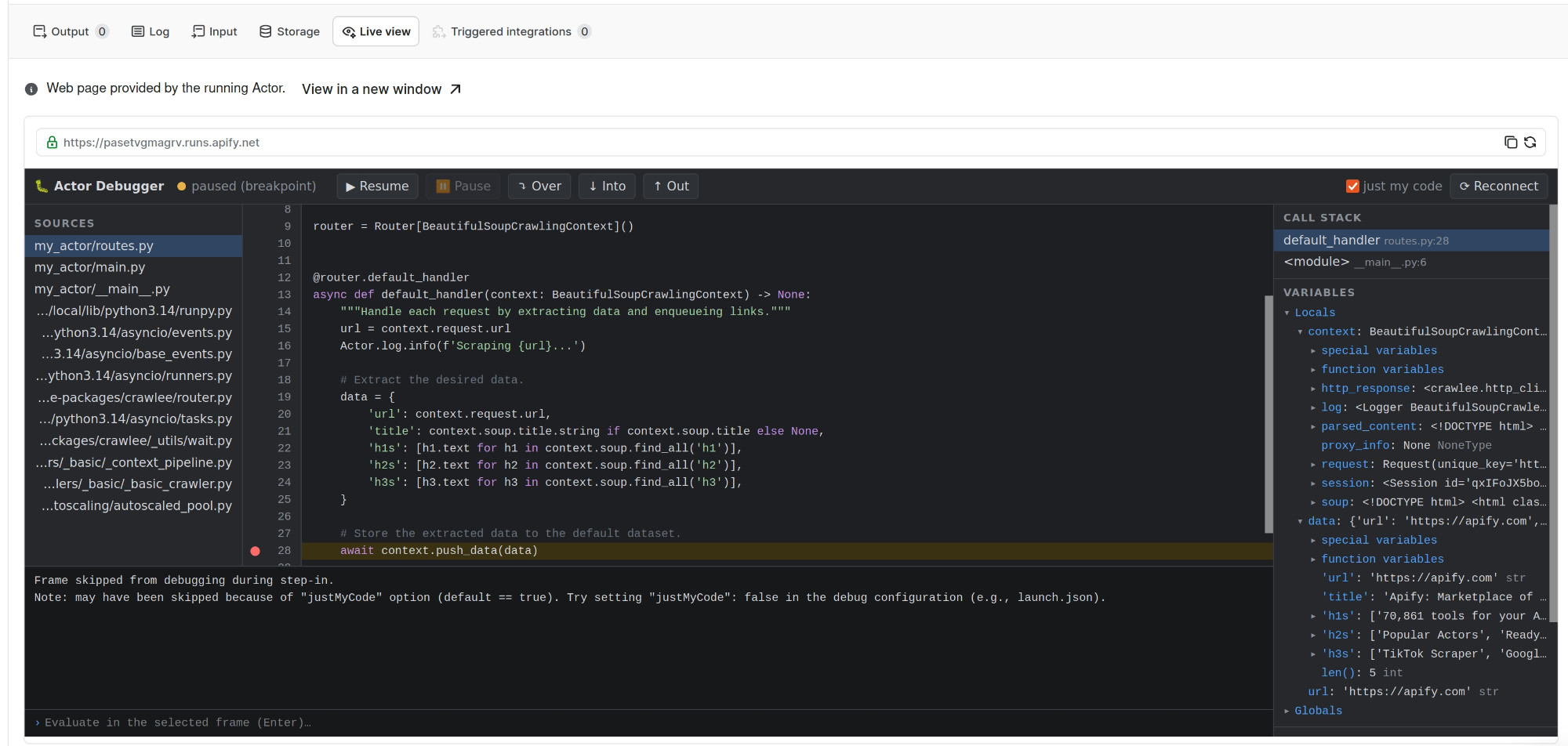
A Crawlee BeautifulSoupCrawler Actor paused on await context.push_data(data) in the Live view
tab of its run in Apify Console. Sources on the left, call stack and locals on the right (the scraped
data dict included), an evaluate prompt for the selected frame at the bottom, and Resume / Over /
Into / Out plus "just my code" in the toolbar. Everything you see runs in the browser.
Drop-in remote debugging for any Apify Python Actor with a two-line Dockerfile change. It launches your Actor under debugpy (the debugger that powers VS Code's Python debugging) and serves a full browser debugger UI over the run's container URL — so you open one link in your own browser and debug. No IDE, no tunnel, no local setup, no rebuild of your source, and no browser or IDE inside the Actor.
This is the Python sibling of the Node/TS actor-debugger
npm package, injected the same way:
# Get the package
RUN pip install actor-debugger

# Swap the entrypoint for the debug launcher (revert this line to disable debugging):
CMD ["python3", "-m", "actor_debugger", "--brk"]     # was e.g.: CMD ["python3", "-m", "src"]
That's the entire integration — no code changes, no new ports, no platform configuration. Build, run, and the run log prints one URL:
[actor-debugger] OPEN THIS in your local browser for a full debugger UI (no local setup):
[actor-debugger]   https://<run>.runs.apify.net/ui/
Open it: click line numbers to set breakpoints, step, inspect the call stack and variables,
evaluate expressions in the paused frame, break on exceptions. --brk pauses the Actor on its
first line until you attach — drop it to let the Actor run and attach mid-flight instead.
To try unreleased changes, install straight from the repository instead:
RUN pip install "actor-debugger @ git+https://github.com/apify/actor-debugger.git@master#subdirectory=python"
CMD ["python3", "-m", "actor_debugger"]              # auto-detect the Actor's entrypoint
CMD ["python3", "-m", "actor_debugger", "--brk"]     # pause on the first line until attached
CMD ["python3", "-m", "actor_debugger", "-m", "src"] # explicit module
CMD ["python3", "-m", "actor_debugger", "main.py"]   # explicit file
(actor-debugger also works as a console command; the python3 -m form is immune to PATH
surprises in slim images.)
Entrypoint detection: an explicit -m <module> / <file.py> argument always wins. Otherwise the
launcher scans the working directory for runnable packages (top-level directories with a
__main__.py) — by shape, not by name — which covers every current Apify Python template
(my_actor/), older ones (src/), and Crawlee-generated projects, whose package is named after
your project. The apify/actor-python base image ships a placeholder src/ package ("replace
this file with your actual application code") that exists in every derived image — it is
recognized by content and skipped. With several real runnable packages, src and my_actor are
preferred, otherwise the log lists the candidates and asks for an explicit -m. Flat layouts
fall back to src/main.py → main.py / __main__.py / app.py. The run log always prints
entrypoint: … so a wrong pick is immediately visible.
python -m debugpy --listen 127.0.0.1:5678 <entry> — the debugger
runs on your code, in its own process, exactly as it normally runs. debugpy speaks the
Debug Adapter Protocol (DAP), the same
protocol VS Code uses.ACTOR_WEB_SERVER_PORT that:
/dap to debugpy's DAP-over-TCP socket, translating framing (one
WebSocket message per DAP JSON message ↔ Content-Length-framed TCP), injecting the
adapter's loopback address into attach requests, and sending a disconnect on the
browser's behalf when a tab closes abruptly — which is what makes page reloads re-attach
cleanly;/source?path=... so the UI can display files that exist only on the container's
disk (the same problem the Node version solves by inlining source maps).localStorage, so they survive reloads and
re-attach automatically.Because the container side is a dumb byte bridge, all protocol intelligence lives in the served
frontend — the Actor image gains only debugpy (~3 MB) plus the static files. The platform is
used exactly as-is: the standard container web-server port is the only channel. Prefer a raw
channel? wss://<run>.runs.apify.net/dap speaks DAP directly, one JSON message per WebSocket
text frame — any DAP client can drive it.
The debug endpoint is unauthenticated — anyone who reaches the container URL can execute code
in your run (and read its env, including APIFY_TOKEN); /source additionally serves any file
readable in the container. Keep the debug CMD only in builds you are actively debugging, prefer
a restricted run/token, never ship it in a published Actor, and gate the endpoint (owner-only)
before any non-prototype use. This matches the security posture of the Node version; both need
the same hardening pass.
debugpy; the HTTP server and the RFC 6455 WebSocket implementation
are pure stdlib (Python ≥3.9).--brk.Download counts and popularity will appear here as the collector receives them.
| Package / target | Requirement | Relationship |
|---|---|---|
debugpyEnvironment{
"extras": "",
"marker": null,
"requires_python": ">=3.9",
"evaluation": "NOT_EVALUATED"
} | debugpy>=1.8 | runtime |
bdist_wheel · 20.65 KB · Python py3
sdist · 18.37 KB · Python source
Observed since 20 Oct, 18:39 UTC
No superseded metadata states collected. Unchanged observations do not create new revisions.
package_version:207c44f1d171e794d1efb3fa613104f62015ecd55385bc897a09029763fa2943