
 Repository
Current collected state Current
Observed since 20 Oct, 19:52 UTC
No superseded metadata states collected. Unchanged observations do not create new revisions.
ads4MO
Python module which adds new CMEMS downloads services (applied mainly to big data requests)


I developed this software because motivated to improve my efficiency and productivity. It is just an attemp/idea/prototype and it is not fully optimased or considered stable.
This project gave me also ideas to develop other tools as tool4NC, JupLab4NetCDF and MerOC. To know more about them just visit the projects web pages which are hyperlinked above.
I created also a chat-community powered by "Gitter" where is possible have an exchange of ideas,functionalities,bugs and many more. Just click to acces the chat room.
Many thanks to visit this page and try this python software.
Carmelo Sammarco
It is possible download data by MONTH, DEPTH or DAY until a maximum of three selected variables(Planning to increase this number thought). It brings in a very intuitive scripting way what was already proposed with MerOC.
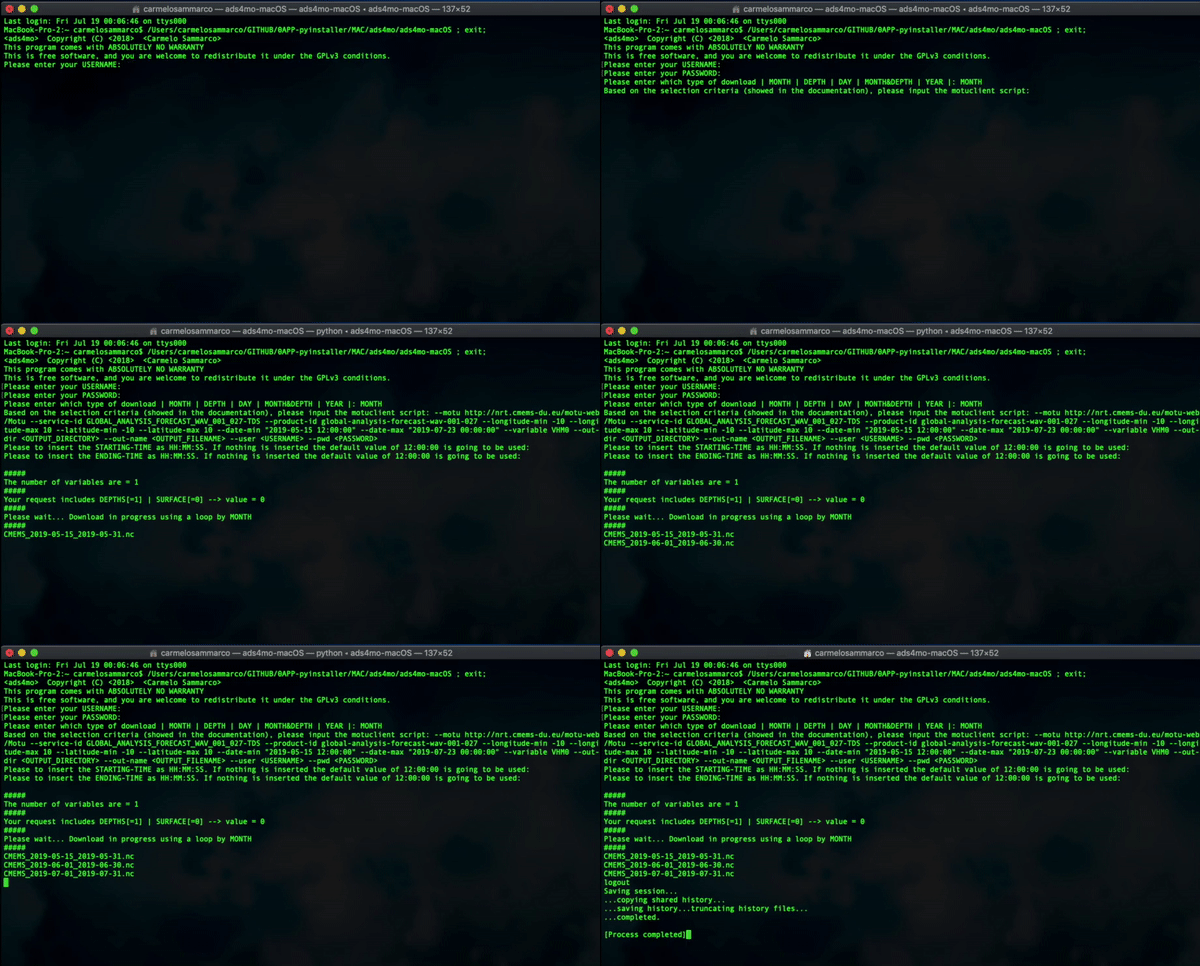
The tool is in development so it can be possible find bugs, errors and imprecisions. Please to report them if you find one.
The dependencies required which are not installed by default are listed below:
It is possible to install and then use in both UNIX and Windows operative systems following the below steps:
pip install ads4MO
we can import the module as:
from ads4MO import download
Once the module is imported we can call the interactive download process typing;
download()
At this point the system is going to ask:
Username and password
Type of the download which can be set typing one of the following:
Starting/Ending Time: If not values as HH:MM:SS are typed then "12:00:00" is going to be used as default value.
Motu client script which is generated by the CMEMS web portal. Please to copy and paste just from the "--motu" until the end. You can leave untouched "--out-dir <OUTPUT_DIR> --out-name <OUTPUT_FILENAME> --user <USERNAME.> --pwd <PASSWORD.>" because they were already set previously.
Following an example of the full script generted by the Web-portal:
python -m motuclient --motu http://..... --service-id GLOBAL_ANALYSIS_FORECAST_PHY_001_024-TDS --product-id global-analysis-forecast-phy-001-024 --longitude-min -180 --longitude-max 179.9166717529297 --latitude-min -80 --latitude-max 90 --date-min "2019-04-19 12:00:00" --date-max "2019-04-19 12:00:00" --depth-min 0.493 --depth-max 0.4942 --variable thetao --variable bottomT --out-dir <OUTPUT_DIR> --out-name <OUTPUT_FILENAME> --user <USERNAME> --pwd <PASSWORD>
What you need to use as module's input:
--motu http://nrt.cmems-du.eu/motu-web/Motu --service-id GLOBAL_ANALYSIS_FORECAST_PHY_001_024-TDS --product-id global-analysis-forecast-phy-001-024 --longitude-min -180 --longitude-max 179.9166717529297 --latitude-min -80 --latitude-max 90 --date-min "2019-04-19 12:00:00" --date-max "2019-04-19 12:00:00" --depth-min 0.493 --depth-max 0.4942 --variable thetao --variable bottomT --out-dir <OUTPUT_DIR> --out-name <OUTPUT_FILENAME> --user <USERNAME> --pwd <PASSWORD>
The results are going to be downloaded in the file path in which the terminal/command-prompt was at the moment of the data request.
The stand-alone App for Windows OS can be downloaded from HERE.
The APP was developed, compiled and tested in Windows 10 environment. As soon as I have time I will try to test it in other Windows environments. It will generate a folder in which all the data downloaded are going to be stored. This folder will be stored in the same system path where the executable "ads4mo-win.exe" is located.
The stand-alone App for macOS can be downloaded from HERE.
If the APP doesn't start because of "unidentified developer" message then you need to give the system the permission to run it. In more details, please to go in Security & Privacy (Tab "General") and then click on the button which will allows the execution of the tool. It will create a Desktop folder which will store all the data downloaded.
Download counts and popularity will appear here as the collector receives them.
| Package / target | Requirement | Relationship |
|---|---|---|
motuclientEnvironment{
"extras": "",
"marker": null,
"requires_python": "~=3.6",
"evaluation": "NOT_EVALUATED"
} | motuclient (>=1.8.1) | runtime |
ftputilEnvironment{
"extras": "",
"marker": null,
"requires_python": "~=3.6",
"evaluation": "NOT_EVALUATED"
} | ftputil (>=3.4) | runtime |
bdist_wheel · 21.04 KB · Python py3
sdist · 11.12 KB · Python source
Observed since 20 Oct, 19:52 UTC
No superseded metadata states collected. Unchanged observations do not create new revisions.
package_version:52fc853b26c61511ca0909d2bfc5bc2293ca71cbab38210403e003c5f444884c