

 Repository
Current collected state Current
Observed since 21 Oct, 11:30 UTC
No superseded metadata states collected. Unchanged observations do not create new revisions.
aind-physiology-fip
A repository for Fiber Photometry data acquisition


For FIP photometry data acquisition and hardware control.
The FIP (Frame-projected Independent Photometry) system is a low-cost, scalable photometry setup designed for chronic recording of optical signals from behaving mice during daily training. The system is based on a modified design of Frame-projected Independent Photometry (Kim et al., 2016), using inexpensive, commercially available, off-the-shelf components.
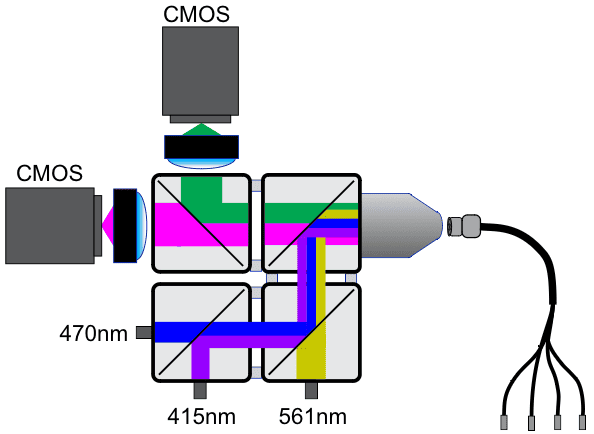
For more information, see the AIND Fiber Photometry Platform Page and the following protocols:
The table below summarizes the photometry system's optical configuration, showing the relationship between emission channels and their corresponding excitation sources.
| Excitation | Emission | |||||
|---|---|---|---|---|---|---|
| Name | Wavelength (nm) | Led Name | name | Wavelength (nm) | Detector Name | |
| Yellow | 565 | 565 nm LED | Red | ~590 (peak) | Red CMOS | |
| Blue | 470 | 470 nm LED | Green | ~510 (peak) | Green CMOS | |
| UV | 415 | 415 nm LED | Isosbestic | 490-540 (passband) | Green CMOS |
The system uses dedicated CMOS cameras for the red and green emissions, with the isosbestic signal being captured by the green camera under different excitation conditions.
The system employs temporal multiplexing to acquire signals from multiple fluorescent indicators through the same optical fiber. This is achieved by rapidly cycling through different excitation wavelengths while synchronizing camera acquisitions:
            --->|              |<--- period = 16.67 ms
Blue LED(470)   ████░░░░░░░░░░░████░░░░░░░░░░░████░░░░░░░░░░░████░░░░░░░░░░░████░░░░░░░░░░░

UV LED (415)    ░░░░░████░░░░░░░░░░░████░░░░░░░░░░░████░░░░░░░░░░░████░░░░░░░░░░░████░░░░░░

Yellow LED (560)░░░░░░░░░░████░░░░░░░░░░░████░░░░░░░░░░░████░░░░░░░░░░░████░░░░░░░░░░░████░

Green CMOS      ████░████░░░░░░████░████░░░░░░████░████░░░░░░████░████░░░░░░████░████░░░░░░  (captures 470/415)
Red CMOS        ░░░░░░░░░░████░░░░░░░░░░░████░░░░░░░░░░░████░░░░░░░░░░░████░░░░░░░░░░░████░  (captures 560)
                ───────────────────────────────────────────────────────────────────────────►
                                    Time
The temporal multiplexing sequence:
This cycling occurs at 60 Hz, allowing near-simultaneous measurement of multiple signals while preventing crosstalk between channels. Each LED is activated in sequence and cameras are synchronized to capture data only during their respective LED's ON period.
See wiki for AIND internal installation instructions.
Download > archive > 1.29.0.5 > SpinnakerSDK_FULL_1.29.0.5_x64.exeuv. Alternatively, you can use other environment managers such as venv or conda to create a Python environment and install the required dependencies listed in the package metadata: pyproject.toml)./.bonsai/setup.cmd (can be by double-clickin it too). This is required to run experiments using the Bonsai script in an experimental PC.uv venv if using uv, or create a virtual environment using your preferred method. This is only used to run the Python script generating configuration files. (rig PCs can inherit those files from somewhere else)./scripts/deploy.ps1 to bootstrap a Python and Bonsai environment at the same time for the project automatically.The current pipeline relies on two input configuration files. These configure the rig/instruments and session parameters, respectively. These files are formalized as pydantic models as shown in ./examples/examples.py. Template configuration files are included in the ./examples/ folder, and running the examples.py will create configuration files into ./local/
Briefly:
from aind_behavior_services.session import Session
from aind_physiology_fip.rig import AindPhysioFipRig

this_rig = AindPhysioFipRig(...)
this_session = Session(...)

for model in [this_session, this_rig]:
    with open(model.__class__.__name__ + ".json", "w", encoding="utf-8") as f:
        f.write(model.model_dump_json(indent=2))
Acquisition is done through Bonsai via a single entry-point workflow. As any Bonsai workflow, one can run the acquisition workflow via the editor:
./.bonsai/bonsai.exe./src/main.bonsaiRigPath and SessionPath to the paths of the configuration files generated in the previous step.camera_green_iso serial_number and cuttlefish_fip port_name needs to be modified per PC for Bonsai to detect those hardware.[!Important]
Session.allow_dirtyproperty will be checked at the start of the workflow. If set toFalsethe workflow will immediately throw an error and stop execution if the repository has uncommitted changes. If the user intends to run the workflow with a dirty repository, they should set this property toTruein the session configuration file.
The workflow can be launched via the Bonsai Command Line Interface (CLI). Additional documentation on the CLI can be found here. To run the acquisition workflow using the CLI, use the following command:
"./.bonsai/bonsai.exe" "./src/main.bonsai" -p RigPath="../path/to/rig.json" -p SessionPath="../path/to/session.json"
[!Note] The paths to the configuration file are relative to the workflow working directory (i.e.
./src/)
Additional flags can be passed to automatically start the workflow (--start) or run in headless mode (--no-editor) as stated in the Bonsai CLI documentation.
Once the workflow is running, a UI will pop up and users can start acquisition by clicking Start. The system will then begin to acquire data from the cameras and store it in the specified session directory. Once the session is ready to stop, users can click Stop in the UI. The system will then save the session data and stop/close the workflow.
Contributions to this repository are welcome! However, please ensure that your code adheres to the recommended DevOps practices below:
We use ruff as our primary linting tool:.
    uv run ruff format .
    uv run ruff check .
Attempt to add tests when new features are added.
To run the currently available tests, run uv run python -m unittest from the root of the repository.
We use uv to manage our lock files and therefore encourage everyone to use uv as a package manager as well.
The package provides a command line interface (CLI) to facilitate common tasks. The CLI can be accessed by running the following command from the root of the repository:
uv run fip <subcommand> [options]
For a list of available subcommands and options, run:
uv run fip --help
(If you are not using uv, activate your python environment and run the fip tool directly.)
aind-data-schema metadataThe repository will maintain tools to generate aind-data-schema compliant metadata for experiments run using the IsoForce task:
mappers optional dependencies:uv sync --extra mappers
uv run fip data-mapper -h
Alternatively, you can use the mapping classes directly. For instance to run the mapper/extractor for acquisition data:
from aind_physiology_fip.data_mappers import ProtoAcquisitionMapper

data_path = "path to dataset"
acquisition_mapped = ProtoAcquisitionMapper(data_path).map()
with open("fip.json", "w", encoding="utf-8") as f:
    f.write(acquisition_mapped.model_dump_json(indent=2))
Instructions for regenerating schemas can be found here.
Download counts and popularity will appear here as the collector receives them.
| Package / target | Requirement | Relationship |
|---|---|---|
aind-behavior-servicesEnvironment{
"extras": "",
"marker": null,
"requires_python": ">=3.11",
"evaluation": "NOT_EVALUATED"
} | aind-behavior-services>=0.13.6 | runtime |
contraqctorEnvironment{
"extras": "",
"marker": "extra == \"data\"",
"requires_python": ">=3.11",
"evaluation": "NOT_EVALUATED"
} | contraqctor<0.6; extra == "data" | runtime |
pydantic-settingsEnvironment{
"extras": "",
"marker": "extra == \"data\"",
"requires_python": ">=3.11",
"evaluation": "NOT_EVALUATED"
} | pydantic-settings; extra == "data" | runtime |
opencv-pythonEnvironment{
"extras": "",
"marker": "extra == \"data\"",
"requires_python": ">=3.11",
"evaluation": "NOT_EVALUATED"
} | opencv-python; extra == "data" | runtime |
bdist_wheel · 22.69 KB · Python py3
sdist · 19.13 KB · Python source
Shared repository data · GitHub
Observed since 21 Oct, 11:30 UTC
No superseded metadata states collected. Unchanged observations do not create new revisions.
package_version:c53e9f873fe7bcf14dcc0a4afb5aadf72d1cce1542223a2f28e3c8779ac20dd3