
 Repository
Current collected state Current
Observed since 20 Oct, 22:32 UTC
No superseded metadata states collected. Unchanged observations do not create new revisions.
@0x0/vue-js-modal
Modal Component for Vue.js



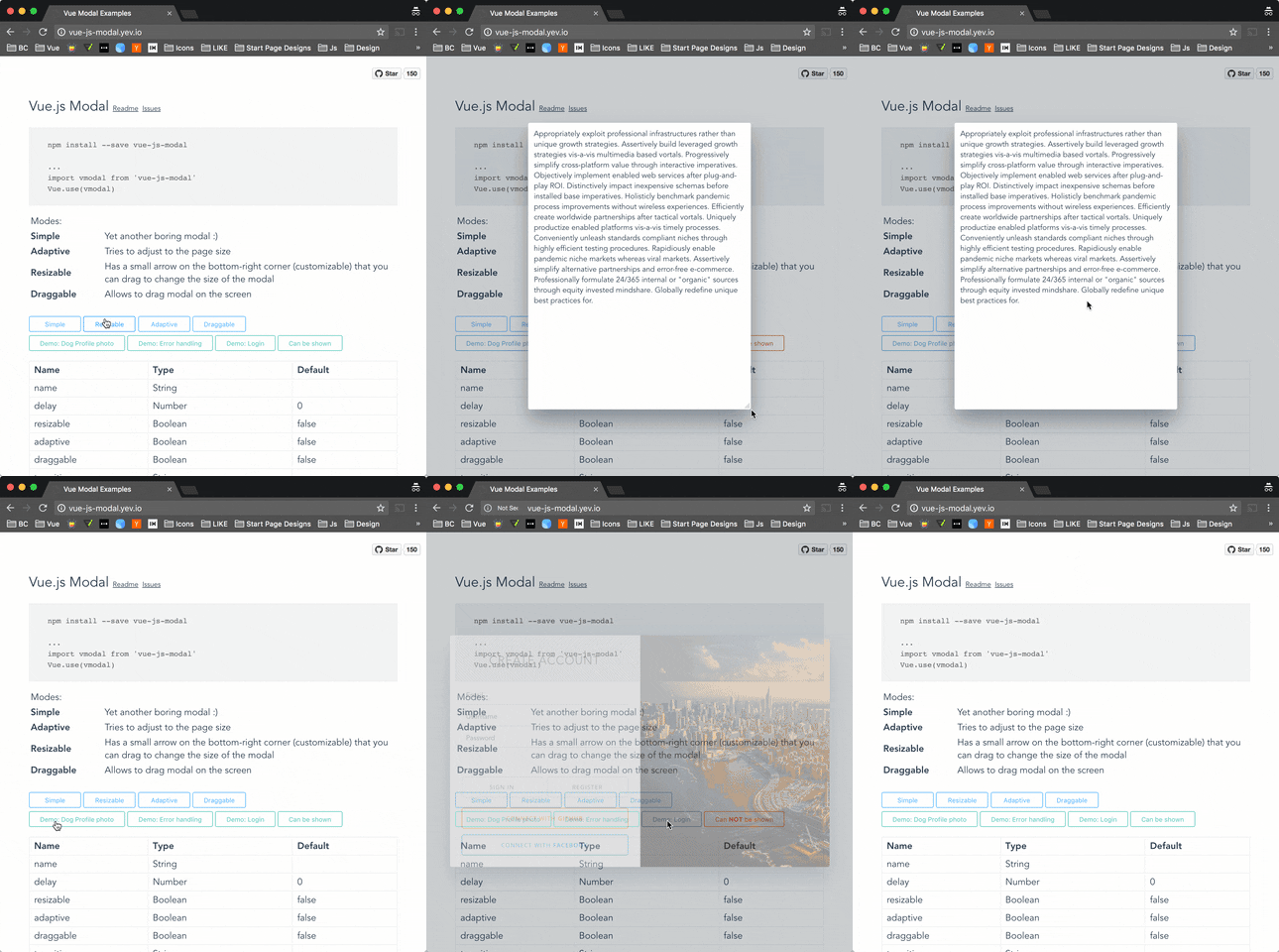
Demo: http://vue-js-modal.yev.io/
npm install vue-js-modal --save
Include plugin in your main.js file.
import VModal from 'vue-js-modal'

Vue.use(VModal)

/*
By default plugin will use "modal" name for the component.
If you need to change it, you can do so by providing "componentName" param.

Example:

Vue.use(VModal, { componentName: "foo-modal" })
...
<foo-modal name="bar"></foo-modal>
*/
Create modal:
<modal name="hello-world">
  hello, world!
</modal>
Call it from anywhere in the app:
methods: {
  show () {
    this.$modal.show('hello-world');
  },
  hide () {
    this.$modal.hide('hello-world');
  }
}
You can easily send data into the modal:
this.$modal.show('hello-world', { foo: 'bar' })
And receive it in beforeOpen event handler:
<modal name="hello-world" @before-open="beforeOpen"/>
methods: {
  beforeOpen (event) {
    console.log(event.params.foo);
  }
}
If you use Bower package manager - you will have to initialize library differently:
Vue.use(window["vue-js-modal"].default);
It is a simplified version of the modal, which has most parameters set by default and is pretty useful for quick prototyping, showing alerts or creating mobile-like modals.
To start using <v-dialog/> you must set dialog: true in plugin configuration:
Vue.use(VModal, { dialog: true })
And include it in your project:
<v-dialog/>
Call it (all params except of “text” are optional):
this.$modal.show('dialog', {
  title: 'Alert!',
  text: 'You are too awesome',
  buttons: [
    {
      title: 'Deal with it',
      handler: () => { alert('Woot!') }
    },
    {
      title: '',       // Button title
      default: true,    // Will be triggered by default if 'Enter' pressed.
      handler: () => {} // Button click handler
    },
    {
      title: 'Close'
    }
 ]
})

In order to instantiate modals at runtime (for lazy-loading or decluttering templates), it is possible to create modals dynamically.
To start using this feature you must set dynamic: true in plugin configuration:
Vue.use(VModal, { dynamic: true })
And include the <modals-container/> component it in your project:
<modals-container/>
Call it (the first argument is the component definition, the second are component properties, the third modal parameters, and the fourth the modal event listeners):
this.$modal.show({
  template: `
    <div>
      <h1>This is created inline</h1>
      <p>{{ text }}</p>
    </div>
  `,
  props: ['text']
}, {
  text: 'This text is passed as a property'
}, {
  height: 'auto'
}, {
  'before-close': (event) => { console.log('this will be called before the modal closes'); }
})
It can also be used with .vue files:
import MyComponent from './MyComponent.vue'

this.$modal.show(MyComponent, {
  text: 'This text is passed as a property'
}, {
  draggable: true
})
Other than defining the name modal parameter, it's also possible to close dynamic modals emitting a 'close' event:
this.$modal.show({
  template: `
    <div>
      <p>Close using this button:</p>
      <button @click="$emit('close')">Close</button>
    </div>
  `
})
For more examples please take a look at vue-js-modal.yev.io.
Note: keep in mind that there are some limitations for using dynamic modals. If you need full functionality then use ordinary modal instead.
Include plugin in your nuxt.config.js file:
module.exports = {
  plugins: ['~plugins/vue-js-modal']
}
And your plugins/vue-js-modal.js will look like:
import Vue from 'vue'
import VModal from 'vue-js-modal/dist/ssr.index'

Vue.use(VModal)
For full demo please look at demo/server_side_rendering
There is also a ssr build with css file extracted. Take a look in /dist folder.
| Name | Required | Type | Default | Description |
|---|---|---|---|---|
| name | true | [String, Number] | Name of the modal | |
| delay | false | Number | 0 | Delay between showing overlay and actual modal box |
| resizable | false | Boolean | false | If true, allows to resize modal window, keeping it in the center of the screen. |
| adaptive | false | Boolean | false | If true, modal box will try to adapt to the window size |
| draggable | false | [Boolean, String] | false | If true, modal box will be draggable. |
| scrollable | false | Boolean | false | If height property is auto and the modal height exceeds window height - you will be able to scroll modal |
| reset | false | Boolean | false | Resets position and size before showing modal |
| clickToClose | false | Boolean | true | If set to false, it will not be possible to close modal by clicking on the background |
| transition | false | String | Transition name | |
| classes | false | [String, Array] | 'v--modal' | Classes that will be applied to the actual modal box, if not specified, the default 'vue--modal' class will be applied |
| width | false | [String, Number] | 600 | Width in pixels or percents (e.g. 50 or "50px", "50%") |
| height | false | [String, Number] | 300 | Height in pixels or percents (e.g. 50 or "50px", "50%") or "auto" |
| minWidth | false | Number (px) | 0 | The minimum width to which modal can be resized |
| minHeight | false | Number (px) | 0 | The minimum height to which modal can be resized |
| maxWidth | false | Number (px) | Infinity | The maximum width of the modal (if the value is greater than window width, window width will be used instead |
| maxHeight | false | Number (px) | Infinity | The maximum height of the modal (if the value is greater than window height, window height will be used instead |
| pivotX | false | Number (0 - 1.0) | 0.5 | Horizontal position in %, default is 0.5 (meaning that modal box will be in the middle (50% from left) of the window |
| pivotY | false | Number (0 - 1.0) | 0.5 | Vertical position in %, default is 0.5 (meaning that modal box will be in the middle (50% from top) of the window |
| Name | Description |
|---|---|
| before-open | Emits while modal is still invisible, but was added to the DOM |
| opened | Emits after modal became visible or started transition |
| before-close | Emits before modal is going to be closed. Can be stopped from the event listener calling event.stop() (example: you are creating a text editor, and want to stop closisng and ask user to correct mistakes if text is not valid) |
| closed | Emits right before modal is destoyed |
Example:
<template>
  <modal name="example"
         :width="300"
         :height="300"
         @before-open="beforeOpen"
         @before-close="beforeClose">
    <b>{{time}}</b>
  </modal>
</template>
<script>
export default {
  name: 'ExampleModal',
  data () {
    return {
      time: 0,
      duration: 5000
    }
  },
  methods: {
    beforeOpen (event) {
      console.log(event)
      // Set the opening time of the modal
      this.time = Date.now()
    },
    beforeClose (event) {
      console.log(event)
      // If modal was open less then 5000 ms - prevent closing it
      if (this.time + this.duration < Date.now()) {
        event.stop()
      }
    }
  }
}
</script>
Example with a dynamic modal:
export default {
  name: 'ExampleModal',
  data () {
    return {
      time: 0,
      duration: 5000
    }
  },
  methods: {
    openModal () {
      this.$modal.show({
        template: `<b>{{time}}</b>`,
        props: ['time']
      }, {
        time: this.time
      }, {
        width: 300,
        height: 300
      }, {
        'before-open': this.beforeOpen,
        'before-close': this.beforeClose
      })
    },
    beforeOpen (event) {
      console.log(event)
      // Set the opening time of the modal
      this.time = Date.now()
    },
    beforeClose (event) {
      console.log(event)
      // If modal was open less then 5000 ms - prevent closing it
      if (this.time + this.duration < Date.now()) {
        event.stop()
      }
    }
  }
}
</script>
This example, initializes time variable every time the modal is being opened.
And then forbits closing it for the next 5000 ms
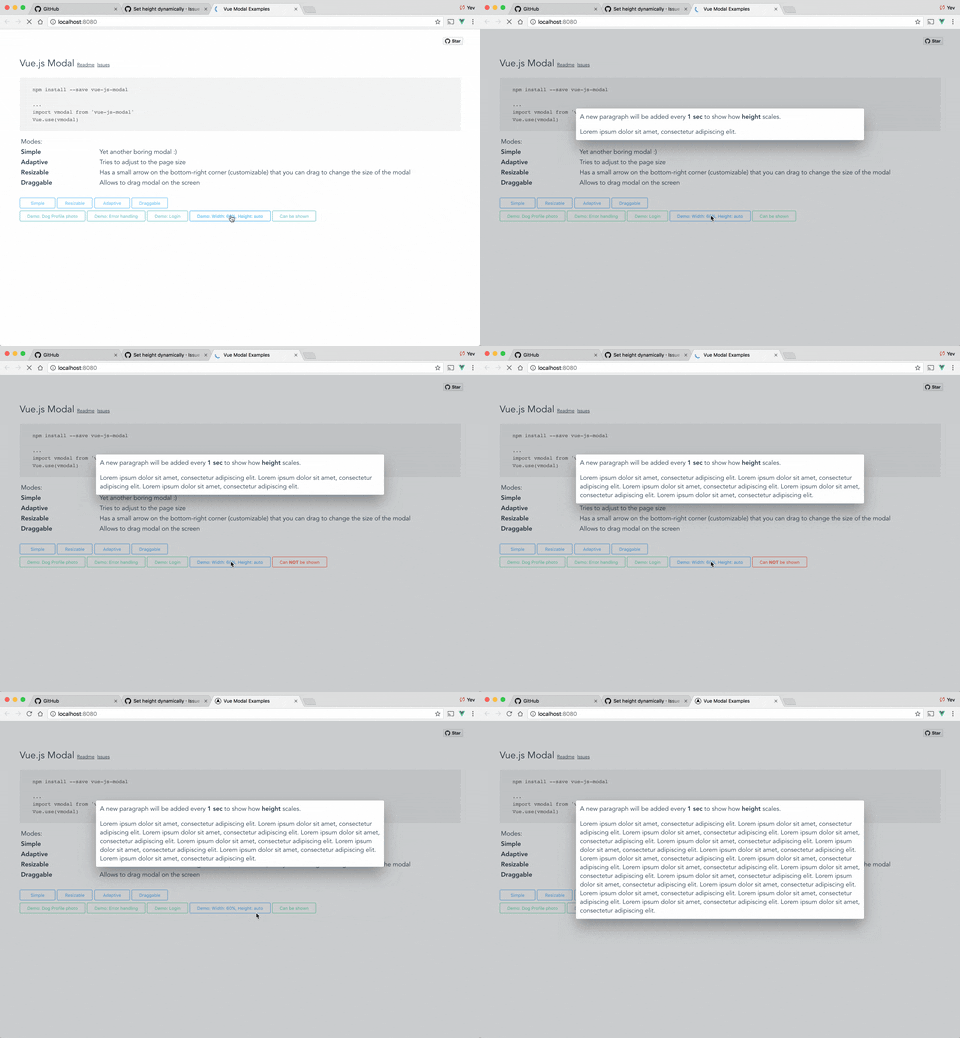
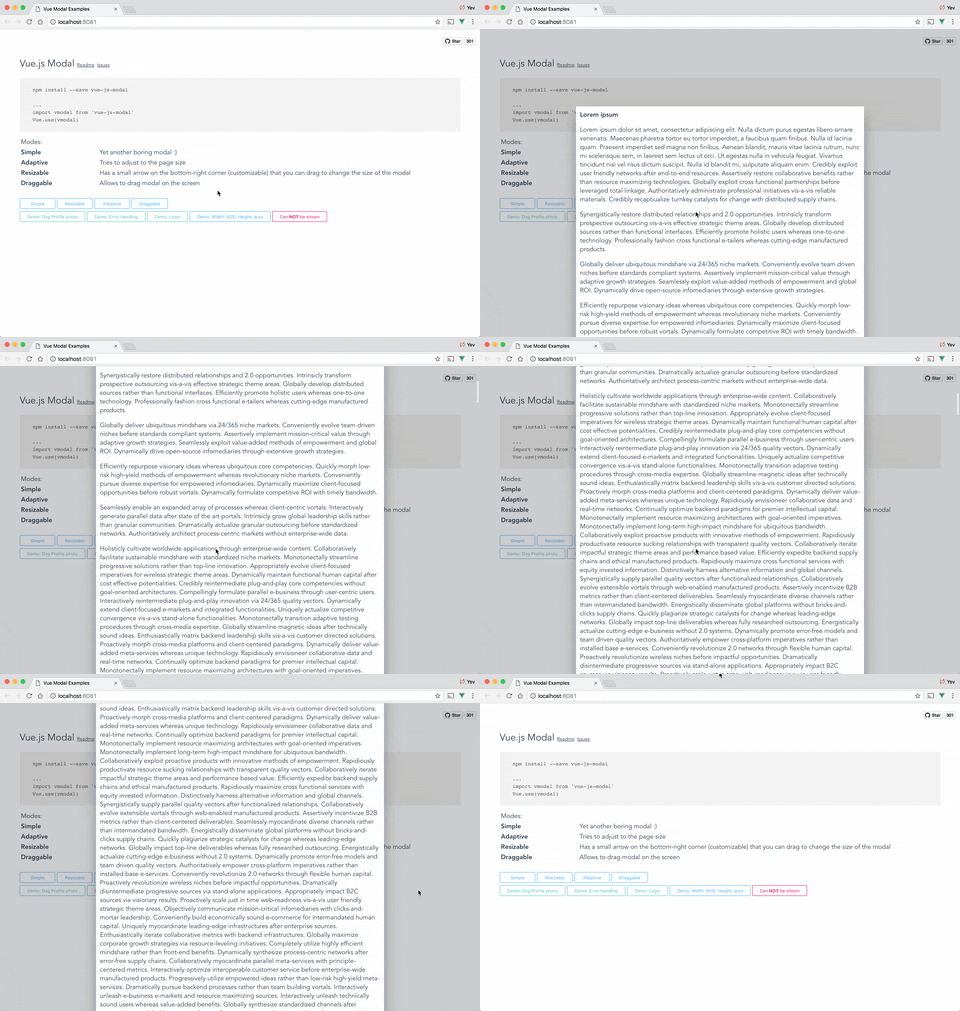
From v1.2.6 height can be set to "auto". If you want to be able to scroll modal in case it's height exceeds window height - you can set flag scrollable="true".
p.s. scrollable will only work with height="auto".
Example:
<modal name="foo" height="auto" :scrollable="true">...</modal>
Auto height:
Scrollable content & auto height:
If you want to have a Close (x) button in the top-right corner, you can use "top-right" slot for it. There is deliberately no predefined Close button style - you will have to implement/use your own button.
Example:
<template>
  <modal name="foo">

    <div slot="top-right">
      <button @click="$modal.hide('foo')">
        ❌
      </button>
    </div>

    Hello, ☀️!

  </modal>
</template>
Draggable property can accept not only Boolean but also String paramenters. With String value, you can specify a CSS selector to the element which will be a "handler" for dragging.
Example:
<modal name="bar" draggable=".window-header">
  <div class="window-header">DRAG ME HERE</div>
  <div>
     Hello, 🌎!
  </div>
</modal>
If you want to change overlay background color, you can easily do it using css.
For all modals:
.v--modal-overlay {
  background: red;
}
For specific modal:
.v--modal-overlay[data-modal="my_modal_name"] {
  background: transparent;
}
<modal name="fs" :adaptive="true" width="100%" height="100%">
Dont forget about close button :)
</modal>
Check out my other projects:
To run an example:
# Clone repo
git clone https://github.com/euvl/vue-js-modal.git

# Run unit tests
npm run unit

# Run linter
npm run lint

# Build main library for client & ssr
cd vue-js-modal
npm install
npm run build

# Build and run demo
cd demo/client_side_rendering
npm install
npm run dev
Download counts and popularity will appear here as the collector receives them.
| Package / target | Requirement | Relationship |
|---|---|---|
babel-coreEnvironment{
"local_name": "babel-core",
"alias": false,
"peer_metadata": null
} | ^6.25.0 | development |
babel-loaderEnvironment{
"local_name": "babel-loader",
"alias": false,
"peer_metadata": null
} | latest | development |
babel-preset-envEnvironment{
"local_name": "babel-preset-env",
"alias": false,
"peer_metadata": null
} | ^1.5.2 | development |
chaiEnvironment{
"local_name": "chai",
"alias": false,
"peer_metadata": null
} | ^3.5.0 | development |
cross-envEnvironment{
"local_name": "cross-env",
"alias": false,
"peer_metadata": null
} | ^3.0.0 | development |
css-loaderEnvironment{
"local_name": "css-loader",
"alias": false,
"peer_metadata": null
} | ^0.25.0 | development |
eslintEnvironment{
"local_name": "eslint",
"alias": false,
"peer_metadata": null
} | ^3.19.0 | development |
eslint-config-standardEnvironment{
"local_name": "eslint-config-standard",
"alias": false,
"peer_metadata": null
} | ^6.2.1 | development |
eslint-friendly-formatterEnvironment{
"local_name": "eslint-friendly-formatter",
"alias": false,
"peer_metadata": null
} | ^2.0.7 | development |
eslint-loaderEnvironment{
"local_name": "eslint-loader",
"alias": false,
"peer_metadata": null
} | ^1.7.1 | development |
eslint-plugin-htmlEnvironment{
"local_name": "eslint-plugin-html",
"alias": false,
"peer_metadata": null
} | ^2.0.0 | development |
eslint-plugin-promiseEnvironment{
"local_name": "eslint-plugin-promise",
"alias": false,
"peer_metadata": null
} | ^3.4.0 | development |
eslint-plugin-standardEnvironment{
"local_name": "eslint-plugin-standard",
"alias": false,
"peer_metadata": null
} | ^2.0.1 | development |
extract-text-webpack-pluginEnvironment{
"local_name": "extract-text-webpack-plugin",
"alias": false,
"peer_metadata": null
} | ^2.1.2 | development |
file-loaderEnvironment{
"local_name": "file-loader",
"alias": false,
"peer_metadata": null
} | ^0.9.0 | development |
jasmine-coreEnvironment{
"local_name": "jasmine-core",
"alias": false,
"peer_metadata": null
} | ^2.7.0 | development |
karmaEnvironment{
"local_name": "karma",
"alias": false,
"peer_metadata": null
} | ^1.4.1 | development |
karma-chrome-launcherEnvironment{
"local_name": "karma-chrome-launcher",
"alias": false,
"peer_metadata": null
} | ^2.2.0 | development |
karma-coverageEnvironment{
"local_name": "karma-coverage",
"alias": false,
"peer_metadata": null
} | ^1.1.1 | development |
karma-mochaEnvironment{
"local_name": "karma-mocha",
"alias": false,
"peer_metadata": null
} | ^1.3.0 | development |
karma-phantomjs-launcherEnvironment{
"local_name": "karma-phantomjs-launcher",
"alias": false,
"peer_metadata": null
} | ^1.0.4 | development |
karma-phantomjs-shimEnvironment{
"local_name": "karma-phantomjs-shim",
"alias": false,
"peer_metadata": null
} | ^1.4.0 | development |
karma-sinon-chaiEnvironment{
"local_name": "karma-sinon-chai",
"alias": false,
"peer_metadata": null
} | ^1.3.1 | development |
karma-sourcemap-loaderEnvironment{
"local_name": "karma-sourcemap-loader",
"alias": false,
"peer_metadata": null
} | ^0.3.7 | development |
karma-spec-reporterEnvironment{
"local_name": "karma-spec-reporter",
"alias": false,
"peer_metadata": null
} | 0.0.31 | development |
karma-webpackEnvironment{
"local_name": "karma-webpack",
"alias": false,
"peer_metadata": null
} | ^2.0.2 | development |
lolexEnvironment{
"local_name": "lolex",
"alias": false,
"peer_metadata": null
} | ^1.5.2 | development |
mochaEnvironment{
"local_name": "mocha",
"alias": false,
"peer_metadata": null
} | ^3.2.0 | development |
node-sassEnvironment{
"local_name": "node-sass",
"alias": false,
"peer_metadata": null
} | ^4.5.0 | development |
phantomjs-prebuiltEnvironment{
"local_name": "phantomjs-prebuilt",
"alias": false,
"peer_metadata": null
} | ^2.1.14 | development |
sass-loaderEnvironment{
"local_name": "sass-loader",
"alias": false,
"peer_metadata": null
} | ^5.0.1 | development |
sinonEnvironment{
"local_name": "sinon",
"alias": false,
"peer_metadata": null
} | ^2.1.0 | development |
sinon-chaiEnvironment{
"local_name": "sinon-chai",
"alias": false,
"peer_metadata": null
} | ^2.8.0 | development |
uglifyjs-webpack-pluginEnvironment{
"local_name": "uglifyjs-webpack-plugin",
"alias": false,
"peer_metadata": null
} | ^0.4.6 | development |
vueEnvironment{
"local_name": "vue",
"alias": false,
"peer_metadata": null
} | ^2.2.6 | development |
vue-hot-reload-apiEnvironment{
"local_name": "vue-hot-reload-api",
"alias": false,
"peer_metadata": null
} | ^2.0.8 | development |
vue-loaderEnvironment{
"local_name": "vue-loader",
"alias": false,
"peer_metadata": null
} | ^10.0.0 | development |
vue-style-loaderEnvironment{
"local_name": "vue-style-loader",
"alias": false,
"peer_metadata": null
} | ^2.0.0 | development |
vue-template-compilerEnvironment{
"local_name": "vue-template-compiler",
"alias": false,
"peer_metadata": null
} | ^2.1.0 | development |
webpackEnvironment{
"local_name": "webpack",
"alias": false,
"peer_metadata": null
} | ^2.2.0 | development |
webpack-dev-serverEnvironment{
"local_name": "webpack-dev-server",
"alias": false,
"peer_metadata": null
} | ^2.2.0 | development |
webpack-mergeEnvironment{
"local_name": "webpack-merge",
"alias": false,
"peer_metadata": null
} | ^4.1.0 | development |
vueEnvironment{
"local_name": "vue",
"alias": false,
"peer_metadata": null
} | ^2.2.6 | peer |
Source distribution
{
  "integrity": "sha512-bXKcOS4aiVIBxk5mg1h5YxXbVEymjx82PcuAJqhVP2I4Z+0mSGRrXhHEYze31A1aBeYZqbAImzgFT+mmBKbOJA==",
  "shasum": "c693ac63065b33fb9e04ffc0e222fe6d2a00f8a5",
  "tarball": "https://registry.npmjs.org/@0x0/vue-js-modal/-/vue-js-modal-1.3.14.tgz",
  "fileCount": 32,
  "unpackedSize": 192550,
  "npm-signature": "-----BEGIN PGP SIGNATURE-----\r\nVersion: OpenPGP.js v3.0.4\r\nComment: https://openpgpjs.org\r\n\r\nwsFcBAEBCAAQBQJb04dDCRA9TVsSAnZWagAAO2sP/R2GpaIdXfHyBes0j3eY\nB/AHQJl6VIzc6v/EG4IeUtuHgJXZmbBMZAzLcKZ9EMP+nf3F+NSlQQN16jYk\nuJNCF3boriuJ+ZklwQvP0Eug5kgTqPnuyAjO0Zz9jAE+d9G7G0GdBWJCdPMg\npsB69TbByXjQHPnUZLyP5+sOXkrINwMbj4MALvUVDvR9kkXaIWBQJ96RD/W5\nhyVufP3lRRM0DmJi78xOieexj6xig57e1grssq1tLgPeVqbCDBmVBt1mFtY0\nmbs4AYatnB/6/hhXY3KcpbpM8lG2iFp5qxJ3XqLa5EbuOtFaQ+sLFwFH0XLS\nfn/CddrQp7npP4f5hP1oM3gXg44l6866Z5YUmfkbTB+qAB5AjMzbr5GO04da\nyNUQG6ieiba+9kmAju/f66U4ZnPu9c7ju2xerW8+mOjijjXB/VHN/J6TSjmI\nK3p1Jph2L/ygzEZj83wz1EIWz5lDLnRqIdRSMgTB0ghdLgQKIj0cjLEmIwn4\nK7tBpmZnyp5vMvFky8vmxCWdsyEfJQdguCiexpd2pCILcytF85sqHQXcxLIv\ng6wVJ+P0YFTRYGeJ1MFrnZJfiABnlWri53lTwX/Wow4dElqOZuRwc4KgxZYD\n5ENFWoOvRG792TqurUWhyzMkciugW/tyW61aA6imjzEJdLfUPM0W4AkcZVDK\n7gwa\r\n=dsFl\r\n-----END PGP SIGNATURE-----\r\n",
  "signatures": [
    {
      "keyid": "SHA256:jl3bwswu80PjjokCgh0o2w5c2U4LhQAE57gj9cz1kzA",
      "sig": "MEYCIQDIcLg5iFBqH8ecBaO3PBQ5TD85KxAl7XHqjht5dhOcHAIhAJUxHpjWA2qJ42Asr92SLBaKORUzORv008wEl/dV24KR"
    }
  ]
}Shared repository data · GitHub
Observed since 20 Oct, 22:32 UTC
No superseded metadata states collected. Unchanged observations do not create new revisions.
package_version:d7f6a2ba328af30a867a7a5690aa1df78e41af778badf616e755be778331e700