
 Repository
Current collected state Current
Observed since 20 Oct, 19:28 UTC
No superseded metadata states collected. Unchanged observations do not create new revisions.
37bytes-react-d3-chart-graphs
A javascript library for building charts components made with React.js and D3.js | fork @hh.ru/react-d3-chart-graphs
A javascript library for building charts based on d3.js@4.10.0 Allows you to easily build the following graph:
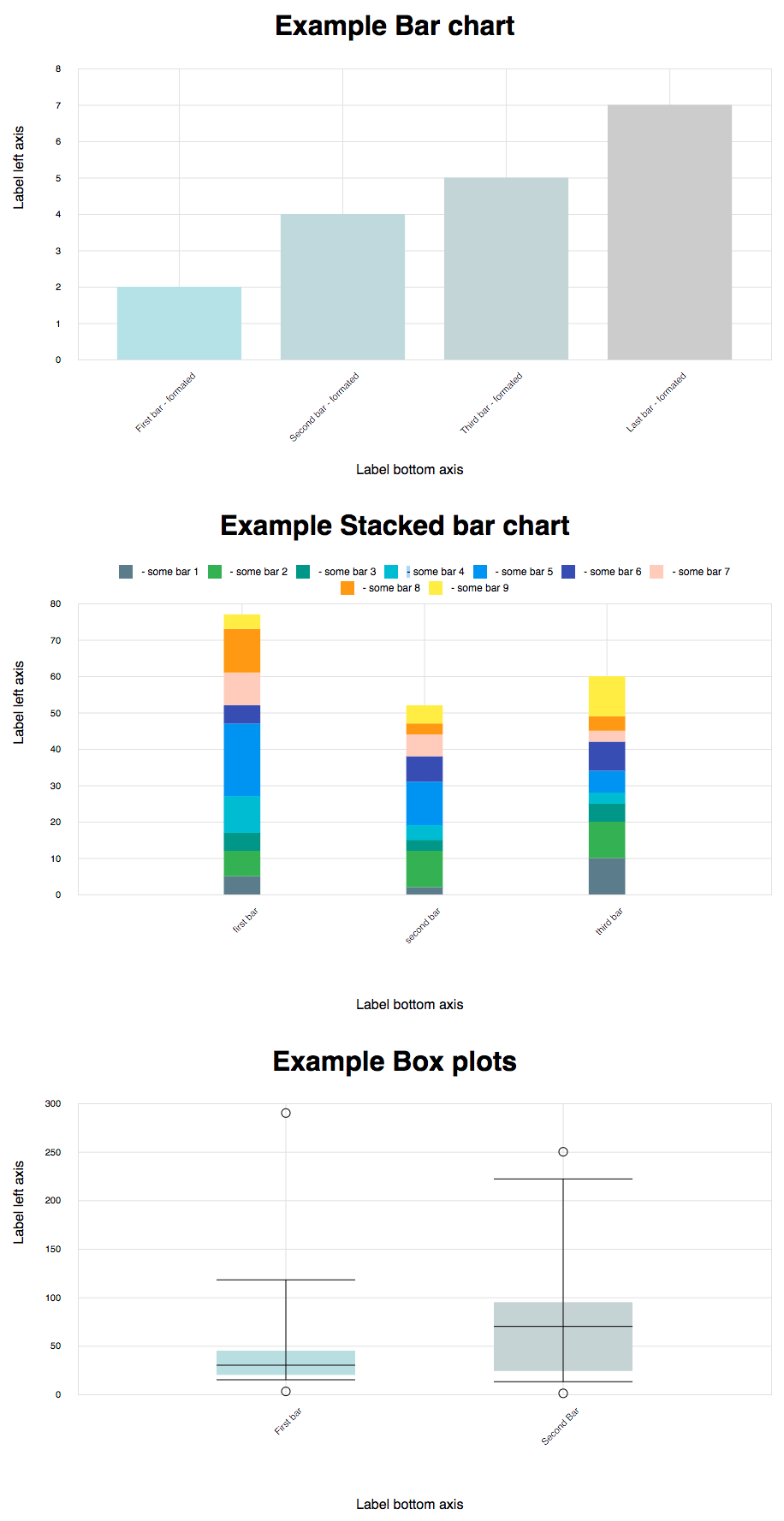
A bar chart or bar graph is a chart or graph that presents grouped data with rectangular bars with lengths proportional to the values that they represent. Only vertical bars are supported.
Consists of the following properties:
data - type: array of object.
Fields:
{
   title: "title chart",
   value: 7
}
paddingMultiplier - type: Number (from 0 to 1). Default value = 0. Specifies an indent between bars.
margins - type: object. Set canvas margins. Fields (default values):
   {
       top: 10,
       right: 10,
       bottom: 150,
       left: 80
   }
colorScale - type Object. Sets the color of the bar, depending on the value on the y-axis with the help of the function d3-interpolate. Fields (default values):
   {
       min: '#B2EBF2'
       max: '#00BCD4',
   }
handleBarClick - The click event is raised when the user clicks on the canvas. If user clicked on bar argument - item of data and metrics current bar. Fields :
{
    metrics: {
        left: 548
        top: 129
        width: 52
    },
    title: "title chart",
    value: 7
}
If user click on canvas without bar, argument is null
handleBarHover - The mouseenter and mouseleave events. If user moved mouse in bar, first argument - item of data and metrics current bar, second - event data.
{
    metrics: {
        left: 548
        top: 129
        width: 52
    },
    title: "title chart",
    value: 7
},
event: {
    clientX,
    clientY,
}
If user mouseleave bar or if user mouseenter on canvas without bar, arguments is null
toggleResize - type Boolean. Forced resizing by the parent, changing the current state to the opposite will resize.
Bar graphs can also be used for more complex comparisons of data with grouped bar charts and stacked bar charts. In a grouped bar chart, for each categorical group there are two or more bars.
Consists of the following properties:
data - type: array of object.
Fields:
{
  "titleBar": "first bar",
  "key": "uId", //default titleBar
   "values": [
       {
           "title": "BAR_1",
           "value": 5
       },
       {
           "title": "BAR_2",
           "value": 7
       },
       {
           "title": "BAR_3",
           "value": 5
       },
       {
           "title": "BAR_4",
           "value": 10
       },
       {
           "title": "BAR_5",
           "value": 20
       },
       {
           "title": "BAR_6",
           "value": 5
       },
       {
           "title": "BAR_7",
           "value": 9
       },
       {
           "title": "BAR_8",
           "value": 12
       },
       {
           "title": "BAR_9",
           "value": 4
       }
   ]
}
stackColors -type: object. It is map colors to title data. Example:
stackColors = {
    BAR_1: {
        color: '#607D8B', //bar color
        legend: 'some bar 1', // legend text
    },
    BAR_2: {
        color: '#4CAF50',
        legend: 'some bar 2',
    },
}
paddingMultiplier - type: Number (from 0 to 1). Default value = 0. Specifies an indent between bars.
margins - type: object. Set canvas margins. Fields (default values):
   {
       top: 10,
       right: 10,
       bottom: 150,
       left: 80
   }
handleBarClick - The click event is raised when the user clicks on the canvas. If user clicked on bar argument - item of data and metrics current bar and titleBar is a title of stack bars. Fields :
{
    metrics: {
        left: 548
        top: 129
        width: 52
    },
    title: "title chart",
    value: 7,
    titleBar: "first bar"
}
If user click on canvas without bar, argument is null
handleBarHover - The mouseenter and mouseleave events. If user moved mouse in bar, first argument - item of data and metrics current bar, second - event data.metrics current bar.
{
    metrics: {
        left: 548
        top: 129
        width: 52
    },
    title: "title chart",
    value: 7,
    titleBar: "first bar"
},
event: {
    clientX,
    clientY,
}
If user mouseleave bar or if user mouseenter on canvas without bar, arguments is null
toggleResize - type Boolean. Forced resizing by the parent, changing the current state to the opposite will resize.
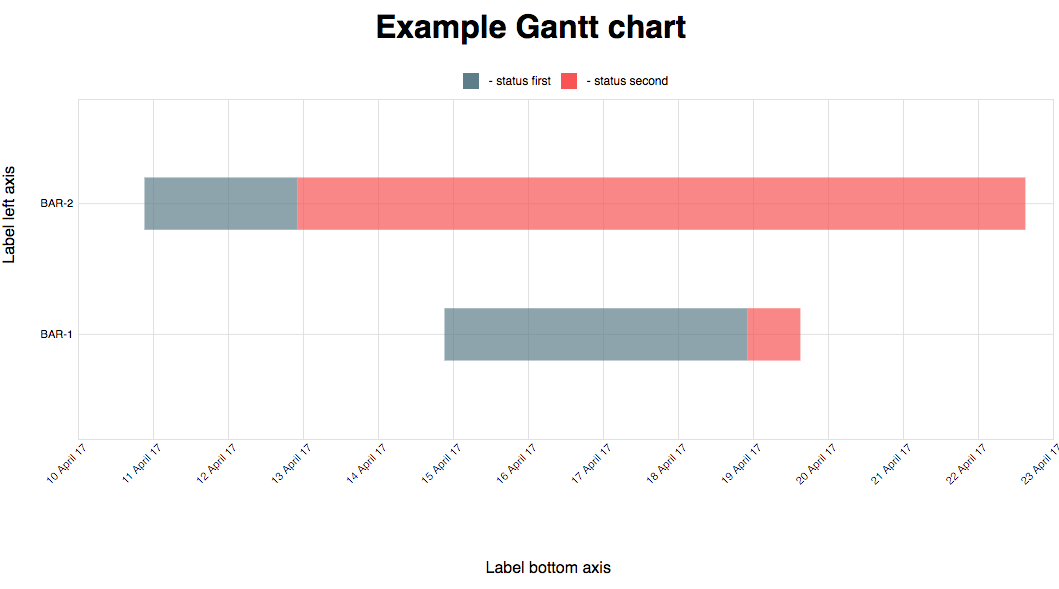 A Gantt chart is a type of bar chart that illustrates a project schedule.
Consists of the following properties:
data - type: array of object.
Fields:
{
  titleBar: 'BAR_1 bar',
  key: 'uId', //default titleBar
  values: [
       {
           title: 'status-1',
           dateStart: 'Fri, 10 Apr 2017 18:16:05 GMT',
           dateEnd: 'Tue, 12 Apr 2017 19:10:06 GMT',
       },
       {
           title: 'status-2',
           dateStart: 'Tue, 12 Apr 2017 19:10:06 GMT',
           dateEnd: 'Tue, 14 Apr 2017 19:10:06 GMT',
       }
   ]
}
stackColors -type: object. It is map colors to title data. Example:
stackColors = {
    status-1: {
        color: '#607D8B', //bar color
        legend: 'status first', // legend text
    },
    status-2: {
        color: '#4CAF50',
        legend: 'status second',
    },
}
paddingMultiplier - type: Number (from 0 to 1). Default value = 0. Specifies an indent between bars.
margins - type: object. Set canvas margins. Fields (default values):
   {
       top: 10,
       right: 10,
       bottom: 150,
       left: 80
   }
handleBarClick - The click event is raised when the user clicks on the canvas. If user clicked on bar argument - item of data and metrics current bar and titleBar is a title of stack bars. Fields :
{
    metrics: {
        left: 548
        top: 129
        width: 52
    },
    title: 'title chart',
    dateStart: 'Tue, 12 Apr 2017 19:10:06 GMT',
    dateEnd: 'Tue, 14 Apr 2017 19:10:06 GMT',
    titleBar: 'first bar'
}
If user click on canvas without bar, argument is null
handleBarHover - The mouseenter and mouseleave events. If user moved mouse in bar, argument - first argument - item of data and metrics current bar, second - event data.
{
    metrics: {
        left: 548
        top: 129
        width: 52
    },
    title: 'title chart',
    dateStart: 'Tue, 12 Apr 2017 19:10:06 GMT',
    dateEnd: 'Tue, 14 Apr 2017 19:10:06 GMT',
    titleBar: 'first bar'
},
event: {
    clientX,
    clientY,
}
If user mouseleave bar or if user mouseenter on canvas without bar, arguments is null
toggleResize - type Boolean. Forced resizing by the parent, changing the current state to the opposite will resize.
Bar graphs is a method for graphically depicting groups of numerical data through their quartiles.
Consists of the following properties:
data - type: array of object.
Fields:
{
   title: 'First bar',
   numbers: {
       min: 15,
       max: 218,
       median: 30,
       quartiles: [20, 45],
   },
   outliers: [{
       key: 'First',
       value: 289,
       title: 'text',
   }],
}
colorScale - type Object. Sets the color of the bar, depending on the value on the y-axis with the help of the function d3-interpolate. Fields (default values):
   {
       min: '#B2EBF2'
       max: '#00BCD4',
   }
paddingMultiplier - type: Number (from 0 to 1). Default value = 0. Specifies an indent between bars.
margins - type: object. Set canvas margins. Fields (default values):
   {
       top: 10,
       right: 10,
       bottom: 150,
       left: 80
   }
handleBarClick - The click event is raised when the user clicks on the bar. Argument - item of data and metrics current bar. Fields :
{
    metrics: {
        left: 548
        top: 129
        width: 52
    },
    title: "title chart",
    values: {
         min: 7,
         max: 118,
         median: 20,
         quartiles: {
             min: 15,
             max: 40,
         },
    },
    outliers: {
        min: 2,
        max: 220,
    },
    titleBar: "first bar"
}
handleOutlierClick - The click event is raised when the user clicks on the outlier. Argument - item of data and metrics current Circle.
   {
       metrics: {
           left: 548
           top: 129
           width: 5
       },
       title: 'First bar',
       values: {
           min: 7,
           max: 118,
           median: 20,
           quartiles: {
               min: 15,
               max: 40,
           },
       },
       outliers: {
           min: 2,
           max: 220,
       }
   }
handleBarHover - The mouseenter and mouseleave events. If user moved mouse in bar, first argument - item of data and metrics current bar, second - event data.
{
    metrics: {
        left: 548
        top: 129
        width: 52
    },
    title: 'First bar',
    values: {
        min: 7,
        max: 118,
        median: 20,
        quartiles: {
            min: 15,
            max: 40,
        },
    },
    outliers: {
        min: 2,
        max: 220,
    }
},
event: {
    clientX,
    clientY,
}
If user mouseleave bar or if user mouseenter on canvas without bar, arguments is null
toggleResize - type Boolean. Forced resizing by the parent, changing the current state to the opposite will resize.
axesProps.legend.xAxis || yAxis - Text on legend
axesProps.padding.xAxis || yAxis - If padding is specified, sets the padding to the specified value in pixels and returns the axis. Default value = 5px. d3-axis tickPadding
axesProps.ticksCount.xAxis || yAxis - d3-axis tickArguments. Default value = 4.
axesProps.tickFormat.xAxis || yAxis - If format is specified, sets the tick format function and returns the axis. d3-axis axis_tickFormat.
Example params:
axesProps = {
    label: { //Label text on legend
        xAxis: 'Label bottom axis',
        yAxis: 'Label left axis'
    },
    padding: {
        xAxis: 20,
        yAxis: 20
    },
    ticksCount: 6,
    tickFormat: {
        xAxis: function(value) {
            return value + 'mm';
        }
    }
}
Component for creating chart's axes. Has the following props:
orientscaletranslatetickSizelegend see AxesProps.legendpadding see AxesProps.paddingticksCount see AxesProps.ticksCounttickFormat see AxesProps.tickFormatWrapper component that expands to container's width. Forwards parentWidth prop to wrapped component.
Example:
import {Component} from 'react';
import {ResponsiveWrapper} from '@hh.ru/react-d3-chart-graphs';

class MyComponent extends Component {
    render() {
        const { parentWidth } = this.props;
        // ...
    }
}

export default ResponsiveWrapper(MyComponent);
Line charts are used to display trends over time. Use a "line chart time" if you have dates on the horizontal axis.
Consists of the following properties:
data - type: array of object.
Fields:
{
   title: 'First',
   values: [
       {
           date: 'Fri, 30 Jun 2017 00:00:00 GMT',
           value: 0.04918032786885246,
       },
   ],
}
margins - type: object. Set canvas margins. Fields (default values):
   {
       top: 10,
       right: 10,
       bottom: 150,
       left: 80
   }
stackColors -type: object. It is map colors to title data. Example:
stackColors = {
    First: {
        color: '#607D8B', //bar color
        legend: 'some bar 1', // legend text
    },
}
hideCircles -type: Boolean. Hide "circles" data point.
handleCircleHover - The mouseenter and mouseleave events. If user moved mouse in Circle, first argument - item of data and metrics current Circle, second - event data.
{
    metrics: {
        left: 548
        top: 129
        width: 52
    },
    title: 'First',
    item: {
        date: 'Fri, 30 Jun 2017 00:00:00 GMT',
        value: 0.04918032786885246,
    }
}
event: {
    clientX,
    clientY,
}
If user mouseleave bar or if user mouseenter on canvas without Circle, arguments is null
toggleResize - type Boolean. Forced resizing by the parent, changing the current state to the opposite will resize.
NODE_ENV=development yarn wepack && cd examples && yarn start
Fix boxPlot mousemove
Rename click handlers BoxPlot
Export Legends
Add Gantt Chart
Add tickCount props to Axes GanttChart
Rename ejections to outliers, add outliers' hover handlers
Introduce handleOutlierClick and handleOutlierHover, update box plot chart's appearance
Add second argument event to hover
Update react and react-dom to 16.0 version and fix box plot
Bug fixes
Add chart LineChartTime
Make Gantt chart height adaptive
Add render prop to Gantt chart.
Updated dependencies
Up webpack version
Up react-scripts version in examples
Change render prop for Gantt chart (render -> renderBefore)
Add renderBefore prop for Gantt chart
Add renderAfter prop for BarsChart
Add renderBarDescription prop for Gantt chart
Expand axesProps (add ticksCount.minXAxisTicksCount) prop for Gantt chart
Expand axesProps (add ticksCount.roundMethod) prop for Gantt chart
Download counts and popularity will appear here as the collector receives them.
| Package / target | Requirement | Relationship |
|---|---|---|
d3-arrayEnvironment{
"local_name": "d3-array",
"alias": false,
"peer_metadata": null
} | 1.2.0 | runtime |
d3-axisEnvironment{
"local_name": "d3-axis",
"alias": false,
"peer_metadata": null
} | 1.0.8 | runtime |
d3-scaleEnvironment{
"local_name": "d3-scale",
"alias": false,
"peer_metadata": null
} | 1.0.6 | runtime |
d3-selectionEnvironment{
"local_name": "d3-selection",
"alias": false,
"peer_metadata": null
} | 1.1.0 | runtime |
d3-shapeEnvironment{
"local_name": "d3-shape",
"alias": false,
"peer_metadata": null
} | 1.2.0 | runtime |
d3-timeEnvironment{
"local_name": "d3-time",
"alias": false,
"peer_metadata": null
} | 1.0.7 | runtime |
lodash.throttleEnvironment{
"local_name": "lodash.throttle",
"alias": false,
"peer_metadata": null
} | 4.1.1 | runtime |
reactEnvironment{
"local_name": "react",
"alias": false,
"peer_metadata": null
} | 16.1.1 | runtime |
react-domEnvironment{
"local_name": "react-dom",
"alias": false,
"peer_metadata": null
} | 16.1.2 | runtime |
styled-componentsEnvironment{
"local_name": "styled-components",
"alias": false,
"peer_metadata": null
} | 2.1.1 | runtime |
@babel/coreEnvironment{
"local_name": "@babel/core",
"alias": false,
"peer_metadata": null
} | 7.5.4 | development |
@babel/plugin-proposal-class-propertiesEnvironment{
"local_name": "@babel/plugin-proposal-class-properties",
"alias": false,
"peer_metadata": null
} | 7.5.0 | development |
@babel/plugin-proposal-object-rest-spreadEnvironment{
"local_name": "@babel/plugin-proposal-object-rest-spread",
"alias": false,
"peer_metadata": null
} | 7.5.4 | development |
@babel/plugin-transform-object-assignEnvironment{
"local_name": "@babel/plugin-transform-object-assign",
"alias": false,
"peer_metadata": null
} | 7.2.0 | development |
@babel/plugin-transform-react-jsxEnvironment{
"local_name": "@babel/plugin-transform-react-jsx",
"alias": false,
"peer_metadata": null
} | 7.3.0 | development |
@babel/preset-reactEnvironment{
"local_name": "@babel/preset-react",
"alias": false,
"peer_metadata": null
} | 7.0.0 | development |
@hh.ru/eslint-configEnvironment{
"local_name": "@hh.ru/eslint-config",
"alias": false,
"peer_metadata": null
} | 6.1.0 | development |
babel-loaderEnvironment{
"local_name": "babel-loader",
"alias": false,
"peer_metadata": null
} | 8.0.5 | development |
babel-plugin-styled-componentsEnvironment{
"local_name": "babel-plugin-styled-components",
"alias": false,
"peer_metadata": null
} | 1.1.7 | development |
css-loaderEnvironment{
"local_name": "css-loader",
"alias": false,
"peer_metadata": null
} | 3.0.0 | development |
eslintEnvironment{
"local_name": "eslint",
"alias": false,
"peer_metadata": null
} | 6.3.0 | development |
eslint-config-prettierEnvironment{
"local_name": "eslint-config-prettier",
"alias": false,
"peer_metadata": null
} | ~2.9.0 | development |
eslint-import-resolver-webpackEnvironment{
"local_name": "eslint-import-resolver-webpack",
"alias": false,
"peer_metadata": null
} | 0.11.1 | development |
eslint-plugin-prettierEnvironment{
"local_name": "eslint-plugin-prettier",
"alias": false,
"peer_metadata": null
} | 3.1.0 | development |
eslint-plugin-reactEnvironment{
"local_name": "eslint-plugin-react",
"alias": false,
"peer_metadata": null
} | 7.11.0 | development |
lint-stagedEnvironment{
"local_name": "lint-staged",
"alias": false,
"peer_metadata": null
} | 7.3.0 | development |
mini-css-extract-pluginEnvironment{
"local_name": "mini-css-extract-plugin",
"alias": false,
"peer_metadata": null
} | 0.7.0 | development |
pathEnvironment{
"local_name": "path",
"alias": false,
"peer_metadata": null
} | 0.12.7 | development |
prettierEnvironment{
"local_name": "prettier",
"alias": false,
"peer_metadata": null
} | 1.18.2 | development |
prop-typesEnvironment{
"local_name": "prop-types",
"alias": false,
"peer_metadata": null
} | ~15.7.2 | development |
webpackEnvironment{
"local_name": "webpack",
"alias": false,
"peer_metadata": null
} | ^4.44.1 | development |
webpack-cliEnvironment{
"local_name": "webpack-cli",
"alias": false,
"peer_metadata": null
} | 3.3.5 | development |
Source distribution
{
  "integrity": "sha512-eWlRJWrwSbk+bxGy3N9lW6/QUQc7kqLB/QzW+uiUPpvxaws0Mdv4Ra9XTvfEyug5eniuSe8GVnM1NkP5qwoqpQ==",
  "shasum": "8df897ebb74752c65199c112de5e642dd544deea",
  "tarball": "https://registry.npmjs.org/37bytes-react-d3-chart-graphs/-/37bytes-react-d3-chart-graphs-6.3.1.tgz",
  "fileCount": 5,
  "unpackedSize": 181962,
  "npm-signature": "-----BEGIN PGP SIGNATURE-----\r\nVersion: OpenPGP.js v3.0.13\r\nComment: https://openpgpjs.org\r\n\r\nwsFcBAEBCAAQBQJhCmDXCRA9TVsSAnZWagAAGsAQAJKcK1TYhWB+7Up6mwe6\n/VouVFIzTylsSsP8DmkQDOUfn66ZYtjQ9Zk8HkAAY+W/lAoQ3G068ERXTkzT\npGf8KFpIK61kxZAeAGGp1s4JvMoMSX5wOsDe8GK0AENsOnV0VpX6ycrYKQkc\nq+YOTjiIWX15ItqqvfUi4lJIOog8UiQeAZXXkDHub0E1nJJoCnJ2s4I2VI8I\nXeCSJuECxKiuzbXShrCkgzg3mYqDNqqVa78c6JEHzWwe/AQwJfAm5Q0Zgtva\n8l8upm2zCQKkl5iTaGIDMpIGVDrlv/Z9AqcNm1Ko91RyRhx57h6QWCgbEJMj\nvvnyOucD47FmpR7oXcna3J1IL6uZayEpxq+U3HYLxdIclDfJJ3JbkeZDOvdX\ncNY2LLpFquwvB8HDTAE88QtYfDC/lZUH4OYMMG+58EDCjXsSBjG72bQmQAp2\nUGYFBiuIo7BiWClRbW7ecMPOfnZ4gvErEYofwnaeTBiotUfcpOvjGePKHyTd\nD52bzab0ZAloQDxZNW8Q4/FjZsqD6KGaKY7vsQkW8OKeGZumiYKkNFF24/gY\nHqBmIsTnTJQN1QOdxP+NnZ05GPZ+4Q5tm7lbNlb2WaybDY2ZEVy/Iu9CbACa\nhr107J37QZUxXMD0rBRYAOWUZfvMdtN7lSK0I2IV6tehyOAncylUBr3sEtlf\njOgG\r\n=n0x7\r\n-----END PGP SIGNATURE-----\r\n",
  "signatures": [
    {
      "keyid": "SHA256:jl3bwswu80PjjokCgh0o2w5c2U4LhQAE57gj9cz1kzA",
      "sig": "MEUCIQD8n/2gQGhAhhdc/qswFCuHq1QMn94M6yJTCR8pTywn5QIgBDXE+6COxFtLPTIPuT2Qfoje/twtcP3d6xIxM4Epr8c="
    }
  ]
}Shared repository data · GitHub
Observed since 20 Oct, 19:28 UTC
No superseded metadata states collected. Unchanged observations do not create new revisions.
package_version:da0ffab1a0b6bd5067340d1c35d271e2db7049733d2a4f53561040ac827e802f