
 Repository
Current collected state Current
Observed since 20 Oct, 18:25 UTC
No superseded metadata states collected. Unchanged observations do not create new revisions.
acrobotics
Primitive robot kinematics and collision checking.



Quickly test motion planning ideas is the goal, and Python seems like a great language for rapid prototyping. There are great libraries for robot simulation and related task, but installing them is can be a hassle and very dependent on operating system and python version. The drawback is that I have to write a lot of stuff myself. I'm not sure if it is useful to do this. But it will be fun and I will learn a bunch.
This library provides robot kinematics and collision checking for serial kinematic chains. The idea is that this library can be easily swapped by another one providing the same functionality.
The acro part comes from ACRO a robotics research group at KU Leuven in Belgium.
pip install acrobotics
Or for development
git clone https://github.com/JeroenDM/acrobotics.git
cd acrobotics
python setup.py develop
No Windows support for the moment because python-fcl is not supported. :( In the future I will possibly switch to pybullet. In the meantime, use windows subsystem for linux. MacOS is not tested yet.
(Code for example below: examples/getting_started.py)
This library has three main tricks.
T = robot.fk(joint_values)
IKSolution = robot.ik(T)
Forward kinematics are implemented in a generic RobotKinematics class.
import acrobotics as ab

robot = ab.Kuka()

joint_values = [0.1, 0.2, 0.3, 0.4, 0.5, 0.6]
T_fk = robot.fk(joint_values)
Analytical inverse kinematics only for specific robots:
ik_solution = robot.ik(T_fk)  # T_fk is a numpy 4x4 array

print(f"Inverse kinematics successful? {ik_solution.success}")
for q in ik_solution.solutions:
    print(q)
Inverse kinematics successful? True
[ 0.1        -1.0949727   2.84159265  2.87778828  0.79803563 -1.99992985]
[ 0.1        -1.0949727   2.84159265 -0.26380438 -0.79803563  1.1416628 ]
[0.1 0.2 0.3 0.4 0.5 0.6]
[ 0.1         0.2         0.3        -2.74159265 -0.5        -2.54159265]
bool = robot.is_in_collision(joint_values, planning_scene)
First create a planning scene with obstacles the robot can collide with.
from acrolib.geometry import translation

table = ab.Box(2, 2, 0.1)
T_table = translation(0, 0, -0.2)

obstacle = ab.Box(0.2, 0.2, 1.5)
T_obs = translation(0, 0.5, 0.55)

scene = ab.Scene([table, obstacle], [T_table, T_obs])
Then create a list of robot configurations for wich you want to check collision with the planning scene.
import numpy as np

q_start = np.array([0.5, 1.5, -0.3, 0, 0, 0])
q_goal = np.array([2.5, 1.5, 0.3, 0, 0, 0])
q_path = np.linspace(q_start, q_goal, 10)
And then you could do:
print([robot.is_in_collision(q, scene) for q in q_path])
[False, False, False, False, True, True, True, True, False, False]
robot.plot(axes_handle, joint_values)
robot.animate_path(figure_handle, axes_handle, joint_path)
from acrolib.plotting import get_default_axes3d

fig, ax = get_default_axes3d()

scene.plot(ax, c="green")
robot.animate_path(fig, ax, q_path)
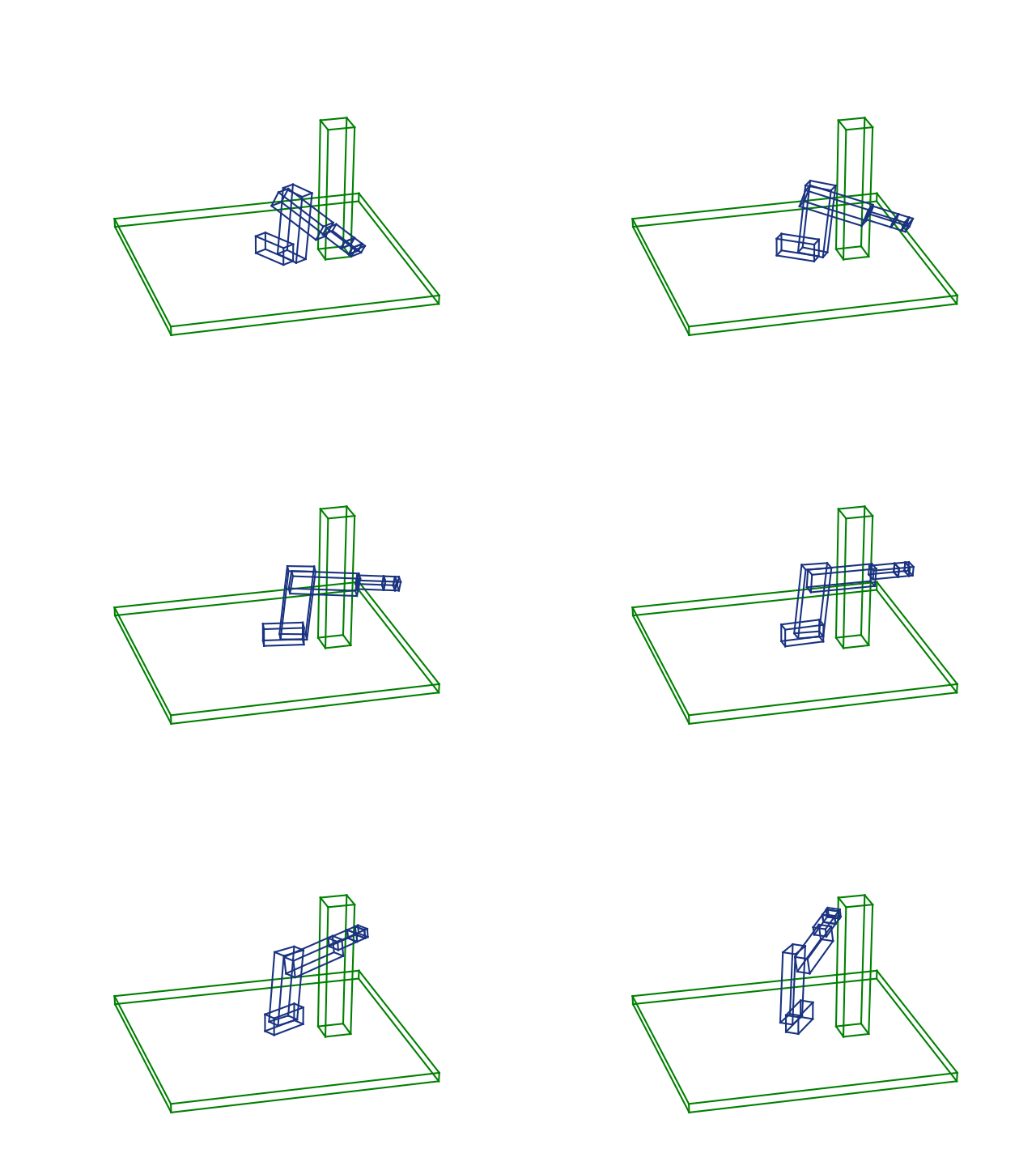
There's a more in depth explanation in the jupyter-notebooks in the examples folder.
Most of the usefull stuff can be imported similar to common numpy usage:
import acrobotics as ab
For more advanced classes, such as Robot to create a custom robot, you have to explicitly import them:
from acrobotics.robot import Robot
from acrobotics.link import DHLink, JointType, Link
The package implements a basic sampling-based and optimization-based planner. Examples on how to use them can be found in the test folder, in test_planning_sampling_based.py and test_planning_optimization_based.py. However, there is a non-trivial amount of setting types you have to supply to get it working. These appeared after a major refactor in an attempt to make to code more maintainable, but we went a bit overboard in the settings department...
Download counts and popularity will appear here as the collector receives them.
Declarations describe requirements; they are not a resolved dependency graph.
bdist_egg · 96.2 KB · Python 3.7
sdist · 31.98 KB · Python source
Observed since 20 Oct, 18:25 UTC
No superseded metadata states collected. Unchanged observations do not create new revisions.
package_version:e27b6209ce74aa680879b34139bb2d229fb42e6c7a7456fca5b9b417fbc18fc6