
 Repository
Current collected state Current
Observed since 20 Oct, 19:02 UTC
No superseded metadata states collected. Unchanged observations do not create new revisions.
23mofang-react-native-picker
cross platform picker for Ios and Android





Cross platform picker for IOS and Android. It is based on PickerIOS for IOS while react-native-wheel for android.
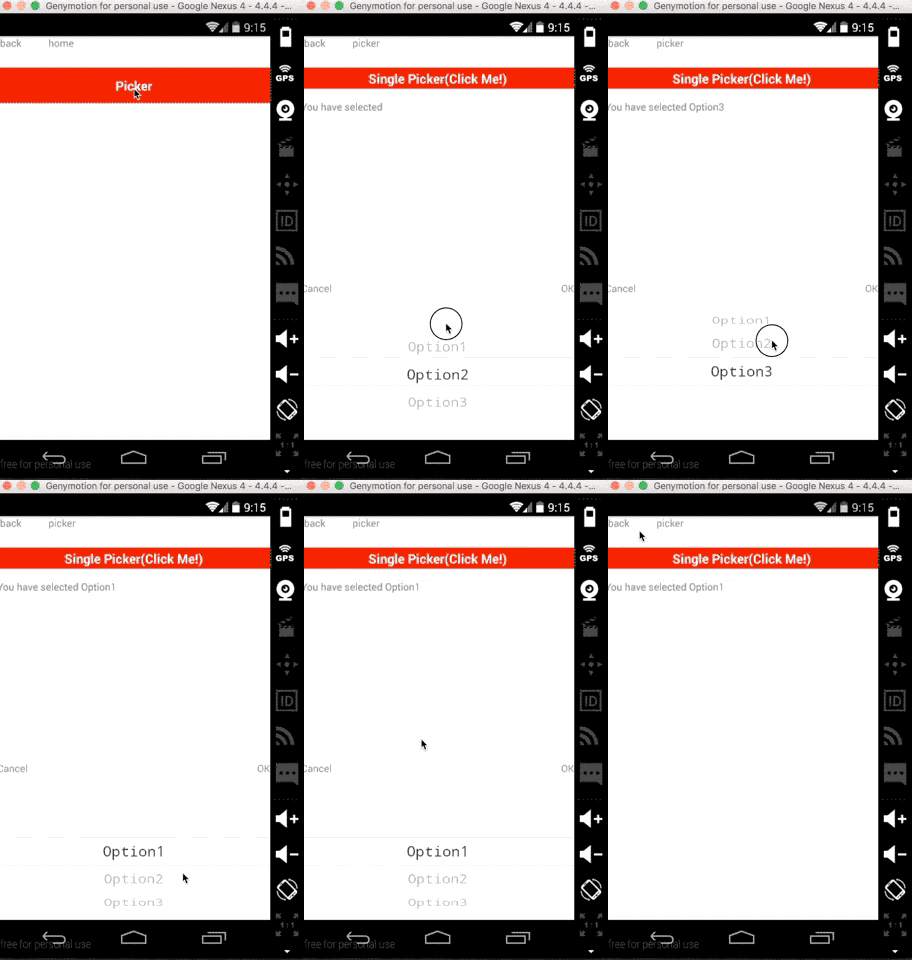
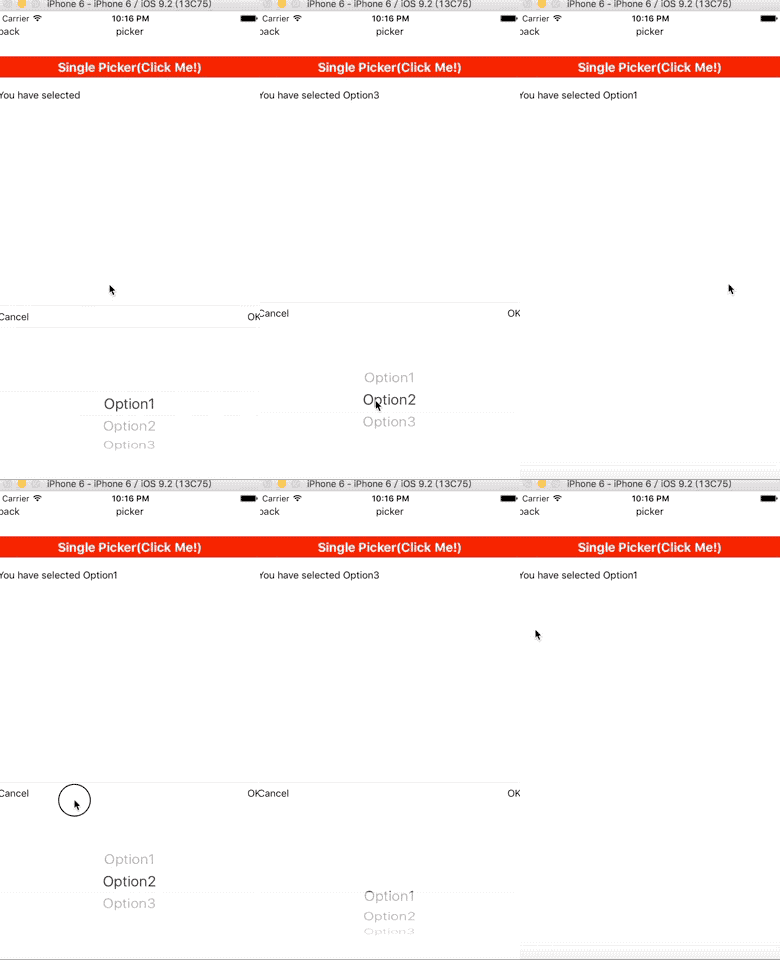
$ npm i mkp-react-native-picker --save
// file: android/settings.gradle
...
include ':react-native-wheel'
project(':react-native-wheel').projectDir = new File(rootProject.projectDir, '../node_modules/react-native-wheel/android')
// file: android/app/build.gradle
...

dependencies {
  ...
  compile project(':react-native-wheel')
}
// file: android/src/main/java/com.xx/MainApplication.java
...

private final ReactNativeHost mReactNativeHost = new ReactNativeHost(this) {
    @Override
        protected boolean getUseDeveloperSupport() {
            return BuildConfig.DEBUG;
        }

        @Override
        protected List<ReactPackage> getPackages() {
            return Arrays.<ReactPackage>asList(
                new MainReactPackage(),
                new WheelPackage()          // Added there
            );
        }
    };
import React ,{Component}from 'react';
import {
    StyleSheet,
    Text,
    View,
    TouchableOpacity,
    Platform
} from 'react-native';

import BaseComponent from './baseComponent';
import SinglePicker from 'mkp-react-native-picker';

import {viewStyles} from '../themes/default';

const options = [{
    key: 1,
    value: "Option1"
}, {
    key: 2,
    value: "Option2"
}, {
    key: 3,
    value: "Option3"
}]

const another_options = [{
    key: 1,
    value: "OptionA"
}, {
    key: 2,
    value: "OptionB"
}, {
    key: 3,
    value: "OptionC"
}];

const optionsGroup = [options, another_options]

export default class Picker extends BaseComponent {
    constructor(props) {
        super(props);
        this.state = {
            selected: ''
        }
        this.optionsGroupIndex = 0
    }

    render() {
        return <View style={viewStyles.main}>
            <TouchableOpacity
                style={{height:30,flexDirection:'row',justifyContent:'center',alignItems:'center',backgroundColor:'red'}}
                onPress={()=>{
                    this.singlePicker.show();
                }}>
                <Text style={{fontSize:18,color:'white',fontWeight:'bold'}}>Single Picker(Click Me!)</Text>
            </TouchableOpacity>

            <View style={{height:50,justifyContent:'center'}}><Text>You have
                selected {this.state.selected}</Text></View>

            <TouchableOpacity
                style={{height:30,flexDirection:'row',justifyContent:'center',alignItems:'center',backgroundColor:'red'}}
                onPress={()=>{
                    this.optionsGroupIndex = Math.abs(this.optionsGroupIndex - 1)
                    this.singlePicker.setOption(optionsGroup[this.optionsGroupIndex]);
                }}>
                <Text>Switch Options</Text>
            </TouchableOpacity>

            <SinglePicker
                lang="en-US"
                ref={ref=>this.singlePicker=ref}
                onConfirm={(option)=>{
                    //this.setState({selected:option.value})
                }}
                onSelect={(option)=>{
                    this.setState({selected:option.value})
                }}
                options={options}
            >

            </SinglePicker>
        </View>
    }
}
| Key | Type | Required | Default | Description |
|---|---|---|---|---|
| options | array | yes | must be an array of key-value pairs,like {key:1,value:'option'} | |
| lang | string | no | 'zh-CN' | enums:'zh-CN','en-US','es-AR',indicate the language of the text in buttons |
| style | object | no | {backgroundColor: "white"} | |
| defaultSelectedValue | any | no | key of each option,if undefined, the first option will be selected | |
| onConfirm | function | no | option that be selected as the parameter | |
| onSelect | function | no | option that be selected as the parameter | |
| onCancel | function | no |
| Name | Description |
|---|---|
| show | show the Picker |
| hide | hide the Picker |
| setOption(options,defaultSelectedValue) | change options of the Picker |
Download counts and popularity will appear here as the collector receives them.
| Package / target | Requirement | Relationship |
|---|---|---|
react-native-wheelEnvironment{
"local_name": "react-native-wheel",
"alias": false,
"peer_metadata": null
} | ^1.1.3 | runtime |
Source distribution
{
  "shasum": "73832eabc882f1df05ef8c9968d6bd9015230438",
  "tarball": "https://registry.npmjs.org/23mofang-react-native-picker/-/23mofang-react-native-picker-1.0.2.tgz",
  "integrity": "sha512-Y5YNP1qGPoDx80t5GwCT287Zgl1jKctqlsciqtFkGlPv7bfAk88//vlnyzSrsHoB+4i3b1WzUXfu02SAbQWEBw==",
  "signatures": [
    {
      "keyid": "SHA256:jl3bwswu80PjjokCgh0o2w5c2U4LhQAE57gj9cz1kzA",
      "sig": "MEQCIFAg2r6CyTkUqIGJrLlNdMqCj+s4HX7eyFktO2MEqET6AiAjkCZ6lqk+YgMJrXNyBSXwoO5Im2MXGm/0fz5Hg23c0Q=="
    }
  ]
}Shared repository data · GitHub
Observed since 20 Oct, 19:02 UTC
No superseded metadata states collected. Unchanged observations do not create new revisions.
package_version:2efff1d49e1f4cfb293301d421e7c30cd97c0aae6e7b7d1e189e0c751b81d3b9